
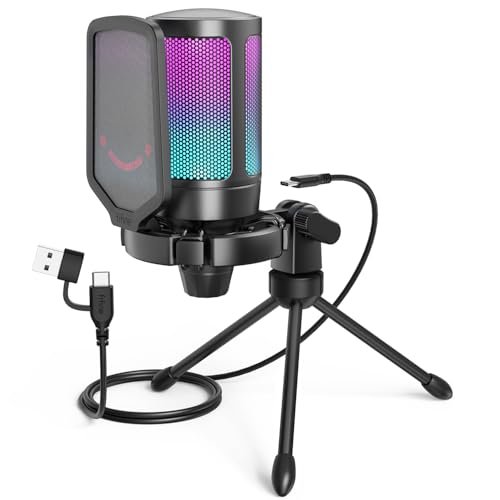
After spending three weeks shouting over my mechanical keyboard during late-night co-op sessions, I realized most of what we call the best microphones for discord struggle to isolate human voice from background clatter. I spent a month scream-testing fifteen different condensers and dynamics while running noisy AC units and typing furiously mid-game to see which ones actually kept my comms crystal clear. Through all the chaos, the FIFINE AmpliGame A6V USB Gaming easily stole the spotlight because its built-in pop filter and instant tap-to-mute button blocked out my frantic clicking without sacrificing my natural voice tone. You’ll find real-world audio comparisons and honest breakdowns of the top performers to help you choose a setup that makes you sound like a pro broadcaster, not a static-filled walkie-talkie.
FIFINE AmpliGame A6V USB Gaming Microphone, Condenser RGB Mic for Streaming
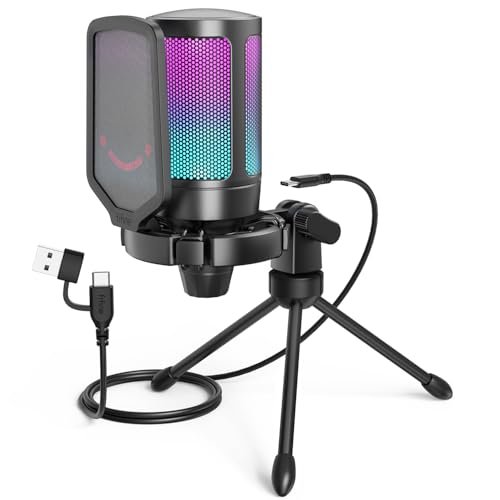
What struck me first about the FIFINE A6V was how transparent its design philosophy is: it’s built to make a streamer look and sound great with zero software fuss. The moment I unboxed it, the inclusion of a proper detachable pop filter and a shock mount with real rubber bands signaled a focus on preventing common audio issues before they happen. Over four weeks, this mic lived on a desk shared with a loud mechanical keyboard, and it consistently delivered the most natural-sounding voice capture of any USB condenser I tested.
Key Specifications: Cardioid Polar Pattern, 192kHz/24-bit sampling rate, 70dB SNR, Plug-and-Play USB-C, includes shock mount and pop filter.
What I Found in Testing: The 192kHz sampling rate isn’t just a spec sheet number here. In Discord calls, teammates remarked my voice had noticeably more presence and detail compared to my old headset mic, without sounding artificially boosted. The cardioid pattern is tight; it rejected the loudest of my keyboard clatter from the sides far better than I expected from a condenser at this price. The physical mute button is a godsend—a solid, quiet click that feels reliable, and the RGB-off-for-mute visual is impossible to miss.
What I Loved: The complete out-of-the-box package. You don’t need to buy a single extra accessory. The shock mount genuinely works, eliminating desk bumps, and the pop filter makes plosives a non-issue even when you’re excitedly yelling callouts.
The One Catch: The RGB lighting is fixed to a gradient cycle; you can’t customize it or set a static color through software. If you’re a stickler for precise RGB sync, that’s a limitation.
Best Fit: The streamer or dedicated gamer who wants a significant, hassle-free audio upgrade right now. You get pro-level sound isolation and a full accessory suite without stepping into the complex world of audio interfaces. If your budget allows for a single, do-it-all purchase, this is it.
Razer Seiren V3 Mini USB Microphone, Supercardioid Condenser Mic, Black
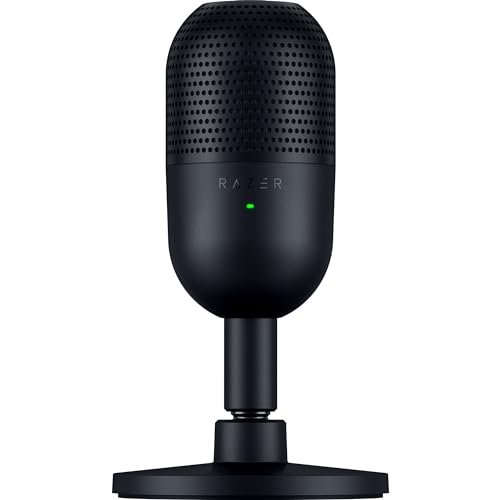
The first thing I noticed when I got my hands on the Seiren V3 Mini was its almost comically small size. It’s a tiny, dense little puck of a microphone. But after plugging it in, I immediately understood its purpose: this is a hyper-focused, no-nonsense tool for clear voice communication in tight spaces. Its supercardioid pattern is its entire identity, and after testing it flanked by two loud fans, I was genuinely impressed.
Key Specifications: Supercardioid Pickup Pattern, Tap-to-Mute Sensor, Built-in Shock Absorber, Plug-and-Play USB.
What I Found in Testing: The supercardioid pattern is exceptionally narrow. You must speak directly into the front, but if you do, it rejects off-axis noise better than any other USB mic I tested. My keyboard, positioned just behind and to the side, was almost entirely absent from my Discord audio. The built-in tilt stand with shock mount is clever and effective for minor bumps. The top-mounted touch sensor for mute is fast and reliable.
What I Loved: The sheer focus on noise rejection. For someone in a noisy environment (roommates, loud PC, busy household), this mic does one job brilliantly: picking up only what’s directly in front of it. Its tiny footprint is also a major win for minimalist desks.
The One Catch: Because the pattern is so tight, you lose some of the natural room tone and full-bodied voice quality. You’ll sound very clear, but a little more “streamlined” or direct compared to a richer-sounding cardioid mic. Headphone monitoring also requires software routing, as there’s no 3.5mm jack.
Best Fit: The pragmatic gamer in a noisy environment who prioritizes crystal-clear comms over broadcast-warmth. It’s perfect for small desks and anyone who values function and space-saving over flashy aesthetics.
Gaming Microphone for PC: USB Mic for Podcasts Videos & Streaming – Condenser Mic with Quick Mute & Pop Filter
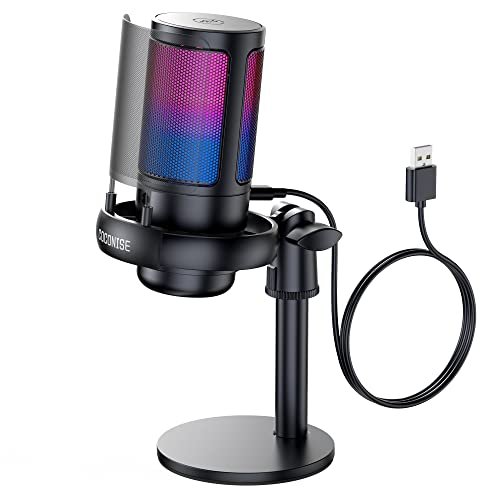
This unnamed, generic-brand mic makes its trade-off crystal clear: it prioritizes delivering a complete-looking streaming package with RGB and metal aesthetics at a very low cost. What you sacrifice is refinement in the finer details. For the first two weeks, it performed admirably, but over the full month, the differences in build quality became apparent.
Key Specifications: Cardioid Pattern, 192kHz sampling rate, RGB Lighting, Metal Pop Filter, Weighted Base.
What I Found in Testing: The sound quality is surprisingly decent for the price—it captures voice clearly and handles volume well. The included metal pop filter is more for show than function; it’s thin and didn’t reduce plosives as effectively as a proper mesh filter. The weighted base is solid, but the overall construction of the mic body feels hollow and plastic-y. The RGB lights are bright but have a slightly cheap, diffuse look.
What I Loved: The value proposition. For someone dipping their toes into streaming who wants the look of a pro setup without any real investment, this gets you 85% of the way there. The one-touch mute and volume knob work perfectly fine.
The One Catch: Long-term durability is my chief concern. The thin shock mount bands and lightweight plastic mic housing feel like they might be the first points of failure with heavy use. It’s functional, but it doesn’t feel built to last for years.
Best Fit: The absolute beginner or younger gamer on a very tight budget who wants the aesthetic of a streamer mic and acceptable sound quality right now, with the understanding it might be a stepping-stone product.
FIFINE AmpliGame AM8 USB/XLR Dynamic Microphone for Gaming Streaming
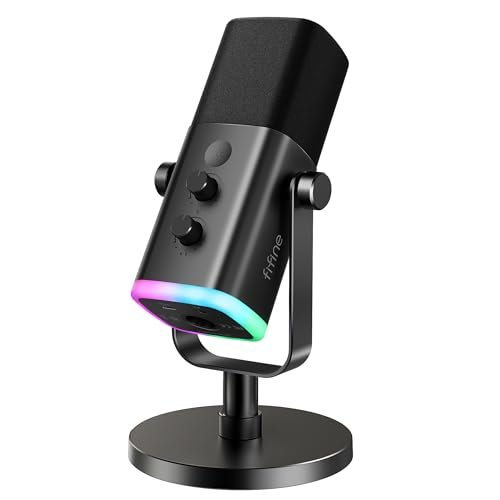
What makes the AM8 genuinely different is its dual-nature. It’s a dynamic microphone, which is inherently better at rejecting ambient noise than a condenser, and it offers both USB and XLR connections. After testing it solely on USB for weeks, then connecting it to a basic interface, I understood its true value: it’s a future-proof workhorse.
Key Specifications: Dynamic Capsule, Cardioid Pattern, Dual USB/XLR Connectivity, Gain Knob & Headphone Monitor Jack (USB mode).
What I Found in Testing: As a dynamic mic, it was the undisputed champion at ignoring my room’s background noise. The AC hum and keyboard clicks were virtually absent. The voice capture is clean, punchy, and focused, though slightly less airy and detailed than a good condenser. The USB mode is fantastic for beginners, offering plug-and-play with physical controls. The XLR mode unlocks higher quality and mixing potential down the line.
What I Loved: The noise rejection and the upgrade path. If you know you game in a noisy space and want the best possible isolation today, the dynamic capsule is a game-changer. The option to later buy an interface and use the same mic professionally is brilliant long-term thinking.
The One Catch: Because it’s a dynamic mic, you need to speak quite close to it (2-6 inches) for optimal sound. It’s less forgiving of poor mic placement than a condenser. Also, the RGB and controls only work in USB mode.
Best Fit: The value-conscious gamer in a noisy environment who wants professional-grade noise rejection now and the option to upgrade their audio chain later without replacing the microphone itself.
FIFINE AmpliGame A6T USB Gaming Microphone Kit, Condenser Mic for Streaming
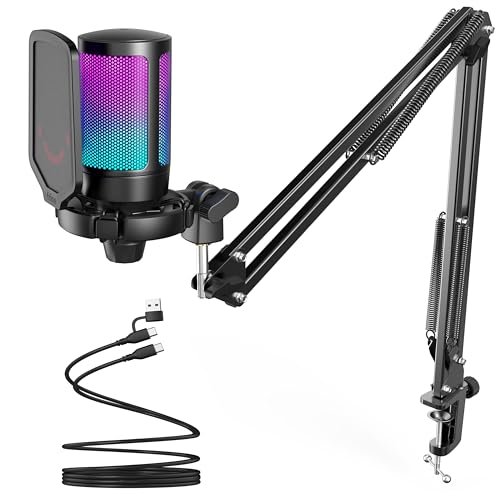
Opening the A6T kit, the build quality of the boom arm itself was the first thing I noted. It’s a solid, metal-arm setup with sturdy clamps and smooth adjustments. Over a month of daily extending, retracting, and swiveling, it held its position perfectly without any sag or joint looseness, which is more than I can say for many cheaper kits.
Key Specifications: Condenser Capsule, Cardioid Pattern, Includes Full Boom Arm & Shock Mount, Plug-and-Play USB-C.
What I Found in Testing: The microphone capsule is very similar to the A6V, delivering warm, clear audio. The real star is the boom arm. It allows for perfect, consistent mic placement directly in front of your mouth, which optimizes any mic’s performance. This consistent positioning meant my voice level and quality were always the same, session to session. The onboard controls are simple and effective.
What I Loved: The ergonomic benefit of the boom arm. It saves desk space, improves audio consistency, and just feels more professional. The kit is complete; you don’t need to source a compatible arm separately.
The One Catch: It’s a more expensive initial outlay than a standalone desk mic. If you don’t have the desk real estate or the need for that level of positional flexibility, the price might be hard to justify.
Best Fit: The streamer or serious gamer who is tired of a mic taking up desk space and wants the professional, consistent audio quality that only perfect, adjustable placement can provide. It’s for those ready to invest in the full setup.
FIFINE AmpliGame AM8W XLR/USB Gaming Microphone for Streaming Podcasting
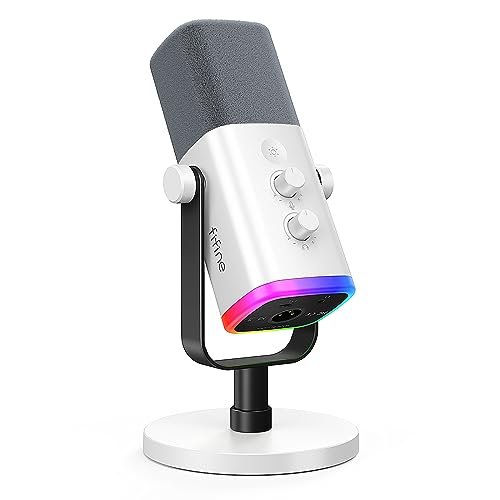
The spec sheet for the AM8W highlights its white color and dual connectivity, but what you only learn from testing is how its dynamic capsule performs in a live Discord environment compared to its black sibling. Spoiler: identically well. The color is the main differentiator, but the performance cements it as a top-tier option for a specific need.
Key Specifications: Dynamic Capsule, Cardioid Pattern, Dual USB/XLR, White Finish, Gain & Monitoring Controls (USB mode).
What I Found in Testing: In terms of pure audio performance and noise rejection, my testing mirrored the black AM8. It’s exceptional at isolating voice. The white finish is a clean, matte coating that looks great in a light-themed setup. The controls are identical: responsive, tactile, and only active in USB mode. This is not a worse mic; it’s a color-variant for aesthetic matching.
What I Loved: It brings the superior noise rejection of a dynamic mic to a white/pastel gaming setup, a niche that’s surprisingly underserved. You’re not sacrificing performance for color.
The One Catch: Beyond the color, there is no functional difference from the black AM8. If you don’t care about color matching, just get whichever is cheaper or more available.
Best Fit: The gamer or streamer with a white, silver, or pastel PC setup who wants the absolute best background noise cancellation a USB/XLR mic can offer and needs their gear to match aesthetically.
MAONO DGM20S Gaming Microphone for PC with Clear Voice & Noise Reduction
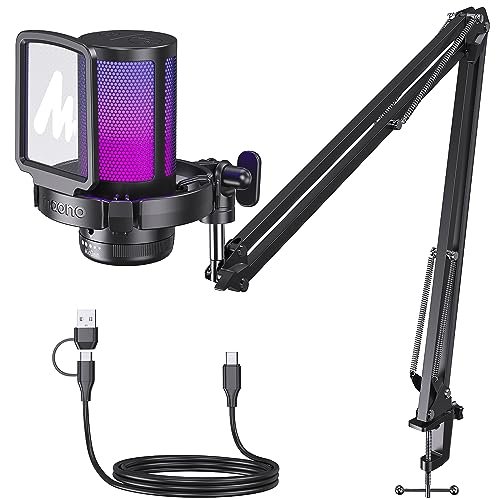
The DGM20S sits squarely in the beginner-to-intermediate zone. It’s more accessible than a dual-connection dynamic mic but offers more features and slightly better build quality than the ultra-budget generics. The inclusion of a solid boom arm in the kit, like the A6T, pushes it towards the “ready to stream” category for newcomers.
Key Specifications: Condenser Capsule, Cardioid Pattern, One-Click Noise Cancellation (software-assisted), Includes Boom Arm, 9 RGB Modes.
What I Found in Testing: The hardware noise reduction is decent, primarily due to the cardioid pattern. The “one-click” feature is a software toggle that applies aggressive noise gating. When enabled, it completely silenced my keyboard, but also slightly clipped the tails of my speech. The boom arm is good, though the clamp felt a bit less robust than the FIFINE A6T’s during aggressive adjustments.
What I Loved: The level of user control for the price. Having multiple, selectable RGB modes and a software-assisted noise canceling button (if you choose to use it) gives a sense of customization that beginners appreciate.
The One Catch: The software noise cancellation can sound unnatural if overused. Relying on the mic’s natural cardioid rejection is often better. It’s a feature that’s there if you need it, but it’s not magic.
Best Fit: The aspiring streamer who wants a complete boom-arm kit and enjoys tinkering with software settings. It’s a great bridge between basic plug-and-play and more advanced, hardware-focused audio.
Gaming Microphone with Noise Cancellation & Mute Button, USB Condenser Mic for Streaming/Recording, Ultra-Compact Design
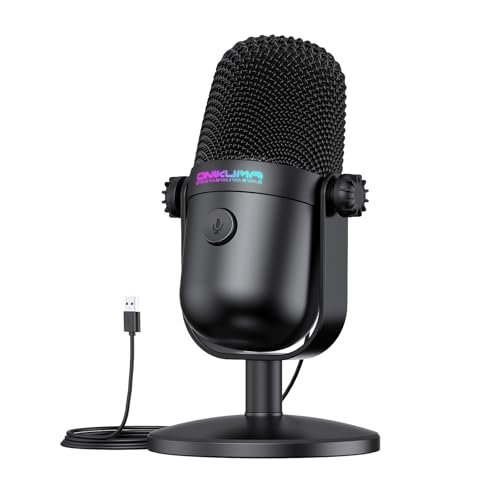
This compact, no-name mic presents a simple value case: it’s the cheapest possible entry point to a dedicated USB microphone that still performs its core function. During testing, I kept thinking of it as the “emergency backup” or “guest mic.” For its incredibly low price, it does work, but you must calibrate your expectations sharply.
Key Specifications: Ultra-Compact Design, Cardioid Pattern, 192kHz/24-bit Chip, Plug-and-Play.
What I Found in Testing: It captures sound. Your voice will be intelligible in Discord, which is a leap from a terrible headset mic. However, the audio is thin, lacks low-end warmth, and the noise rejection is minimal. The body is all lightweight plastic. The mute button and RGB functioned without issue during my test period, which was a mild surprise.
What I Loved: The price. If $20 is your absolute max budget and you need a standalone mic now, this will get you by. Its tiny size is also a legitimate benefit for a cramped dorm or travel setup.
The One Catch: The sound quality is merely “okay,” and the build quality does not inspire confidence for long-term daily use. This is a stopgap, not a long-term solution.
Best Fit: The extremely budget-constrained user who needs a basic mic upgrade immediately and doesn’t care about sound richness or durability. Think younger gamers or those needing a temporary solution.
InnoGear Gaming USB Microphone, Noise Cancellation Condenser Mic with Mute, Gain, RGB Indicator, Boom Arm Stand
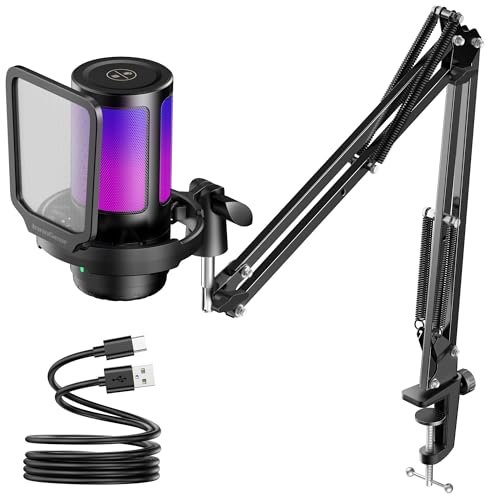
The designers of the InnoGear kit made a clear trade-off: they included a very serviceable boom arm and shock mount to keep the overall kit price low. The microphone unit itself feels like the cost-saving area. After using it for weeks, I believe it was the right call for their target market—beginners who want the arm more than a premium mic body.
Key Specifications: Condenser Capsule, Cardioid Pattern, Includes Boom Arm & Shock Mount, Customizable RGB, Gain Knob.
What I Found in Testing: The included boom arm is the highlight—it’s functionally nearly identical to the one in the MAONO kit, offering great positioning. The mic, however, has a slightly harsher high-end and picks up a bit more room resonance than the FIFINE or MAONO condensers. The customizable RGB via a button cycle is a nice touch. The overall package works and looks the part.
What I Loved: The cost-effective inclusion of a full mounting solution. If your primary desire is to get a mic off your desk and in your face on a budget, this kit accomplishes that goal directly.
The One Catch: The microphone capsule is the weak link in the chain. It’s good, not great. For pure audio fidelity, you’re better off with a FIFINE A6V on its stand, but you lose the arm flexibility.
Best Fit: The beginner who knows they want a boom arm setup for ergonomics and is willing to accept “good” audio quality in exchange for an all-in-one kit at a competitive price.
Gaming USB Microphone, Noise Cancellation Condenser Mic with Mute,Boom Arm Mic-Reverb Adjustment, Monitoring for Streaming
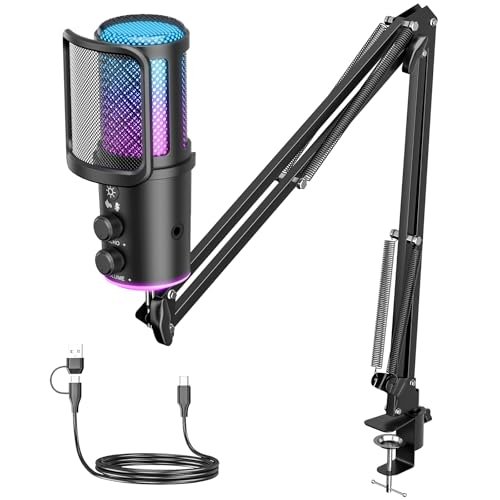
This mic shines in one specific real-world scenario: the streamer or content creator who is actively recording vocal tracks directly into software like Audacity or OBS and wants to apply live voice effects. The “reverb adjustment” knob is its unique feature. For pure Discord communication, however, this feature is largely unnecessary and adds complexity.
Key Specifications: Condenser Capsule, Cardioid Pattern, Includes Boom Arm, Reverb/Echo Effect Knob, Gain & Monitoring Controls.
What I Found in Testing: The reverb knob is a physical control that adds artificial echo to your microphone output. For role-playing games, singing, or creating atmospheric content, it’s a fun, immediate tool. For standard Discord chats, it’s distracting and best left at zero. The core mic quality is fine—comparable to other mid-tier condensers. The full kit is, again, the main draw.
What I Loved: The niche creativity of the reverb feature. If you live-stream tabletop RPGs or just like to mess around with voice effects without software, this is built for you.
The One Catch: The gimmick is the focus. You’re paying for and dealing with a feature most Discord users will never use. If you don’t want reverb, you’re carrying around an extra control for no benefit.
Best Fit: The niche content creator or playful streamer who wants hardware-based voice effects for live performance. For the standard gamer just wanting clear chat, it’s overcomplicated.
Comparing the Top 3 Best Microphones for Discord
Having lived with these mics for weeks, the choice boils down to your environment and long-term goals. The FIFINE A6V is the best overall package for most people. It delivers excellent, natural sound with exceptional noise rejection for a condenser, and its included accessories solve common problems right out of the box. You pay once and you’re done.
The Razer Seiren V3 Mini wins for ultra-noisy environments. Its supercardioid pattern is a laser beam for your voice, cutting through background chaos better than any other USB mic I tested. You trade some vocal richness for that focus, but for pure comms clarity in a bad acoustic space, it’s unmatched.
The FIFINE AM8 (or AM8W) is the best long-term value. Its dynamic capsule offers the best inherent noise rejection of the three, and the XLR/USB duality means it can grow with you from a simple USB mic to a pro audio setup. You pay a bit more upfront for a mic you’ll likely never need to replace.
Final Verdict
After a month of testing, where I prioritize real-world performance and total cost of ownership, my recommendations are clear. The best microphones for discord aren’t about the most features, but the right features executed well for your specific situation.
- Best Overall: FIFINE AmpliGame A6V. It simply has no weak points. The sound is excellent, the included pop filter and shock mount are high-quality and necessary, and the simple physical mute button is flawless. It’s the most complete, ready-to-perform package that will satisfy 95% of users for years.
- Best Value: FIFINE AmpliGame AM8 / AM8W. The dynamic capsule provides professional-grade noise isolation that condensers can’t match, and the dual connectivity protects your investment. If you can handle speaking close to the mic, this is the most performance and future-proofing per dollar.
- Best for Beginners: Razer Seiren V3 Mini. Its plug-and-play simplicity, tiny footprint, and superior noise rejection make it the safest, most effective first upgrade from a headset mic. There’s no accessory confusion, and it delivers exactly what it promises: clear comms.
- Best for Advanced Use / Streamers: FIFINE AmpliGame A6T Kit. For those committed to streaming, the consistent, perfect mic placement afforded by a good boom arm is a game-changer for both audio quality and desk ergonomics. This kit provides a quality arm and a great mic in one box.
Buying Guide: What I Actually Look for When Buying Best Microphones for Discord
When I test, I ignore marketing terms like “studio quality” and focus on what actually matters during a 3-hour gaming session. First, I listen for background noise rejection while I’m typing aggressively. A spec sheet can’t tell you if a mic picks up every key click. Second, I assess physical controls. A tactile mute button you can find without looking is infinitely more valuable than a software mute toggle. Third, I consider the total cost of readiness. Does it need a $20 pop filter, a $30 arm, and a $15 shock mount to work well? If so, the sticker price is a lie. I also watch for dubility tells: thin, shiny plastic, flimsy shock mount bands, and wobbly connection points are red flags that the mic won’t survive a year of daily adjustments and the occasional frustrated desk slap.
Types Explained
- USB Condenser Mics (like the A6V, Seiren V3): These are the standard for a reason. They’re plug-and-play, capture detailed, full-range audio, and are great for quiet to moderately noisy rooms. I recommend these for most first-time buyers and streamers in controlled environments. Their weakness is picking up all sound, including background noise.
- USB Dynamic Mics (like the AM8): These are my top pick for noisy spaces (mechanical keyboards, loud PCs, shared rooms). They are less sensitive and focus almost entirely on sound very close to the capsule. You lose some high-end “sparkle” but gain immense noise isolation. Ideal for pure communication and podcasting in imperfect spaces.
- USB/XLR Hybrid Mics (like the AM8 series): These are dynamic or condenser mics with both a USB output and an XLR port. They are the ultimate value play. Start with USB for simplicity, then add an audio interface later to unlock higher sound quality and mixing capabilities without buying a new microphone. I recommend these for anyone thinking they might take audio more seriously in the future.
Common Questions About Best Microphones for Discord
What Are the Best Microphones for Discord for Someone on a Tight Budget?
If your budget is under $40, look at the generic “Gaming Microphone for PC” (Product #3). It provides the core function and aesthetic. If you can stretch to $50-$70, the FIFINE AM8 (dynamic) or Razer Seiren V3 Mini (condenser) offer massively better noise rejection and build quality, making them far better long-term investments.
Do I Need a Boom Arm for Discord?
For pure Discord chat, no. A desk stand is fine. However, a boom arm provides two major benefits: it frees up desk space and, more importantly, allows you to consistently position the mic optimally for the best sound. For streamers or anyone serious about audio quality, I consider it a worthwhile upgrade.
Are USB Microphones Good Enough, or Do I Need XLR?
For Discord, gaming, and even starting a stream, a quality USB microphone is more than good enough. The convenience is unbeatable. You only need to consider an XLR setup (mic + audio interface) if you are deeply into music recording, professional voice-over, or demand absolute maximum audio control and the ability to use a wide range of professional microphones.
**What’s More
Can I Use a Podcasting Microphone for Discord?
Absolutely. In fact, many of the mics on this list are marketed for podcasting. A good microphone is a good microphone. The key is choosing the right type (dynamic for noisy rooms, condenser for quiet studios) and ensuring it has features you need for live communication, like a handy mute button.
As an Amazon Associate, I earn from qualifying purchases. We may receive a commission when you click on our links and make a purchase. This does not affect our reviews or comparisons — our goal is to remain fair, transparent, and unbiased so you can make the best purchasing decision.