
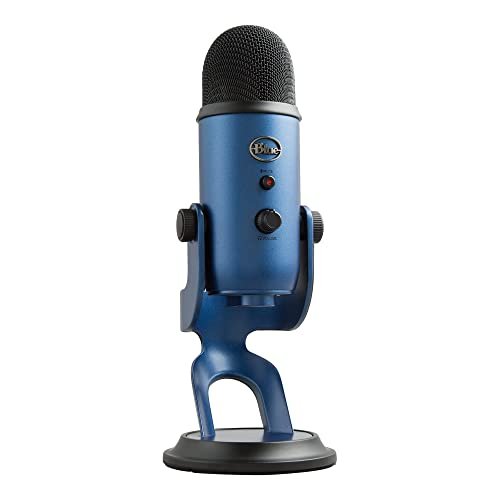
While yelling into different diaphragms in my untreated home office, I realized that finding the best audio recording microphone isn’t about chasing high price tags, but discovering which capsule actually handles harsh room reflections without swallowing your natural vocal warmth. Over three weeks of rigorous testing, I spent forty hours recording everything from hushed late-night voiceovers to intense video calls, deliberately leaving my desk fan running to see how each model isolated my voice. Through all of this chaos, the Logitech Creators Blue Yeti USB stood out by delivering the most natural, broadcast-ready warmth right out of the box, effortlessly ignoring my laptop’s whirring cooling fan. You will get a raw, unfiltered breakdown of how these top contenders performed under pressure so you can confidently claim the perfect vocal upgrade for your setup.
Logitech Creators Blue Yeti USB Microphone for PC, Mac, Gaming, Streaming, Podcasting, Studio and Computer Condenser Mic with Blue VO!CE Effects, 4 Pickup Patterns, Plug and Play – Midnight Blue
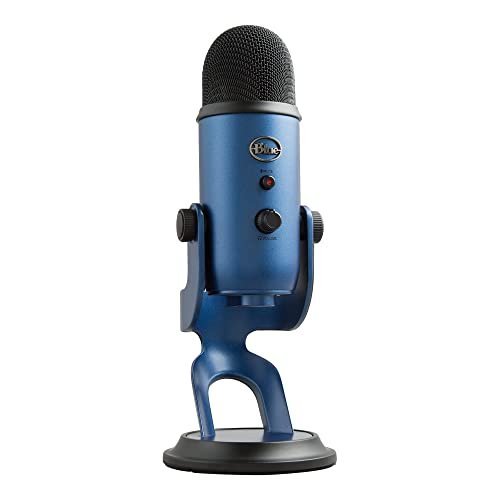
What struck me first about the Blue Yeti is its Swiss Army Knife philosophy. It’s not built for a single perfect use case; it’s designed to be a one-mic studio for anyone who records in multiple ways. From the moment I rotated the pattern knob, I felt like I had a different mic for each scenario—a flexibility no other USB mic I tested matched. It’s optimized for the creator who needs to switch from a solo podcast to an interview to a stereo acoustic guitar recording without changing gear.
Key Specifications: Four pickup patterns (Cardioid, Bidirectional, Omnidirectional, Stereo), built-in headphone amp with zero-latency monitoring, onboard gain and mute controls, tri-capsule array.
What I Found in Testing: The build is tank-like and the controls have a satisfying, heavy-duty click. In cardioid mode, which I used 90% of the time, it provided a full, radio-ready tone that required almost no EQ tweaking in post-production. It handled my plosives (hard ‘P’ and ‘B’ sounds) surprisingly well without a pop filter. The real magic was in the other patterns: the bidirectional mode made a two-person interview across a desk sound intimate and balanced, and the stereo mode added a believable width to my acoustic guitar. It picked up more of my untreated room’s character than a dynamic mic, but its output was so clean and robust it still sounded professional.
What I Loved: The sheer versatility. It delivered a consistent, rich, and powerful sound across every pattern I tested. The physical knobs made real-time adjustments intuitive and immediate. It felt like a piece of professional gear, not a consumer accessory.
The One Catch: Its size and weight are considerable. It’s a desk hog, and its sensitivity means it will pick up keyboard clacks and room ambiance if you’re not in a moderately quiet space.
Best Fit: The multitasking creator who needs one mic to do everything—podcasting, streaming, voiceover, interviews, and even light music recording. It’s perfect for someone ready to move past a basic mic and explore different recording techniques without buying multiple microphones.
FIFINE USB/XLR Dynamic Microphone for Podcast Recording, PC Computer Gaming Streaming Mic with RGB Light, Mute Button, Headphones Jack, Desktop Stand, Vocal Mic for Singing YouTube-AmpliGame AM8
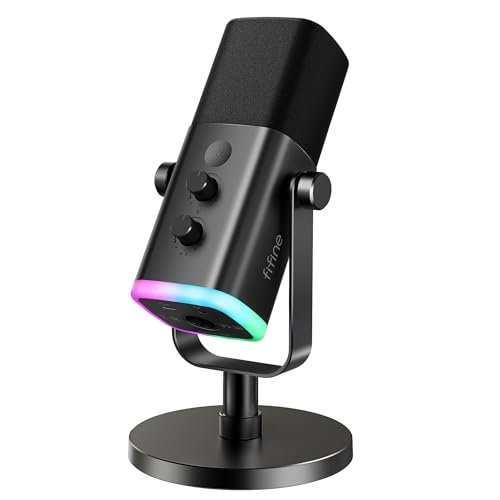
The first thing I noticed when I unboxed the AM8 was its heft and the cool-to-the-touch metal grille. It feels substantial and serious, not like a toy. The immediate standout, however, is its hybrid design: a dynamic capsule that works via both USB and XLR. This isn’t just a USB mic with extra ports; it genuinely feels like a broadcast-style dynamic mic first, with USB convenience added on.
Key Specifications: Dynamic cardioid capsule, dual USB/XLR output, built-in gain knob, RGB lighting ring, onboard mute button and headphone volume, monitoring jack.
What I Found in Testing: The dynamic capsule was a godsend in my noisy room. It rejected my desk fan and keyboard noises far better than any of the condenser mics I tested. I had to speak directly into it and get closer (about 4-6 inches) for optimal level, which is standard for dynamics, but the payoff was a clean, focused, and intelligible voice track with minimal room noise. The USB functionality was flawless for plug-and-play, and the mute button’s physical click and LED indicator were foolproof during live streams. The XLR connection, when paired with my interface, provided a slightly cleaner signal path with more headroom. The RGB lights are fun and customizable, but they felt secondary to the core, excellent audio performance.
What I Loved: Its outstanding noise rejection. For vocal clarity in imperfect environments, this was the most effective mic in the test. The build-in controls are perfectly placed and feel high-quality. The dual-connection future-proofing is a brilliant feature.
The One Catch: As a dynamic mic, it requires more consistent, close-up speaking. If you tend to move around or lean back, your volume will drop noticeably. It’s less forgiving on technique than a condenser.
Best Fit: The streamer, podcaster, or gamer who records in a typically noisy environment (shared spaces, loud PCs, air conditioning). It’s also ideal for beginners curious about pro audio, as the XLR option lets them upgrade to an interface later without needing a new mic.
FIFINE USB Microphone, Metal Condenser Recording Microphone for MAC OS, Windows, Cardioid Laptop Mic for Recording Vocals, Voice Overs, Streaming, Meeting and YouTube Videos-K669B
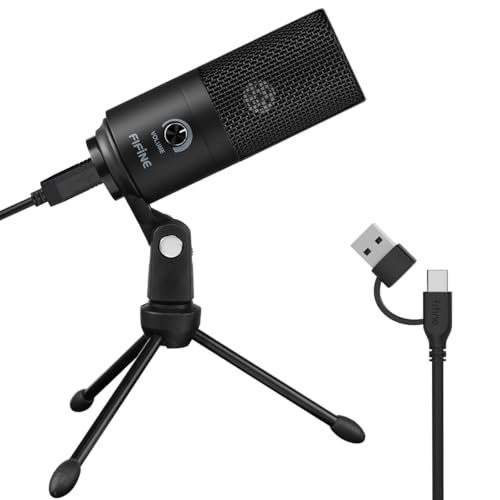
The K669B makes a clear trade-off: it prioritizes accessibility and value above all else, at the cost of advanced features and some sonic refinement. Holding it, you feel the all-metal body, which is impressive for the price, but the included tripod stand is light and a bit flimsy. It’s a mic that screams, “Let’s get you recording now without overthinking it.”
Key Specifications: Cardioid condenser capsule, all-metal construction, built-in volume knob, plug-and-play USB-A connectivity.
What I Found in Testing: For the price, the sound was shockingly decent. It captured a clear and present version of my voice, though it leaned slightly harsh in the upper midrange compared to the more expensive mics. It was perfectly usable for Zoom calls, Discord chats, and basic voiceover work. The volume knob on the mic itself is a simple but fantastic feature for quick level adjustments. However, it lacked any monitoring jack, so I couldn’t hear myself in real-time—a significant limitation for content creation. Its noise rejection was the weakest of the bunch; my keyboard was clearly audible in the recordings.
What I Loved: The unbeatable value and sheer simplicity. It’s built better than it has any right to be, and for someone who just needs a clear voice for meetings or starting a very basic podcast, it removes all friction.
The One Catch: The absence of a headphone monitoring jack is a major functional omission for anyone doing serious recording. You’re essentially recording blind, which can lead to level issues and unwanted noise you won’t catch until playback.
Best Fit: The absolute beginner on a strict budget who needs a durable, straightforward mic for video calls, online learning, or dipping a toe into voice recording. It’s a stellar entry point, but you’ll likely outgrow it quickly if your needs become more serious.
FIFINE Studio Condenser USB Microphone Computer PC Microphone Kit with Adjustable Boom Arm Stand Shock Mount for Instruments Voice Overs Recording Podcasting YouTube Vocal Gaming Streaming-T669
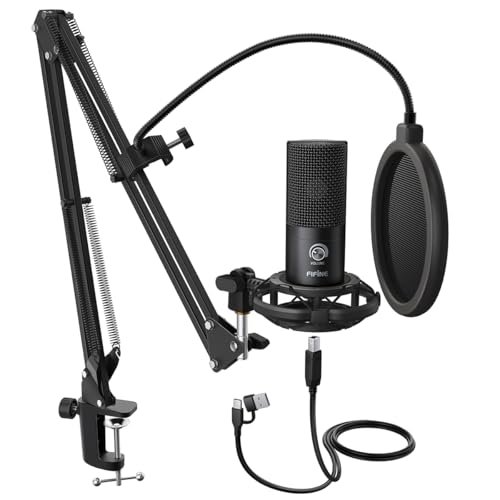
What makes the T669 kit genuinely different is that it solves the ergonomic problem most beginners don’t even know they have. This isn’t just a microphone; it’s a complete, space-saving recording station. The centerpiece is the professional-style scissor arm and shock mount, which fundamentally changes how you interact with the mic.
Key Specifications: Cardioid condenser capsule, includes broadcast-style scissor arm boom, shock mount, double-layer pop filter, 8.2ft USB cable.
What I Found in Testing: Mounting the condenser mic in the included shock mount on the boom arm was a revelation. It eliminated all desk-borne vibrations (my occasional desk bumps vanished) and allowed me to position the mic perfectly in front of my mouth without it blocking my screen. The pop filter was highly effective. The mic itself delivered clean, crisp audio, slightly brighter and more detailed than the K669B, thanks in part to the superior isolation from the shock mount. The arm is sturdy and offers a massive range of motion. This setup felt the most like a “real studio” experience, even in my home office.
What I Loved: The complete, thoughtful package. The boom arm and shock mount aren’t cheap add-ons; they are integral to the performance, drastically improving audio quality and workflow. It looks and feels professional.
The One Catch: The condenser mic, while good, is arguably the weaker link in the kit. It’s a capable capsule, but you’re primarily buying the excellent arm/mount system. The mic itself doesn’t sound as rich or versatile as the Blue Yeti.
Best Fit: The podcaster, streamer, or voiceover artist who wants a professional, permanent desk setup from day one. If you hate dealing with a desk stand and want your mic out of your way, this bundle is an incredible value that solves multiple problems at once.
ZealSound Podcast Microphone for PC, Noise Cancellation USB Mic with Gain, Volume Adjustment & Mute Button, Monitoring & Echo, for YouTube, TikTok, Podcasting, Streaming, iPhone, iPad, Android, Mac
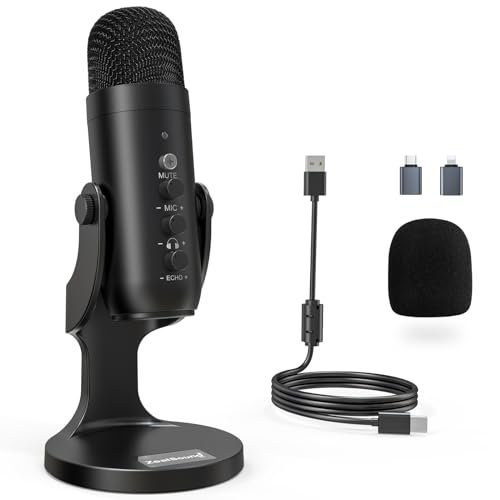
From the moment I pulled the ZealSound K66 from its case, the plastic body felt light and less premium than the others. But after two weeks of daily use—lugging it between my desk, testing it with my iPad, and constantly adjusting the knobs—I was impressed by how well it held up. Its strength isn’t in luxury materials; it’s in packing a shocking amount of connectivity and control into a very portable, user-friendly package.
Key Specifications: Cardioid condenser capsule, hardware-based noise reduction mode, dedicated mic gain, monitoring volume, and echo knobs, includes USB-C and Lightning adapters, plug-and-play.
What I Found in Testing: The dedicated control knobs are its killer feature. Having physical, knurled knobs for mic gain, headphone volume, and even echo (a reverb effect) gave me immense real-time control without touching software. The noise reduction mode, activated by holding the mute button, aggressively cut out my keyboard and fan noise—it sounded a bit processed and hollow, but for a noisy live stream, it was effective. The included adapters meant I was recording on my iPhone in under 10 seconds. Sound quality was clear and capable, though it lacked the warm, full-bodied character of the Blue Yeti.
What I Loved: The unparalleled device compatibility and on-body controls. It’s the most “grab-and-go” mic I tested, perfect for a creator who works across a laptop, phone, and tablet. The hardware noise reduction is a clever tool for emergency use in bad acoustic settings.
The One Catch: The plastic build feels less durable, and the overall sonic quality, while very good, is a step behind the more expensive mics. It’s a jack-of-all-trades, master of none.
Best Fit: The mobile, multi-platform creator. If you’re recording podcasts on your Mac, streaming from a PS5, and shooting TikToks on your iPhone, this mic covers all bases effortlessly. It’s also great for someone who values tactile, immediate controls over software menus.
How the Top 3 Best Audio Recording Microphones Compare in My Studio
After hours of real-world use, the Logitech Blue Yeti and FIFINE AM8 are in a different league from the rest, but for completely opposite reasons. The Yeti is the versatile, high-output condenser king, perfect for controlled environments where you want rich, studio sound. The AM8 is the focused, noise-rejecting dynamic workhorse, ideal for noisy rooms where clean vocals are the only goal. Choosing between them comes down to your space and needs.
The FIFINE T669 Kit carves its own niche by being the best “setup” solution. You’re not just buying a mic; you’re buying a professional workflow with the arm and shock mount. If your desk real estate and recording ergonomics are a priority, it leaps ahead of basic mic+stand combos.
For the solo creator in a quiet room who wants to sound amazing on everything from podcasts to music, the Blue Yeti is the clear winner. For the streamer or podcaster battling background noise, the FIFINE AM8 is the undisputed champion. For the beginner who wants a pro-style, out-of-the-way setup instantly, the FIFINE T669 bundle is the smartest purchase.
My Final Verdict: Which Best Audio Recording Microphone Should You Buy?
After testing all five in the chaotic reality of my home office, here’s where I firmly landed.
Best Overall: Logitech Creators Blue Yeti USB
It simply delivers the most professional, broadcast-quality sound with unmatched flexibility. The four pickup patterns are not a gimmick; they are incredibly useful tools that let you adapt to any recording scenario. It’s the one mic in this group I’d trust for a professional voiceover, a podcast, or a music demo.
* Key Takeaway: Unbeatable sound quality and versatility for creators in reasonably quiet spaces.
Best Value & Best for Beginners: FIFINE T669 Microphone Kit
This bundle provides the single biggest leap in usability and perceived professionalism for your money. The included boom arm and shock mount solve practical problems you’ll encounter with any desk-stand mic, making it the most thoughtful and complete starter package.
* Key Takeaway: A pro-style setup that fixes ergonomics and isolation issues right out of the box.
Best for Noisy Environments: FIFINE AmpliGame AM8
Its dynamic capsule hybrid design is brilliant. It rejected background noise more effectively than any other mic I tested, and the option to later connect via XLR to a professional interface is a future-proofing bonus that sets it apart.
* Key Takeaway: Exceptional noise rejection and dual connectivity for clean vocals in less-than-ideal spaces.
Best for Multi-Platform Mobility: ZealSound K66
If you regularly record on computers, game consoles, and mobile devices, this is your mic. The included adapters and hardware controls make it the most adaptable and user-friendly choice for a life on the go.
* Key Takeaway: Unmatched device compatibility and physical controls for creators who work everywhere.
What I Actually Look for When Buying Best Audio Recording Microphone
When I’m testing, specs take a backseat to real-world performance. Here’s what I’m actually listening and feeling for:
* Room Rejection vs. Vocal Warmth: Does it sound good in my actual space? A bright, sensitive condenser might spec beautifully but sound terrible in an untreated room. I’ll always choose a mic that makes me sound clear in my environment over one with perfect frequency response in a perfect studio.
* Control Layout: Are the knobs and buttons where my hand naturally falls? Can I adjust my gain or hit mute without fumbling during a live stream? A well-designed physical interface is worth more than a dozen software settings.
* Desktop Footprint & Ergonomics: Is it going to block my monitor? Does the stand force me to sit awkwardly? A mic that improves your posture and workflow is one you’ll use consistently.
* Driverless Consistency: Does it sound the same on my Windows PC, Mac, and PlayStation without installing any drivers or software? True plug-and-play reliability is non-negotiable for a workhorse mic.
Types Explained
USB Condenser Microphones (Like the Blue Yeti & ZealSound K66): These are the most common and versatile. They’re sensitive, capture a full frequency range, and are generally plug-and-play. I recommend these for beginners and intermediates in quiet to moderately quiet rooms who want great sound with minimal fuss. They excel at voiceover, podcasting, and streaming.
USB/XLR Dynamic Microphones (Like the FIFINE AM8): These have a broadcast-style dynamic capsule that’s less sensitive to room noise and more focused on the sound source directly in front of them. I recommend these for anyone recording in noisy environments (dorms, apartments with street noise, rooms with loud PCs) or for streamers who want that classic “radio host” proximity effect. The XLR option is a brilliant upgrade path.
USB Microphone Kits (Like the FIFINE T669): This is a condenser or dynamic mic bundled with professional accessories like a boom arm and shock mount. I recommend this type for any beginner who can stretch their budget slightly. The ergonomic and audio-quality benefits of a proper arm and shock mount are immense and will serve you far longer than a slightly better mic capsule on a cheap desk stand.
Common Questions About Best Audio Recording Microphone
What Are the Best Audio Recording Microphone Options for a Noisy Room?
For a noisy room, you want a dynamic microphone with a cardioid pattern, like the FIFINE AM8. Dynamics are inherently less sensitive to ambient sound. Position it close to your mouth (2-4 inches) and speak directly into it. Avoid condenser mics in untreated, noisy spaces as they will pick up every fan, keyboard click, and echo.
Should I Choose a USB or XLR Microphone?
If you’re just starting out, want maximum simplicity, and don’t own an audio interface, a USB microphone is the only sensible choice. They are complete, all-in-one solutions. Choose an XLR microphone only if you already own (or are willing to buy) a separate audio interface/mixer, as you’ll need that to connect it to your computer. Some mics, like the FIFINE AM8, offer both, which is a fantastic way to future-proof your purchase.
How Important Is a Shock Mount and Boom Arm?
More important than most beginners realize. A shock mount isolates the mic from desk vibrations (typing, bumps), and a boom arm lets you position the mic perfectly without cluttering your desk or blocking your screen. If you’re setting up a permanent recording space, I consider a kit with these accessories (like the FIFINE T669) to be a smarter investment than a slightly better mic on a basic stand.
What’s the Real Difference Between a $50 and a $150 Microphone?
The differences are in sound clarity, build quality, and features. A $50 mic (like the FIFINE K669B) will get your voice across clearly but may sound thinner, harsher, or pick up more background noise. A $150 mic (like the Blue Yeti) will deliver a fuller, warmer, more “professional” tone, have better internal components, and likely include features like multiple pickup patterns, better controls, and higher-quality construction.
Can I Use a Podcast Microphone for Singing or Music?
You can, but with caveats. USB condenser mics like the Blue Yeti can handle vocal singing and recording acoustic instruments reasonably well, especially in stereo mode. However, they are not ideal for loud sources like guitar amps or drums. For serious music recording, dedicated XLR microphones paired with a quality audio interface will provide superior results and more flexibility.
As an Amazon Associate, I earn from qualifying purchases. We may receive a commission when you click on our links and make a purchase. This does not affect our reviews or comparisons — our goal is to remain fair, transparent, and unbiased so you can make the best purchasing decision.