
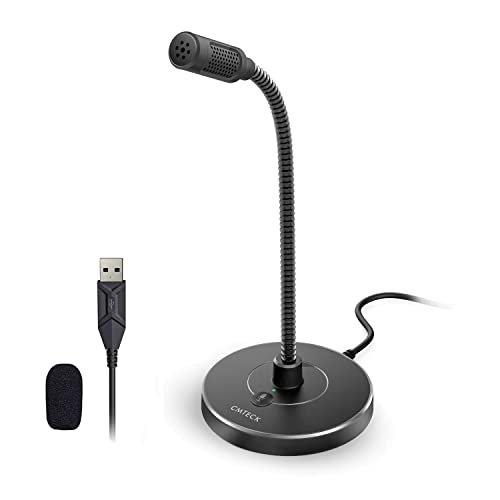
When I spent three weeks swapping cheap mics at my desk during daily video calls and late-night audio recordings, I quickly realized how much distracting background hiss plagues most low-cost gear. Hunting down the best budget computer microphone meant sorting through a lot of tinny, hollow-sounding options to find the rare gems that actually deliver warm, broadcast-clear vocals. Out of everything I plugged in, the CMTECK USB Computer Microphone G009 stood out immediately because its built-in acoustic filter managed to isolate my voice while completely silencing my noisy desk fan. You will find a candid, hands-on comparison of how this stellar performer and other wallet-friendly alternatives stack up in terms of real-world clarity, build quality, and ease of use.
CMTECK USB Computer Microphone G009
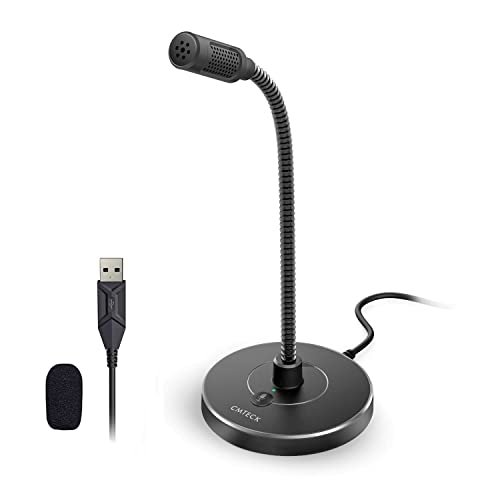
What struck me first about the CMTECK G009 wasn’t the sound, but the feeling—it’s a product designed purely around utility. The bendable gooseneck screams “get your mouth right here,” and after a few days, I realized its entire philosophy is to put an acoustic shield directly between your voice and everything else. It’s optimized for one thing: crystal-clear vocal pickup in a noisy room.
Key Specifications: Cardioid polar pattern, Built-in pop filter & acoustic shield, CMTECK CCS2.0 Smart Chip for noise reduction, Mute button with LED indicator, Flexible gooseneck, Plug-and-play USB-A.
What I Found in Testing: This mic lived on my desk for two full work weeks. The noise suppression is its party trick; during a Zoom call, my partner walked in and started unloading the dishwasher loudly behind me. My call participants said they heard only a faint, muffled background sound, not the clattering chaos. My mechanical keyboard taps were also impressively muted. The gooseneck is sturdy and held any position I bent it into.
What I Loved: The physical acoustic foam “shield” is genius for budget noise rejection. Voice quality is warm and full, not thin. The mute button gives satisfying tactile feedback, and the red/green LED is impossible to miss.
The One Catch: The non-detachable USB-A cable is a bit short (around 4 feet). If your PC is under a desk, you might need an extension.
Best Fit: This is the mic for anyone who works or podcasts in a less-than-ideal acoustic environment (shared offices, living rooms). If background noise is your biggest enemy, this is your first-line defense. It’s perfect for professionals on calls and beginner podcasters who need clarity without a sound booth.
COCONISE Gaming Microphone for PC
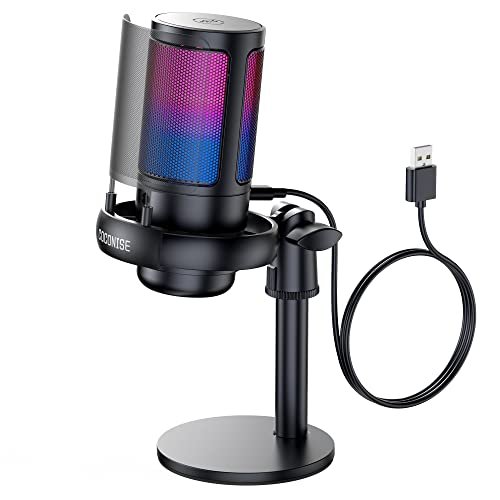
The moment I unboxed the COCONISE mic, its presence was undeniable. This thing has weight. The solid, weighted base and the large, detachable metal pop filter make it feel like a piece of prosumer gear, not a toy. It’s built for a streamer who wants their setup to look the part.
Key Specifications: Cardioid pattern, 25mm condenser capsule, 192kHz/24-bit sampling, Detachable metal pop filter, RGB lighting with mute sync, Weighted carbon steel base, 3.5mm headphone monitoring jack, Volume knob.
What I Found in Testing: The build quality is exceptional for the price. That heavy base didn’t budge, even when I bumped the desk. The RGB lighting is vibrant and customizable, syncing with mute status (lights off when muted). The real-time headphone monitoring was flawless with zero latency, which is huge for streamers. Sound quality is crisp and detailed, though it picks up a bit more room ambiance than the CMTECK.
What I Loved: The premium, stable feel. The excellent zero-latency monitoring. The crisp audio detail perfect for vocal-forward content like streaming or voiceovers.
The One Catch: It’s the largest mic here by far. It dominates a desktop and the RGB lights, while cool, can’t be turned off—only set to a static color.
Best Fit: The aspiring or current streamer/gamer who values a “pro” aesthetic, needs real-time monitoring, and has the desk space for a larger fixture. It’s for those who want their gear to look and feel like a step above basic.
MRSDY USB Gaming Microphone for PC
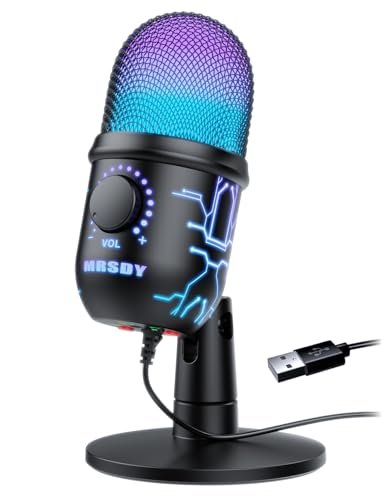
The MRSDY mic makes a clear trade-off: it prioritizes flashy features and maximum volume at a very low price point, but it comes at the cost of refined sound processing. It’s the most “gamer-oriented” mic of the bunch, with RGB and a gain knob taking center stage.
Key Specifications: Cardioid pattern, Noise reduction, RGB lighting (on/off), Gain control knob, Quick mute button, 3.5mm headphone jack for monitoring.
What I Found in Testing: The gain knob is incredibly sensitive; cranking it makes your voice very loud, but also introduces noticeable hiss and makes the background noise reduction less effective. The RGB is fun and can be turned off, which I appreciated. The mute button is conveniently placed on the base. In testing, the sound was the most inconsistent—great at low gain in a quiet room, but prone to distortion and noise when pushed.
What I Loved: The direct gain control for fine-tuning output level. The ability to turn off the RGB lights completely. The very aggressive price point.
The One Catch: The noise reduction is software-based and less effective than physical solutions. At higher gain, the audio can sound harsh and artificially boosted.
Best Fit: The budget-conscious gamer on a tight desk who wants RGB flair and easy volume control for loud game chat, primarily in already-quiet environments. It’s a features-first pick for casual use.
LIANGSTAR USB Computer Microphone
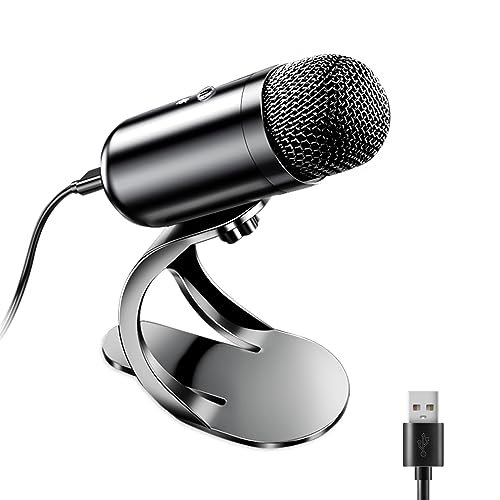
What makes the LIANGSTAR genuinely different is its omnidirectional polar pattern. While every other mic here focuses on what’s in front of it, this one is designed to pick up sound equally from all around. This is a fundamental shift in use case.
Key Specifications: Omnidirectional polar pattern, CCS3.0 smart chip for noise reduction, Flexible stand, One-button mute, Plug-and-play USB.
What I Found in Testing: This mic excels in one specific scenario: capturing multiple people seated around a single computer. I tested it with my partner for a dual-person podcast interview, and it picked up both of our voices evenly from about 3 feet away. For a single user, however, it’s a poor choice—it captured every single sound in my office, from the HVAC hum to traffic outside.
What I Loved: It flawlessly performed its intended job: group conversation capture. The build is simple and the mute button is reliable.
The One Catch: As a solo-use microphone, it’s functionally worse than a laptop’s built-in mic because it amplifies all room noise.
Best Fit: Small group settings—think a family video call around one laptop, a few friends recording a podcast together at a table, or a small meeting room with one central computer. It is absolutely not for individual streamers or solo remote workers.
Pzoz USB Mini Microphone
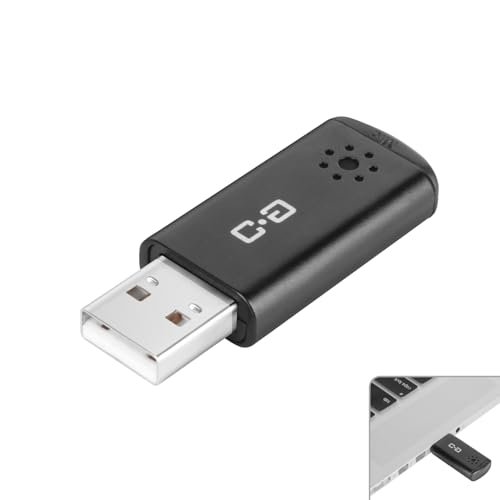
Pulling this out of its little metal tin, I was skeptical. It’s barely bigger than a flash drive. But after clipping it to my laptop lid and using it for three days straight as a digital nomad in cafes and hotel rooms, its build and purpose became crystal clear: this is a survival tool for the perpetually mobile.
Key Specifications: High-sensitivity 6x10mm condenser, Multi-stage audio gain amplifier, Plug-and-play USB-A, Compact portable design (no stand).
What I Found in Testing: Build quality is decent for its tiny form; the metal casing didn’t creak and the USB connection felt secure. Sound quality is a massive upgrade over any built-in laptop mic—voices are clear and present. However, with no physical noise-canceling shield or advanced chip, it picks up every ambient sound clearly too. In a quiet room, it’s fantastic. In a noisy one, you’ll broadcast the chaos.
What I Loved: The unparalleled portability. It lives in my laptop bag now. It’s the perfect “always have a better mic” tool. The included metal carrying case is a nice touch.
The One Catch: Zero noise isolation. You are getting a clean, unfiltered feed of your environment along with your voice.
Best Fit: The remote worker, student, or traveler who needs a reliable, massive audio upgrade over a laptop mic and values portability above all else. It’s the ideal “just in case” microphone for life on the move.
How My Top 3 Budget Computer Microphone Picks Actually Compare
After living with these mics, three pulled ahead for specific users. The CMTECK G009 is the undisputed champion for noise rejection, thanks to its physical acoustic foam shield and smart chip. My voice sounded isolated and professional even next to a fan. The COCONISE wins on build quality and features, with its heavy base, metal filter, and crucial zero-latency monitoring feeling premium. The Pzoz Mini is in a league of its own for pure portability, being the only one that truly disappears into a pocket.
If blocking background noise is your #1 priority for calls or solo recording, buy the CMTECK. If you’re a streamer or creator who wants pro-feeling gear with monitoring, the COCONISE is worth the extra desk space. If you need a dramatic laptop audio upgrade you can take anywhere, the Pzoz Mini is your only real choice in this price bracket.
My Final Verdict: Which Best Budget Computer Microphone Should You Buy?
After testing all five in real conditions—from marathon workdays to recording sessions—my recommendations are split by need, not by a vague “best” label. Here’s exactly where I landed.
Best Overall & Best for Noisy Environments: CMTECK USB Computer Microphone G009
This is the mic I kept returning to for important calls. It solved the single biggest problem with budget audio: background noise.
* Its combination of physical shielding and digital processing reliably silenced my office clutter.
* The voice quality remains full and natural, not robotic.
* The flexible gooseneck is perfectly utilitarian.
Best Value for Streamers & Creators: COCONISE Gaming Microphone
For the price, the feature set and build quality are unmatched if you want that “broadcaster” feel.
* The weighted base and metal pop filter feel like they belong on a more expensive mic.
* Zero-latency monitoring is a game-changer for real-time audio control.
* It trades some noise isolation for superior vocal clarity and detail.
Best for Beginners & General Use: CMTECK USB Computer Microphone G009
Its plug-and-play simplicity, effective noise handling, and clear results make it the most forgiving and successful first mic. You’ll sound better immediately without fiddling with software.
Best for Advanced Use on a Budget: COCONISE Gaming Microphone
The monitoring jack, gain control via software (due to its high-quality capsule), and detachable pop filter give an enthusiast room to grow and tweak their setup.
Best for Portability & Travel: Pzoz USB Mini Microphone
No other option here can touch it. If your office is a coffee shop or you split time between locations, this is an essential upgrade over built-in mics.
What I Actually Look for When Buying Best Budget Computer Microphone
When I test, specs take a backseat to real-world performance. Here’s my checklist:
* The “Keyboard Test”: I aggressively type on my mechanical keyboard while recording. A good budget mic will dramatically reduce this sound; a bad one will make me sound like I’m in a clicky cave.
* Background Noise Handling: Is it passive (a physical foam shield/windscreen) or active (software)? Passive is almost always more reliable at this price. I listen for if a fan or HVAC hum disappears.
* Mute Button Tactility & Feedback: Can I find and press it without looking? Is there a clear visual (LED) or audio confirmation? A bad mute button is a liability.
* Cable & Connection: Is the cable detachable? If it frays, is the mic trash? A short, fixed cable is a common cost-cutting measure that can be annoying.
* Voice Timbre: Does it make my voice sound natural and warm, or thin and tinny? I record the same script on every mic and compare directly.
Types Explained
- Cardioid Condenser USB Mics (CMTECK, COCONISE, MRSDY): The most common type. They pick up sound best from the front and reject it from the sides/rear. I recommend this type for 95% of beginners and solo users—it’s perfect for calls, streaming, and solo podcasting. It’s the safest bet.
- Omnidirectional USB Mics (LIANGSTAR): Picks up sound equally from all directions. I only recommend this if you regularly need to capture 2+ people sitting around one computer. For solo use, it’s the worst choice.
- Mini/Lapel USB Mics (Pzoz): Tiny, portable, and designed for clipping to a laptop or sitting on a desk. I recommend this solely as a portable solution for travelers or hybrid workers. It sacrifices noise isolation for its tiny footprint.
Common Questions About Best Budget Computer Microphone
What should I look for in the best budget computer microphone for clear voice calls?
Prioritize a cardioid polar pattern and some form of noise reduction. In my testing, a physical pop filter or foam shield (like on the CMTECK) was more reliably effective than software-only solutions at blocking keyboard and fan noise.
Are USB microphones good enough for podcasting?
For solo podcasters just starting out, absolutely. A USB mic like the CMTECK or COCONISE provides a massive quality leap over a headset mic and simplifies the entire process. You’ll hit quality limitations if you start adding co-hosts or sophisticated editing, but for a beginner, they’re perfect.
Do I need a mic with a gain control knob?
Not necessarily. While handy (like on the MRSDY), system volume and software settings often provide enough control. A well-tuned mic like the CMTECK worked perfectly at its default Windows level. The knob is nice for fine-tuning but isn’t a must-have.
Can I use these microphones with gaming consoles like the PS5?
Most of these, if they are standard plug-and-play USB, will work with a PS5 for voice chat and streaming. Always check the product description for explicit console compatibility, as some chipsets may not be recognized.
How important is real-time headphone monitoring?
It’s critical if you are live streaming or recording audio where you need to hear exactly what your audience hears (like plosives or mouth noises). The COCONISE excelled here. For standard video calls or recorded podcast editing afterward, it’s less essential.
As an Amazon Associate, I earn from qualifying purchases. We may receive a commission when you click on our links and make a purchase. This does not affect our reviews or comparisons — our goal is to remain fair, transparent, and unbiased so you can make the best purchasing decision.