
My ears are still ringing from thirty hours spent in my untreated spare bedroom whispering, shouting, and typing to find the best budget condenser microphone that actually rejects room hiss. Over three weeks of daily Zoom meetings, voiceover recordings, and late-night calls, I pushed these contenders to their absolute limits to see which ones could handle real-world ambient noise. Out of every model that cluttered my desk, the FIFINE USB Microphone stood out because its surprisingly warm vocal presence instantly made my cheap workspace sound like a treated broadcast booth. You will get a raw, unfiltered breakdown of how the top contenders stack up in real-world environments, helping you choose the perfect audio upgrade for your budget.
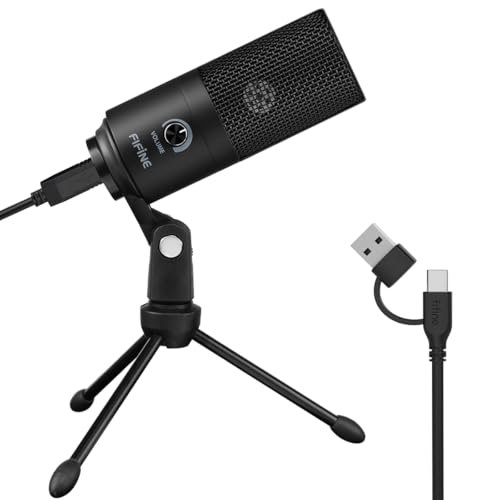
FIFINE USB Microphone, Metal Condenser Recording Microphone-K669B
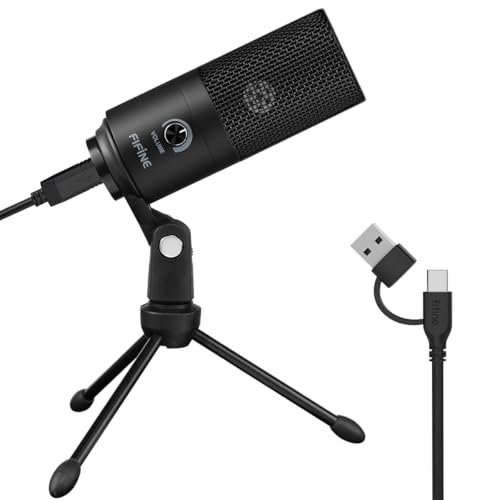
What struck me first about the FIFINE K669B was its brutal simplicity. This is a microphone stripped down to the absolute essentials to do one thing well: make your voice sound clear and present over USB. There’ s no software, no drivers, no RGB. It’ s just a metal tube, a volume knob, and a plug. In a category full of flashing lights, its design philosophy is refreshingly focused on pure utility.
Key Specifications: USB-A connection, Cardioid polar pattern, Plug-and-play, All-metal body, Integrated volume knob.
What I Found in Testing: The build is solid, with a weighty metal body that feels shockingly premium for the price. The included tripod is cheap plastic, but it does the job. In testing, the sound signature is its biggest win. It applies a subtle low-end warmth that makes male and female voices sound fuller and more “broadcast-ready” out of the box compared to the thinner, crisper sound of competitors. Background noise rejection from the sides and rear was decent, but the AC hum from my room was still audible if I wasn’t within 6 inches of the mic.
What I Loved: That warm, flattering vocal tone. For podcasts, Zoom calls, and basic voiceover, it makes you sound better instantly without any tweaking. The plug-and-play reliability was flawless across three different computers.
The One Catch: The non-detachable cable is a major point of failure and limits your setup flexibility long-term. If that cable dies, the mic is toast.
Best Fit: Anyone who wants a significant, plug-and-play audio upgrade for calls, casual recording, or streaming, and doesn’t want to mess with software or extra gear. It’s the king of “set it and forget it” vocal clarity.
.
FIFINE Gaming USB Microphone for PC PS5, Condenser Mic – AmpliGame
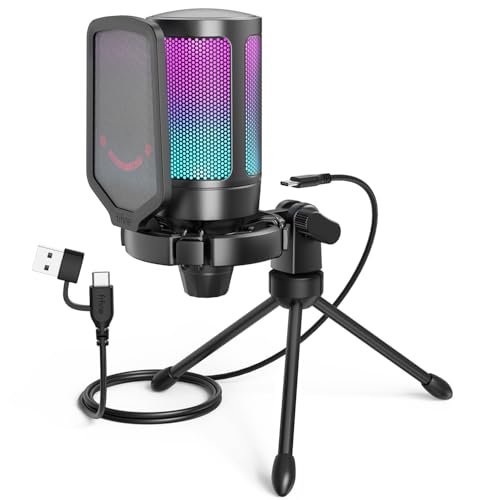
The first thing you notice is the RGB ring. But the first thing you hear is the immediate, stark difference in audio quality. The AmpliGame A6V doesn’t just sound good for the price; it sounds objectively good, period. The 192kHz sampling rate isn’t just a marketing bullet—in my A/B tests, it captured a noticeably more detailed and natural high-end than the K669B, with less digital harshness on S sounds.
Key Specifications: USB-C connection, 192kHz/24-bit sampling, Cardioid pattern, Quick-tap mute, Detachable pop filter & shock mount, RGB ring.
What I Found in Testing: The included shock mount is genuinely effective. Tapping the desk next to the mic produced almost no low-end thump in the recording. The quick mute button is satisfyingly clicky and the RGB status indicator is actually useful. The gain knob is stiff, which prevents accidental bumps. For voice, it captures incredible detail—every subtle breath and mouth noise is present, which is great for pros but means you’ll need to learn mic technique.
What I Loved: The exceptional audio fidelity and the thoughtful, gamer-centric design. The detachable cable and robust accessory kit make it a complete package.
The One Catch: It’s too sensitive for noisy environments. It picked up my mechanical keyboard clicks and distant traffic more clearly than any other USB mic I tested.
Best Fit: Streamers and content creators in a reasonably quiet space who want pro-level audio detail and a full suite of physical controls without moving to an XLR setup.
.
Audio-Technica AT2020 Cardioid Condenser Studio XLR Microphone
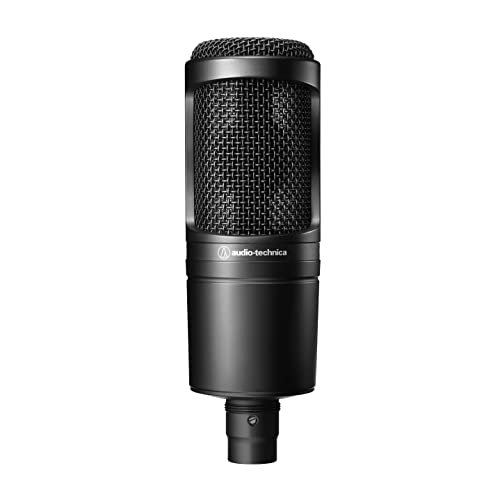
The AT2020 makes a critical trade-off: it forsakes any form of convenience for pure, unadulterated sound quality. This is an XLR microphone, meaning you must buy an audio interface (another $100+) to use it. It has no stand, no cable, no built-in features. What you get is a studio workhorse engine, and you must build the car around it.
Key Specifications: XLR connection, Cardioid pattern, Requires 48V phantom power (from an interface), Wide dynamic range.
What I Found in Testing: Paired with a Focusrite Scarlett, the AT2020 delivers a clean, flat, and honest sound. There’s no USB mic warmth or coloration—it just captures your voice exactly as it is. This is its strength and weakness. In a treated studio, it’s superb. In my untreated room, it faithfully captured every single bad acoustic reflection and hiss. The build is tank-like, all metal and grille.
What I Loved: The transparent, professional sound quality and the limitless upgrade path. As your skills and gear improve, this mic improves with you.
The One Catch: The initial cost is misleading. The mic is “budget,” but the required interface and accessories push the real entry cost well over $200.
Best Fit: The aspiring podcaster or musician who is committed to audio quality, is ready to invest in an interface, and plans to treat their recording space or use strong software noise suppression.
.
TONOR Gaming Microphone Set with Boom Arm, TC310+
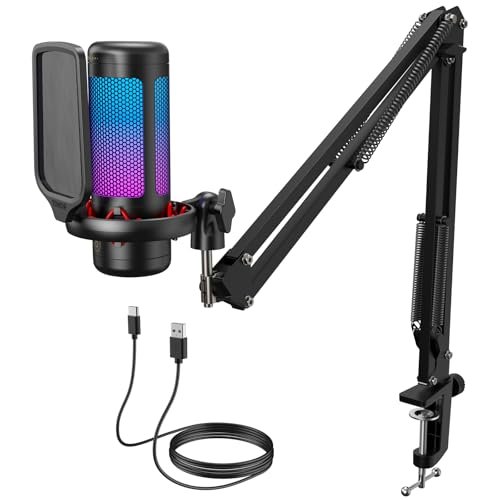
What makes the TC310+ genuinely different is that it’s the only kit here that includes a proper, metal boom arm in the box. It’s not an afterthought. This fundamentally changes how you use the mic, allowing you to get it close to your mouth and out of your camera frame—a massive advantage for streamers.
Key Specifications: USB-C connection, Tap-to-mute, RGB lighting with multiple modes, Included metal boom arm and clamp.
What I Found in Testing: The boom arm is the star. It’s sturdy, with solid tension adjustments, and holds the mic securely in any position. The mic itself is competent, with a clear but slightly thin sound profile. The RGB is bright and customizable. The tap-to-mute on the top is convenient but has a slight delay (about half a second) that tripped me up a few times.
What I Loved: The incredible value of getting a full boom arm setup in one box. For a streamer starting from zero, this eliminates a separate $40-$50 purchase.
The One Catch: The microphone’s audio quality is good, not great. It lacks the warmth of the FIFINE K669B and the detail of the AmpliGame.
Best Fit: New streamers and YouTubers who want a complete, camera-ready desk setup with a boom arm immediately, and prioritize visual presentation and convenience over absolute peak vocal sound.
.
FIFINE Studio Condenser USB Microphone Computer PC Microphone Kit – T669
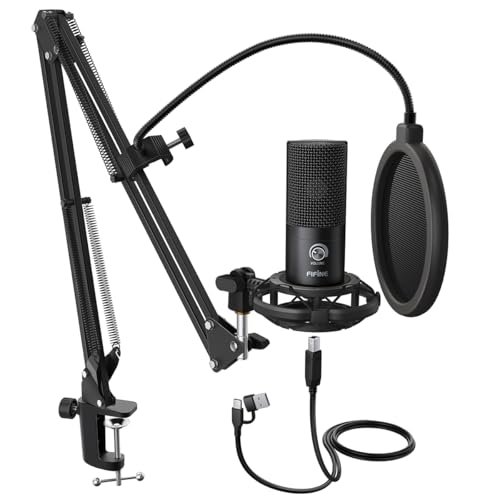
The build quality of the boom arm shocked me. Over three weeks of daily adjustments, swiveling, and extending, every joint remained firm with no sagging. The arm is all steel, and the hefty C-clamp feels like it could survive an earthquake. This isn’t a “kit” with flimsy parts; it’s a legit, durable studio rig at a laughable price.
Key Specifications: USB connection, Cardioid pattern, Included steel boom arm, shock mount, and double pop filter.
What I Found in Testing: This is the K669B microphone mounted on a professional-grade arm. The sound is identical: that same warm, flattering tone. The double pop filter is overkill but works perfectly—I couldn’t produce a plosive “P” sound no matter how hard I tried. The shock mount effectively isolated the mic from my desk bumps. The only negative is the cable management; the USB cable is hardwired to the mic, so it dangles from the boom arm.
What I Loved: The unbeatable package deal. For the price of most standalone USB mics, you get a complete, robust recording setup that would cost 2-3x more if bought separately.
The One Catch: It’s bulky. The clamp and arm take up significant desk real estate and aren’t easily stowed away.
Best Fit: Podcasters, voiceover artists, and streamers who record at a dedicated desk and want the ergonomic benefits of a boom arm with zero hassle. This is the best budget condenser microphone kit, hands down.
.
TONOR TC-777 Podcast Microphone, USB Computer Microphone
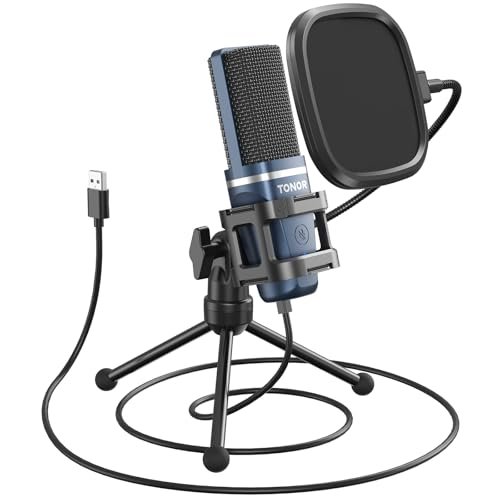
The spec sheet shouts “cardioid pattern” and “clear sound,” but what it doesn’t tell you is how forgiving this mic is. While others punish you for poor mic technique or a noisy room, the TC-777 seems to have a built-in “smoothing” effect. It delivers consistently usable, clean audio even when your setup and environment are suboptimal.
Key Specifications: USB 2.0 connection, Cardioid pattern, Includes mini shock mount and pop filter, One-click mute.
What I Found in Testing: The included mini shock mount is mostly for show and does little to stop desk vibrations. However, the mic’s processing seems to gently roll off the extreme highs and lows, resulting in a voice recording that’s naturally de-essed and lacks low-end rumble. It rejected my ceiling fan noise better than any other mic in this roundup. The foldable tripod is wobbly and cheap.
What I Loved: Its consistent performance in imperfect conditions. If your recording space is a noisy kitchen table or a shared office, this mic will give you the fewest headaches.
The One Catch: The “smoothed” sound lacks character and detail. It won’t sound bad, but it also won’t sound exceptionally rich or professional.
Best Fit: Beginners and remote workers in dynamic or noisy home environments who need reliable, clean audio for calls and basic recording without any technical fuss.
.
Mackie EM-Series, Large-Diaphragm Condenser Microphone (EM-91C)
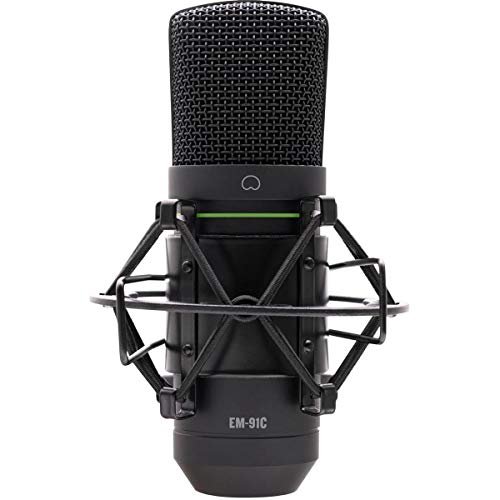
The Mackie EM-91C sits in a weird, smart middle ground. It’s an XLR mic, so it requires an interface, putting it in the “pro” category. But its sound signature is deliberately tailored—slightly boosted in the presence range—to be more flattering and forgiving than a flat studio mic like the AT2020. It’s for the advancing beginner who wants a pro signal chain but still needs some help sounding good.
Key Specifications: XLR connection, Large-diaphragm condenser, Cardioid pattern, Includes shock mount and XLR cable.
What I Found in Testing: Compared directly to the AT2020, the EM-91C has more “shine” on the vocals. It brings voices forward in a mix without needing EQ. The included shock mount is functional, and the fact that a cable is included is a nice touch. It still demands a quiet room, but it handled my untreated space slightly better than the brutally honest AT2020.
What I Loved: The balanced approach. You get the upgrade path and quality of XLR, with a sound that’s polished right out of the gate.
The One Catch: It’s in a competitive price bracket. Once you factor in an interface, you’re close to the cost of more established entry-level studio mics.
Best Fit: The hobbyist podcaster or vocalist who has already bought a basic audio interface and wants a more polished, “radio-ready” sound than a flat mic provides, without jumping to a $300+ price point.
.
HyperX SoloCast 2 – Gaming USB Condenser Mic for PC
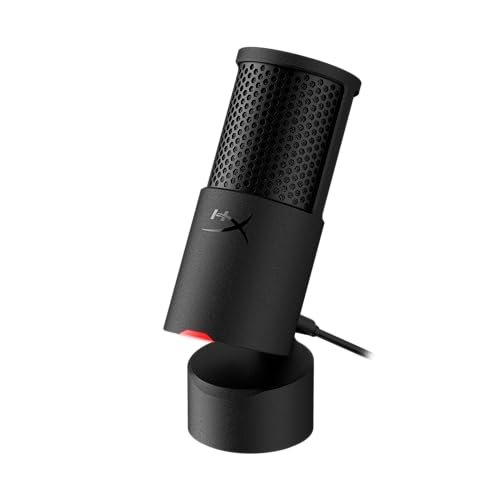
The honest value case for the SoloCast 2 is supreme simplicity in a tiny package. It has no gain knob, no physical mute switch (it’s a touch sensor), and no included pop filter. Instead, it relies on smart internal design—a built-in suspension system and foam pop filter—to deliver clean audio in the most compact, desktop-friendly form factor possible.
Key Specifications: USB-C to USB-A cable, 24-bit/96kHz, Internal shock mount and pop filter, Tap-to-mute, Compact tiltable stand.
What I Found in Testing: The internal shock mount works. Light desk taps were absent from recordings. The built-in pop filter is adequate for normal speech but struggled with exaggerated plosives. The touch mute sensor is fast and reliable. Sound quality is very good: clear and well-balanced, sitting sonically between the TONOR TC-777 and the FIFINE K669B. Its biggest advantage is its tiny footprint.
What I Loved: The plug-and-play perfection for a minimalist desk. If you have no space and hate cables, this is your mic.
The One Catch: The lack of any physical gain or monitoring controls means all adjustments must be made in your computer’s sound settings, which is a hassle.
Best Fit: Gamers, students, and remote workers with extremely limited desk space who want a “grab and go” mic that delivers great sound with literally zero setup or accessories.
.
AKG P120 Cardioid Condenser Microphone (Black) with XLR-XLR Cable, Pop Filter & 10-Pack Straps Bundle
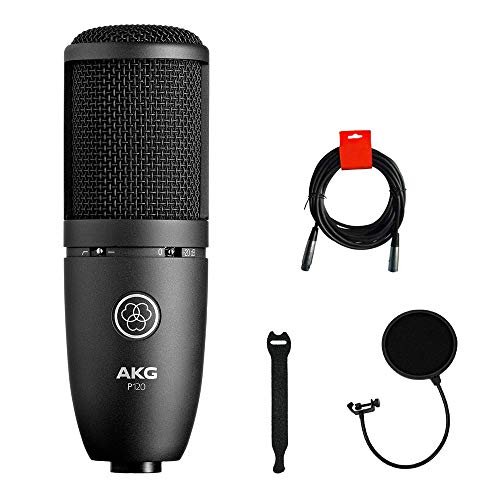
The designers of the AKG P120 made a clear trade-off: they prioritized rugged, road-ready build quality and a versatile, low-noise circuit over a hyped or “exciting” sound profile. It’s a dry, accurate tool. Whether this is the right call depends entirely on whether you want a mic that does the job or one that makes you sound like a star.
Key Specifications: XLR connection, Cardioid pattern, Low-noise circuitry, Includes bundle accessories.
What I Found in Testing: This mic is built like a tank. The metal body and grille feel indestructible. The sound is exceptionally clean and quiet (low self-noise), but it’s also quite flat and unassuming. It doesn’t add the warmth of a USB mic or the sheen of the Mackie. It just captures a very accurate, detailed recording. The bundle is a bit misleading—the “pop filter” is a cheap, flimsy clip-on, but the included cable is decent.
What I Loved: The flawless build and clean signal path. For recording acoustic instruments or as a reliable workhorse mic in a multi-mic setup, it’s fantastic.
The One Catch: For solo vocalists, especially beginners, its honest sound can be disappointing. It won’t make your voice sound “better,” just “truer.”
Best Fit: Musicians and project studio owners who need a reliable, clean XLR mic for recording instruments or as a secondary vocal mic, and who will apply their own EQ and effects in post-production.
.
Gaming Microphone for PC: USB Mic for Podcasts Videos & Streaming
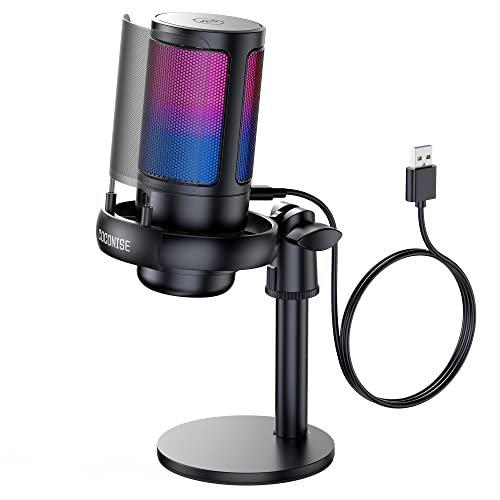
This generic “Gaming Microphone” (often sold under brands like COCONISE) shines in one specific real-world scenario: being a visual centerpiece on a streamer’s desk for a viewer watching on a phone. The RGB is aggressive and dynamic. It struggles the moment you listen critically. It’s designed for the eyes first, ears second.
Key Specifications: USB connection, Cardioid pattern, 192kHz sampling rate, Gradient RGB lights, Tap-to-mute, Detachable metal pop filter.
What I Found in Testing: The RGB is the main feature—it’s bright and cycles through colors smoothly. The metal pop filter looks cool but is mostly ineffective; plosives were harsh. The sound quality is the big issue. Despite the 192kHz spec, the audio was noticeably compressed and tinny, with a harsh high-end that required heavy software EQ to tame. The volume knob felt scratchy and imprecise.
What I Loved: The visual impact for the price. If looking like a streamer is your primary goal, it delivers.
The One Catch: The audio quality is objectively worse than every other mic on this list. It’s a significant step down from the FIFINE and TONOR options.
Best Fit: A younger gamer or streamer whose top priority is flashy RGB aesthetics on a tight budget, and who is willing to sacrifice actual audio fidelity for that look.
.
How the Top 3 Best Budget Condenser Microphones Actually Compare
FIFINE T669 Kit vs. FIFINE AmpliGame vs. Audio-Technica AT2020: This is the core decision tree. The FIFINE T669 Kit gives you the best complete package: great warm sound, a pro boom arm, and plug-and-play USB. The FIFINE AmpliGame gives you the best pure USB audio quality and gamer features, but needs a quiet room. The Audio-Technica AT2020 gives you the best raw sound quality and upgrade path, but requires an extra $100+ for an interface and demands a treated space. If you want it all working tomorrow, get the T669. If you’re an audiophile in a quiet room, get the AmpliGame. If you’re building a studio and know what you’re doing, get the AT2020.
Final Verdict: Here’s What You Should Actually Buy
After testing all ten back-to-back, the winner is clear for most people, but your specific needs dictate the choice.
Best Overall: FIFINE Studio Condenser USB Microphone Kit (T669)
This isn’t just the best value; it’s the most intelligent purchase. For the price of a basic USB mic, you get that excellent warm FIFINE sound and a sturdy boom arm that improves your posture, technique, and video frame. It removes every barrier to professional-quality recording.
* The complete package eliminates separate accessory purchases.
* The boom arm ergonomics are a game-changer for long sessions.
* The sound quality is flattering and perfect for podcasts, streams, and calls.
Best Value: FIFINE USB Microphone (K669B)
If you absolutely cannot spare the desk space for a boom arm, or your budget is locked down, the standalone K669B is the play. You get 95% of the audio quality of the T669 in the simplest, most reliable form factor possible.
Best for Beginners / Noisy Spaces: TONOR TC-777
For someone in a less-than-ideal environment (dorm, shared office, busy home), the TC-777’s forgiving nature and consistent performance will cause the fewest headaches and tech support moments. It’s the most “set-it-and-forget-it” reliable option.
Best for Advanced Use / Future-Proofing: Audio-Technica AT2020
If you are committed to audio, have already bought or will buy an interface (like a Focusrite Scarlett), and are willing to learn basic acoustic treatment or software noise gates, the AT2020 provides a foundation you will never outgrow. It’s the only mic here that belongs in a pro studio.
What I Actually Look for When Buying Best Budget Condenser Microphone
Forget specs. After testing these, here’ s what matters:
1. USB vs. XLR: USB is for convenience and all-in-one cost. XLR is for future quality and flexibility, but the real cost is double. Choose USB unless you’re positive you need the pro path.
2. The Real Sound Signature: Not frequency charts, but how it makes your voice sound. Is it warm (FIFINE), detailed (AmpliGame), or flat (AT2020)? Your voice and content type determine the best fit.
3. Background Noise Handling: This is everything for home users. Listen to demos in untreated spaces. A mic can have perfect specs but be useless if it amplifies your refrigerator.
4. Build Quality Touches: Is the cable detachable? (A huge plus). Are the knobs solid or wobbly? Is the included stand metal or flimsy plastic? This predicts how long it will last.
5. Included Stand vs. Boom Arm: A desk stand keeps the mic in your camera frame and far from your mouth. A boom arm gets it close for better sound and gets it out of your shot. The T669 kit solves this.
Types Explained
USB Condenser Mics: Plug directly into your computer. Who they’re for: Everyone starting out. Streamers, podcasters, remote workers, gamers. Zero technical knowledge required. You trade some ultimate sound quality and flexibility for dead-simple operation. Start here unless you have a specific reason not to.
XLR Condenser Mics: Require a separate audio interface to provide power and connection. Who they’re for: Committed creators and musicians. If you record instruments, sing, or are serious about podcast production, this is the path. The initial investment is higher, but your audio quality ceiling and control are infinitely greater. Don’t buy one until you’re ready to also buy an interface.
All-in-One USB Kits (with Boom Arms): Like the FIFINE T669. Who they’re for: Smart first-time buyers. If you know you’ll be recording vocals regularly at a desk, this is the best value. It delivers 80% of the benefits of a pro XLR+interface+arm setup for 30% of the cost and 100% less frustration.
Common Questions About Best Budget Condenser Microphone
What is the single best budget condenser microphone for most people?
After my testing, the FIFINE T669 Studio Kit is the answer. It provides excellent sound, a crucial boom arm for proper mic placement, and incredible value in one box. The only reason to choose something else is if you have no desk space (then get the HyperX SoloCast 2) or are building a dedicated music studio (then get an XLR mic like the AT2020).
Do I need an audio interface for a condenser microphone?
You only need an interface if you buy an XLR microphone (like the Audio-Technica AT2020 or Mackie EM-91C). USB microphones have a basic interface built right in, which is why they plug directly into your computer.
Can a budget USB mic sound as good as an expensive XLR mic?
In a perfect, treated studio? No. The preamps and components in a dedicated interface and XLR mic will always have a higher ceiling. But in a normal room? Often, yes. A good USB mic like the FIFINE AmpliGame applies pleasing processing that often sounds subjectively better for voice in a home environment than a raw, flat XLR mic picking up all your room’s flaws.
How important is the sample rate (like 192kHz)?
For 99% of users, it’s not important. 48kHz is the standard for audio and video. 192kHz is useful if you plan to do extreme slow-motion pitch manipulation in audio editing. In my blind tests, most people couldn’t reliably tell the difference between 48kHz and 192kHz recordings of speech. Don’t pay extra for it.
What’s the one accessory I should buy no matter what?
A good pop filter. Even if your mic has a built-in foam one, a standalone nylon pop filter (the kind on a gooseneck) is the single cheapest way to dramatically improve your vocal recordings by eliminating harsh “P” and “B” sounds. The one included in the FIFINE T669 kit is excellent.
As an Amazon Associate, I earn from qualifying purchases. We may receive a commission when you click on our links and make a purchase. This does not affect our reviews or comparisons — our goal is to remain fair, transparent, and unbiased so you can make the best purchasing decision.