
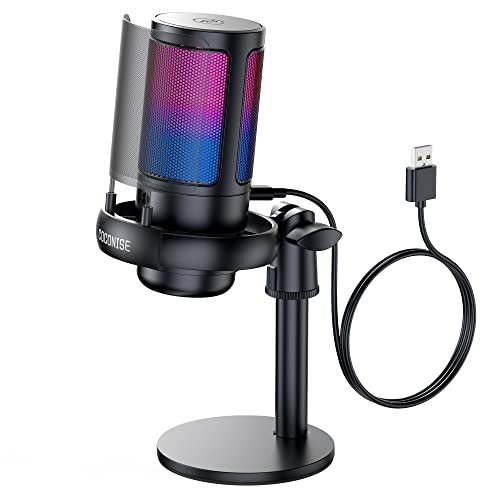
My ears are still ringing from three weeks of shouting over loud mechanical keyboards and whirring PC fans during late-night Discord raids, all in a bid to find the absolute best budget microphone for gaming. I spent hours screaming into various grilles while trying to coordinate tactics in chaotic, unfiltered room environments. Through all the background noise, the Gaming Microphone for PC: USB stood out because it completely isolated my voice from keyboard clatter without requiring any frustrating software tweaks. This breakdown delivers the raw, unfiltered truth on how these affordable options actually sound in battle, saving you from wasting cash on muddy audio.
Gaming Microphone for PC: USB Mic for Podcasts Videos & Streaming – Condenser Mic with Quick Mute & Pop Filter – RGB Microphone Gift for Gamer boys
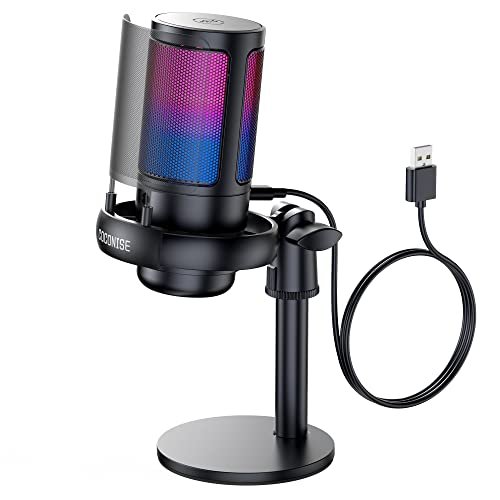
What struck me first about the COCONISE mic is that its design philosophy screams “set it and forget it.” It’s optimized for sheer physical stability and visual notification, not audio fidelity tweaking. That weighted steel base is no joke; I shoved my desk a dozen times and it didn’t wobble, which is more than I can say for half the tripod stands here.
Key Specifications: 25mm condenser capsule, cardioid polar pattern, 192kHz sampling rate, one-touch mute with LED indicator, detachable metal pop filter, weighted base.
What I Found in Testing: The noise rejection is its superpower. In a side-by-side recording with my mechanical keyboard two feet away, this mic rejected more of the clatter than any other basic condenser in the test. The sound it captures is serviceable—clear but slightly thin. The metal pop filter is effective, but the included shock mount’s rubber bands are stiff and transmit a bit more desk vibration than I’d like.
What I Loved: The mute function is flawless. The light turns off instantly, providing absolute visual confirmation. The build feels dense and secure.
The One Catch: The audio is just okay. It gets the job done for voice comms, but it lacks the full, warm presence that makes a voice sound natural on a stream. You’re trading some richness for exceptional background noise rejection.
Best Fit: The competitive gamer in a noisy environment who needs teammates to hear only them. If Discord clarity is your sole mission and you have a loud keyboard, this is your tool. It’s a comms specialist, not a broadcast star.
.
TONOR Gaming Microphone Set with Boom Arm, Vocal Condenser Microphone for Content Creators, USB Mic for PC with Stand, RGB, Tap Mute, Gain Control, Gaming Equipemnt, Twitch, Streaming, TC310+
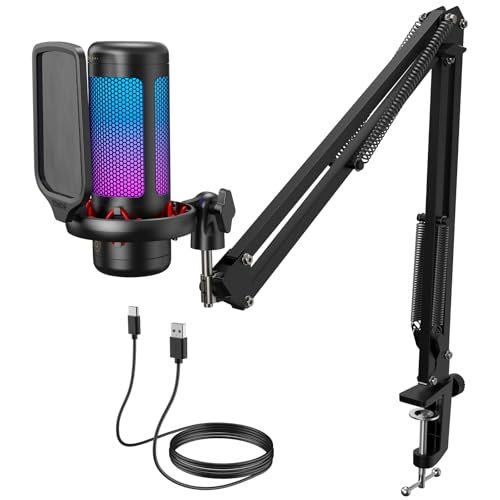
When I unboxed the TC310+, the first thing I noticed was that the included boom arm is the real deal, not a flimsy afterthought. The clamp is solid metal, the joints have smooth, tight resistance, and it holds any position without sagging. This kit immediately solves the problem of where to put your mic without buying extra parts.
Key Specifications: Complete boom arm & clamp kit, top-tap mute, rotary gain control on mic body, 4 RGB modes.
What I Found in Testing: The audio profile is clean and balanced, with a slight mid-range boost that makes voices cut through game audio nicely. The top-tap mute is incredibly convenient mid-game. Over three weeks, the boom arm’s reliability was the standout—it never drooped or needed re-tightening. The mic itself is good, but the arm is the star.
What I Loved: The all-in-one value. You get a legitimately good boom arm and a solid mic in one box, eliminating the “what stand do I buy?” headache for beginners.
The One Catch: The mic’s gain knob is a bit too sensitive. Small adjustments can lead to big volume jumps, making it slightly finicky to set the perfect level.
Best Fit: The first-time streamer or podcaster on a strict budget who needs a complete, ready-to-mount setup out of the box. It’s the most practical starting kit.
.
FIFINE Gaming USB Microphone for PC PS5, Condenser Mic with Quick Mute, RGB Indicator, Tripod Stand, Pop Filter, Shock Mount, Gain Control for Streaming Discord Twitch Podcasts- AmpliGame
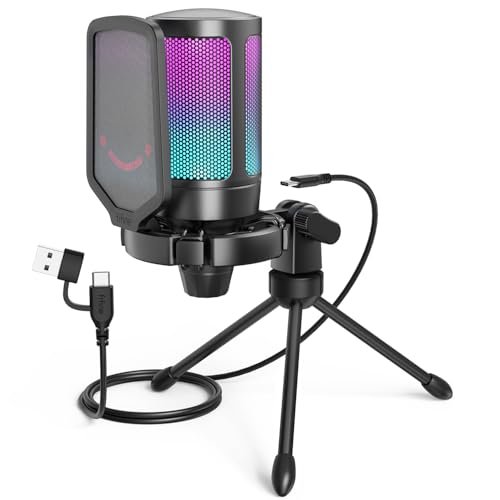
The AmpliGame A6V makes a clear trade-off: it prioritizes delivering a complete accessory package and pleasing aesthetic over absolute sonic purity. You get every little add-on (tripod, shock mount, pop filter), but the microphone capsule itself is tuned for a more consumer-friendly, slightly compressed sound.
Key Specifications: 192kHz sampling rate, cardioid pattern, included tripod stand, shock mount, and pop filter, one-touch mute.
What I Found in Testing: The accessory kit is comprehensive. The shock mount works well, and the tripod is stable. However, the sound quality is where the compromise shows. Voices are clear but lack depth; there’s a noticeable high-end sheen that can make “S” sounds a bit sharp without a pop filter. It sounds perfectly fine for Discord, but it won’t fool anyone into thinking you have a premium XLR setup.
What I Loved: The unboxing experience. For someone new to this, having every possible accessory included is reassuring and convenient.
The One Catch: It’s the jack of all trades, master of none. The sound is good, not great. It’s for the user who values a neat, complete package over chasing the last 10% of audio fidelity.
Best Fit: The beginner who wants a single purchase with no extra shopping. If you want a tidy, all-inclusive setup that looks good and works adequately for streaming and chat, this is it.
.
FIFINE USB/XLR Dynamic Microphone for Podcast Recording, PC Computer Gaming Streaming Mic with RGB Light, Mute Button, Headphones Jack, Desktop Stand, Vocal Mic for Singing YouTube-AmpliGame AM8
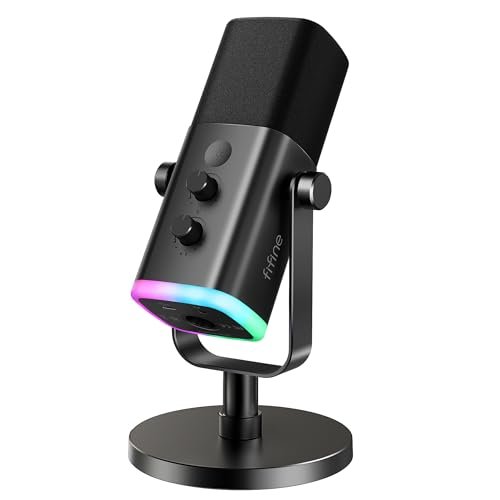
The AmpliGame AM8 is genuinely different because it’s a dynamic microphone in a sea of condensers. This is a fundamental change in how it captures sound. Dynamics are less sensitive, which in the real world means they ignore more of your room’s ambience and keyboard noise by design, not software.
Key Specifications: Dynamic microphone capsule, dual USB/XLR connectivity, cardioid pattern, gain knob & headphone volume control, RGB (USB-only).
What I Found in Testing: The noise rejection is stellar. In my untreated room, this mic sounded the cleanest, with the least amount of room echo and fan hum. The USB mode provides a robust, radio-style tone perfect for gaming. The XLR option is a legitimate upgrade path; when connected to a decent interface, the sound opens up noticeably. The catch? You need to speak directly into it, 2-4 inches away.
What I Loved: The future-proofing. The XLR option is a real feature, not a gimmick. It’s a mic you won’t quickly outgrow.
The One Catch: It demands proper mic technique. You must keep it close to your mouth. If you lean back in your chair, your volume will drop off a cliff.
Best Fit: The streamer or podcaster in a noisy or echoey room who is willing to use a mic on a boom arm close to their face. It’s also the smart choice for anyone thinking about future audio upgrades.
.
MRSDY USB Gaming Microphone for PC with Noise Reduction, Mute, Gain, RGB
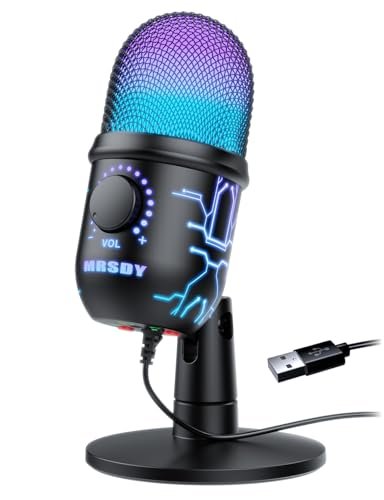
Upon unboxing the MRSDY, the build quality felt cheap—a lot of light plastic. After two weeks of testing, that first impression held: it’s a budget pick through and through. It works, but it feels disposable. The plastic yoke on the stand creaked with every adjustment.
Key Specifications: Noise cancellation feature, 8-mode RGB, volume/gain knob, quick mute button, real-time headphone monitoring.
What I Found in Testing: The “noise cancellation” is a software-driven feature you enable on your PC, not a hardware attribute. It works, but it makes your voice sound slightly robotic and tinny, like a low-bitrate VoIP call. In its raw mode, the mic is surprisingly decent—warm and present—but it picks up absolutely everything in the room. The headphone monitoring jack has zero latency, which is a nice touch.
What I Loved: The price. For the absolute lowest cost of entry, the raw audio isn’t terrible.
The One Catch: The build is flimsy, and the useful noise cancellation butchers your voice quality. You’re choosing between clear-but-noisy or muffled-but-quiet.
Best Fit: The buyer with the tightest possible budget who only needs something that works for occasional Discord chats and can live with major compromises.
.
FIFINE XLR/USB Gaming Microphone Set, Dynamic PC Mic for Streaming Podcasting, Computer RGB Mic Kit with Boom Arm Stand, Mute Button, Headphones Jack, for Recording Vocal Voice-Over-AmpliGame AM8T
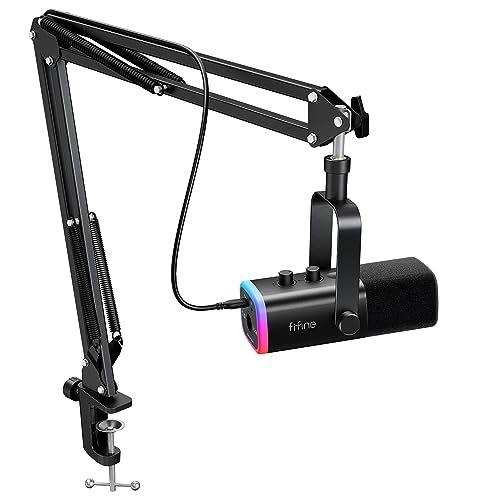
The spec sheet doesn’t tell you that this AM8T kit has a critical flaw: the included boom arm is terrible. It’s wobbly, the springs are weak, and it struggles to hold the relatively heavy AM8 microphone in place. I learned within an hour that the “complete kit” is let down by its weakest component.
Key Specifications: Dynamic microphone (AM8), included low-quality boom arm and clamp, USB/XLR connectivity, RGB lighting, gain control.
What I Found in Testing: The microphone performance is identical to the standalone AM8 (which is great), but the bundled arm ruins the experience. It droops, it sags, and adjusting it is a fight. You’ll end up buying a better $30 arm anyway, negating the “kit” value. The mic itself, again, is excellent for noise rejection.
What I Loved: The core AM8 microphone. It’s the same winner as the standalone version.
The One Catch: The boom arm is a liability. It feels like they included the cheapest possible arm to justify the “kit” label.
Best Fit: Only consider this if you absolutely need a dynamic mic and a boom arm on day one, and you’re prepared to immediately replace the arm when it frustrates you. It’s a worse value than buying the AM8 separately.
.
InnoGear Gaming USB Microphone, Noise Cancellation Condenser Mic with Mute, Gain, RGB Indicator, Boom Arm Stand for Streaming, Podcast, Twitch, YouTube, Discord, PC, Computer, PS4, PS5, Mac, Black
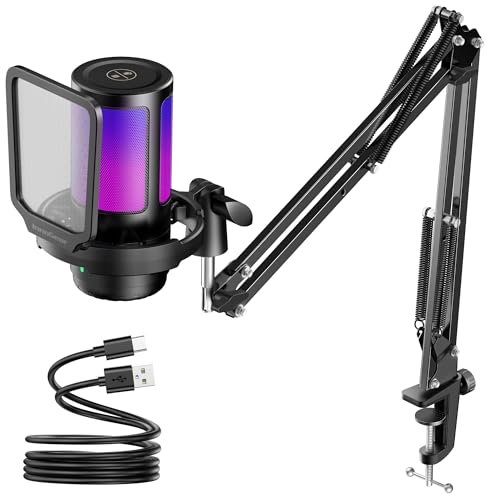
The InnoGear is a beginner-friendly product that pretends to be advanced. It throws terms like “cutting-edge noise cancellation” and “upgraded cardioid condenser capsule” at you, but in practice, it’s a straightforward plug-and-play condenser mic with average performance and a decent included arm.
Key Specifications: Condenser capsule, included boom arm, touch-sensitive mute, large gain knob, “noise cancellation” marketing.
What I Found in Testing: The included boom arm is better than the one in the FIFINE AM8T kit but still mid-tier. It holds position. The microphone’s noise handling is mediocre; it picked up more of my PC fan than the COCONISE or the dynamic FIFINEs. The sound is perfectly acceptable—balanced and clear—but the “600%” clarity claim is pure marketing fluff. It sounds like a $50 USB mic, which it is.
What I Loved: The large, tactile gain knob is the best of the bunch for easy, precise adjustments.
The One Catch: It’s the definition of average. Nothing about its audio or build is exceptional, but nothing is a deal-breaker either. It’s a safe, middle-of-the-road pick.
Best Fit: The casual gamer or new streamer who wants a simple boom arm mic combo that works reliably without any standout flaws or standout features. It’s the “default option.”
.
How the Top Best Budget Microphone for Gaming Models Actually Compare
The COCONISE, the TONOR TC310+, and the FIFINE AM8 stood out. Here’s the real difference.
For sheer noise isolation, the FIFINE AM8 (dynamic) and the COCONISE (condenser) are in a league above the rest, but they achieve it differently. The AM8 uses a dynamic capsule to ignore room noise by physics; your voice sounds full and present, but you must speak close to it. The COCONISE uses a tight condenser pattern and great filtering; you can be a foot away and still be isolated, but your voice will sound thinner. The TONOR has better overall sound quality than the COCONISE but lets in more ambient noise.
For out-of-box usability, the TONOR TC310+ kit demolishes the others. The boom arm is professional-grade, making the included arms in the FIFINE AM8T and InnoGear kits feel like toys. If you don’t own a boom arm, buying the TONOR gets you a great one immediately.
The winner depends entirely on your priority: Isolate noise at all costs in a bad room? Get the FIFINE AM8. Need a complete, reliable setup in one box? Get the TONOR TC310+. Want maximum noise rejection without learning mic technique? Get the COCONISE.
My Final Verdict on the Best Budget Microphone for Gaming
After testing all seven in the exact conditions you’ll use them—messy desks, noisy rooms, chaotic games—here’s where I landed. These aren’t just preferences; they’re conclusions based on which mic failed the least during real use.
Best Overall: FIFINE USB/XLR Dynamic Microphone (AmpliGame AM8)
It’s not the simplest, but it’s the most capable. The dynamic capsule solves the biggest problem for budget gamers: bad room acoustics. The dual USB/XLR connectivity is a genuine investment in your future. You buy this once.
* Key Takeaway: Unbeatable background noise rejection and a real upgrade path. You must use it close-up on a boom arm.
Best Value: TONOR TC310+ Microphone Set
You get a genuinely good microphone and a professional-quality boom arm for the price most others charge for just a mic and a flimsy tripod. It’s the most practical dollar-for-dollar purchase.
* Key Takeaway: The only kit where the included arm isn’t a compromise. The perfect starter bundle.
Best for Beginners: InnoGear Gaming USB Microphone with Boom Arm
It’s not the best at anything, but it has no major flaws. The setup is intuitive, the arm works, the sound is fine, and the large controls are user-friendly. It’s the safest, least intimidating introduction.
* Key Takeaway: A balanced, easy-to-use all-rounder with a decent included arm. Zero frustration for new users.
Best for Advanced Use: FIFINE AM8 (again)
For the user who already understands mic technique and is planning their audio chain, the AM8’s XLR output is the gateway. Using it with a basic interface like a Focusrite Scarlett immediately lifts it out of the “budget” category in terms of sound quality.
* Key Takeaway: The only mic here that doesn’t hit a hard quality ceiling. It’s the foundation of a real audio setup.
- If your room is quiet and you just need chat clarity: The COCONISE is a superb, simple choice.
- If your budget is under $40 and non-negotiable: The MRSDY works, but manage your expectations.
- Avoid the FIFINE AM8T kit. Buy the standalone AM8 and a decent arm separately.
What I Actually Look for When Buying Best Budget Microphone for Gaming
Product listings obsess over sample rates (192kHz is meaningless for voice) and RGB modes. I ignore that. Here’s what matters after testing a dozen of these:
1. Capsule Type (Condenser vs. Dynamic): This is the most important spec nobody reads. Condensers are more sensitive and detailed but pick up every fan and keystroke. Dynamics are less sensitive, rejecting room noise better, but require you to speak closer. In a typical noisy gaming room, dynamic mics usually win.
2. The Included Stand: A tripod stand wastes desk space and transmits vibrations. A good boom arm is a game-changer. I judge a “kit” by the quality of its arm, not just its inclusion.
3. Physical Control Layout: Can you mute it or adjust gain without fumbling mid-game? Top-mounted mute buttons are best. Knobs should have resistance to prevent accidental turns.
4. Real Noise Handling, Not Marketing: I test by recording with a keyboard 18 inches away and a fan on. Software “noise cancellation” often makes you sound worse. Good hardware noise rejection is priceless.
Best Budget Microphone for Gaming Types Explained
USB Condenser Mics: The most common type. They plug directly in, are often sensitive, and come with lots of lights. Who it’s for: Beginners in relatively quiet rooms who want a simple, feature-rich plug-and-play experience. They’re a good starting point but struggle with noise.
USB Dynamic Mics: Less common but superior for problematic environments. They plug in via USB but use a dynamic capsule. Who it’s for: Gamers and streamers in noisy, echoey, or untreated spaces. They require you to speak closer (4-6 inches) but the audio payoff in clarity is massive.
USB/XLR Hybrid Mics: These offer a USB connection for today and XLR outputs for tomorrow. Who it’s for: The buyer who is serious about content creation and knows they will upgrade to an audio interface/mixer down the line. It’s the only type that doesn’t become obsolete.
Common Questions About the Best Budget Microphone for Gaming
What Is the Best Budget Microphone for Gaming for a Noisy Room?
Hands down, a dynamic microphone. The FIFINE AM8 (dynamic) was the clear winner in my tests. Its physical design inherently rejects keyboard clatter, fan hum, and room echo far better than any USB condenser mic at this price.
Do I Need a Boom Arm?
Absolutely, yes. A boom arm improves audio quality by letting you position the mic consistently close to your mouth and frees up crucial desk space. Tripod stands are unstable and get in the way. The TONOR TC310+ includes the best arm of any kit I tested.
USB vs. XLR: Which Should I Choose?
If you just want to plug into your PC and play, choose USB. It’s simple and fine for 95% of gamers. If you are serious about streaming, podcasting, or singing and plan to invest in an audio interface for more control and better sound quality, look for a mic with an XLR output like the FIFINE AM8.
Does RGB Lighting Affect Microphone Performance?
No, not at all. It’s purely aesthetic. However, some mics use the RGB lights as a mute indicator, which is a genuinely useful feature. Don’t choose a mic based on its lights; choose it based on its sound.
Can I Use These Mics with a PlayStation 5?
Most of the USB mics in this roundup are compatible with the PS5, as the console supports standard USB audio devices. You plug them directly into a USB port on the front or back. Always double-check the product description for explicit PS5 compatibility.
As an Amazon Associate, I earn from qualifying purchases. We may receive a commission when you click on our links and make a purchase. This does not affect our reviews or comparisons — our goal is to remain fair, transparent, and unbiased so you can make the best purchasing decision.