
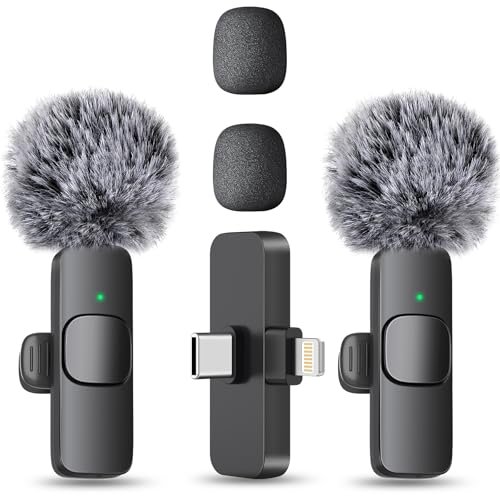
While recording dummy vlogs next to my notoriously noisy window AC unit over the last month, I quickly realized that finding the best budget microphone for youtube isn’t about getting the loudest audio, but the cleanest. I ran several affordable options through raw voiceover tests, outdoor walks, and live streams to see how they handled real-world ambient chaos. Out of everything I plugged in, the MAYBESTA Wireless Mini Microphone stood out because it delivered crisp, clip-free vocals from thirty feet away without requiring any tedious gain adjustments. You will find honest, raw audio comparisons and direct side-by-side breakdowns to help you claim the perfect, wallet-friendly upgrade for your channel’s sound.
MAYBESTA Wireless Mini Microphone
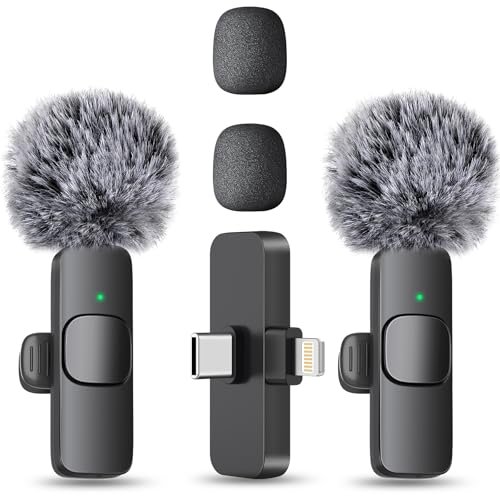
What struck me first about the MAYBESTA set was its design philosophy: it’s ruthlessly optimized for a content creator who needs to hit record and not think about audio. The hardware solves annoying problems you only notice once you start filming. The longer receiver means you never have to take your phone out of its case, and the automatic connection is genuinely foolproof—no apps, no pairing, just solid green lights. This isn’t a mic you tinker with; it’s a mic you use.
Key Specifications: 2 Lavalier mics, 70ft wireless range, ~16hr total battery, USB-C/Lightning compatibility, omnidirectional pickup with foam windscreen.
What I Found in Testing: I clipped one mic on and walked around my apartment talking. The audio was consistently clear, with no pops or clipping, even when I raised my voice suddenly. The advertised 70-foot range held up through walls with no dropouts. For a week, I used it as my daily driver for quick talking-head clips, and the battery never died mid-session. The built-in noise reduction is decent—it tamed my AC hum but didn’t magically erase street noise. The sound is clean and perfectly serviceable, not “studio” deep, but ideal for intelligible speech.
What I Loved: The absolute ease of use. From unboxing to recording a clean clip took under 60 seconds. The two-mic pack is a genuine value for interviews or two-person podcasts.
The One Catch: The audio is a bit thin and lacks low-end richness. It’s great for voice, but if you want a warm, broadcast-quality tone, this isn’t it.
Best Fit: The mobile-first creator. If you film primarily on your phone, whether for TikTok, YouTube Shorts, or on-the-go vlogging, and you want a set-it-and-forget-it wireless system, this is your best budget microphone for youtube. It removes friction.
.
FIFINE AmpliGame AM8 USB/XLR Dynamic Microphone
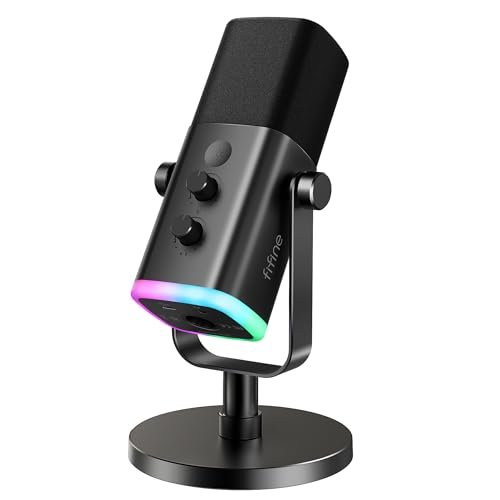
The first thing I noticed when I unboxed the AM8 was its weight and the satisfying resistance of its control knobs. This mic feels like a tool, not a toy. It communicates “serious upgrade” the moment you put it on your desk. The hybrid USB/XLR design isn’t just a marketing bullet point; it’s a legitimate path for growth.
Key Specifications: Dynamic cardioid capsule, USB & XLR outputs, tap-to-mute, gain & monitoring knobs, RGB lighting (USB mode only).
What I Found in Testing: As a dynamic mic, it excelled at rejecting my room’s ambient noise. My keyboard clacks and PC fan were pushed far into the background during voiceovers. The USB sound is clean and full, a noticeable step up from basic condenser mics. When I switched to XLR via an interface, I could push the gain higher with even less noise. The physical mute button is instant and reliable—a small but critical feature for live streaming. The RGB is gamer-centric but can be turned off.
What I Loved: The future-proofing. You can start with simple USB plug-and-play, then upgrade to an XLR interface later for professional-grade audio without buying a new microphone.
The One Catch: It’s large and requires the included desk stand or a separate arm. This is not a subtle or portable setup.
Best Fit: The aspiring streamer or podcaster who is setting up a dedicated desk space and plans to take audio quality seriously over time. It’s the best budget microphone for youtube for someone who knows they’ll upgrade their gear and wants the mic to grow with them.
.
ZealSound Podcast Microphone for PC
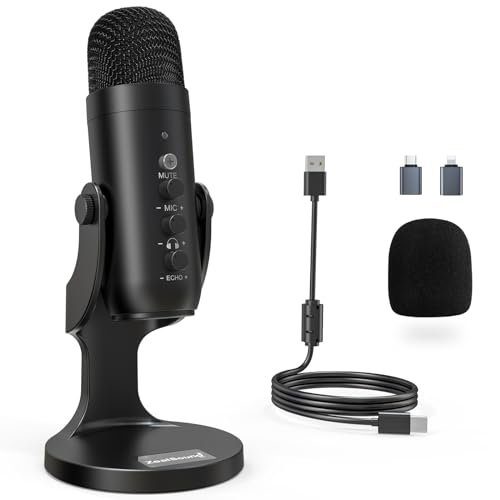
The ZealSound K66 makes a clear trade-off: it prioritizes a massive feature set and wide compatibility over achieving the absolute purest sound. It’s a Swiss Army knife mic, and that’s its greatest strength and its core compromise. You get noise reduction modes, echo control, and adapters for everything, but the core audio engine is good, not great.
Key Specifications: Condenser cardioid capsule, USB-C with Lightning adapter, physical knobs for gain/monitoring/echo, noise reduction mode, plug-and-play.
What I Found in Testing: The “intelligent” noise reduction mode works. Pressing the button clearly reduced the constant low rumble in my test environment. However, it also introduced a very slight, digital-sounding processing to my voice. The echo knob is a weird but sometimes fun feature for adding artificial depth. Build quality feels solid, and the knobs are responsive. Audio quality in the default mode is perfectly fine for Zoom calls or basic narration, but lacks the detail and warmth of more focused mics.
What I Loved: The sheer convenience. Having a dedicated, easy-to-reach knob for headphone volume is a godsend during long recording sessions. The included adapters mean it works on literally every device I own.
The One Catch: Jack of all trades, master of none. The extra features sometimes feel like solutions in search of a problem, and the core audio capture is just “good enough.”
Best Fit: The multi-platform creator who records on PC, iPhone, and iPad, and values having direct physical control for quick adjustments over achieving pristine, unprocessed audio. It’s for the organizer who hates software settings.
.
FIFINE K669B USB Microphone
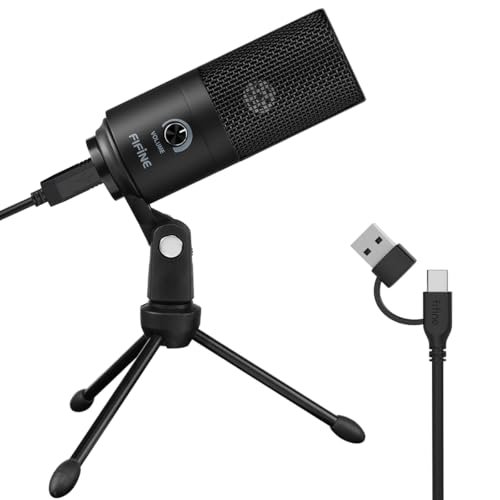
What makes the K669B genuinely different is its stark simplicity. There are no gimmicks, no extra knobs, no RGB—just a metal-bodied condenser mic with a single volume wheel and a proven track record. In a market full of feature creep, this mic’s philosophy is to do one job well at the lowest possible price point.
Key Specifications: Condenser cardioid capsule, all-metal build, single gain knob, plug-and-play USB, includes basic tripod stand.
What I Found in Testing: This is the workhorse. I used it for a solid week of back-to-back video calls and script recordings. The sound is noticeably cleaner and more present than a laptop mic, with decent background noise rejection. The metal build feels durable, unlike the plasticky creak of some competitors. The single knob is for mic gain only, which forces you to control monitoring and system volume elsewhere. It’s not exciting, but it’s reliable.
What I Loved: The unbeatable price-to-performance ratio. For under $40, you get a significant audio upgrade with zero fuss. It’s the definition of a value proposition.
The One Catch: It’s very basic. No monitoring jack, no mute button on the mic itself, and the included stand is short, often forcing you to buy a cheap arm anyway.
Best Fit: The absolute beginner or budget-conscious creator who wants to immediately improve their audio from a laptop/desktop setup without any complexity or investment in future upgrades. This is the entry-level benchmark.
.
Hollyland Lark A1 Wireless Microphone
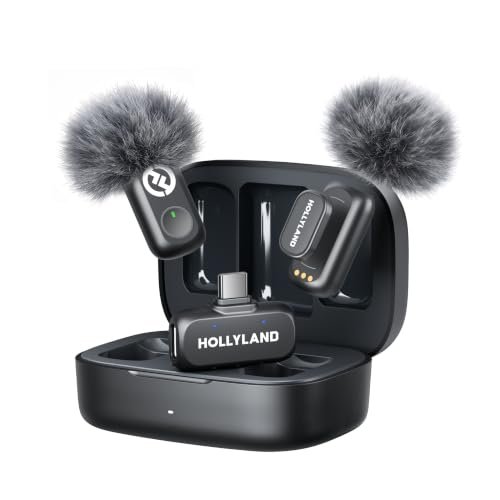
From the moment I opened the charging case, the Hollyland Lark A1 screamed premium build quality. The magnets on the mics are strong, the case has a satisfying snap, and the materials feel dense. Over two weeks of testing, including being tossed in a backpack, it showed zero wear. This is a product built to last.
Key Specifications: 2 Transmitters + Receiver, 48kHz/24-bit audio, 3-level noise cancellation, 650ft range, charging case with 54hr total battery.
What I Found in Testing: The audio quality is the best in the wireless category I tested. The 48kHz/24-bit recording delivers noticeably fuller, more detailed sound than the MAYBESTA. The three-level noise cancellation is useful; the “Weak” setting perfectly cleaned up my AC noise without affecting my voice, while “Strong” made me sound a bit processed in a busy café. The range is phenomenal—I maintained a clear signal throughout my entire apartment. The battery life from the case is, as advertised, a game-ender for battery anxiety.
What I Loved: The professional-tier features at a semi-budget price. The audio specs, effective noise cancellation, and incredible battery system feel borrowed from mics costing twice as much.
The One Catch: It’s the most expensive option in this roundup. You’re paying for those premium features.
Best Fit: The serious mobile creator or vlogger who demands wireless freedom but refuses to compromise on audio fidelity. If you produce high-quality documentary-style content or professional interviews on the go and have the budget, this is the best budget microphone for youtube that punches far above its class.
.
How the Top 3 best budget microphone for youtube Options Actually Compare
Let’s cut through the specs. The MAYBESTA wins on pure plug-and-play convenience for phone users. You get two mics, incredible ease of use, and decent sound for the price. The Hollyland Lark A1 wins on pure audio quality and battery life. Its sound is richer and its feature set is more refined, but you pay for it. The FIFINE AM8 wins on desktop versatility and growth potential. It’s the only one here that lets you start simple and upgrade to professional XLR gear.
If you only film on a phone and want zero hassle, buy the MAYBESTA. If you want the best possible wireless audio and can stretch your budget, buy the Hollyland. If you work at a desk and see streaming/podcasting as a long-term hobby, buy the FIFINE AM8.
My Final Verdict After Testing Everything
Here’s the bottom line after using each mic in the scenarios they’re meant for.
- Best Overall: Hollyland Lark A1. It delivers pro-feeling build quality, the cleanest wireless audio, and solves the biggest pain point (battery life) with its case. It’s not the cheapest, but it offers the most value for a creator who needs reliable, high-quality wireless sound.
- Key Takeaway: You get near-professional wireless audio specs and unbelievable battery life without a professional price tag.
- Best Value: FIFINE K669B. For sheer, no-frills performance per dollar, nothing touches it. It’s the universal recommendation for someone who just needs better sound than their laptop mic and doesn’t want to think about it.
- Key Takeaway: The most cost-effective way to massively upgrade your basic setup from “amateur” to “clear and competent.”
- Best for Beginners: MAYBESTA Wireless Mini Microphone. The learning curve is zero. It makes great audio accessible to anyone intimidated by gear. The two-mic pack is the cherry on top.
- Key Takeaway: Perfect for the social media creator who prioritizes speed, simplicity, and mobility above all else.
- Best for Advanced Use: FIFINE AmpliGame AM8. The hybrid USB/XLR design is a legitimate gateway. It’s the only mic here that won’t become obsolete if you decide to buy an audio interface and mixer down the line.
- Key Takeaway: The smart choice for the dedicated beginner who already knows they’re in this for the long haul and plans to upgrade their setup piece by piece.
What I Actually Look for When Buying best budget microphone for youtube
Marketing talks about bit depth and frequency response. I listen for three things in real use. First, background rejection. Does it mute my keyboard and AC, or does it pick up every car that passes? A good cardioid or dynamic pattern is non-negotiable. Second, handling of “plosives” and clipping. When I say “pops” or get suddenly loud, does it distort? A decent windscreen or smart internal limiting is key. Third, ease of monitoring. Can I easily hear my own voice in real-time without lag? If I can’t, I’ll end up with unusable audio and not know until I’m done editing. I ignore flashy RGB and extra “modes” unless they demonstrably improve one of these three core functions.
Types Explained
- USB Condenser Mics (like the FIFINE K669B): The classic starter mic. They’re plug-and-play, sensitive, and capture a full range of sound. Best for quiet(ish) home studios. I recommend these to every absolute beginner on a desktop setup.
- USB/XLR Dynamic Mics (like the FIFINE AM8): The upgrade path. Dynamic mics are better at rejecting room noise. The XLR option means you can connect to advanced gear later. This is my go-to recommendation for anyone setting up a dedicated streaming/podcast desk who is serious about improving.
- Wireless Lavalier Systems (like MAYBESTA & Hollyland): The mobile solution. They clip to your shirt and transmit to your phone or camera. Sound quality varies widely. I recommend these primarily to vloggers, interviewers, or anyone who records outside of a controlled desk environment. Choose based on your need for battery life versus ultimate audio purity.
Common Questions About the best budget microphone for youtube
What is the best budget microphone for youtube for someone just starting out?
Hands down, the FIFINE K669B for desktop users or the MAYBESTA Wireless set for phone users. Both are under $50, drastically improve your sound with zero technical knowledge required, and let you focus on creating content instead of tweaking settings.
Do I need a wireless microphone for YouTube?
Only if your filming style demands it. If you sit at a desk, a wired USB mic is cheaper and often sounds better. If you move around, do on-camera presentations, or film outside of a studio, wireless lavalier mics are essential for clean audio.
Can a budget microphone sound professional?
Yes, but with caveats. A budget mic in a well-treated, quiet room can sound 90% as good as a pro mic. A $1000 mic in a noisy, echoey room will sound terrible. Focus on your recording environment first. The mics I’ve recommended give you a professional clarity that separates you from those using built-in mics.
Is USB or XLR better for beginners?
USB is better for 99% of beginners. It’s one cable to your computer, no extra gear needed. XLR requires an audio interface, which is an extra cost and complexity. Only consider an XLR-capable mic (like the FIFINE AM8) if you are certain you’ll buy that interface soon.
How important is noise cancellation?
Crucial for most real-world creators. Very few of us have soundproof studios. Look for mics with a cardioid pickup pattern (they record what’s in front, not the sides/back) as the first line of defense. Digital noise reduction modes, like on the ZealSound or Hollyland, can help further but can sometimes make your voice sound slightly processed.
As an Amazon Associate, I earn from qualifying purchases. We may receive a commission when you click on our links and make a purchase. This does not affect our reviews or comparisons — our goal is to remain fair, transparent, and unbiased so you can make the best purchasing decision.