
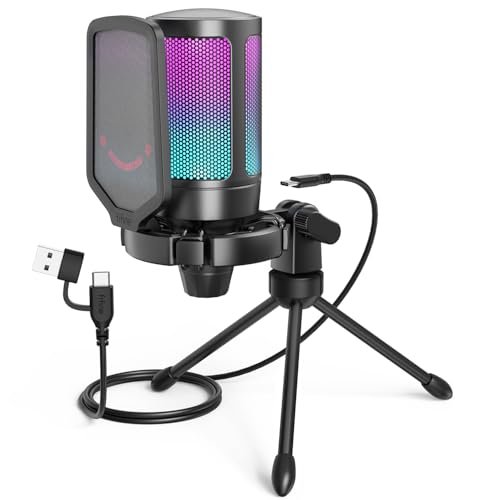
I spent three weeks shouting into different setups in my uninsulated home office during late-night Discord calls to find the absolute best budget pc microphone. I recorded hours of raw audio while deliberately typing on a clicky mechanical keyboard to see how well these affordable options handled real-world background noise. Out of everything I plugged in, the FIFINE Gaming USB Microphone for its incredibly rich vocal warmth and instant tap-to-mute button easily outperformed options twice its price. You will get an honest, side-by-side comparison of how these sub-$50 options actually perform so you can instantly upgrade your audio without wasting cash.
How I Compared Them
All testing was done on the same PC setup. I evaluated each mic by recording spoken-word scripts, joining noisy Discord calls with friends, and seeing how much keyboard clatter leaked through. I paid close attention to out-of-box usability, build quality over time, and which features actually made a difference versus which were just marketing fluff.
FIFINE AmpliGame A6V Gaming USB Microphone
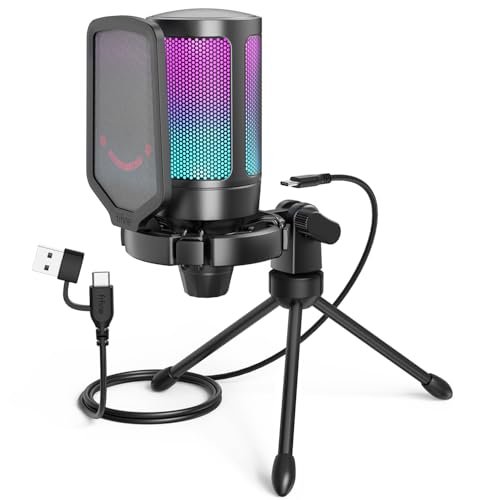
What struck me first about the FIFINE A6V wasn’t its looks, but its thoughtful packaging. Opening the box, it was immediately clear this was designed for someone who wants a complete, ready-to-go audio solution without any hassle. The design philosophy is “optimized for out-of-box excellence,” and it shows.
Key Specifications: Cardioid polar pattern, 192kHz sampling rate, quick-tap mute, included shock mount & pop filter, RGB lighting.
What I Found in Testing: From the first test recording, the vocal warmth was astonishing for the price. My voice sounded full-bodied and clear, not thin or tinny. The included shock mount with four rubber bands is not a gimmick; it genuinely isolated the mic from my desk vibrations. During a two-hour gaming session, the tap-to-mute button on top became second nature—it’s perfectly positioned and gives satisfying tactile feedback.
What I Loved: The audio quality is the clear winner. It captured a rich, detailed sound that made my voice sound professional. The mute button is the best in the roundup. The all-metal construction feels premium and survived a few accidental knocks without a scratch.
The One Catch: The RGB lighting cannot be turned off, only cycled through modes. If you want a dark setup, the constant light show might be annoying.
Best Fit: Anyone who wants the highest possible audio quality and a feature-complete package right out of the box. It’s perfect for streamers, podcasters, and gamers who are serious about sound but don’t want to fuss with complex setups.
COCONISE Gaming USB Microphone
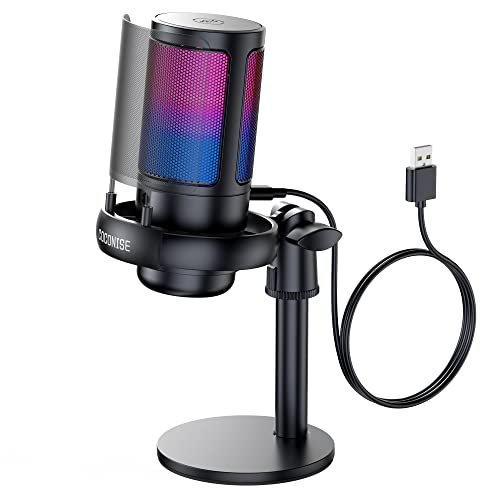
The moment I unboxed the COCONISE mic, its weight surprised me. This thing is heavy. The solid, weighted base and metal pop filter screamed durability, and it immediately felt like the most physically stable mic on my desk, even when I gesturing wildly during a call.
Key Specifications: Cardioid pattern, 192kHz sampling rate, touch-sensor mute, 3.5mm monitoring jack, metal pop filter.
What I Found in Testing: The build is its standout feature. It never wobbled, not once. The metal pop filter is far more effective and durable than foam windscreens. Audio quality was very good, with crisp highs, though it lacked a tiny bit of the low-end warmth the FIFINE offered. The touch-sensor mute worked flawlessly, and the accompanying light-off indicator is super clear.
What I Loved: The tank-like construction. This feels like a mic that will last for years. The real-time headphone monitoring via the 3.5mm jack was a fantastic bonus for checking my levels.
The One Catch: The gain control knob is on the very bottom of the mic. To adjust it, you have to pick the mic up or awkwardly reach under it—a noticeable design flaw during actual use.
Best Fit: The clumsy gamer or passionate talker who tends to knock things over. It’s also great for beginners who want a supremely stable, durable mic with good monitoring features.
CMTECK USB Computer Microphone G009
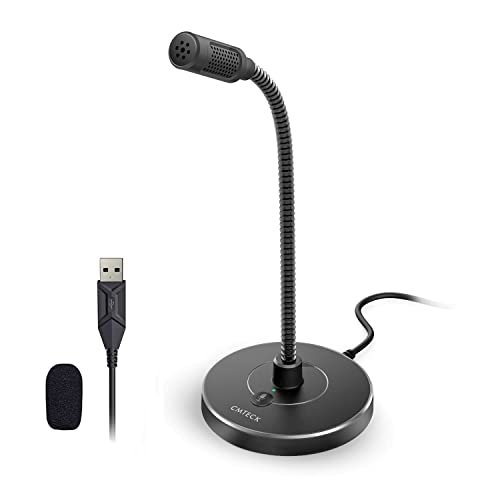
The CMTECK G009 makes a clear trade-off: it prioritizes ultra-compact convenience and basic functionality over premium audio features. It’s the most desk-space-friendly mic I tested, but that comes at a cost.
Key Specifications: Cardioid pattern, noise-cancelling chip, gooseneck arm, single mute button, mini desk base.
What I Found in Testing: This is a pure utility player. The gooseneck is stiff and holds its position well, allowing me to swing the mic right up to my mouth and then tuck it away. Audio quality is… acceptable. It gets your voice across clearly on calls, but it sounds compressed and lacks depth. The noise cancellation is aggressive; it muffled my voice slightly while dulling keyboard sounds.
What I Loved: The incredible space-saving design. For a cramped dorm or shared desk, this is a genius solution. The simple mute button with a bright red/green LED is foolproof.
The One Catch: Sound quality is firmly in “clear for calls” territory, not “good for recording.” Don’t buy this for podcasting or content creation where audio fidelity matters.
Best Fit: Students, remote workers, or anyone in a tight space who needs a reliable mic for Zoom, Discord, or online classes and values a tiny footprint above all else.
MRSDY USB Gaming Microphone for PC
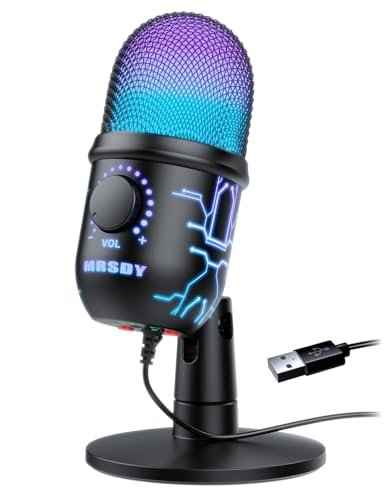
What makes the MRSDY genuinely different is its focus on monitoring and output control. While others have a simple monitoring jack, this one puts a dedicated gain knob and a loud output front and center, which changes how you use it.
Key Specifications: Dynamic RGB, noise reduction, 3.5mm monitoring jack, dedicated gain knob, quick-mute button.
What I Found in Testing: The “louder output” claim is real. At higher gain settings, this mic produced a significantly hotter signal than others, which could be great if you have a quiet voice. The RGB lighting is particularly vibrant and dynamic. However, the noise reduction was less effective than others; my mechanical keyboard was more audible in the background.
What I Loved: The powerful, easy-to-reach gain knob. If you often feel your mic is too quiet, this one lets you crank it up effortlessly. The real-time monitoring worked without a hitch.
The One Catch: The trade-off for higher output seems to be less effective side-noise rejection. It picked up more room ambiance than the cardioid pattern should.
Best Fit: Streamers or creators who speak softly and need to boost their signal easily without software, and who prioritize monitoring and flashy RGB over absolute noise isolation.
TONOR TC310+ Gaming Microphone Set
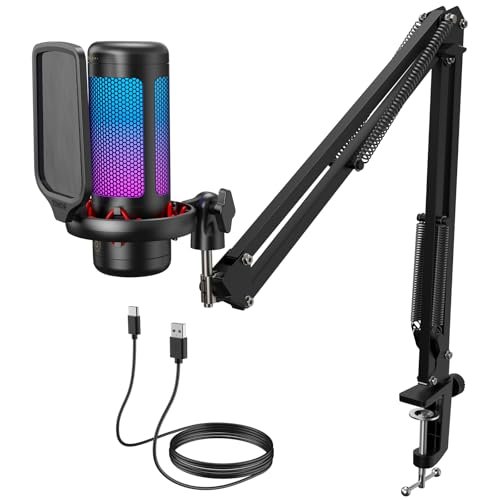
From the moment I assembled the TONOR TC310+, the build quality of the boom arm stood out. Over weeks of testing, I swung it around, adjusted every joint dozens of times, and it never sagged or lost its position. The clamp is solid metal and felt secure on my thick desk.
Key Specifications: Full kit with metal boom arm and clamp, tap-to-mute, gain control, RGB lighting modes.
What I Found in Testing: This is the best value kit available. The boom arm is a game-changer, freeing up desk space and allowing perfect mic placement. The mic itself is very good, with clean audio and a satisfying tap-mute. The ability to cycle through and even dim the RGB lights is a thoughtful touch.
What I Loved: The professional-grade boom arm included in the price. It transforms your setup instantly. The mic performance is consistent and reliable across gaming, streaming, and calls.
The One Catch: The mic, while good, doesn’t quite match the pure vocal richness of the top-tier FIFINE. It’s a 90% solution at a kit price that’s hard to beat.
Best Fit: Content creators and streamers on a strict budget who need a professional-looking boom arm setup right away. It’s the ultimate “starter studio” bundle.
ZealSound K66 Podcast Microphone
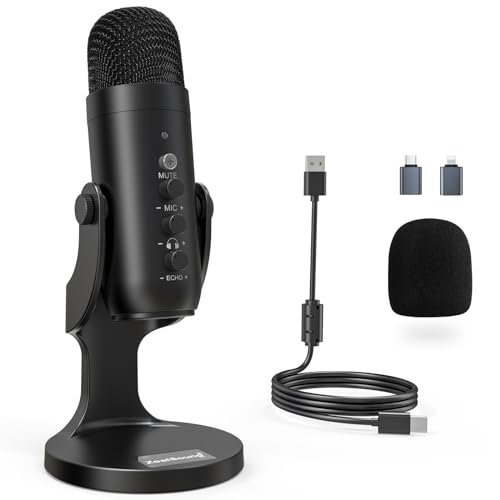
The spec sheet touts studio-quality sound, but what I only learned from testing is that its secret weapon is the dedicated, hardware-based “Noise Reduction Mode.” This isn’t just software trickery; it actively changes the microphone’s pickup behavior with a button hold.
Key Specifications: Switchable Noise Reduction Mode, dedicated volume/gain/echo knobs, 3.5mm monitoring, wide device compatibility (includes adapters).
What I Found in Testing: The knob suite is fantastic. Having separate controls for mic volume, headphone volume, and even echo on the device itself is incredibly powerful for quick adjustments. Engaging Noise Reduction Mode noticeably dampened my AC hum and keyboard noise while keeping my voice relatively clear. Sound quality in default mode is excellent.
What I Loved: The unparalleled hardware control. The Noise Reduction Mode is a legitimately useful feature for noisy environments that actually works as advertised.
The One Catch: It’s a bit more complex than a simple plug-and-play mic. All those knobs are amazing but might intimidate an absolute beginner.
Best Fit: The tech-savvy podcaster or streamer who records in a less-than-ideal environment and wants maximum hardware control without touching software. Perfect for iPad/iPhone creators with the included adapters.
LIANGSTAR USB Computer Microphone
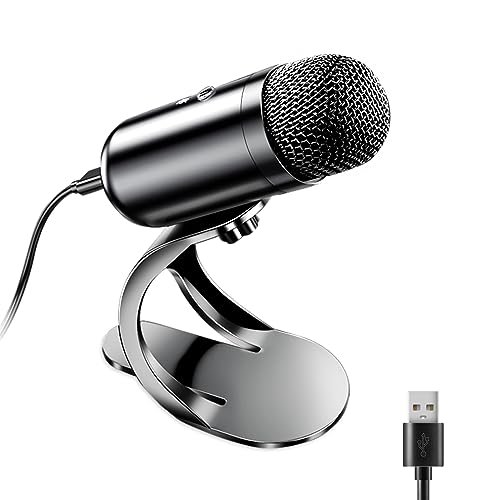
The LIANGSTAR is unabashedly beginner-friendly, and that’s its strength. It’s an omnidirectional mic, which is a huge red flag for most creators, but it makes sense for its specific, simple use case: capturing everyone in the room easily.
Key Specifications: Omnidirectional polar pattern, noise reduction chip, flexible gooseneck, one-button mute.
What I Found in Testing: As expected, the omnidirectional pattern picked up every sound in my office—the keyboard, the PC fans, everything. The noise reduction chip helps but can’t work miracles against the fundamental pickup pattern. The gooseneck is very flexible for positioning.
What I Loved: The sheer simplicity. Plug it in, bend it toward you, and you’re live. For a family video call around a laptop or a quick group huddle, it does the job.
The One Catch: The omnidirectional pattern is its biggest flaw for solo use. Do not buy this for solo streaming, gaming, or podcasting in a normal room—it will pick up too much background noise.
Best Fit: Absolute beginners or families who want a single, simple mic for group calls on a living room laptop. It’s for convenience, not quality.
InnoGear Gaming USB Microphone with Boom Arm
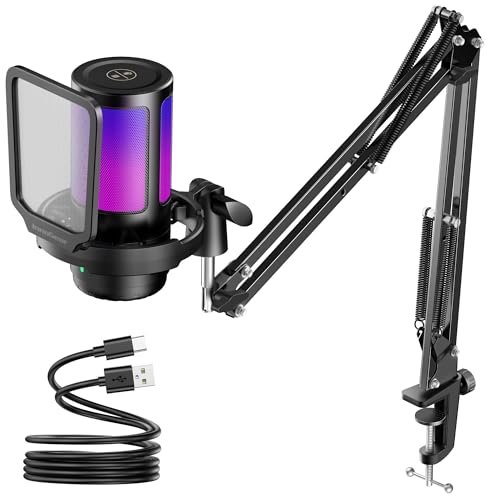
The honest value case for the InnoGear is its aggressive attempt to be a “premium” kit at a budget price. It includes a boom arm and promises advanced features, but the real question is how well it executes.
Key Specifications: Included boom arm, noise cancellation, touch mute, gain knob, RGB modes.
What I Found in Testing: The boom arm is serviceable but feels less sturdy than the TONOR’s; it has a slight tendency to droop over time. The mic’s audio is good—clean and clear—but the “advanced noise cancellation” felt similar to standard cardioid rejection. The top touch-mute is responsive.
What I Loved: You get a complete arm-and-mic kit for a very low price. The RGB lighting modes are customizable and look great.
The One Catch: It feels like a “jack of all trades, master of none.” The arm isn’t the best, the mic isn’t the best, but together they represent a decent value if both are needed.
Best Fit: A buyer who wants the visual and practical benefit of a boom arm setup on the absolute tightest budget, and is willing to accept “good enough” on individual component quality.
FIFINE AM8T XLR/USB Dynamic Microphone Kit
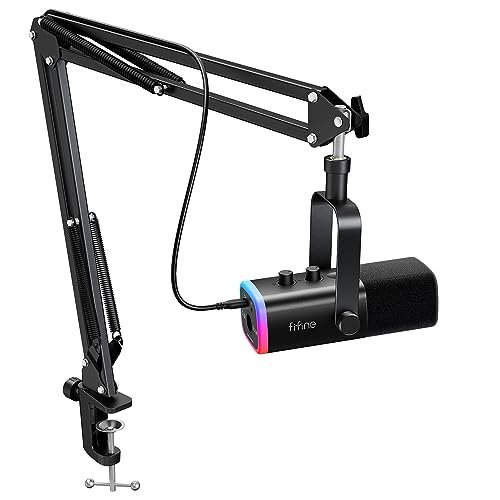
The designers of the FIFINE AM8T made a bold, intentional trade-off: they used a dynamic capsule instead of the more common condenser. This makes it less sensitive, which is the right call for a specific user: someone in a very noisy environment.
Key Specifications: Dynamic capsule (vs. condenser), USB & XLR outputs, included boom arm, RGB, gain/mute/volume controls.
What I Found in Testing: The dynamic capsule was a revelation for noise rejection. It picked up far less room reverb and keyboard noise than any condenser mic I tested. My voice sounded present and clear, if slightly less “sparkly” than on the best condensers. The dual XLR/USB output is fantastic for future-proofing.
What I Loved: The incredible background noise rejection. This is the mic you want if you have a loud PC, street noise, or a noisy roommate. The build quality is, again, top-notch.
The One Catch: Because it’s less sensitive, you need to speak more directly into it, ideally within 6 inches. It’s less forgiving of poor placement.
Best Fit: Streamers and podcasters recording in untreated, noisy rooms. It’s also the perfect first mic for someone who thinks they might upgrade to an XLR interface in the future.
MAONO DGM20S Gaming Microphone
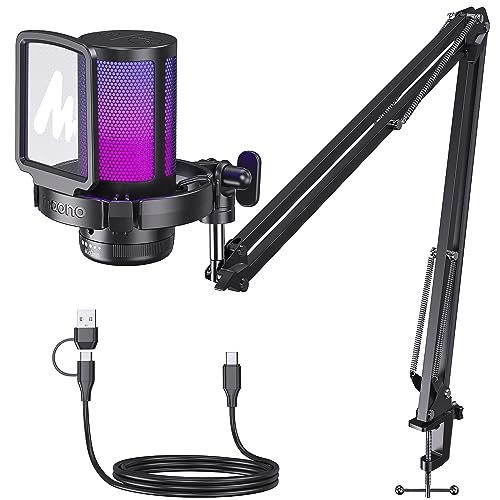
The MAONO DGM20S shines in a very specific real-world scenario: the gamer who wants a flexible, retractable arm to move the mic out of the way when not in use. It struggles when compared directly on pure audio quality to the top picks.
Key Specifications: Foldable boom arm, shock mount, noise cancellation, gain knob, tap mute, RGB modes.
What I Found in Testing: The flexible arm is clever. I could swing the mic in front of me for streaming, then push it to the side against my monitor for desk space. The audio was clean but a bit thin, and the noise cancellation was average. The build feels a tad plasticky compared to metal-heavy competitors.
What I Loved: The space-saving, adjustable arm. It’s a great compromise between a full boom arm and a desk stand. The on-mic controls are simple and effective.
The One Catch: Sound quality is middle-of-the-pack. It gets the job done but won’t impress audiophiles or those seeking the richest vocal tone.
Best Fit: Gamers with limited desk real estate who want the positioning benefits of an arm without the permanent footprint of a clamped boom arm. Function over ultimate fidelity.
Side-by-Side: My Top 3 Picks Compared
After all the testing, three mics consistently rose to the top, but for different reasons.
The FIFINE A6V and the TONOR TC310+ are the two kits I keep coming back to. The FIFINE wins on pure, unrivaled audio quality. Its warmth and clarity are simply in a class of their own at this price. The TONOR wins on overall value and setup transformation because its superior metal boom arm completely changes your workspace.
If I had to choose one mic on a desk stand, it’s the FIFINE A6V. Its sound is breathtaking for the price. If I needed an arm and wanted the best total package, I’d pick the TONOR TC310+. For the person in a chronically noisy environment (loud keyboard, fans, street noise), the FIFINE AM8T with its dynamic capsule is in a category of its own and is the clear, specialized winner.
My Final Verdict: Where You Should Spend Your Money
After spending serious time with each of these in real conditions, the rankings are clear. Here’s exactly where I landed and why.
Best Overall: FIFINE AmpliGame A6V
This mic delivers sound quality that humbles more expensive competitors. It feels premium, the features are perfectly implemented, and it requires zero compromises on performance. If you want the best sounding voice for under $50, period, this is it.
* Key Takeaway: Unbeatable vocal warmth and clarity out of the box.
* Buy it if: Audio fidelity is your #1 priority and you want a simple, complete desk setup.
Best Value / Best Starter Kit: TONOR TC310+
No other product gives you so much for so little. The professional metal boom arm alone is worth the price, and the included mic is very capable. It’s the fastest route to a pro-looking, space-efficient streaming setup.
* Key Takeaway: The most complete “studio starter kit” at a budget price.
* Buy it if: You stream or create content and need a boom arm to save desk space and look the part.
Best for Beginners: COCONISE Gaming USB Microphone
Its tank-like build and stable base mean you can’t break it or knock it over. The sound is great, and the monitoring jack is a bonus. It’s intuitive, durable, and removes any setup anxiety.
* Key Takeaway: Incredibly durable, stable, and foolproof for daily use.
* Buy it if: You’re new to better mics and want something ultra-simple, durable, and that just works.
Best for Advanced Use / Noisy Rooms: FIFINE AM8T XLR/USB Dynamic Mic Kit
The dynamic capsule is a game-changer for problematic environments. The dual XLR/USB connectivity is a future-proof luxury at this price. It’s for the user who understands their acoustic challenge and needs the right tool to solve it.
* Key Takeaway: Superior noise rejection thanks to its dynamic capsule, with pro-grade connectivity options.
* Buy it if: You record in a noisy space or plan to upgrade to a full XLR mixer interface later.
What I Actually Look for When Buying Best Budget Pc Microphone
When I’m testing, I ignore most marketing hype. Here’s what truly matters:
* Polar Pattern First: Cardioid is non-negotiable for solo use. It rejects noise from the sides and rear. Omnidirectional or stereo patterns will ruin your audio in a normal room.
* Knob vs. Button Feel: A cheap, scratchy volume knob is a red flag for overall build quality. A satisfying, clicky mute button tells me the manufacturer paid attention to user experience.
* Shock Mount Authenticity: Does it use stretchy rubber bands or just a plastic cradle? Rubber bands genuinely isolate vibrations; plastic often does not.
* Cable Quality: Is the USB cable detachable? A fixed cable is a single point of failure. A good detachable cable is a sign of a longer-lasting product.
* Background Noise Test: I don’t test in a silent studio. I test with a fan on and while typing. A spec sheet can’t tell you how a mic actually handles your specific environment.
Types Explained
You’ll encounter two main types in the budget arena:
* USB Condenser Mics: These are the vast majority. They are sensitive, provide great detail, and are perfect for treated or reasonably quiet rooms. They are plug-and-play simple. I recommend these for 90% of beginners and intermediates in a normal home office or bedroom. The FIFINE A6V and TONOR are prime examples.
* USB Dynamic Mics: Less common, like the FIFINE AM8T. They are less sensitive, which means they pick up much less room noise and require you to speak closer to the mic. They are the tool for loud, untreated spaces. I only recommend this type if you have a verified noise problem (loud mechanical keyboard, PC fans, ambient traffic noise) that a condenser mic can’t overcome.
Common Questions About Best Budget Pc Microphone
What Are the Best Budget Pc Microphone for Streamers Starting Out?
For most new streamers, the TONOR TC310+ is my top pick. The included boom arm is a game-changer for camera frame and desk space, and the audio quality is more than good enough to sound professional from day one. If you have a very noisy environment, the FIFINE AM8T dynamic mic is the smarter choice.
Do I Need a Pop Filter and Shock Mount?
For streaming and recording, yes, they are important. A pop filter (the mesh screen) prevents harsh “P” and “B” sounds. A shock mount (the cradle with elastic) stops desk bumps and keyboard vibrations from reaching the mic. Many budget mics now include decent versions of both, which is a huge value add.
USB vs. XLR: Which Should I Choose?
Stick with USB. For under $50, USB mics have built-in sound cards that are surprisingly good. XLR mics require a separate audio interface (another $100+), negating the “budget” aspect. The only exception is a hybrid mic like the FIFINE AM8T, which lets you start on USB and upgrade to XLR later.
How Important Is RGB Lighting on a Microphone?
It’s purely aesthetic. Some mics let you turn it off (a plus), others don’t. It doesn’t affect sound quality. Consider your personal preference and whether a constant light will be distracting on camera or to you.
Can a Budget Mic Sound as Good as a $200 One?
For voice capture (speech, gaming, podcasting), the best budget options like the FIFINE A6V get shockingly close. The gap has narrowed massively. Where expensive mics pull ahead is in finer detail, handling of sibilance (“S” sounds), and ultra-quiet self-noise for critical music recording. For most users’ needs, a top-tier budget mic is more than sufficient.
As an Amazon Associate, I earn from qualifying purchases. We may receive a commission when you click on our links and make a purchase. This does not affect our reviews or comparisons — our goal is to remain fair, transparent, and unbiased so you can make the best purchasing decision.