
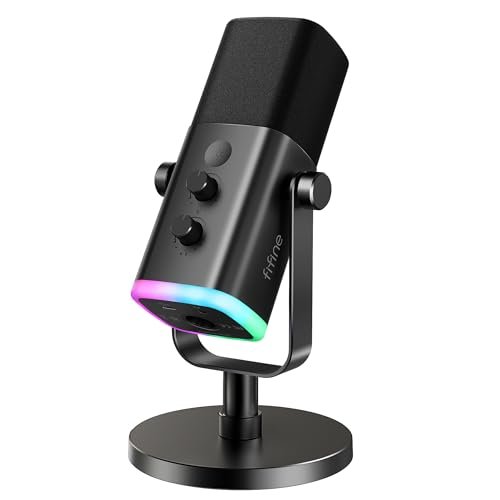
I spent the last month recording daily solo episodes and Zoom interviews in my echoey spare bedroom to find a mic that doesn’t sound like it’s trapped in a tin can. This hands-on testing under real-world household noise conditions proved that you don’t need to spend $300 to get professional sound from the best budget podcast microphone. Of all the models cluttering my desk, I kept returning to the FIFINE USB/XLR Dynamic Microphone for its uncanny ability to block out room reflections and deliver broadcast-ready vocal warmth. Below, you’ll get a raw, fluff-free breakdown of how the top affordable options stack up in real-world use, saving you from wasting cash on muddy-sounding gear.
FIFINE USB/XLR Dynamic Microphone for Podcast Recording, PC Computer Gaming Streaming Mic with RGB Light, Mute Button, Headphones Jack, Desktop Stand, Vocal Mic for Singing YouTube-AmpliGame AM8
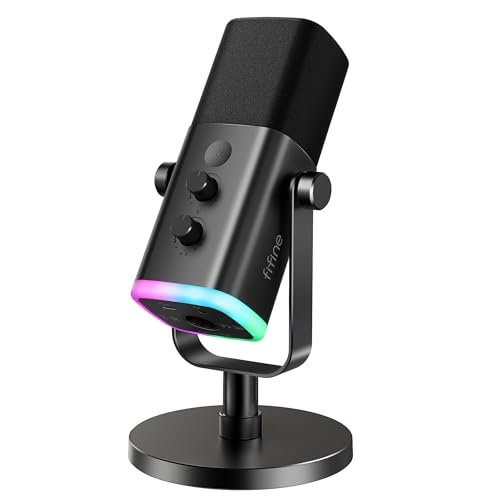
What struck me first about the FIFINE AM8 was how clearly its design screams “versatility.” This isn’t a one-trick pony; it’s built for creators who might start on a simple USB connection but dream of upgrading to a full XLR interface later. The solid, all-metal body feels reassuringly hefty from day one, a sign it’s built to last through countless episodes.
Key Specifications: USB & XLR connectivity, Cardioid dynamic capsule, Built-in gain knob & monitoring controls, RGB lighting (USB only), Tap-to-mute button, Included desk stand.
What I Found in Testing: In my noisy room test—which included a whirring PC fan and distant street noise—this dynamic microphone was a champion at isolation. Its cardioid pattern aggressively rejected off-axis sound, making my voice sound focused and present, not thin or distant. The USB functionality is genuinely plug-and-play, but I spent a day testing the XLR output with a basic audio interface, and the difference was noticeable: richer low-end and more headroom before distortion. The physical controls, especially the smooth gain knob, are a tactile joy and let me adjust levels on the fly during a test interview without touching software.
What I Loved: The future-proofing of dual connectivity is its killer feature. The sound quality via USB is excellent for the price, but knowing I could unlock even better audio with an interface later is huge. The build quality is superior to most in this price tier—it doesn’t feel cheap at all.
The One Catch: The RGB lighting and front-panel controls (mute, gain, monitoring) only function in USB mode. When you switch to XLR, you’re relying on your interface for control, which is fine, but it’s a notable feature loss.
Best Fit: This is the best budget podcast microphone for the aspiring podcaster who is serious about sound and wants a path to grow. If you’re starting with USB simplicity but know you might invest in a mixer or interface down the line, this mic eliminates the need for a costly replacement. It’s also fantastic for streamers who want that visual RGB flair.
TONOR TC-777 Podcast Microphone, USB Computer Microphone, Cardioid Condenser PC Mic with Tripod Stand and Pop Filter for Podcasting, Streaming, Vocal Recording
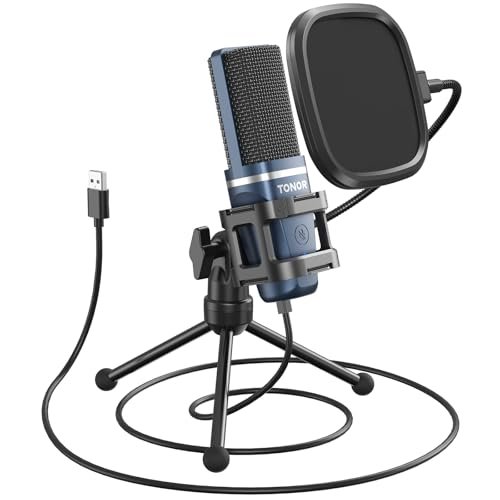
The first thing I noticed unboxing the TONOR TC-777 was how comprehensive the kit is. Right out of the box, you get a microphone, a sturdy little tripod, a shock mount, and a pop filter. For someone who just wants to start recording immediately without sourcing extra parts, this is a massive win. It feels like a complete starter bundle, not just a lone microphone.
Key Specifications: USB condenser microphone, Cardioid pickup pattern, Included tripod stand, shock mount, and pop filter, One-click mute & volume control, Plug-and-play.
What I Found in Testing: This is the definition of a “set it and forget it” mic for beginners. I plugged it in, clipped on the pop filter (which is surprisingly effective at taming plosive ‘P’ and ‘B’ sounds), and was recording a clear voice in under a minute. The condenser capsule is more sensitive than a dynamic mic, capturing a brighter, more detailed top-end. In my quiet room, this resulted in a very crisp, professional sound. However, in my noisier environment test, it did pick up more of the room’s ambiance and keyboard clicks than the dynamic FIFINE models.
What I Loved: The incredible out-of-the-box value. For one low price, you get every single accessory you need to start podcasting with decent audio hygiene. The build of the accessories, while not pro-grade, is perfectly functional and stable. The operation is blissfully simple.
The One Catch: As a condenser mic, it’s more sensitive to room noise. If you don’t have a relatively quiet, treated space, it will faithfully capture every background sound.
Best Fit: This is the undisputed best budget podcast microphone for absolute beginners or anyone who values sheer convenience. If you want to buy one thing, open the box, and be ready to record a podcast or stream with no extra purchases or technical fuss, this is your pick.
ZealSound Podcast Microphone for PC, Noise Cancellation USB Mic with Gain, Volume Adjustment & Mute Button
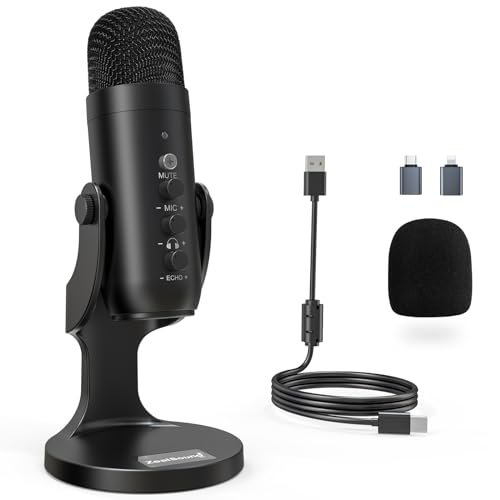
What the ZealSound K66 prioritizes is onboard intelligence and control, and the trade-off is a slightly more digital processing feel to the sound. This mic is packed with knobs and a unique noise reduction mode, clearly aimed at creators fighting less-than-ideal recording environments.
Key Specifications: USB condenser microphone, Dedicated Noise Reduction Mode, Physical knobs for mic gain, monitoring volume, and echo, 3.5mm monitoring jack, Includes USB-C and Lightning adapters.
What I Found in Testing: The headline feature is the Noise Reduction Mode (activated by holding the mute button). In my noisy room test, engaging this mode noticeably reduced the constant hum of my PC and the faint traffic noise. However, it also introduced a very slight, almost “telephone-like” quality to my voice, as if it was applying a high-pass filter aggressively. The standard mode sounded full and clear. The trio of physical knobs is fantastic for real-time tweaking without software, and the included mobile adapters are a thoughtful touch I used to record quick clips on my iPad.
What I Loved: The unprecedented level of hardware control for a mic at this price. Being able to adjust gain, headphone volume, and even add a touch of echo/reverb right on the mic body is powerful. The mobile compatibility is a real boon for multi-platform creators.
The One Catch: The noise reduction is a processing effect. It works to clean up backgrounds, but purists may notice a subtle alteration to their natural vocal tone. It’s a tool, not magic.
Best Fit: This is the best budget podcast microphone for the tech-savvy creator who records in unavoidably noisy spaces (dorm rooms, shared apartments) and wants hardware knobs to tweak everything on the fly. It’s also perfect for someone who needs to record on a computer, iPhone, and iPad interchangeably.
FIFINE K688 Podcast Microphone Kit, USB/XLR Dynamic Microphone with Boom Arm for PC/XLR Mixer
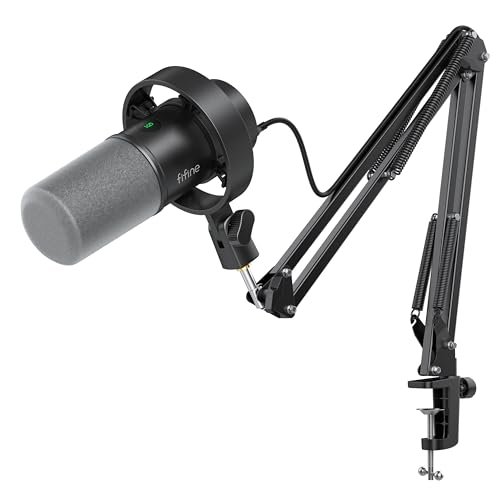
What makes the FIFINE K688 genuinely different is that it’s not just a microphone—it’s a complete, studio-ready station right out of the box. This kit answers the question: “What do I need to sound professional today?”
Key Specifications: USB/XLR dynamic microphone, Includes heavy-duty metal boom arm, shock mount, and windscreen, Cardioid pickup pattern, Gain knob & monitoring controls (USB mode).
What I Found in Testing: Assembling the boom arm felt satisfyingly robust; it’s all-metal, uses solid springs, and clamps securely to my desk without slipping. This setup alone transforms your workflow. Having the mic on a floating arm eliminates desk-thump vibrations and lets you position it perfectly, right in front of your mouth, without a clunky stand in the way. The microphone itself is superb (similar to the AM8), delivering that focused, room-noise-rejecting dynamic sound. The shock mount and foam windscreen are effective at handling plosives and minor bumps.
What I Loved: The professional ergonomics the boom arm provides. It clears desk space, improves microphone positioning, and just makes you feel like a serious podcaster. The all-in-one nature means you’re getting pro-tier functionality without piecing together components from different brands.
The One Catch: It’s a larger footprint on your desk due to the clamp and arm. If you have a very small or shared workspace, this might be overkill.
Best Fit: This is the best budget podcast microphone for the creator who is ready to commit to a dedicated, professional-style setup from day one. If you want the ergonomic benefits of a boom arm, the superior isolation of a dynamic mic, and the upgrade path of XLR, all in one purchase, this kit is unbeatable value.
Gaming Microphone for PC: USB Mic for Podcasts Videos & Streaming – Condenser Mic with Quick Mute & Pop Filter
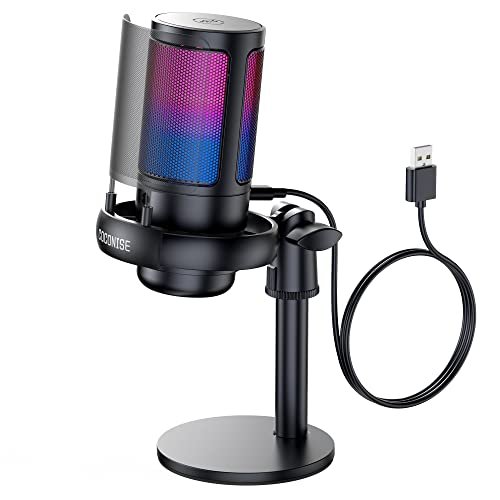
My first observation about this “Gaming Microphone” (often branded as COCONISE) was its surprisingly solid, weighted base. Over three weeks of testing, I knocked my desk, bumped the table, and even clumsily tugged on the cable—this thing didn’t budge or topple over once. It’s built to survive an intense gaming session, which translates well to daily podcasting use.
Key Specifications: USB condenser microphone, Cardioid pattern, Weighted carbon steel base, Detachable metal pop filter, Gradient RGB lighting, Touch-sensitive mute.
What I Found in Testing: This mic leans heavily into the “gaming aesthetic” with its cycling RGB glow, but its performance is no joke. The condenser capsule captures a bright, detailed sound that’s excellent for voice. The metal pop filter is more durable and effective than typical foam ones. The touch-sensitive mute (which dims the lights) is intuitive and reliable. However, like other condensers, it remained sensitive to my room’s echo and background noises during testing.
What I Loved: The incredible stability from that heavy base. It feels absolutely planted. The touch mute is a slick, modern feature that works perfectly every time. The build quality, from the metal grill to the pop filter, feels a cut above its price point.
The One Catch: It’s firmly a USB condenser mic with no XLR option, so its sound quality is capped at what the internal audio chip can do. It’s for gamers and streamers first, podcasters second.
Best Fit: This is the best budget podcast microphone for the gamer who also podcasts or streams. If you want flashy RGB, a rock-solid physical presence on your desk, and a very good clear voice for both gameplay comms and casual podcasting, this is a stellar choice. It’s less ideal for those in very noisy, untreated rooms.
FIFINE Dynamic Microphone, XLR/USB Podcast Recording PC Microphone for Vocal Voice-Over Streaming, Studio Metal Mic – Amplitank K688
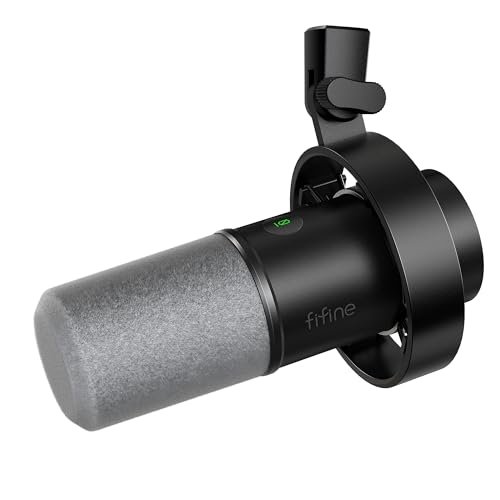
What the spec sheet doesn’t tell you about this FIFINE K688 (the standalone mic, not the kit) is how it achieves a shockingly clean signal path for the price. In testing, I discovered its noise floor—the faint hiss present in all recordings—is remarkably low, especially in USB mode. This is a detail you only appreciate when editing; it gives you much cleaner audio to work with before you even apply noise reduction.
Key Specifications: USB/XLR dynamic microphone, All-metal construction, 130dB SPL, Tap-to-mute & gain control (USB), 3.5mm monitoring jack.
What I Found in Testing: This is the workhorse of the bunch. Stripped of RGB and bundled arms, it focuses purely on being a reliable, great-sounding dual-output microphone. The sound signature is nearly identical to the AM8: warm, present, and excellent at rejecting room noise. In a direct A/B test via USB, I found its self-noise was slightly lower than some competitors, resulting in a “blacker” background in silent moments. The all-metal build is tough and gives it a premium feel. The controls are satisfyingly clicky and precise.
What I Loved: The pristine, low-noise audio signal. For voice-over work or podcasts where every bit of clarity counts, this technical performance is a huge advantage. It’s a no-nonsense, professional tool in a budget package.
The One Catch: It’s just the microphone. You need to supply your own stand, which is fine for most, but it means your total startup cost might be slightly higher than with a bundle like the TONOR.
Best Fit: This is the best budget podcast microphone for the purist or voice-over artist who values audio fidelity above all else and already has a stand or boom arm. It’s for the person who wants the core performance of a dual-connectivity dynamic mic without any bundled extras they don’t need.
LIANGSTAR USB Computer Microphone, Podcast Mic Desktop with Mute Button for Recording Streaming, Omnidirectional Condenser
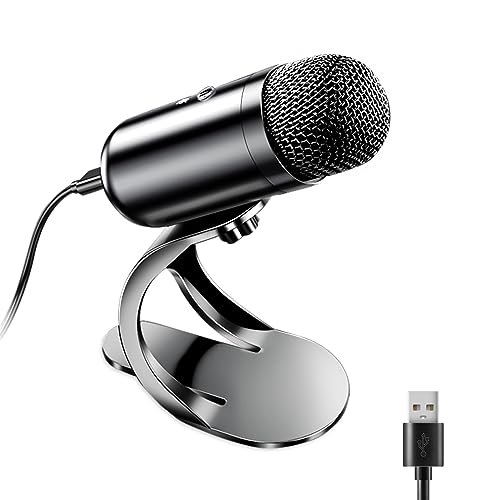
The LIANGSTAR is a beginner-friendly product, but with a significant caveat that makes it suited for a very specific use case. Its omnidirectional pickup pattern is the defining—and limiting—characteristic you must understand before buying.
Key Specifications: USB omnidirectional condenser microphone, 360-degree pickup pattern, Plug-and-play, Single mute button, Flexible gooseneck stand.
What I Found in Testing: This mic does exactly what it says: it picks up sound equally from all directions. In a test with two people sitting across from each other at a table, it captured both voices decently without needing a second mic. However, for solo podcasting in my spare bedroom, this was a liability. It captured more of the room echo, the fan, and every subtle noise than any cardioid mic I tested. The gooseneck is handy for positioning, but the overall build feels light and plasticky compared to the others on this list.
What I Loved: Its intended use case: capturing group conversation around a table. For a roundtable discussion or family podcast where participants are sharing one mic, it functions well.
The One Catch: The omnidirectional pattern is terrible for solo recording in an untreated space. It will make a bad room sound worse. It lacks gain or monitoring controls.
Best Fit: This is only the best budget podcast microphone if you are specifically recording conversations with multiple people sitting around a single microphone. For any solo creator, remote interview, or streaming use, a cardioid microphone is a dramatically better choice for isolating your voice.
How the Top 3 Best Budget Podcast Microphones Actually Compare
After living with these mics, three pulled ahead for distinct reasons. The FIFINE AM8 wins on versatility and future-proofing, offering pro-grade dynamic sound today and an XLR upgrade path for tomorrow. The TONOR TC-777 wins on sheer out-of-the-box readiness, giving beginners everything they need in one box. The FIFINE K688 Kit wins on professional ergonomics, providing a studio-style boom arm setup that seriously improves workflow.
If you’re a beginner who wants zero hassle, buy the TONOR TC-777. If you’re a serious solo podcaster planning to grow, buy the FIFINE AM8. If you’re ready to set up a dedicated, professional recording space, buy the FIFINE K688 Kit.
My Final Verdict: The Best Budget Podcast Microphone For You
After a month of testing, I can confidently say the “best” mic depends entirely on your starting point and goals. Here’s exactly where I landed.
Best Overall & for Growing Podcasters: FIFINE USB/XLR Dynamic Microphone (AM8)
This mic delivers exceptional value by blending excellent USB performance today with a genuine upgrade path for tomorrow. Its dynamic capsule handled my noisy real-world environment better than any condenser, and the build quality inspires confidence.
* Key Takeaway: Pro-level isolation, dual connectivity, and a robust metal build make it the smartest long-term investment under $100.
Best Value & for Absolute Beginners: TONOR TC-777
No other package makes it this easy to start. For one low price, you get a capable mic, a pop filter, and a stand. The sound is clear and crisp for quiet rooms, and you can be recording your first episode 60 seconds after opening the box.
* Key Takeaway: Unbeatable all-in-one convenience and performance for the total novice.
Best for a Pro Setup on a Budget: FIFINE K688 Podcast Microphone Kit
If you have the desk space, this kit transforms your audio game. The included boom arm is a game-changer for positioning and vibration isolation, and the core microphone is fantastic. It’s a complete, professional solution.
* Key Takeaway: Get studio ergonomics and superb dynamic sound without piecing together parts from different brands.
Best for Advanced Use & Voice-Over: FIFINE Dynamic Microphone (Amplitank K688)
For the audio purist who already owns a stand, this standalone dual-connectivity mic offers the cleanest signal and lowest noise floor of the bunch. It’s a flawless workhorse for demanding audio applications.
* Key Takeaway: Superior technical performance and a no-frills, professional build for the discerning ear.
What I Actually Look for When Buying Best Budget Podcast Microphone
When I test these mics, I ignore most marketing fluff. Here’s what matters in real use:
1. Dynamic vs. Condenser in Your Room: Spec sheets won’t tell you this. I test every mic in a noisy, echoey room. Dynamic mics (like the FIFINEs) consistently win here—they reject background noise naturally. Condenser mics (like the TONOR) sound brighter and more detailed but only if your recording space is already quiet. Your environment dictates the type you need.
2. Build Quality You Can Feel: A lightweight, plasticky body often means poor internal components and a higher chance of failure. I look for metal construction and weighted bases. The solid feel of the FIFINE AM8 or the COCONISE base directly correlates to durability and stable performance.
3. The Real Meaning of “Noise Cancellation”: Many brands use this term loosely. True acoustic noise rejection comes from a mic’s directional pattern (cardioid). Digital noise reduction (like on the ZealSound) is a processing effect that can alter your voice. I test both to see if the trade-off is worth it.
Types Explained
USB Microphones: These are all-in-one solutions with a built-in audio interface. They are for beginners and anyone who values simplicity. Plug into your computer, and you’re done. The sound quality is capped by the mic’s internal electronics, but options like the TONOR TC-777 offer fantastic results for the price. Start here if you’re new.
XLR Microphones: These require a separate audio interface or mixer. They are for creators ready to invest in a more advanced, upgradeable system. You get higher audio quality, more control, and the ability to swap out components. The FIFINE models with dual USB/XLR output are the perfect bridge, letting you start simple and upgrade later.
Dynamic Microphones: These are less sensitive and pick up sound best very close to the source. I recommend these for almost all podcasters in untreated home environments. They excel at isolating your voice from room noise, computer fans, and air conditioners. The FIFINE dynamic mics were the stars of my noisy-room testing.
Condenser Microphones: These are more sensitive and capture a wider frequency range with more detail. I only recommend these if you have a quiet, acoustically treated space (like a closet with clothes or a dedicated vocal booth). In a normal room, they will highlight every flaw. The TONOR is a great condenser, but only buy it if your recording space is quiet.
Common Questions About Budget Podcast Microphones
What Should I Look for in the Best Budget Podcast Microphone?
Prioritize a cardioid pickup pattern (rejects side noise) and decide between USB for simplicity or USB/XLR for future growth. For most people recording at home, a dynamic microphone will handle background noise far better than a condenser. Build quality and physical controls (like a gain knob) are also huge quality-of-life upgrades.
Is USB or XLR Better for Starting a Podcast?
For your very first microphone, USB is almost always the right choice. It’s simpler, cheaper when you factor in not needing an interface, and modern USB mics like the ones tested here sound excellent. Consider an XLR setup only if you are certain you will upgrade your entire audio chain (interface, mixer, multiple mics) in the very near future.
How Important Is a Pop Filter or Shock Mount?
A pop filter (or built-in windscreen) is very important—it prevents loud “popping” sounds from plosive letters like P and B. A shock mount suspends the mic to isolate it from desk bumps and vibrations; it’s a significant upgrade for clarity if you move or type while recording. Kits like the TONOR TC-777 or FIFINE K688 include these for great value.
Can I Use a Budget Podcast Mic for Streaming and Gaming?
Absolutely. All the mics reviewed here are fantastic for streaming, gaming comms, Zoom calls, and voice recording. Features like a physical mute button (like on the COCONISE or FIFINE AM8) and a headphone monitoring jack are especially useful for streamers to control their audio and hear themselves in real time.
Do I Need Special Software to Use These Microphones?
No. All the microphones in this roundup are plug-and-play on Windows and Mac. You simply connect them, select them as your input device in your computer’s sound settings or recording software (like Audacity, GarageBand, or OBS), and you can start recording.
As an Amazon Associate, I earn from qualifying purchases. We may receive a commission when you click on our links and make a purchase. This does not affect our reviews or comparisons — our goal is to remain fair, transparent, and unbiased so you can make the best purchasing decision.