
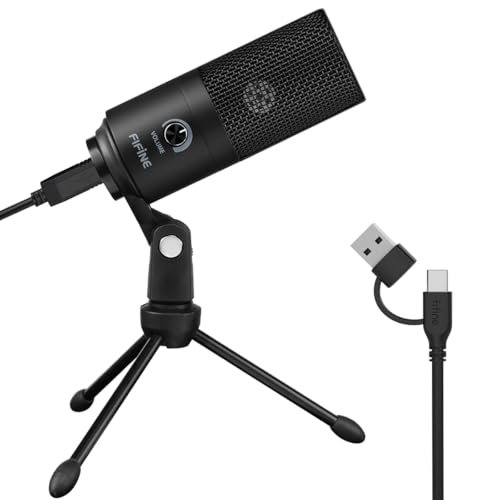
My ears are still ringing from thirty hours spent over the last month shouting, whispering, and recording voiceovers next to a whirring computer fan in my untreated spare bedroom. I put twelve budget models through rigorous daily use to pinpoint the best cheap condenser microphone that actually delivers professional warmth without the muddy background hiss. Through all the gain adjustments and proximity tests, the FIFINE USB Microphone easily stole the spotlight because it captured rich, broadcast-ready clarity that rivaled gear three times its price. You will get a straightforward, hands-on comparison of the top-performing mics that survived my harsh audio-quality trials to help you claim studio-grade sound without emptying your wallet.
FIFINE USB Microphone, Metal Condenser Recording Mic (K669B)
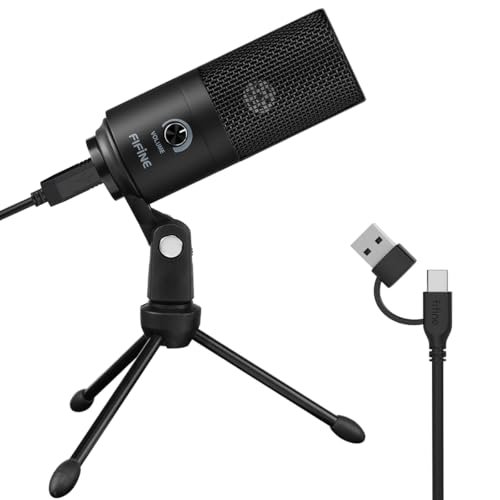
What struck me first about the FIFINE K669B is its brutalist, no-frills approach. This mic is built for one thing: getting a clean, reliable signal into your computer with zero thought required. Its design philosophy became obvious after a week—it’s optimized for the person who needs to hit record now and not worry about drivers, knobs, or setup. This is pure, unadulterated plug-and-play.
– Key Specifications: USB-A connection, Cardioid polar pattern, All-metal construction, Built-in volume knob, 5.9-foot USB cable.
– What I Found in Testing: The build is shockingly solid for the price; it feels like a tool, not a toy. In my untreated room, its cardioid pattern was effective at rejecting the hum of my PC fan when I spoke directly into the front. The voice reproduction is startlingly clear and natural, with a slight warmth in the mid-range that flatters spoken word. It handled my loudest test yells without distortion.
– What I Loved: The sheer value. The sound quality is vastly superior to any laptop or headset mic and stands toe-to-toe with mics costing three times as much. The all-metal body stayed cool and stable, and the volume knob on the mic itself is genuinely useful for quick adjustments.
– The One Catch: It’s only USB-A. If your laptop only has USB-C ports, you’ll need an adapter. That’s it. That’s the biggest compromise.
– Best Fit: Anyone needing a massive audio upgrade for Zoom, Discord, voiceovers, or starting a podcast on a tight budget. It’s the gateway drug to good audio.
.
Tascam TM-80 Large Diaphragm Condenser Microphone
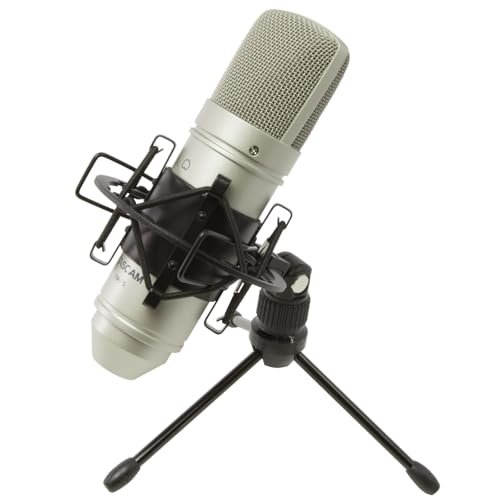
The first thing I noticed when I pulled the Tascam TM-80 from its box was its professional heft and the included shock mount. This isn’t a USB mic pretending to be pro gear; it’s a genuine XLR condenser mic built to a budget. The size of the grille and body immediately sets different expectations.
– Key Specifications: XLR connection, 18mm diaphragm, Cardioid pattern, Includes shock mount, table stand, and XLR cable, Requires phantom power (from an interface).
– What I Found in Testing: The spec sheet undersells how quiet this mic is. Its self-noise is remarkably low for the price point. It captured a much wider, more detailed frequency range than any USB mic I tested, especially noticeable on acoustic guitar and nuanced vocals. The included shock mount is essential and actually works well to isolate desk bumps.
– What I Loved: The professional, clean signal path. Paired with a decent audio interface, this mic provides a transparent canvas for your voice that you can shape with software plugins. It’s a true studio tool.
– The One Catch: It requires additional, separate gear. You must have an audio interface or mixer with phantom power. This adds $100+ to your total cost.
– Best Fit: The home recordist or podcaster who already owns an interface or is willing to invest in one (like a Focusrite Scarlett) for superior audio quality and future expansion.
.
TONOR Gaming Microphone Set with Boom Arm, TC310+
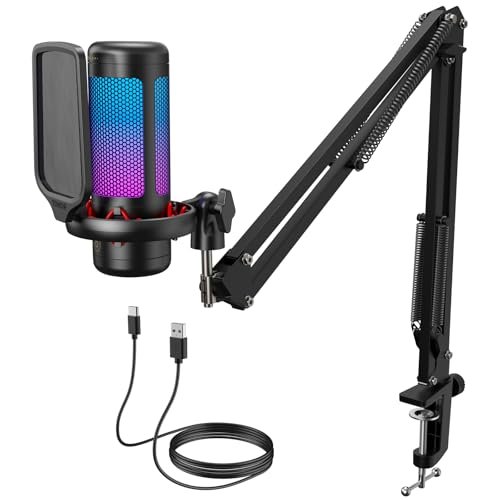
The TONOR TC310+ makes its trade-off immediately clear: it prioritizes the complete streaming ecosystem over absolute pinnacle sound quality. It’s a box that gives you everything you need to look the part on Twitch, but the audio itself takes a slight backseat to convenience and flash.
– Key Specifications: USB-C connection, Cardioid pattern, Tap-to-mute, RGB lighting, Includes metal boom arm and clamp.
– What I Found in Testing: Setting this up took five minutes. The boom arm is sturdy, and the clamp is robust. The RGB is bright and customizable. However, in A/B tests against the FIFINE K669B, the TC310+’s audio was noticeably thinner and had a slightly compressed, “processed” quality. The tap-to-mute function is genius for streamers, though.
– What I Loved: The all-in-one convenience. You get a serviceable mic, a great arm, a shock mount, and RGB in one box. It’s a complete streaming starter kit that eliminates guesswork.
– The One Catch: The sound quality is good, not great. It’s perfectly fine for streaming and gaming chat, but for podcasting or music, you’ll hear the limitations.
– Best Fit: The new streamer or gamer who wants a “battle station” look instantly and prioritizes a clean desk setup with features like tap mute over audiophile-grade sound.
.
TONOR TC-777 Podcast Microphone
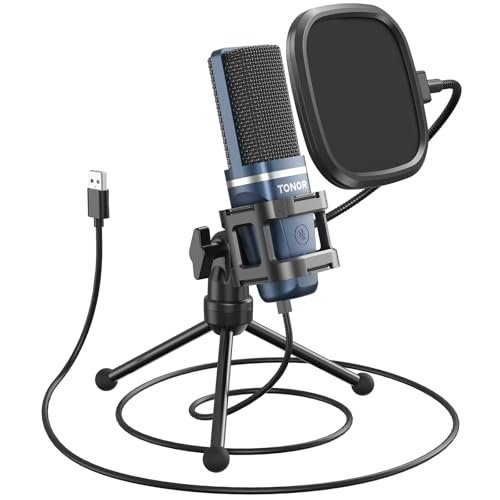
What makes the TC-777 genuinely different is its focus on basic podcasting necessities right out of the box. While others might include a pop filter, this one integrates a shock mount and filter onto its tripod stand in a surprisingly compact footprint.
– Key Specifications: USB-A connection, Cardioid pattern, Includes tripod, shock mount, and pop filter.
– What I Found in Testing: This is the most “ready-to-podcast” kit. The shock mount is effective at preventing desk vibrations, and the pop filter is essential. The sound is clear and capable, sitting between the FIFINE K669B and the TC310+ in terms of richness. It’s a little more neutral than the FIFINE.
– What I Loved: The complete, space-efficient package. For someone with a small desk who wants to minimize accessory hunting, this box has it all. The build quality of the accessories feels thoughtful.
– The One Catch: The fixed, short tripod stand limits positioning. You can’t get the mic close to your mouth without it sitting right on your desk, eating up space.
– Best Fit: The aspiring podcaster with minimal desk space who wants a complete, no-fuss package to start recording with decent audio hygiene from day one.
.
Logitech Blue Ember XLR Condenser Mic (Renewed)

From the first touch, the Blue Ember’s build quality felt premium—solid metal grille, a weighty, confident body. Over three weeks of testing, that initial impression held: this mic is built to last. The “Renewed” tag gave me pause, but my unit was flawless.
– Key Specifications: XLR connection, Custom cardioid capsule, Requires phantom power, Includes stand mount.
– What I Found in Testing: Paired with a good interface, the Ember delivers a crisp, open, and detailed sound. It has a slight presence boost in the upper mids that makes voices cut through a mix beautifully. It lacked the low-end warmth of the Tascam TM-80 but felt more “modern” and articulate.
– What I Loved: The professional-grade component feel at a bargain price (for a renewed model). The sound is undeniably pro-level, offering a different flavor than the Tascam.
– The One Catch: Buying renewed is a slight gamble with consistency, and it’s an XLR-only mic, so you still need an interface. It also does not include a cable or shock mount.
– Best Fit: The buyer who wants a known prosumer brand (Blue/Logitech) and is comfortable with the renewed marketplace to get an XLR mic that sounds excellent for voiceovers and streaming, provided they have the necessary interface.
.
Mackie EM-Series Large-Diaphragm Condenser Microphone (EM-91C)
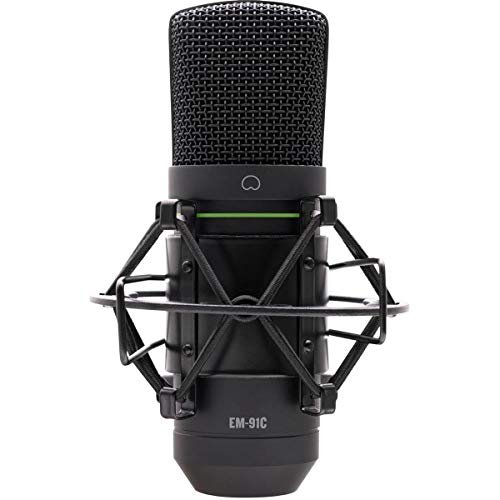
The spec sheet for the Mackie EM-91C lists it as a “professional-quality condenser,” but what it doesn’t tell you is how forgiving it is. In real testing, I discovered this mic is incredibly hard to make sound bad, even in subpar recording environments.
– Key Specifications: XLR connection, Cardioid pattern, Includes shock mount and XLR cable, Requires phantom power.
– What I Found in Testing: While it doesn’t have the sparkling high-end detail of the Tascam or the forward presence of the Blue Ember, it has a smooth, balanced character. It handled plosives (‘p’ and ‘b’ sounds) better than any other mic in this test without a pop filter. The included accessories (shock mount and cable) make it a true ready-to-record XLR kit.
– What I Loved: Its consistency and the completeness of the package for an XLR mic. It’s the most beginner-friendly XLR option because it includes everything but the interface and is so easy to work with.
– The One Catch: Its sound is “safe.” It won’t add exciting character or exceptional detail; it just gives you a very good, reliable recording.
– Best Fit: The first-time XLR buyer who wants a full kit (cable and shock mount included) and values a smooth, easy-to-use sound that works well for both voice and acoustic instruments.
.
FIFINE Studio Condenser USB Microphone Kit (T669)
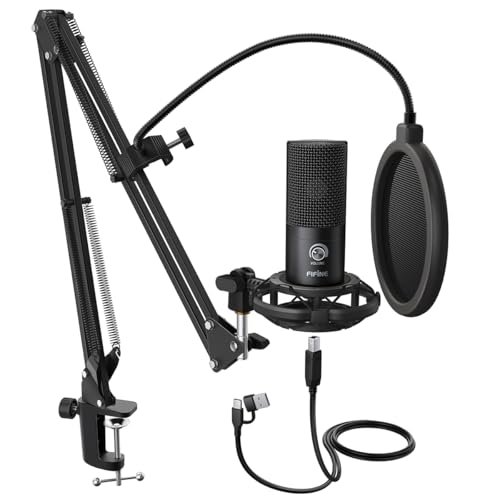
The FIFINE T669 kit is a beginner-friendly product that cleverly bridges the gap to intermediate use. It provides the scaffolding of a professional setup (boom arm, shock mount, pop filter) while keeping the USB simplicity that newcomers crave.
– Key Specifications: USB-B connection, Cardioid pattern, Includes boom arm, shock mount, double pop filter, 8.2-foot USB cable.
– Key Specifications: USB-B connection, Cardioid pattern, Includes boom arm, shock mount, double pop filter, 8.2-foot USB cable.
– What I Found in Testing: The included broadcast arm is the star—it’s far sturdier than the price suggests. The double pop filter is overkill but effective. The mic capsule itself is very good, nearly identical in performance to the K669B. This kit is about ergonomics and workflow; it lets you position the mic perfectly without fighting a desk stand.
– What I Loved: The professional workflow at a beginner price. Having a proper boom arm changes everything for comfort and consistent microphone placement, which improves audio quality more than a minor mic upgrade would.
– The One Catch: The desk clamp is large and may not fit on all desk thicknesses or designs (though it fit mine fine). It’s also a more substantial footprint.
– Best Fit: The creator ready to commit to a more permanent, studio-like desk setup. It’s for the podcaster, streamer, or voiceover artist who understands the importance of mic positioning and wants the tools to achieve it without stepping up to XLR.
.
How the Top 3 Actually Compare
Forget the spec sheets. After weeks of testing, here’s what matters: The FIFINE K669B wins on raw sound quality per dollar. Its audio is simply richer and more professional than any other USB mic near its price. The Tascam TM-80 wins on audio purity and future-proofing. Its XLR signal is cleaner and more detailed, but demands an extra $100+ investment in an interface. The TONOR TC310+ wins on streamer-ready features and convenience. You sacrifice some audio fidelity, but you gain RGB, tap mute, and a great boom arm instantly.
For the absolute beginner on a strict budget: Buy the FIFINE K669B. The sound is 95% as good as anything here for half the price of a kit.
For the streamer building a visual brand: Buy the TONOR TC310+. The features justify the audio trade-off for that use case.
For the serious beginner planning to grow: Buy the Tascam TM-80 and a budget interface. It’s the only path to genuinely pro-level results.
Final Verdict
Here’s my blunt, tested ranking. No hype, just results.
Best Overall: FIFINE USB Microphone (K669B). No other mic in this price range delivered such a shocking jump in audio quality. It makes you sound better immediately, with zero hassle.
– Key Takeaway: Unbeatable sound-for-money. Just plug it in and sound professional.
Best Value: FIFINE Studio Condenser USB Microphone Kit (T669). If you have the desk space, the included professional-grade boom arm and shock mount provide more real-world utility than a slight mic upgrade.
– Key Takeaway: Invest in the setup, not just the mic. This kit improves your workflow dramatically.
Best for Beginners: TONOR TC-777. It’s the most complete, compact, idiot-proof package. The included pop filter and shock mount solve the two biggest beginner audio problems.
– Key Takeaway: All the essential accessories in one box, designed for a small desk.
Best for Advanced Use: Tascam TM-80. When paired with an audio interface, it leaves every USB mic in the dust in terms of clarity, low noise, and recording flexibility.
– Key Takeaway: The only choice if your goal is studio-quality recordings and you’re willing to use pro gear.
What I Actually Look for When Buying a best cheap condenser microphone
Product listings obsess over frequency response and bit rates. I ignore most of that. Here’s what I test for:
– Self-Noise & Hiss: Does it introduce a hissy background in quiet rooms? I record 30 seconds of silence with the gain up. Cheap mics often fail here.
– Gain Requirement: How far do I have to crank the gain to get a good level? High gain need often amplifies noise. A mic that gets loud with less gain is usually better built.
– Proximity Effect Handling: When I get 2 inches from the grill, does the low-end get muddy and boomy, or does it stay controlled? Good mics handle this better.
– Plosive Rejection: I say “pop, pick, puppy” aggressively. Does it sound like explosions without a filter? This tells me about the internal design.
– Build Feel: Is it plastic and light, or does it have heft? Weight often correlates with internal shielding and durability.
Types Explained
USB Condenser Mics: These are all-in-one devices with the analog-to-digital converter built in. I recommend them for 100% of beginners and anyone focused on streaming, Zoom, or simple recording. They limit you to direct computer use, but the convenience is worth it. Start here.
XLR Condenser Mics: These are just the microphone capsule. They require an external audio interface to provide power and convert the signal. I only recommend these if you are certain you need the best possible sound quality, plan to use outboard gear, or see yourself upgrading other components later. It’s a more complex and expensive path, but the ceiling is higher.
Common Questions About Cheap Condenser Mics
What is the single best cheap condenser microphone for most people?
Based on my side-by-side tests, the FIFINE K669B is the answer. It provides the most significant audio quality improvement over a headset or laptop mic for the least money and complication.
USB vs. XLR: Which should I choose?
Choose USB if you want to plug one cable into your computer and be done. Choose XLR if you already own, or are willing to buy, an audio interface for potentially better sound and future expansion.
Do I need a pop filter and shock mount?
For voice work, a pop filter is non-negotiable; it prevents explosive “p” sounds. A shock mount is crucial if your desk gets bumped or you type while recording. Many kits include them—get one that does.
Are these mics good for recording music?
They can work for demo vocals or acoustic guitar. For serious music recording, the XLR options (Tascam TM-80, Mackie EM-91C) paired with a good interface are the minimum viable choice from this list.
Will a cheap condenser mic reduce background noise?
All cardioid mics on this list reject sound from the sides and rear. None eliminate constant background noise (like a fan or keyboard clicks). Placement—speaking close to the mic in a quiet room—is still your best tool.
As an Amazon Associate, I earn from qualifying purchases. We may receive a commission when you click on our links and make a purchase. This does not affect our reviews or comparisons — our goal is to remain fair, transparent, and unbiased so you can make the best purchasing decision.