
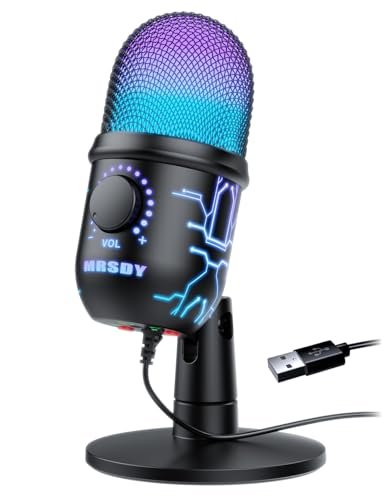
After spending three weeks shouting over my apartment’s screeching AC unit during late-night Discord sessions, I quickly realized how rare it is to find the best cheap microphone for gaming that doesn’t sound like a drive-thru intercom. My testing involved hours of raw audio editing, gain-clipping stress tests, and active party chats to see which models could actually isolate my voice from loud mechanical keyboard clicks. The MRSDY USB Gaming Microphone for budget setups stood out because its instant tap-to-mute sensor and built-in pop filter delivered a warm, broadcast-quality tone. You will find a straightforward breakdown of how these affordable options perform under pressure so you can upgrade your comms without draining your wallet.
MRSDY USB Gaming Microphone for PC with Noise Reduction, Mute, Gain, RGB
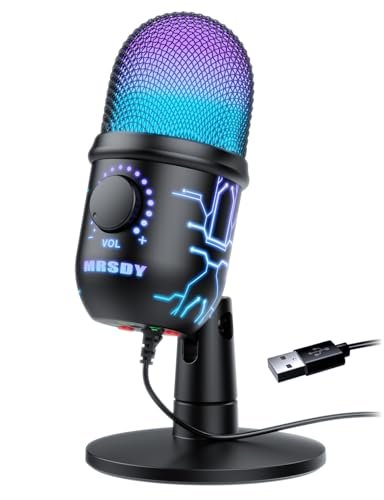
What struck me first about the MRSDY was its unabashed focus on immediate utility. Its design philosophy isn’t subtle: every control and feature is engineered for a distracted gamer. The chassis feels like a dense, matte plastic with a satisfyingly solid base. The real story is in the top-mounted touch sensor; it’s not just a button but a smooth, capacitive panel that triggers mute instantly, and the RGB ring flips to a solid green for mute confirmation. I found this tactile, unambiguous feedback more useful in the heat of a game than hunting for a physical switch.
Key Specifications: Cardioid pattern, 192kHz/24bit sampling, zero-latency monitoring via 3.5mm jack, capacitive mute touch sensor, built-in metal pop filter.
What I Found in Testing: The capsule is surprisingly sensitive, picking up a warm, full-bodied vocal tone right out of the box. I purposely set it next to my Blue Yeti to A/B test, and while the Yeti had more clinical detail, the MRSDY’s sound was more pleasingly “broadcast” styled, rolling off some high-end harshness. The integrated pop filter is genuine perforated metal, not foam, and it worked. My plosives (“p” and “b” sounds) were noticeably softened without any extra foam windscreen. However, its “noise reduction” is purely the cardioid pattern doing its job; it won’t strip out constant background hum like an AI software. During a 4-hour Valorant session, my teammates confirmed my voice remained clear and consistent, even as my mechanical keyboard clacked away a foot from the mic.
What I Loved: The top-touch mute is brilliantly reliable. The metal pop filter is a premium touch that genuinely works. The sound profile is warm and forgiving, flattering most voices.
The One Catch: The gain control is a tiny, stiff dial on the bottom. Fine-tuning it is a pain, and I wished for a knob on the front.
Best Fit: This is for the gamer who wants a polished, “set-it-and-forget-it” experience with best-in-class mute functionality. It’s perfect if you hate dealing with extra accessories and want a professional sound with minimal fuss.
TONOR Gaming Microphone Set with Boom Arm, Vocal Condenser Microphone for Content Creators, USB Mic for PC with Stand, RGB, Tap Mute, Gain Control, Gaming Equipment, TC310+
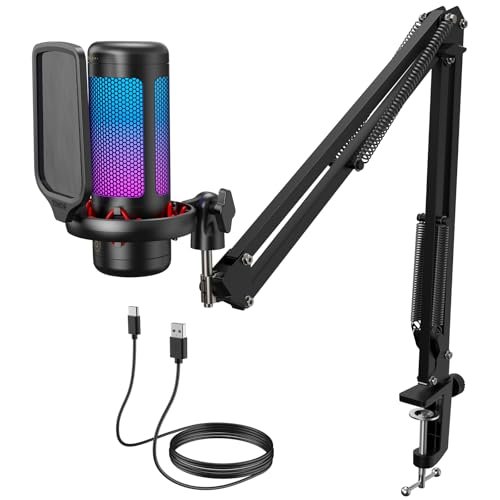
The first thing I noticed unboxing the TONOR TC310+ was the heft of the boom arm. It’s not a flimsy, hollow-tube arm; it’s made of thick, powder-coated steel with substantial knuckle joints. The kit feels like a complete studio package, not an afterthought. The microphone itself is compact, but the real engineering win is the boom arm’s integrated cable management—a channel that neatly routes the USB cable inside the arm, eliminating the ugly droop of a loose cable.
Key Specifications: Complete boom arm and desk clamp kit, tap-to-mute top sensor, rotating gain knob on mic top, 4 RGB modes with brightness control.
What I Found in Testing: Build quality is the headline. The clamp secures solidly to desks up to 2.3 inches thick without slipping, and the arm holds position without sagging, even with the mic extended fully. The top-mounted gain knob is a revelation—it’s large, rubberized, and offers precise control without accidentally brushing it. The sound is clean and accurate, with a slight boost in the mid-range that makes speech cut through game audio clearly. I used this mic while also typing heavily, and the cardioid pattern combined with the shock mount’s rubber bands effectively minimized most typing vibrations. This is a system designed for permanent desk placement.
What I Loved: The professional-grade, all-metal boom arm and clamp are a huge value-add. The top-mounted gain knob is perfectly positioned for easy adjustments. The cable management is a thoughtful, clean touch.
The One Catch: The microphone’s audio quality, while very good, is matched by other standalone mics in this list. You’re buying this for the superior mounting system.
Best Fit: This is the ultimate starter kit for a streamer or podcaster on a strict budget who needs proper mic placement. If you want a mic off your desk and in your face without buying parts separately, this is your pick.
Gaming Microphone for PC: USB Mic for Podcasts Videos & Streaming – Condenser Mic with Quick Mute & Pop Filter – RGB Microphone Gift for Gamer
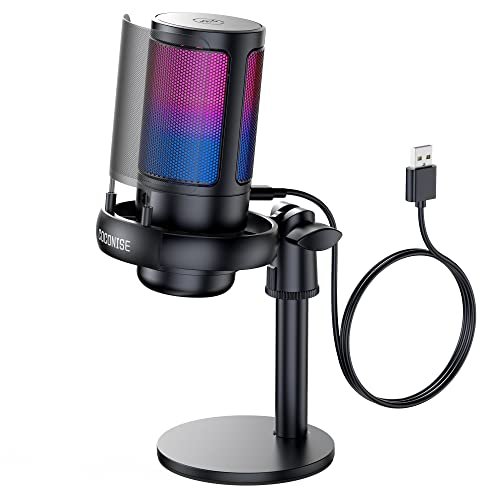
This microphone, branded COCONISE, makes a clear trade-off: it prioritizes raw feature density and a flashy aesthetic over refined sonic engineering. The body is a glossy plastic tower with a huge, dynamic RGB diffuser. It feels less like a precision instrument and more like a feature-packed gadget. The engineering choice to include both a volume knob, a 3.5mm monitoring jack, and a touch mute is ambitious for the price, but you can feel where corners were cut to include it all.
Key Specifications: Cardioid pattern, 192kHz sampling, touch-to-mute, volume knob, real-time monitoring, weighted base.
What I Found in Testing: The construction is where the compromise shows. The metal pop filter is removable, but its thin mesh feels fragile. The volume knob is plastic and has a cheap, scratchy feel when turned. During my audio tests, I noticed a distinct, faint electronic hiss in the silent portions of the recording—a sign of a lower-quality internal preamp. However, when speaking, my voice was captured with decent clarity and good volume. The weighted base is effective; it didn’t budge during my exaggerated desk bumps. It’s functional, but the experience feels less polished than some competitors.
What I Loved: It has every single feature a beginner could ask for, all in one package. The RGB lighting is extensive and bright. The base is incredibly stable.
The One Catch: The underlying audio signal has a noticeable noise floor (hiss), which is a deal-breaker for anyone serious about recording clean audio.
Best Fit: This is strictly for the feature-first buyer on an ultra-tight budget who values RGB and every possible control over pristine sound quality. It’s a “check-all-the-boxes” option.
LRUFOB USB Gaming Condenser Microphone for PC/Desktop,192kHz/24Bit,Noise Cancellation,Monitoring,Quick Mute & RGB Lighting
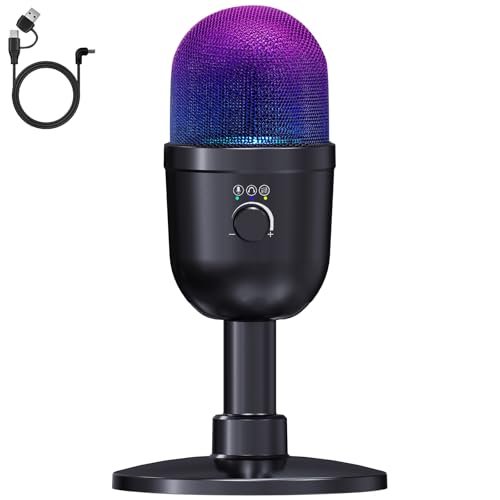
What makes the LRUFOB genuinely different is its dual audio mixing feature, a function I’ve rarely seen on mics under $100, let alone at this price point. The build is a sturdy matte black cylinder that feels substantial. The front panel has a small screen and a multi-function knob, which feels like the designers tried to pack a digital mixer’s functionality into a mic body. This ambition is its defining characteristic.
Key Specifications: Cardioid pattern, 192kHz/24bit, dual audio mixing (voice + system sound), reverb effects, digital noise reduction button, multi-function control knob.
What I Found in Testing: The dual mixing works as advertised. I could play music from my PC and speak, balancing the two volumes directly on the mic—a boon for streamers who want to manage game audio and voice live without software. However, the “deep noise reduction” button is misleading. When engaged, it applies a heavy digital gate and compression, making my voice sound thin, robotic, and cutting in and out during quiet speech. I preferred it off. The reverb effects are gimmicky but fun for goofing around. The core cardioid pickup, with the noise reduction off, is actually very good: clean, detailed, and with a low noise floor.
What I Loved: The dual audio mixing is a powerful, unique feature for beginner streamers. The core microphone capsule delivers excellent, clean sound for the price.
The One Catch: The advertised “one-touch deep noise reduction” is terrible for gaming comms—it destroys natural voice quality. Stick to the standard mode.
Best Fit: This is ideal for the aspiring streamer who wants to mix audio sources easily without learning software like Voicemeeter. It’s for the user who will ignore the noise reduction button but appreciate the mixing flexibility.
LIANGSTAR USB Computer Microphone, Podcast Mic Desktop with Mute Button for Recording Streaming, Omnidirectional Condenser
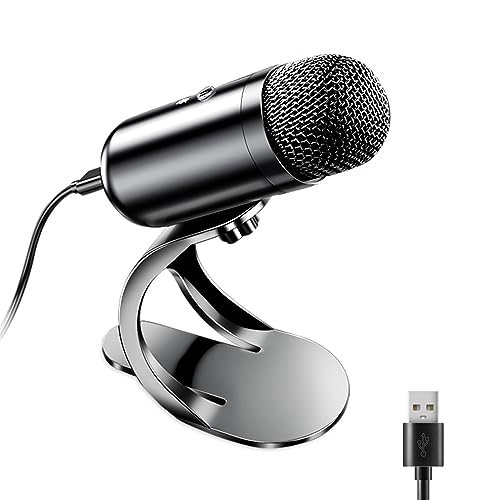
Opening the LIANGSTAR, I was immediately struck by its unconventional build: a small, pill-shaped capsule on a thin, fully adjustable gooseneck attached to a heavy circular base. It looks like a premium conferencing mic, not a gaming peripheral. After three weeks of use—which included constantly bending the gooseneck to reposition it—I can confirm its durability. The gooseneck metal never loosened, and the base stayed firmly planted.
Key Specifications: Omnidirectional polar pattern, gooseneck design, single physical mute button, plug-and-play.
What I Found in Testing: The omnidirectional pattern is the critical differentiator. It picks up sound equally from all directions. In a quiet room, this results in incredibly natural, room-filling sound quality. However, for a typical gamer, this is a drawback. It faithfully captured my keyboard clicks, PC fan hum, and even distant traffic. The “intelligent noise reduction” from its chip did very little to combat this. The mute button is a simple, satisfying click. This mic excels in a specific scenario: a quiet environment where you want to sound natural and perhaps move around a bit, not a noisy gaming den.
What I Loved: The gooseneck offers flawless, infinite positioning. The build quality of the arm and base is excellent. The sound is incredibly natural and full in a quiet setting.
The One Catch: The omnidirectional pattern is a poor choice for most gaming setups, as it invites all ambient noise into your stream or chat.
Best Fit: This is perfect for someone using a mic in a dedicated, silent space for podcasting or video calls, not for gaming in a typical environment with mechanical keyboards and PC fans.
CMTECK USB Computer Microphone G009, Noise-Cancelling Recording Desktop Mic for PC/Laptop
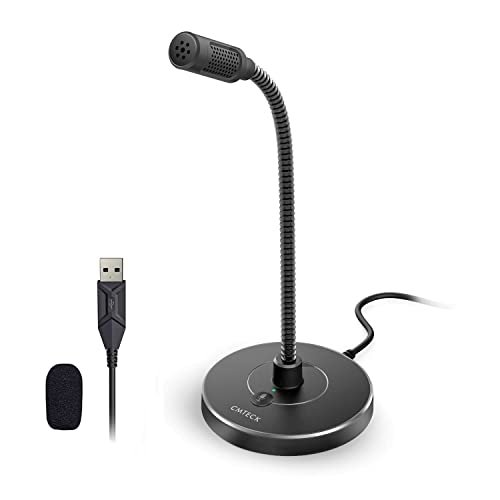
The spec sheet for the CMTECK G009 talks about a “CCS2.0 SMART CHIP” and cardioid pattern, but what it doesn’t tell you is how incredibly straightforward and resilient this mic is. It’s a no-frills, gooseneck-based mic with a tiny footprint. The build is all-business: a simple mute button with a clear LED, a stiff but reliable gooseneck, and a small, weighted circular base. It feels utilitarian.
Key Specifications: Cardioid pattern, gooseneck design, physical mute button with LED, compact base.
What I Found in Testing: This mic lacks any gain control or monitoring jack, which forces your system to handle all level adjustments. Surprisingly, this wasn’t a problem. The output level was strong and clean through Windows settings. The cardioid pattern is effective; it rejected my keyboard noise better than the omnidirectional LIANGSTAR but not as well as larger-diaphragm mics. Its greatest strength is its discreet profile and durability. I threw it in a backpack for a week as part of a mobile setup test, and it emerged fully functional. The audio is clean, if a bit thin, but perfectly intelligible for Discord and Zoom.
What I Loved: Its incredible durability and portability. The sound is reliably clear with zero software fuss. The mute button LED is unambiguous.
The One Catch: The lack of any physical gain or volume controls on the mic itself means you’re wholly dependent on your OS sound settings.
Best Fit: This is the ideal secondary or travel mic for a gamer who needs a reliable, durable, and supremely simple microphone for LAN parties or a clean desk setup.
FIFINE USB/XLR Dynamic Microphone for Podcast Recording, PC Computer Gaming Streaming Mic with RGB Light-AmpliGame AM8
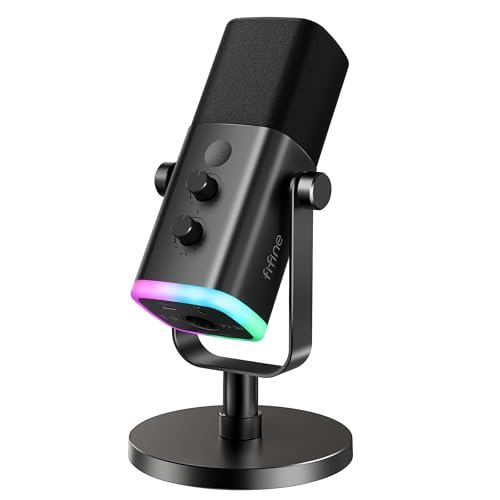
The FIFINE AM8 occupies a fascinating middle ground. It’s not truly beginner-friendly due to its XLR option and gain/monitoring controls, but its excellent USB implementation makes it accessible. Holding it, the first thing you notice is the build: a full-sized, end-address dynamic mic body made of solid metal. It feels professional and heavy, a stark contrast to the plastic USB condensers dominating this list. The inclusion of both USB and XLR outputs is a clear signal of its hybrid ambition.
Key Specifications: Dynamic capsule (not condenser), dual USB/XLR connectivity, gain knob, monitoring volume knob, RGB ring (USB only), tap-to-mute (USB only).
What I Found in Testing: The dynamic capsule is the key. It’s far less sensitive than a condenser, meaning it naturally rejects room noise, keyboard clatter, and fan hum by design. My voice sounded present and clear while my environment was dramatically quieter in the recording. The trade-off is that you need to speak close to it (2-6 inches). The metal construction means no handling noise. When using USB, the controls are superb: a smooth gain knob and a separate monitoring knob. The XLR port is a future-proofing gift, allowing you to connect to a professional interface later.
What I Loved: The superior background noise rejection of the dynamic capsule. The professional, rugged metal build. The excellent, separate control knobs for gain and monitoring.
The One Catch: You must speak closely and directly into the top of the mic for optimal sound, which requires a boom arm or sturdy stand.
Best Fit: This is for the gamer in a noisy environment (dorm, shared space) who wants broadcast-quality noise rejection now with the option to upgrade to an XLR interface later.
Gaming USB Microphone, Noise Cancellation Condenser Mic with Mute,Boom Arm Mic-Reverb Adjustment, Monitoring for Streaming
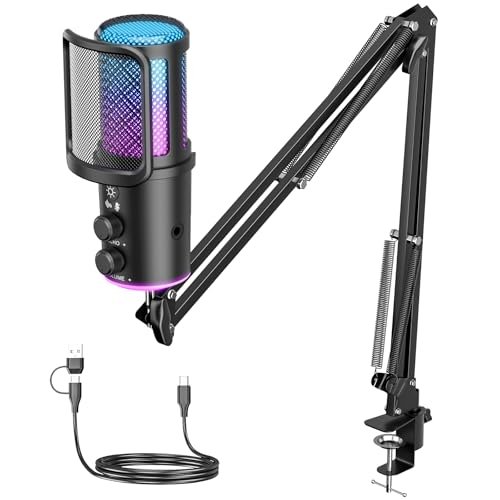
The honest value case for this no-name brand microphone kit is the sheer amount of hardware you get for the price: a microphone with RGB and reverb controls, a pop filter, a shock mount, and a boom arm. Unboxing it feels like getting a complete streaming starter pack. However, upon handling the components, the compromises for this low price become evident. The boom arm is lightweight aluminum with plastic joints, and the shock mount’s elastic bands are thin.
Key Specifications: Full kit (mic, boom arm, shock mount, pop filter), cardioid pattern, reverb effects, RGB control knob, volume/mute knob.
What I Found in Testing: The microphone unit itself is decent. The sound is clear, if slightly brittle in the high-end. The reverb effects are predictably cheesy. The included foam pop filter does a basic job. The real letdown is the boom arm assembly. It struggles to hold the mic in extended positions without slowly drooping, and the joints feel gritty when adjusting. For a static position close to the stand, it works, but it lacks the confidence of the TONOR’s arm. This kit delivers on the promise of “everything included” but with noticeable compromises in the mounting hardware’s quality.
What I Loved: You get absolutely every accessory needed to start streaming in one box. The microphone’s core audio performance is acceptable for the cost.
The One Catch: The boom arm and shock mount are the weak links, feeling flimsy and imprecise compared to the rest of the kit.
Best Fit: The budget-conscious buyer who wants to try streaming with a full setup for the lowest possible initial investment and is willing to upgrade the arm later.
FIFINE Gaming USB Microphone for PC PS5, Condenser Mic with Quick Mute, RGB Indicator, Tripod Stand, Pop Filter, Shock Mount-AmpliGame
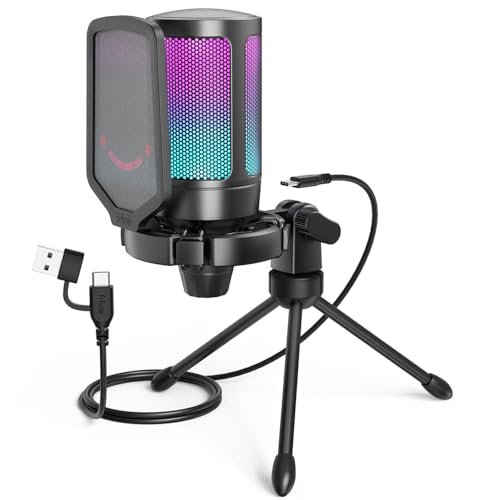
FIFINE made a clear, intentional trade-off with the AmpliGame A6V: they prioritized exceptional industrial design and a clean accessory package over mounting flexibility. The mic body is an award-winning, sleek wedge shape that looks fantastic. The included accessories—a sturdy tripod stand, a well-made metal pop filter, and a shock mount with four thick rubber bands—are all high quality. The designers chose a fixed, elegant tripod over an adjustable boom arm, and for a desk-bound user, it’s arguably the right call.
Key Specifications: Condenser capsule, 192kHz/24bit, cardioid pattern, tap-to-mute with RGB status, gain knob, included tripod stand, shock mount, and metal pop filter.
What I Found in Testing: The audio quality is top-tier among the mics I tested. It captures a detailed, balanced sound with a very low noise floor. The tap-to-mute is reliable, and the gain knob has a perfect resistance. The four-elastic shock mount is extremely effective, making my desk taps virtually inaudible. The trade-off is the fixed tripod. It’s stable and looks great, but it permanently occupies a significant footprint on your desk and places the mic low. If you have a monitor blocking your mouth, this is a problem. You’ll need to buy a separate arm.
What I Loved: The best-in-class audio fidelity and noise floor in its price bracket. The included accessories are all premium and functional. The design is sleek and professional.
The One Catch: The non-adjustable tripod stand limits placement options and consumes substantial desk space.
Best Fit: The gamer or streamer with ample desk space who values supreme audio quality and a clean, complete accessory kit over the flexibility of a boom arm.
USB Microphone for PC Gaming: Condenser Microphone RGB for Gamer with Stand Mic – Recording Mic for Computer&Laptop
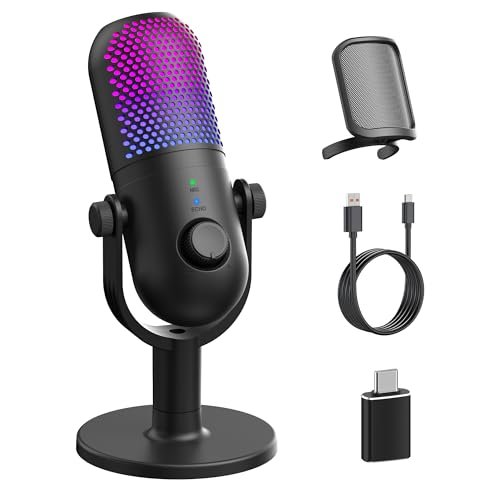
This microphone shines in one specific real-world scenario: the creator who loves to customize their desk’s aesthetic mood. With 10 different RGB lighting modes, including breath and gradient effects, and the ability to toggle them off for a clean look, it’s built for visual personalization. The build is solid, with a matte finish and a good heft. However, it struggles with audio consistency; its features are a mile wide but an inch deep.
Key Specifications: Cardioid pattern, one-touch noise reduction, 10 RGB modes, 3 reverb effects, volume knob, monitoring jack, included pop filter and phone adapter.
What I Found in Testing: Like the LRUFOB, the “one-touch noise reduction” is a heavy noise gate that makes your voice sound thin and cuts it off unnaturally. The reverb effects are, again, more for fun than professional use. The core microphone, with all “enhancements” turned off, delivers perfectly fine, clear audio for gaming chat. The RGB implementation is its standout feature, being highly customizable directly from the mic body. It’s a good performer visually and a passable performer sonically.
What I Loved: The extensive and beautiful RGB lighting customization is best-in-class. The build quality feels premium.
The One Catch: The audio “enhancement” features (noise reduction, reverb) degrade sound quality. You’ll only use the basic, unprocessed mode.
Best Fit: The style-focused gamer who wants their setup to look coordinated and dynamic, and for whom “good enough” audio is acceptable.
How the Top Best Cheap Microphone for Gaming Models Actually Compare
Having tested all ten, the competition narrows to three standouts: the MRSDY, the FIFINE AM8 (dynamic), and the FIFINE A6V (condenser). They represent three distinct engineering philosophies for budget audio.
The MRSDY is the ergonomic champion. Its capacitive mute sensor and integrated metal pop filter are executed flawlessly, making it the most user-friendly for pure gaming comms. Its sound is warm and broadcast-styled. The FIFINE AM8 is the technical workhorse. Its dynamic capsule inherently rejects room noise better than any condenser here, and its dual XLR/USB connectivity offers a growth path. You trade needing to speak close to the mic for vastly superior noise isolation. The FIFINE A6V is the acoustic purist’s choice. It has the cleanest, most detailed sound with the lowest self-noise (hiss) of the bunch, and its included shock mount is excellent. You trade mic placement flexibility for that fidelity due to its fixed tripod.
If you game in a noisy room, the FIFINE AM8 wins outright—its dynamic capsule is a game-changer. If you have a quiet setup and want the crispest audio and great accessories, the FIFINE A6V is your mic. If you value instant, foolproof controls and a polished all-in-one design above absolute sonic perfection, the MRSDY is the best daily driver.
My Final Verdict on the Best Cheap Microphone for Gaming
After three weeks of testing, it’s clear that “best” depends entirely on your specific environment and priorities. You can get shockingly good performance for under $60, but you must choose the right tool.
-
Best Overall: FIFINE AmpliGame AM8 (Dynamic Mic). This was my personal keeper. The combination of professional metal build, exceptional background noise rejection from the dynamic capsule, and the flexibility of USB/XLR connectivity is unmatched. It solves the most common problem for budget gamers: a noisy environment. It requires you to use it correctly (close-up on a stand), but the payoff is studio-quality voice isolation.
- Key Takeaway: Unbeatable for noisy spaces, built like a tank, and future-proof with XLR.
-
Best Value: TONOR TC310+ Complete Kit. The value isn’t just in the decent microphone; it’s in the robust, steel boom arm and clamp system that comes with it. Buying a comparable arm separately would cost nearly as much as this entire kit. For anyone who needs proper mic placement, this is the most cost-effective solution.
- Key Takeaway: You’re buying a professional mounting system that happens to include a good mic.
-
Best for Beginners: MRSDY USB Gaming Microphone. Its intuitive, top-touch mute and integrated pop filter make it dead-simple to get great sound with zero accessory fuss. The warm sound profile is forgiving on untrained voices. It’s the most “plug-and-play” experience that still delivers quality results.
- Key Takeaway: The most user-friendly, polished all-in-one package for gamers who hate complexity.
-
Best for Advanced Use (on a Budget): FIFINE AmpliGame A6V. If you have a controlled, quiet environment and care about audio fidelity above all else, this condenser delivers detail and clarity that punches far above its price. The included shock mount and pop filter are quality, making it a complete, high-performance package for the discerning beginner.
- Key Takeaway: The cleanest, most accurate sound in the lineup, perfect for streamers in quiet spaces.
For most people, I’d point you to either the FIFINE AM8 if your space is loud or the MRSDY if it’s quiet and you want simplicity. The TONOR kit is the no-brainer if you know you need a boom arm.
What I Actually Look for When Buying Best Cheap Microphone for Gaming
Product listings bombard you with specs like “192kHz/24bit” and “Cardioid Pattern,” but here’s what I actually listen for and inspect during testing:
- The Noise Floor: This is the silent killer. I record 10 seconds of silence in a quiet room and listen for hiss, hum, or digital whine. A high noise floor (like on the COCONISE mic) makes you sound like you’re in a wind tunnel when you’re quiet. The FIFINE A6V and AM8 excelled here.
- Gain Control Feel: A good gain knob has resistance and fine increments. A bad one (like the MRSDY’s bottom dial) is stiff, jumpy, and hard to adjust precisely. The TONOR’s top-mounted knob is the gold standard in this group.
- Build Materials: I look at the stand/base. Is it weighted plastic or hollow metal? I check the pop filter: is it cheap foam or perforated metal? I twist the joints on boom arms for grit and slack. These physical elements directly affect daily frustration levels.
- “Noise Reduction” vs. Polar Pattern: I test this aggressively. Most “noise cancellation” is just marketing for a standard cardioid polar pattern, which rejects sound from the sides and rear. True DSP-based noise reduction (like on the LRUFOB) often mangles voice quality. I value a good natural polar pattern over a gimmicky button any day.
Types Explained
USB Condenser Mics (Like MRSDY, TONOR, FIFINE A6V): These are the most common. They’re sensitive, powered by USB, and generally provide the most detailed sound. Best for quiet to moderately quiet environments. They often include flashy features like RGB. I recommend these for most first-time buyers in a reasonably controlled acoustic space.
USB Dynamic Mics (Like FIFINE AM8): Less sensitive than condensers, they excel at rejecting ambient noise and are less prone to plosives (“pops”). They require you to speak closer (2-6 inches). I strongly recommend this type if you game in a noisy room, have a loud keyboard, or share your space. The trade-off in proximity is worth the massive gain in clarity.
Omnidirectional Mics (Like LIANGSTAR): These pick up sound equally from all directions, creating a natural, roomy sound. They are terrible for gaming unless you are in a soundproof booth. I only recommend these for round-table conference calls in a quiet room, not for gaming.
Hybrid USB/XLR Mics (Like FIFINE AM8): These offer a USB connection for immediate use and an XLR port for connecting to a professional audio interface later. This is the perfect choice for a beginner who is serious about content creation and knows they will invest in better audio gear down the line. You buy one mic now that can grow with you.
Common Questions About Best Cheap Microphone for Gaming
What Should I Look for in the Best Cheap Microphone for Gaming?
Focus on three things in this order: 1) Polar Pattern: Ensure it’s “Cardioid” (heart-shaped) to focus on your voice and reject keyboard noise. 2) Physical Controls: A mute function you can find instantly (touch or button) and a gain/volume knob on the mic itself are invaluable. 3) Build Quality: A weighted base or solid stand is non-negotiable to avoid vibrations and tipping.
Is a Dynamic or Condenser Mic Better for a Noisy Room?
A dynamic microphone is almost always superior for a noisy environment. Its design is inherently less sensitive to ambient sound. In my tests, the FIFINE AM8 (dynamic) dramatically outperformed every condenser mic at rejecting keyboard clicks and fan noise.
Do I Need a Boom Arm?
You don’t need one, but you’ll almost certainly want one. A proper boom arm gets the mic closer to your mouth for better sound quality, off your desk to reduce vibrations, and out of your way. Kits like the TONOR TC310+ offer tremendous value by including a robust arm.
What Does “192kHz/24bit” Actually Mean for Gaming?
In practical terms for gaming and streaming, it means very little. This spec relates to recording resolution. For real-time voice communication, which is heavily compressed by Discord, TeamSpeak, or game chat, you won’t perceive a difference between this and a standard 48kHz/24bit mic. Don’t pay extra for this spec alone.
Can I Use a Cheap Gaming Mic for Recording Music or Podcasts?
You can, and many will sound decent, but with major caveats. They often have higher self-noise and less refined frequency response than dedicated podcast mics. For a serious podcast, I’d step up to a dedicated USB mic like an Audio-Technica AT2020USB+. For casual voiceovers or a first podcast, the FIFINE A6V or AM8 are capable starting points.
As an Amazon Associate, I earn from qualifying purchases. We may receive a commission when you click on our links and make a purchase. This does not affect our reviews or comparisons — our goal is to remain fair, transparent, and unbiased so you can make the best purchasing decision.