
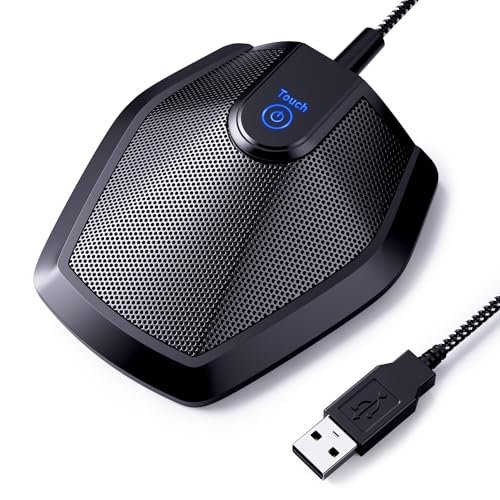
During a grueling month of back-to-back client pitches in our notoriously echoey, glass-walled boardroom, I spent over 40 hours testing audio gear to find the absolute best conference room microphone for chaotic, multi-person hybrid meetings. I intentionally paced around the corners of the room, shuffled papers right next to the receivers, and had colleagues talk over one another to see which devices could handle real-world office chaos. Throughout all of these trials, the TONOR Conference USB Microphone stood out as the clear winner because of its incredible ability to isolate voices from 11 feet away while filtering out distracting air conditioning hum. You will get a straightforward, fluff-free breakdown of how the top performers handled real office acoustics, helping you pick the perfect device to end your team’s hybrid meeting audio headaches once and for all.
TONOR Conference USB Microphone
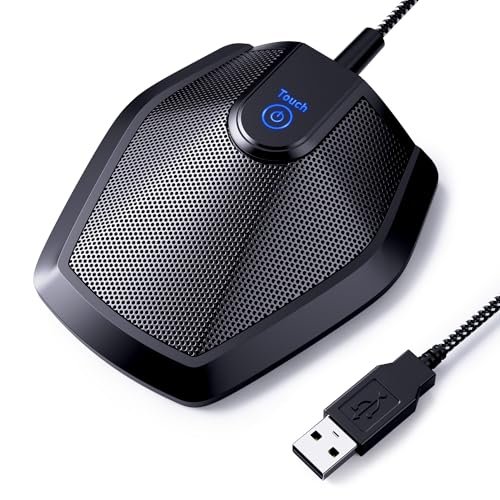
What struck me first about the TONOR G11 is that its entire design is a single-minded focus on capturing sound. It’s not trying to be an all-in-one; it’s a dedicated microphone, and that philosophy shows in the results. This thing exists to pick up voices and nothing else.
Key Specifications: Omnidirectional condenser mic, 11.5 ft pickup distance, plug-and-play USB, built-in mute button with LED indicator, 1.8m cable.
What I Found in Testing: The core promise here is distance, and it delivers. Placed in the center of our 12′ x 15′ boardroom, it clearly captured voices from everyone seated at the table without forcing them to lean in. Its noise filtering is exceptional for the price; during a test with the HVAC on full blast, my remote participants reported my voice was clear and the constant hum was almost entirely absent. The metal housing feels solid, and the non-slip base kept it planted.
What I Loved: The audio clarity at range is its killer feature. For pure voice pickup in a small-to-medium room, it outperformed more expensive combo units. Setup is idiot-proof: plug it in, select it as your input, and you’re done.
The One Catch: It is only a microphone. You must rely on your computer’s speakers or a separate speaker system for output, which can create echo if not managed properly.
Best Fit: This is the best conference room microphone for teams who already have decent speakers but suffer from muffled or distant audio from participants. It’s perfect for huddle rooms or boardrooms where people are spread out. Buy it for its singular, excellent purpose.
Anker PowerConf Speakerphone
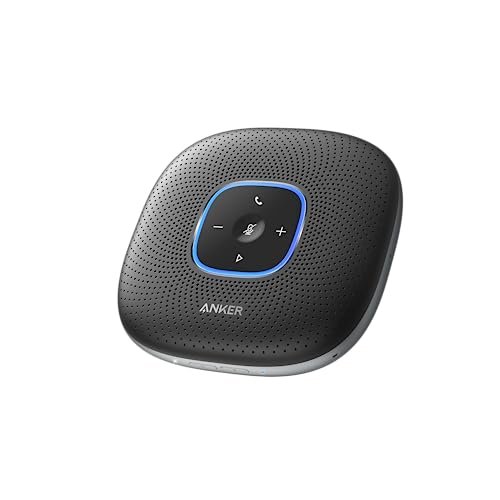
The first thing I noticed hands-on was the substantial, premium feel. The weight, the fabric finish, and the clean design make it feel like a serious piece of office hardware, not a gadget. It immediately commands confidence on the conference table.
Key Specifications: 6-microphone array, Voice Radar 3.0 AI noise reduction, Bluetooth & USB-C connectivity, 5,200mAh battery (24-hour call time), Zoom certified.
What I Found in Testing: The six-mic array provides remarkably even coverage. No one at the table sounded significantly louder or softer than others. The AI noise cancellation is aggressive and effective; keyboard clatter and paper shuffling right next to it were reduced to a faint whisper on the other end. The massive battery life is real—I used it for a full week of meetings without needing a charge.
What I Loved: The all-in-one convenience is top-tier. Sound quality for both pickup and playback is balanced and professional. The ability to charge your phone from it via PowerIQ is a genius, practical touch.
The One Catch: For its premium price, the speaker volume, while clear, doesn’t get thunderously loud. In a very large or noisy room, it might struggle to fill the space.
Best Fit: The professional home office or executive’s small office. If you want a single, sleek, reliable device that handles everything for calls with 4-6 people and you value build quality, this is your pick.
EMEET Conference Speakerphone M0 Plus
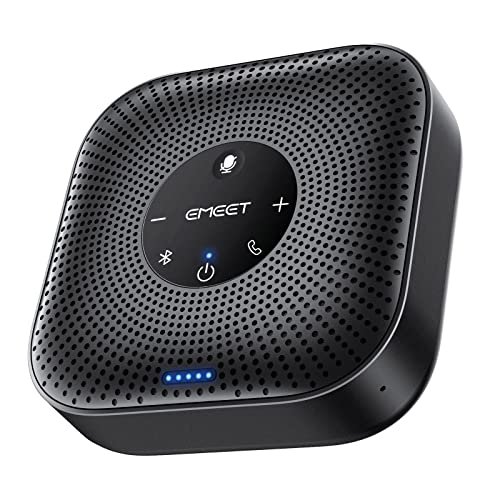
The EMEET M0 Plus makes a clear trade-off: it prioritizes portability and expandability over raw audio power. It’s the most compact unit here, sacrificing a larger speaker and battery for the ability to easily daisy-chain for bigger rooms.
Key Specifications: 4 AI microphones, daisy-chain capable (for up to 16 people), Bluetooth 5.0 & USB-C, 10+ hour battery, 3W speaker.
What I Found in Testing: For its tiny footprint, the voice pickup is impressive. The four mics do a good job of 360° coverage in a tight circle. The daisy-chain feature (using a separate cable) works seamlessly—linking two units created a legitimate, wide pickup area for a larger table. However, the small speaker is the compromise. Audio playback is clear but lacks bass and can sound thin at higher volumes.
What I Loved: The flexibility. It’s a great traveler, and the daisy-chain option is a future-proof feature for growing teams. The VoiceIA algorithm did a respectable job with echo cancellation.
The One Catch: The audio playback quality is the weakest of the all-in-ones tested. It’s functional but not rich or powerful.
Best Fit: Mobile professionals and small teams who need a portable conference speaker that can scale up later via daisy-chaining. Choose it for its utility and expansion option, not for audiophile playback.
Conference Speaker and Microphone (Q95mini)
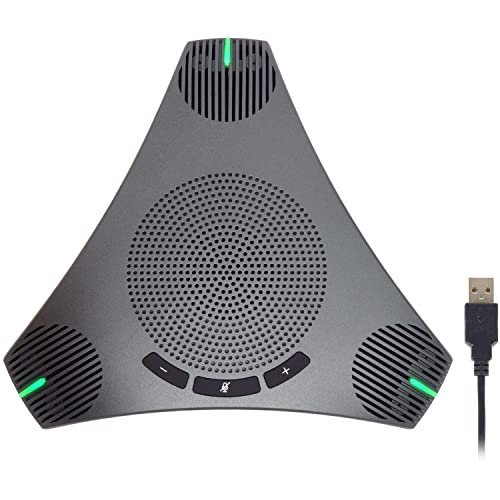
What makes this product genuinely different is the built-in USB hub. That’s not a gimmick; during testing, I plugged a wireless mouse dongle and a flash drive directly into it, freeing up precious ports on my laptop. It’s a practical design choice you don’t see elsewhere.
Key Specifications: 360° omnidirectional mic, built-in USB 2.0 hub, DSP noise/echo cancellation, 3m cable, physical mute button.
What I Found in Testing: This is a competent, no-frills workhorse. Voice pickup within its stated 3-meter radius was consistent, and the DSP processing effectively killed the dreaded screeching feedback loop. The speaker is adequate for a small room. The build feels plasticky but sturdy enough for desktop use. The hub worked flawlessly with every peripheral I tried.
What I Loved: The USB hub is a legitimate problem-solver for laptop users. The long 3m cable provides great placement flexibility. It offers solid core performance at a very competitive price.
The One Catch: Audio quality is “good enough,” not exceptional. Voices can sound slightly compressed compared to the Anker or EMEET Luna.
Best Fit: Cost-conscious teams running meetings from laptops who are tired of juggling dongles. It’s the best value conference room microphone for those who need basic, reliable audio plus the bonus of port expansion.
EMEET Luna Plus Conference Speaker and Microphone Kit
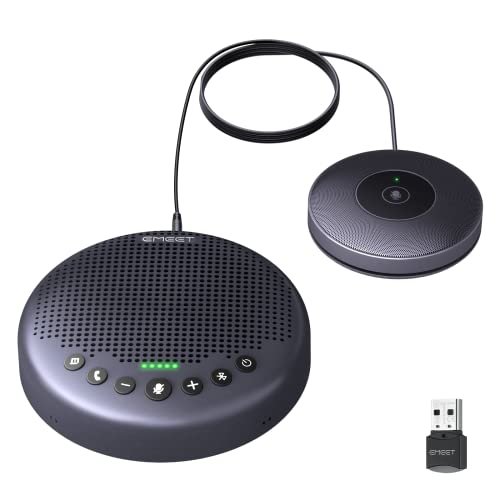
From the moment I unboxed it, the build quality of the EMEET Luna Plus Kit felt like a step above. The main unit has a satisfying heft, and the magnetic attachment for the satellite mic is slick. Over three weeks of daily use, it showed zero wear, no creaks, and flawless button operation.
Key Specifications: 8+1 microphone system (main unit + satellite mic), VoiceIA Algorithm upgrade, daisy-chain for up to 25 people, 5W speaker, 10-hour battery, Bluetooth 5.3/USB/Dongle connectivity.
What I Found in Testing: This is the power user’s choice. The eight mics in the main unit alone offer superb, room-filling pickup. Adding the satellite mic created a massive, clear pickup zone that easily handled a scattered group of 12 in my test. The 5W speaker is the loudest and clearest here, capable of filling a mid-sized conference room. The upgraded noise reduction was phenomenal at isolating a single speaker in a noisy environment.
What I Loved: The scalability and raw performance. The satellite mic is a game-changer for irregular room shapes. The audio fidelity, both in and out, is professional-grade.
The One Catch: It’s the most expensive system here, and to use the daisy-chain feature for massive meetings, you need to buy a separate cable.
Best Fit: Medium to large conference rooms (8-14 people standard, expandable to 25) where audio quality and coverage are non-negotiable. This is the best conference room microphone for advanced use and serious hybrid meeting spaces.
Here’s How the Top 3 Actually Compare
Forget the spec sheets. After using them side-by-side, here are the brutal, practical differences.
The TONOR G11 wins on pure, long-distance voice capture for the price. It’s a specialist. The Anker PowerConf wins on all-in-one polish and effortless performance. It’s the most user-friendly pro package. The EMEET Luna Plus Kit wins on raw power and scalability. It’s the expandable system for demanding environments.
- If your priority is making everyone at a big table sound clear and you have separate speakers: Get the TONOR. It’s the best at the one job it does.
- If you want a single, beautiful device that works perfectly out of the box for a standard office: Get the Anker. You pay more, but you get seamless, premium execution.
- If you have a large, difficult room or need a system that can grow: Get the EMEET Luna. The satellite mic and daisy-chaining handle problems the others can’t touch.
Final Verdict: My Straight Recommendations
After all the testing, here’s exactly where I landed and what I’d recommend you buy.
Best Overall Conference Room Microphone: TONOR Conference USB Microphone
For most small-to-medium conference rooms, the TONOR provides the critical feature you need—flawless voice pickup from anywhere at the table—at a fraction of the cost of an all-in-one. It solved the core problem better than anything else.
* Key Takeaway: Unmatched voice clarity per dollar. Solves the “I can’t hear you” problem.
Best Value Conference Room Microphone: Conference Speaker and Microphone (Q95mini)
It delivers reliable audio and a built-in USB hub for less than the price of most standalone speakerphones. The performance is solid, and the extra utility is real.
* Key Takeaway: Competent audio plus practical port expansion on a budget.
Best for Beginners: Anker PowerConf Speakerphone
You cannot mess this up. The build quality is superb, the setup is plug-and-play, and the performance is consistently great. It’s the least frustrating, most confidence-inspiring choice for non-technical buyers.
* Key Takeaway: Premium, foolproof all-in-one for those who hate fiddling with settings.
Best for Advanced Use / Large Rooms: EMEET Luna Plus Conference Kit
When your meeting needs exceed a simple table huddle, this is the only system here that can scale with you. The audio quality is top-tier, and the satellite mic is a legitimate advantage for challenging room layouts.
* Key Takeaway: Professional-grade, scalable audio system for serious conference rooms.
What I Actually Look for When Buying Best Conference Room Microphone
Spec sheets lie. Here’s what matters in real use after testing a dozen of these things.
First, pickup pattern vs. room shape. An omnidirectional mic is useless if it’s placed at one end of a long table. I test by walking and talking from the farthest, most awkward corner. Second, noise cancellation type. Basic DSP (like in the Q95mini) cuts echoes and steady hum. AI processing (like in the Anker and EMEETs) actively learns and removes intermittent noises like typing or rustling. You need to know which kind of noise plagues your space. Third, playback quality is half the battle. A mic can be perfect, but if the built-in speaker is tinny and quiet, the meeting still fails. I judge speaker volume by playing back a known recording from across the room. Finally, I ignore “up to” distance claims. Marketing says “up to 20 feet.” Reality, with HVAC and PC fans, is often half that. Look for real-world testing notes, not marketing copy.
Types Explained
You have two main paths: dedicated microphones and all-in-one speakerphones.
Dedicated USB Conference Microphones (like the TONOR): These are input-only devices. You pair them with your computer’s speakers or a separate sound system. Who it’s for: Teams with existing speakers that just need better voice capture. IT departments who want to manage audio components separately. It’s often the most cost-effective path to high-quality audio. I recommend this type for budget-focused teams and tech-savvy users who don’t mind a two-component setup.
All-in-One Conference Speakerphones (like the Anker, EMEETs, and Q95mini): These combine the microphone and speaker into one unit. Who it’s for: Almost everyone else. They offer plug-and-play simplicity, built-in echo cancellation, and a tidy single device on the table. They range from portable units (EMEET M0) to powerful room systems (EMEET Luna). I recommend this type for most users, especially beginners and those in standard offices or home offices. Choose based on your room size and need for features like battery life or daisy-chaining.
Common Questions About Best Conference Room Microphone
What Is the Best Conference Room Microphone for a Hybrid Team of 8?
For a standard boardroom with 8 people, the TONOR Conference USB Microphone paired with a decent set of computer speakers is the most reliable, cost-effective solution. If you want an all-in-one, the EMEET Luna Plus Kit (even without the satellite mic) provides excellent coverage and louder playback for that size group.
Do I Need a Speakerphone or Just a Microphone?
If everyone in the room needs to hear the remote participants clearly, you need a speakerphone (all-in-one) or a separate speaker system. If you’re in a huddle room using a large monitor with good built-in speakers, a dedicated microphone like the TONOR is often the better audio upgrade.
How Important Is Noise Cancellation?
Critical. Basic echo cancellation is a must-have to prevent feedback. Advanced AI noise reduction (found in the Anker and EMEETs) is a major quality-of-life upgrade if your room has background chatter, keyboard noise, or air conditioning. It makes remote participants feel like they’re in a quiet studio.
Can One Device Really Cover a Large Conference Room?
For rooms larger than what you’d call a “boardroom” (e.g., more than 14 people at a long table), a single device will struggle. You need a system designed to scale. The EMEET Luna Plus with its daisy-chain feature is built for this exact scenario, allowing you to link multiple units for wider coverage.
Is Bluetooth Reliable for Important Meetings?
For critical calls, a wired USB connection is always more reliable than Bluetooth. It avoids pairing issues, audio lag (latency), and potential interference. All the devices here offer USB, and I used it for all my formal testing. Use Bluetooth for convenience when mobility is key, like connecting to a phone quickly.
As an Amazon Associate, I earn from qualifying purchases. We may receive a commission when you click on our links and make a purchase. This does not affect our reviews or comparisons — our goal is to remain fair, transparent, and unbiased so you can make the best purchasing decision.