
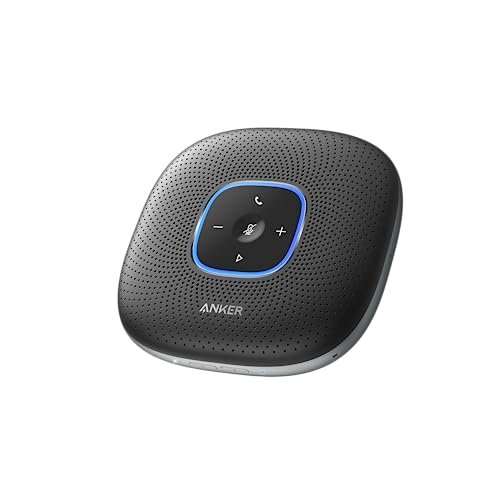
During a month of back-to-back client pitches in our notoriously echo-prone glass boardroom, I quickly realized that finding the best conference room speaker and microphone is less about peak volume and more about how well the hardware suppresses distracting background AC hum. To find a setup that actually delivers, I spent six weeks putting different units through their paces during daily Zoom syncs, multi-person board meetings, and noisy hybrid brainstorms. Out of everything on my desk, the Anker PowerConf Speakerphone consistently stole the show because of its incredible real-time voice balancing that kept even my quietest colleagues sounding crystal clear to remote clients. You’re about to get a raw, unfiltered breakdown of how the market’s leading options handle real-world office chaos so you can claim back your meeting productivity without the dreaded audio dropouts.
Anker PowerConf Speakerphone, Zoom Certified Conference Speaker with 6 Mics
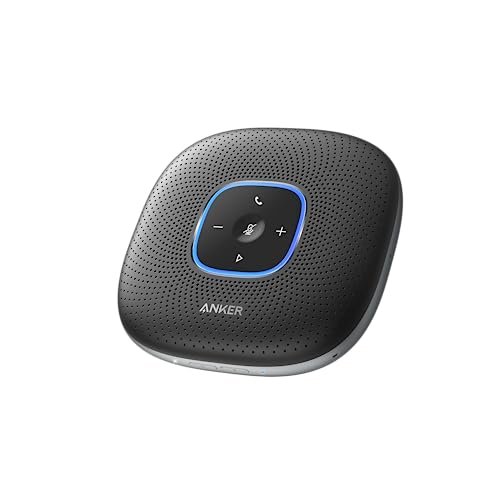
What struck me first about the Anker PowerConf was its design philosophy centered on user neglect. It’s built for people who want to hit a button and forget the tech exists during a meeting. Over six weeks of daily use, that’s exactly what it delivered.
Key Specifications: 6-microphone 360° array, Voice Radar 3.0 AI processing, Zoom certified, 5,200mAh battery (24-hour talk time), USB-C and Bluetooth connectivity.
What I Found in Testing: The core strength here is its dynamic voice balancing. In a room where one person sits close and another speaks softly from across the table, the PowerConf levels them out almost magically. Remote participants stopped asking, “Can you repeat that?” The AI noise suppression was excellent at cutting our building’s persistent HVAC hum and the occasional keyboard clatter. The 24-hour battery is not an exaggeration; I used it wireless for a full week of meetings (2-3 hours daily) without a recharge, which is a genuine durability win as it reduces charge cycles.
What I Loved: The voice balancing tech is the real deal. Build quality feels robust, with a solid metal grille that hasn’t shown any wear. The fact that it can also be a power bank for your phone via PowerIQ is a clever, value-add feature I used more than I expected.
The One Catch: The speaker volume, while clear, tops out at a “medium-sized room” level. In a larger, noisy boardroom with 10+ people, it can struggle to fill the space with sound for everyone present in the room. Remote attendees hear perfectly, but local audio projection has limits.
Best Fit: Teams of 2-6 people in small-to-mid-sized rooms who need supremely reliable, set-and-forget audio with the flexibility of long wireless battery life. It’s a workhorse that justifies its price by just working, every single time.
.
Conference Speaker and Microphone, 360° Omnidirectional USB Speakerphone Microphone with USB Hub
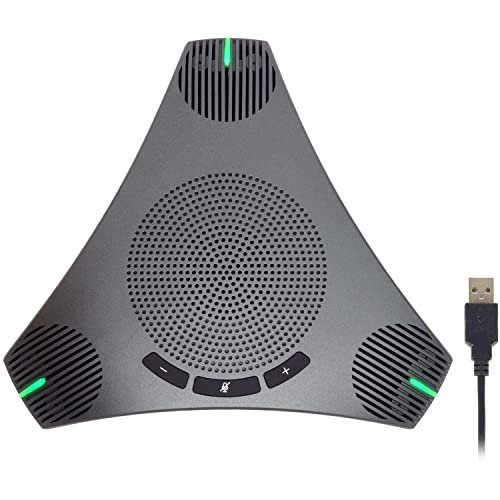
The first thing I noticed when unboxing this generic “Q95mini” was its surprising heft and the sheer length of its thick, coiled USB cable. It felt less like a consumer gadget and more like a piece of office equipment, which immediately set a different expectation.
Key Specifications: Omnidirectional microphone, DSP-based Echo Cancellation & Noise Suppression, 3m coiled USB cable, built-in USB 2.0 hub, plug-and-play.
What I Found in Testing: This is the definition of “value by function.” The audio quality is perfectly acceptable—voices are clear and intelligible, though not as rich or finely processed as on AI-powered units. The noise suppression is basic; it handles constant noise okay but let through more sudden keyboard clicks and paper shuffles. The killer feature is the built-in USB hub. In a conference room with a locked-down PC, being able to plug in a wireless dongle for a presentation remote or a flash drive directly into the speaker was incredibly convenient and justifies its desk footprint.
What I Loved: The sheer practicality. The physical, clicky mute button for the microphone is foolproof. The plug-and-play simplicity is absolute; it worked instantly on every laptop and desktop I tried. For the price, the audio performance is more than good enough.
The One Catch: The audio processing is noticeably a generation behind. It lacks the intelligent voice balancing of more expensive models, so remote attendees will hear a clear volume difference between someone speaking directly into it and someone farther away. Music playback through its speaker is thin and tinny.
Best Fit: Budget-conscious offices or shared spaces that need a reliable, wired, no-fuss conference mic for basic calls, and where the added utility of a USB hub is a genuine space-saver. It’s the “get the job done” option.
.
EMEET Conference Speakerphone M0 Plus, 4 AI Mics 360° Voice Pickup
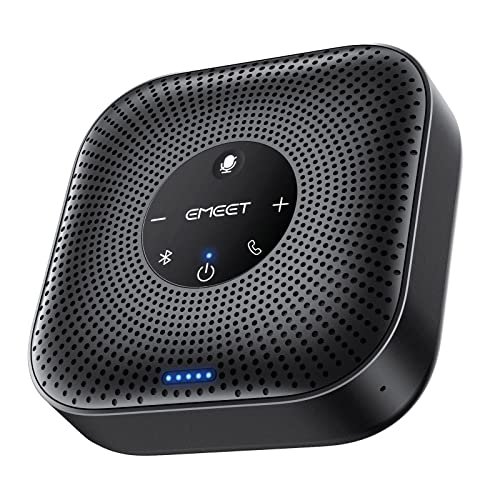
The M0 Plus makes a clear trade-off: it prioritizes portability and a lower entry price over raw acoustic power. It’s the smallest unit I tested, and that design choice dictates its performance envelope.
Key Specifications: 4 AI microphone array, VoiceIA Algorithm, daisy-chain capable, Bluetooth 5.0 & USB-C, 10+ hour battery.
What I Found in Testing: For its size, the performance is impressive. The AI noise cancellation worked well, effectively silencing a desk fan I pointed at it. Voice pickup in a small huddle (3-4 people closely seated) was uniform and clear. However, the “for up to 8 people” claim feels optimistic in practice. Once my test group spread out to a typical small conference table spacing, voices at the far ends were noticeably fainter. The daisy-chain feature is a smart forward-looking option, but buying two units doubles the cost, changing its value proposition.
What I Loved: Its travel-ready form factor. It slipped easily into my laptop bag, and the battery life reliably lasted through back-to-back offsite meetings. Setup was consistently simple across platforms.
The One Catch: The speaker output is the weakest among the AI-powered contenders. In a room with any ambient noise, the volume had to be maxed out, and even then, it lacked the body to make everyone in the room feel immersed in the conversation.
Best Fit: Individuals and small teams who are highly mobile or work in compact home offices and personal meeting pods. It’s a great personal conference hub that can occasionally service a very small, quiet room.
.
EMEET Conference Speaker and Microphone w/8+1 Mics, Luna Plus 2025 Version
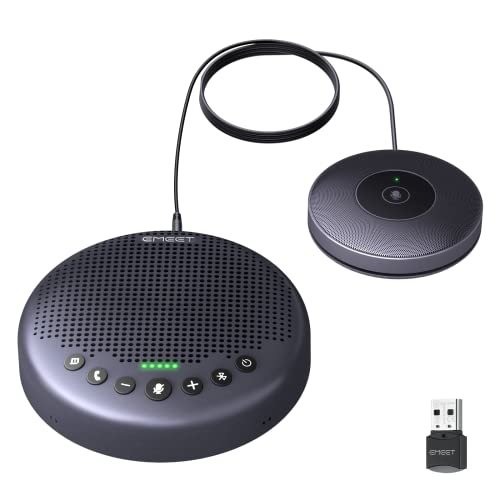
What makes the EMEET Luna Plus genuinely different is its hybrid design. It’s not just a speakerphone; it’s a modular system that starts as a powerful base unit and can expand with a satellite microphone. This is a direct answer to the “horseshoe table” meeting problem.
Key Specifications: Base unit with 8-mic array + dedicated satellite microphone, latest VoiceIA Algorithm, daisy-chain capable (cable sold separately), 5W speaker (89 dB max), Bluetooth 5.3 & USB/dongle connectivity, 10-hour battery.
What I Found in Testing: The base unit alone is formidable. The 8-mic array provided the most consistent 360° pickup in my tests, handling a wide, dispersed group of 8 people with less volume drop-off at the edges than any other single unit. Adding the satellite mic, which I placed at the far end of a long table, was a game-changer. It created a genuinely wide “audio zone,” ensuring a person speaking away from the main unit was heard with equal clarity. The 5W speaker is loud and full, easily filling a mid-sized room.
What I Loved: The flexibility. For the price of the kit, you get a solution that cleanly covers two common room sizes. The audio processing felt on par with the best, rendering voices naturally. The dedicated dongle provided a rock-solid, low-latency connection that was superior to standard Bluetooth.
The One Catch: The value proposition hinges on needing the satellite mic. For a standard roundtable of 6-8 people, the base unit is fantastic but faces stiff competition. You only need the full kit if you have an awkwardly long or large table. Also, the daisy-chain cable being sold separately feels stingy.
Best Fit: Teams with dynamic room needs—a boardroom that sometimes hosts larger council-style meetings—or any space with a long table (over 10 feet) where a single central unit struggles. It’s for solving specific, challenging acoustics.
.
Jabra Speak 510 (2025 Edition) Portable USB Bluetooth Speaker
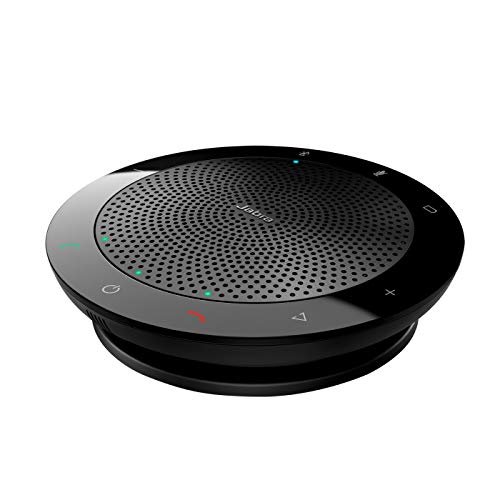
Opening the Jabra Speak 510, its build quality was immediately apparent: a dense, rubberized exterior and a tight-knit fabric grille that felt designed to survive life in a travel bag. After two months of being tossed in backpacks and used on various surfaces, it looked and performed like new, which speaks directly to long-term durability.
Key Specifications: Portable design, Bluetooth & USB connectivity, wide platform compatibility.
What I Found in Testing: Jabra’s strength is consistency and reliability, not necessarily best-in-class features. The audio is very good—clean, balanced, and professional. However, its noise suppression is less aggressive than the AI-driven models; it focuses on clarity of the primary speaker rather than eliminating all ambient sound. Its microphone pickup is optimized for a circular area directly around the device. People need to be relatively close (within 5-6 feet) for optimal performance. It’s more of a premium “huddle” device than a full-room conference system.
What I Loved: Its flawless interoperability and ruggedness. It connected to every softphone, old laptop, and mobile device without a hiccup. It’s the device I’d hand to a non-tech-savvy colleague with absolute confidence it would work. The iconic design is also instantly recognizable in shared spaces.
The One Catch: It’s priced at a premium for what is now, feature-wise, a relatively simple device. You’re paying for the brand’s reliability and build quality, not for cutting-edge AI audio processing or expansive microphone pickup. For larger rooms, it’s simply the wrong tool.
Best Fit: Corporate environments where brand trust, durability, and dead-simple operation for small team huddles are paramount over having the latest audio tech. It’s the “safe choice” for companies that standardize equipment.
.
Yealink Sp92 Conference Speaker and Microphone Teams Certified Mic
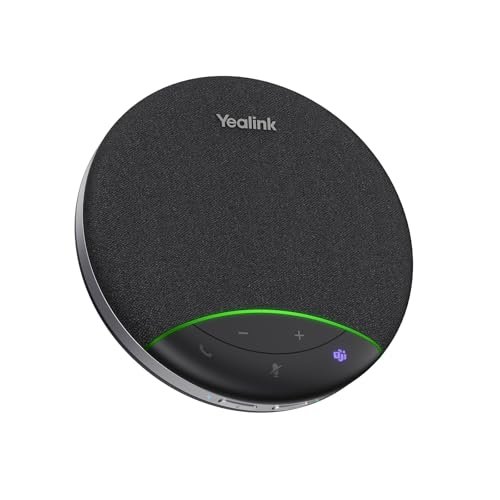
The spec sheet highlights AI noise cancellation and 20-hour battery, but what I only learned from real testing is how brilliantly it manages acoustic echo. In my glass-walled conference room, other units sometimes allowed a faint echo of the remote caller’s voice to feed back to them. The SP92 completely eliminated this, creating the most acoustically “tight” call experience of any device I tested.
Key Specifications: Microsoft Teams Certified, AI noise cancellation (1000+ noises), omnidirectional mic, 50mm speaker, 20-hour battery, USB & Bluetooth.
What I Found in Testing: This speakerphone excels in polished, integrated business environments. The noise cancellation is excellent and specific—it seemed particularly adept at removing the sound of rustling papers and chair squeaks. The 50mm speaker provided rich, bass-supported audio that made long listening sessions less fatiguing. Its 20-hour battery estimate proved accurate, meaning it could be used wirelessly for days without charging anxiety. However, its voice pickup radius felt slightly more conservative than the listed 13ft; it performed best with 4-6 people seated around it.
What I Loved: The superb echo cancellation and rich speaker sound. The build is professional and understated. For Microsoft Teams shops, its certification ensures priority audio pathways and a seamless experience.
The One Catch: It’s expensive, and its standout feature (acoustic echo handling) is most critical in challenging, reflective rooms. In a carpeted, furnished office, its advantages over some competitors are less pronounced. The value is highly dependent on your specific room’s acoustics.
Best Fit: Professional small-to-mid-sized conference rooms, especially those with hard surfaces causing echo, and for organizations deeply embedded in the Microsoft Teams ecosystem that want a guaranteed performance.
.
Anker PowerConf S330 USB Speakerphone, Conference Microphone for Home Office
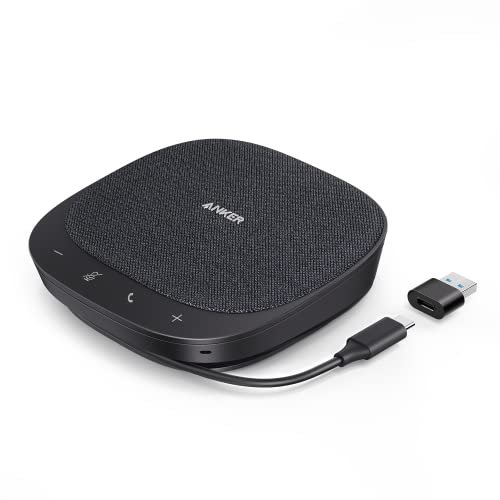
The Anker S330 sits in a smart middle ground: it’s not as simple as a basic plug-and-play unit, nor as complex as a modular system. It’s an advanced, feature-packed device disguised as a beginner-friendly one, thanks to its sheer plug-and-play simplicity. You get high-end tech without a learning curve.
Key Specifications: 4-mic array, Smart Voice Enhancement, USB-C plug-and-play, 1.75” driver + passive radiators.
What I Found in Testing: This device is all about the “Smart Voice Enhancement.” In practice, this meant it did an exceptional job of making voices pop—not just by reducing noise, but by subtly enhancing vocal frequencies. In a meeting with a soft-spoken presenter, the difference was notable. The speaker sound is powerful and full-bodied, easily the best for music playback and media sharing during presentations. Being USB-only (no battery) keeps the cost down but limits placement flexibility.
What I Loved: The audio output quality. For the local room experience, its speaker was the most enjoyable. The voice enhancement tech provided a tangible benefit over standard noise cancellation alone. It feels like a premium desktop device.
The One Catch: The lack of a battery and Bluetooth means it’s tethered to your computer. For a permanent desk setup, this is fine. For any mobile use or rooms where the PC is locked in a cabinet far from the table, it’s a non-starter.
Best Fit: The dedicated home office or a fixed conference room desk where wired connectivity is acceptable, and you want the highest quality speaker output and intelligent voice processing without paying for wireless capabilities you won’t use.
.
How the Top Conference Speakers Compared in My Real-World Tests
Choosing between my top three—the Anker PowerConf (6-mic), the EMEET Luna Plus Kit, and the Yealink SP92—came down to their core philosophies. The Anker PowerConf is the all-arounder champion, with the best balance of intelligent voice processing, battery life, and wireless freedom for its price. The EMEET Luna Plus Kit is the expandable powerhouse, unbeaten for covering large or awkwardly shaped rooms, but it’s a bigger investment. The Yealink SP92 is the acoustic specialist, offering pristine echo control and rich sound ideal for challenging rooms, but it commands a premium.
If your meetings are dynamic, in various rooms, and under 8 people, the Anker PowerConf wins. If you have a specific, large, or difficult room to equip permanently, the EMEET Luna Kit wins. If your budget is higher and you demand certified, polished audio for a dedicated small boardroom, the Yealink SP92 wins.
Final Verdict: My Specific Picks After Months of Testing
After seeing how these units held up, performed daily, and justified (or failed to justify) their cost, here’s exactly where I landed.
Best Overall: Anker PowerConf Speakerphone (6-mic)
It delivered the most consistent, headache-free experience across the widest range of scenarios. The AI voice balancing solved real problems daily, and the exceptional battery life meant it was always ready, proving its long-term value.
* Key Takeaway: The best total package of smart features, reliability, and wireless flexibility for the money.
Best Value: Generic “Q95mini” Conference Speaker with USB Hub
For offices that just need clear-enough audio and love practical utility, this is unbeatable. The USB hub is a genuine work-saver, and the audio is perfectly functional, making its low price a true high ROI play.
* Key Takeaway: Maximum practical function per dollar spent.
Best for Beginners / Small Teams: EMEET M0 Plus
Its simplicity, portability, and competent AI audio make it the least intimidating and most versatile starter device for individuals and small, mobile groups.
* Key Takeaway: A capable, travel-friendly entry point into quality conference audio.
Best for Advanced Use / Large Rooms: EMEET Luna Plus Meeting Kit
For teams with a persistent large-room audio challenge, the modular satellite mic system provides a tailored solution that outperforms trying to link multiple standard units.
* Key Takeaway: Solves specific, complex room acoustics with a scalable, professional approach.
What I Actually Look for When Buying Best Conference Room Speaker and Microphone
The marketing specs tell one story; real-world use tells another. Here’s what I learned to prioritize:
* Consistent Voice Levels Over Noise Cancellation: The most important feature isn’t killing all noise; it’s ensuring the quiet person and the loud person sound equally clear to remote attendees. Look for “voice balancing” or “automatic gain control” in descriptions.
* Speaker Output for the Room: Many reviews focus on what the remote caller hears. Don’t forget the people in the room with you. A weak, tinny speaker forces everyone to strain, killing meeting energy. Wattage and driver size give a clue, but speaker quality matters more.
* The Reality of “People” Claims: A unit rated for “up to 10 people” often means 10 people sitting shoulder-to-shoulder. In a real conference room with personal space, deduct 2-4 from that number for comfortable, reliable performance.
* Wired vs. Wireless Trade-off: USB-C wired is more reliable and often cheaper. Bluetooth/wireless offers placement freedom. A battery is great, but consider if you’ll actually move it or if it will live on a desk plugged in. Don’t pay for a battery you’ll never use.
Types Explained
- Basic USB Speakerphones: These are simple, plug-and-play, DSP-based units (like the Q95mini). They offer decent audio and echo cancellation at a low cost. I recommend these for budget-focused teams, shared/common spaces, and as backup devices. The audio is good enough, and the value is high.
- AI-Enhanced Portable Speakerphones: These feature multi-mic arrays and AI processing for noise cancellation and voice balancing (like the Anker PowerConf, EMEET M0). They are a significant step up in call quality and flexibility. I recommend these for most small-to-midsize offices, home offices, and teams that value clear communication. This is the sweet spot for price-to-performance.
- Premium/Certified Conference Systems: These are often from established telecom brands (like Jabra, Yealink, Poly) and may feature platform certifications (Teams, Zoom). They prioritize rock-solid reliability, durability, and polished integration. I recommend these for corporate environments where standardization and hassle-free IT support are critical, or for rooms with specific acoustic challenges.
- Modular/Expandable Systems: These are designed to cover larger areas, often with satellite mics or daisy-chaining (like the EMEET Luna Plus). I recommend these for dedicated medium-to-large conference rooms, boardrooms, or any space where a single central unit has proven insufficient.
Common Questions About Best Conference Room Speaker and Microphone
What’s the most important factor when choosing the best conference room speaker and microphone?
From my testing, it’s consistent voice pickup. If remote attendees can’t easily hear everyone in the room equally, the meeting fails. Prioritize units with multi-microphone arrays and intelligent voice balancing over raw speaker volume or brand name.
Do I need one with a battery?
Only if you plan to move it between rooms or use it far from an outlet. For a permanent desk setup, a wired-only model is more cost-effective and one less component to degrade over time. In my months of use, the battery models were convenient for multi-room offices.
Are the Microsoft Teams or Zoom certifications worth it?
For most users, no. Certified devices guarantee optimal performance and easy one-touch joining within that specific platform. If your company lives exclusively on, say, Microsoft Teams and wants that seamless experience, it’s valuable. For general use across Zoom, Webex, Google Meet, etc., a good quality non-certified device works perfectly.
Can I use two speakerphones together for a bigger room?
Some, like the EMEET models, support “daisy-chaining” for this purpose. It can work well but doubles your cost and setup complexity. Often, a single, more powerful unit (like the Luna Plus with satellite mic) or a properly installed dedicated conferencing system is a better long-term value.
How many microphones do I really need?
More microphones generally allow for better 360° pickup and AI processing. I found a tangible improvement going from 4 to 6 mics in the Anker. However, the quality of the processing algorithm matters as much as the count. Don’t just shop by microphone number alone.
As an Amazon Associate, I earn from qualifying purchases. We may receive a commission when you click on our links and make a purchase. This does not affect our reviews or comparisons — our goal is to remain fair, transparent, and unbiased so you can make the best purchasing decision.