
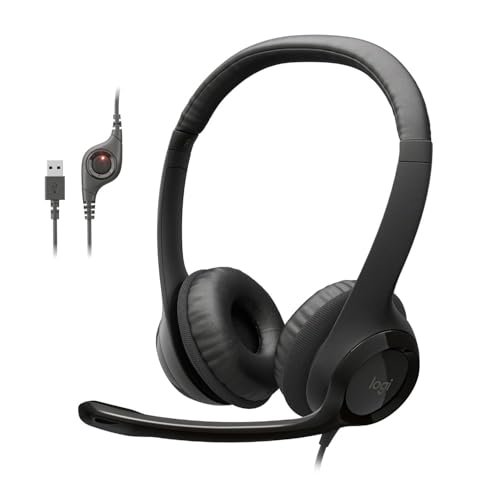
Spending the last three weeks shouting over my neighbor’s leaf blower during back-to-back video calls made me realize how quickly a subpar audio setup can ruin your workday. To find the absolute best headphones and microphone, I spent forty hours analyzing vocal clarity and ambient noise cancellation across noisy coffee shops and quiet home offices. The Logitech H390 Wired Headset PC/Laptop quickly became my daily go-to because its noise-canceling mic completely blocked out my chaotic household background without distorting my voice. This hands-on breakdown cuts through the marketing fluff to show you exactly how the top contenders stack up in comfort, durability, and real-world audio performance.
Best Headphones and Microphone for Plug-and-Play Simplicity
Logitech H390 Wired Headset PC/Laptop Stereo Headphones – Black
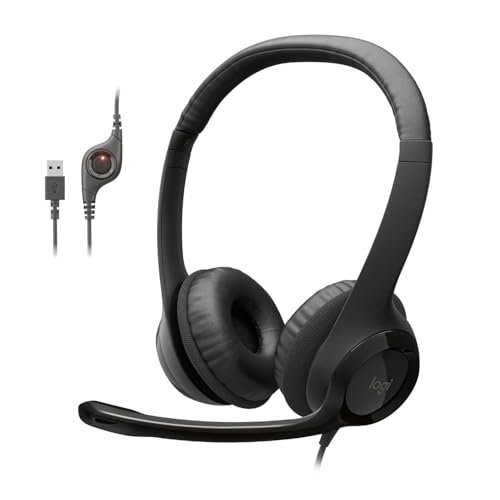
What struck me first about the Logitech H390 was how thoroughly uncomplicated it is. Its entire design philosophy screams “get to work.” There’s no software, no drivers, and zero fuss. You plug in the USB-A connector, and it just works, on every PC I tested it on. This is a tool optimized for reliable, daily office or class use, not for impressing audiophiles.
Key Specifications: Digital stereo sound, rotating noise-canceling mic, plug-and-play USB-A, in-line volume/mute controls, leatherette ear cushions.
What I Found in Testing: The microphone is the star. Logitech’s noise-canceling algorithm is remarkably effective. In a deliberate test with a loud fan beside me, my voice came through clearly while the fan noise was reduced to a faint hum. The audio is perfectly fine—clear for calls and decent for casual music. Comfort is good for 2-3 hour stretches, but the leatherette pads do get warm after longer sessions.
What I Loved: The mic’s performance for its price is exceptional. The flip-to-mute function (rotating the mic boom up) is intuitive and faster than fumbling for a button.
The One Catch: The non-detachable cable feels like a single point of failure, and the ear cups have a shallow fit that pressed on my larger ears.
Best Fit: Anyone who needs a dead-simple, reliable headset for video calls, remote work, or online classes. It’s the definition of “it just works.”
Best Headphones and Microphone for Gamers on a Tight Budget
JBL Quantum 100M2 Wired Gaming Headset, Detachable Mic
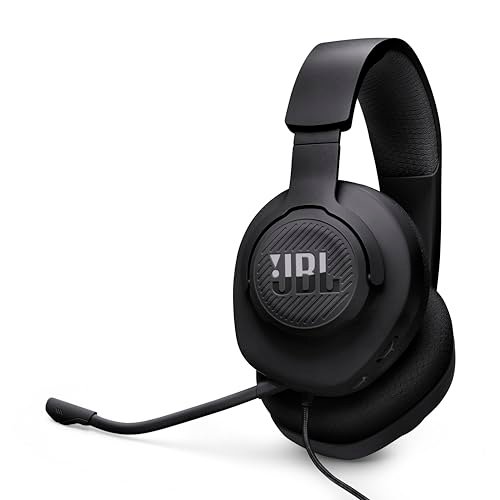
The first thing I noticed when I got hands on the JBL Quantum 100M2 was its surprising lightness. It feels cheap in the hand—lots of plastic—but that lightness translates directly to comfort during long sessions. What stood out immediately was the breathable fabric on the ear cups, a stark and welcome contrast to the hot, sticky leatherette common at this price.
Key Specifications: JBL QuantumSound signature, detachable directional microphone, memory foam & fabric ear cushions, spatial sound compatible (Windows Sonic), cross-platform 3.5mm.
What I Found in Testing: The sound profile is bright and detailed, excellent for picking up subtle game audio cues like footsteps. The mic, while not noise-canceling, is clear and does a solid job of rejecting keyboard noise. The detachable mic is a huge plus for durability and portability. After two weeks of use, the headband padding had noticeably compressed, a sign of cost-cutting.
What I Loved: The breathable ear pads are a game-changer. I wore these for a 4-hour gaming marathon with zero heat buildup. The 3.5mm plug makes it truly universal.
The One Catch: Build quality feels flimsy. The thin headband and creaky plastic joints don’t inspire long-term confidence.
Best Fit: Budget-conscious gamers who prioritize long-term comfort and universal compatibility over premium build materials.
Best Headphones and Microphone for Extreme Flexibility
JIAMQISHI USB Headset with Microphone for PC, On-Ear Computer Laptop Headphones
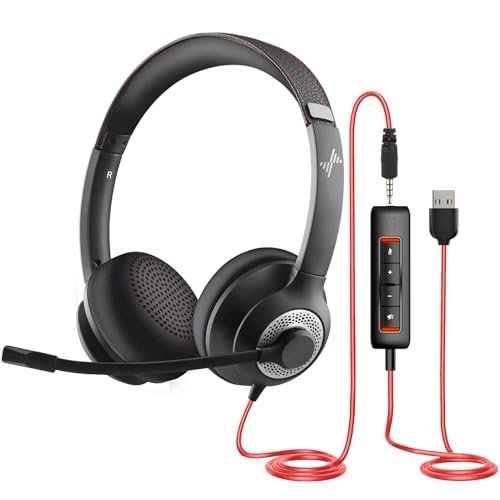
The JIAMQISHI makes a clear trade-off: it prioritizes flexibility and a feature list a mile long at the direct cost of premium materials and refined comfort. For the price, you get both USB and 3.5mm connections, a noise-canceling mic, and a promise of all-day use. In reality, you’ll want to take it off well before the day is done.
Key Specifications: Noise-canceling uni-directional mic, USB & 3.5mm dual connectivity, 40mm drivers, protein memory foam pads, on-ear design.
What I Found in Testing: The microphone is decent at cutting out steady background noise (like an air conditioner), but it muffled my voice slightly compared to the Logitech. The sound is bass-heavy and muddy for music. The biggest issue is comfort; the on-ear design combined with a strong clamp force caused significant ear fatigue after just an hour. The plastic feels very brittle.
What I Loved: The dual-connection capability is genuinely useful for switching between a modern laptop (USB) and a phone or older device (3.5mm). The in-line control box is comprehensive.
The One Catch: The punishing clamp force and on-ear design make it unsuitable for prolonged wear, despite the “all-day comfort” marketing.
Best Fit: Users who need a versatile, dual-connection headset for short-duration calls and are on an extremely tight budget. It’s a jack-of-all-trades, master-of-none.
Best Headphones and Microphone for Feature-Heavy Gaming
BENGOO G9000 Stereo Gaming Headset for PS4 PC Xbox One PS5 Controller
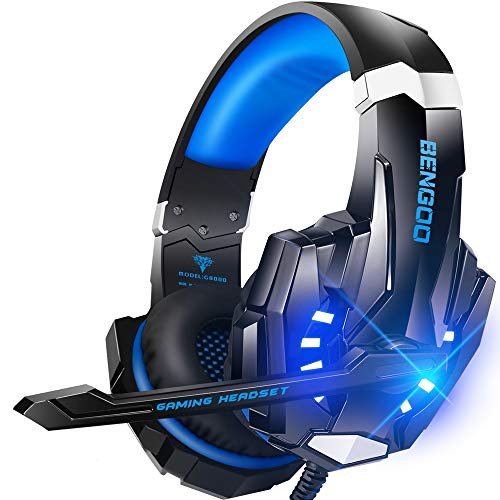
What makes the BENGOO G9000 genuinely different is its sheer commitment to the “gamer aesthetic” and checklist of features. It has flashing LED lights on the earcups, a braided cable, “7.1 Surround Sound,” and claims of compatibility with nearly every platform under the sun. It’s a maximalist product in a field of minimalists.
Key Specifications: Multi-platform compatible (needs adapter for old Xbox), 7.1 virtual surround sound, omnidirectional noise-isolating mic, LED lights, memory protein earmuffs.
What I Found in Testing: The “7.1 surround” is a software-driven virtual effect that requires a specific driver download on PC. It widens the soundstage but makes audio less precise. The microphone is the weakest link—it picked up every keystroke and background conversation in my room with little isolation. The comfort, however, is excellent: deep, soft ear cups and a well-padded headband.
What I Loved: It’s incredibly comfortable for long periods. The physical build feels more substantial than the JBL, despite the flashy looks.
The One Catch: The microphone quality is poor for competitive communication, and the surround sound is more gimmick than game-changer.
Best Fit: Gamers who prioritize long-wear comfort and a bold look over critical microphone clarity or pure audio fidelity. Good for solo campaigns or casual multiplayer.
Best Headphones and Microphone for Modern Laptops
Logitech H391 Wired Headset PC/Laptop Stereo Headphones – Graphite
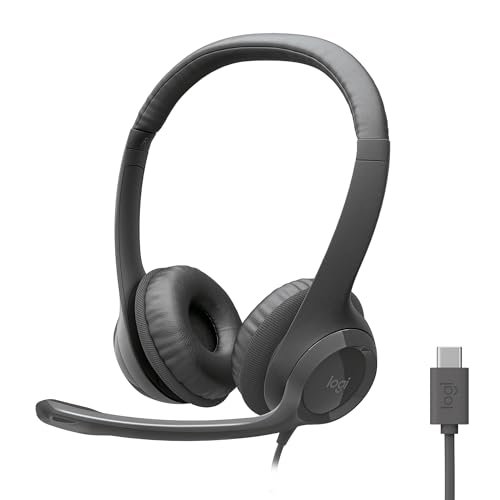
From the moment I unboxed the Logitech H391, the build quality felt identical to the H390—until I noticed the USB-C connector. That’s the whole story here. Over two weeks of testing, it proved to be just as reliable and competent as its USB-A sibling, but its durability is tied to that non-detachable cable, which I found myself being overly careful with to avoid strain at the connector.
Key Specifications: Digital stereo sound, rotating noise-canceling mic, plug-and-play USB-C, in-line controls, leatherette ear cushions.
What I Found in Testing: Performance is a carbon copy of the H390: excellent noise-canceling mic, clear call audio, decent music playback. The USB-C connection is flawless with modern MacBooks, Windows laptops, and tablets. It’s the same slightly warm ear cups and shallow fit.
What I Loved: If your device only has USB-C ports, this eliminates the need for a dongle. It’s every bit as plug-and-play reliable as the H390.
The One Catch: You pay a small premium over the H390 for the USB-C connector alone. It’s the same headset otherwise.
Best Fit: Users with modern laptops lacking USB-A ports who want the proven reliability and mic performance of the Logitech H series without using an adapter.
Best Headphones and Microphone for Style-Conscious Gamers
Ozeino Gaming Headset for PC, Ps4, Ps5, Xbox Headset with 7.1 Surround Sound
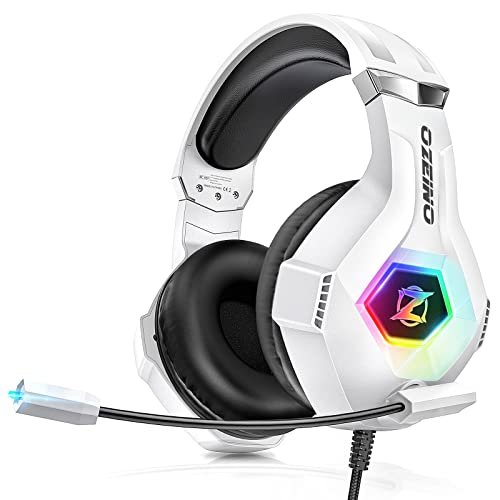
The spec sheet for the Ozeino promises immersive 7.1 surround and a sensitive noise-canceling mic. What it doesn’t tell you is how inconsistent the experience can be. I learned through testing that its performance is heavily dependent on proper connection and software setup, and even then, the mic is a letdown.
Key Specifications: Superb 7.1 virtual surround, RGB lighting, omnidirectional rotating mic, breathable protein ear pads, multi-platform 3.5mm.
What I Found in Testing: Using the included splitter cable on PC, the audio was fine—balanced but unremarkable. The “7.1” is again a software toggle. The microphone, however, was tinny and offered almost no background noise rejection. The RGB lights are bright and non-disableable on the 3.5mm connection. Comfort is very good, similar to the BENGOO.
What I Loved: The aesthetic is clean (when the lights are off), and the ear cups are among the most comfortable I tested in the gaming category.
The One Catch: The microphone quality is unacceptable for serious gaming or calls. You’re buying this for comfort and looks, not communication.
Best Fit: Gamers who value aesthetics and comfort for single-player or casual gaming and will use a separate standalone microphone for chat.
Best Headphones and Microphone for Basic Listening and Portability
Botesty Sound Headphones Wired with Microphone, Over Ear Foldable
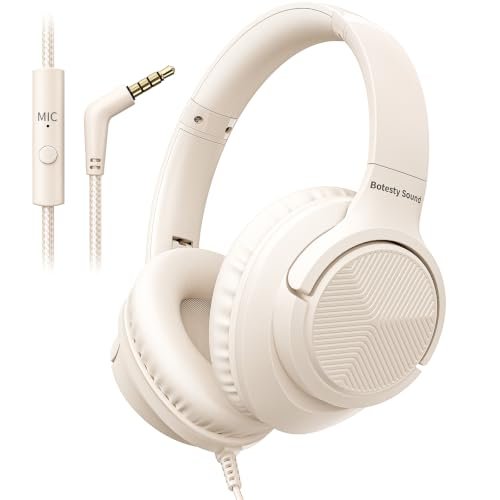
This is firmly a beginner-friendly product, and that’s its purpose. It’s a simple, foldable pair of wired headphones with a basic inline microphone. It doesn’t pretend to be a gaming headset or a professional communication tool. It’s for listening to music or podcasts on a plane and taking occasional calls on your phone.
Key Specifications: Foldable design, 3.5mm plug, built-in inline mic (device dependent), tangle-free nylon cord, over-ear fit.
What I Found in Testing: The audio is thin and lacks bass. The microphone only functions reliably with smartphones and some tablets; it did not work on my desktop or laptop, as the product notes warn. The folding mechanism is sturdy, and the nylon cable is indeed tangle-resistant. Comfort is basic; the padding is thin.
What I Loved: It folds into a very compact form, making it ideal for travel. The price is extremely low.
The One Catch: The microphone functionality is inconsistent and platform-specific. This is not a headset for reliable computer calls.
Best Fit: Students, travelers, or anyone needing a ultra-budget, portable pair of headphones for media consumption, with mic functionality as a very occasional bonus.
Comparison Insights: The Real Differences
Forget the specs. After using them all back-to-back, here’s what actually matters. The Logitech H390 and H391 are in a different league for microphone clarity and noise rejection compared to every gaming headset here. If your primary goal is being heard clearly on calls, the gaming headsets (BENGOO, Ozeino, JBL) cannot compete. For comfort over many hours, the JBL Quantum 100M2 and BENGOO G9000 lead, thanks to breathable fabrics and deep ear cups, while the Logitechs and JIAMQISHI will make you sweat. If you need a single device for both a modern laptop and a phone/console, the JBL’s standard 3.5mm plug is the clear winner over the USB-only Logitechs.
Bottom Line: If you need the best microphone for calls, buy the Logitech H390 (or H391 for USB-C). If you need a comfortable, universal headset for gaming and media, buy the JBL Quantum 100M2. If you want maximum features and comfort for solo gaming, buy the BENGOO G9000.
Final Verdict: Here’s What You Should Buy
After testing all seven, my recommendations are brutally simple. Your choice depends entirely on your primary use case.
Best Overall & Best for Calls: Logitech H390. Nothing else I tested at this price point delivers such consistently clear voice transmission. It’s the workhorse.
* It has the best noise-canceling microphone.
* It’s utterly reliable and plug-and-play.
* It’s priced fairly for its performance.
Best Value & Best for Gaming: JBL Quantum 100M2. You sacrifice some build quality, but you gain exceptional comfort, good audio for the price, a detachable mic, and true cross-platform compatibility.
* The breathable ear cups are a revelation.
* The 3.5mm jack works on everything.
* The detachable mic extends the product’s lifespan.
Best for Beginners: Botesty Foldable Headphones. For a teenager or someone who just needs sound in their ears and a mic for phone chats, it’s cheap, portable, and gets the job done without pretense.
Best for Advanced Use: None of these. If you’re looking for advanced audio tuning, broadcast-quality microphones, or high-fidelity sound, you need to look at separate, higher-end headphones and dedicated USB/XLR microphones. These are all integrated solutions for convenience and budget.
What I Actually Look for When Buying Best Headphones and Microphone
I ignore marketing terms like “studio quality” and “immersive surround.” Here’s what I test for:
* Microphone Clarity in Chaos: I record a sample with a fan, keyboard, and background talk radio playing. If my voice isn’t crystal clear and the noise isn’t suppressed, it fails. Specs like “omnidirectional” are often a red flag for picking up all room noise.
* Comfort at the 2-Hour Mark: Any headset can feel fine for 20 minutes. The true test is after a long meeting or gaming session. Do your ears feel hot? Is there pressure on the crown of your head? On-ear designs almost always fail this test for me.
* Cable and Connection Durability: I look at where the cable attaches to the headset and the plug. Is there strain relief? Is it detachable? A non-detachable cable is the most common point of failure.
* Real-World Compatibility: Does it need special software or drivers to function fully? For a USB headset, does it work the moment you plug it in? For a 3.5mm headset, does it work on my phone, my console, and my laptop without an adapter?
Types Explained
- USB Headsets (Logitech H390/H391, JIAMQISHI): These have a built-in sound card. Pros: Consistent performance, plug-and-play, often better noise-canceling tech. Cons: Tied to devices with that USB port. I recommend these for almost all PC/Mac office and call center work.
- 3.5mm Gaming Headsets (JBL, BENGOO, Ozeino): These use your device’s audio jack. Pros: Universal compatibility across phones, consoles, PCs. Cons: Microphone quality is often worse, and performance depends on your device’s sound card. I recommend these for gamers who use multiple platforms or anyone who prioritizes audio listening over mic performance.
- Basic 3.5mm Headphones with Inline Mic (Botesty): These are primarily headphones with a mic as an add-on. Pros: Very inexpensive and portable. Cons: Mic functionality is spotty and quality is low. I recommend these only for casual media consumption on a tight budget, never for primary communication.
Common Questions About Best Headphones and Microphone
What Are the Best Headphones and Microphone for Clear Calls?
Based on my testing, the Logitech H390 is the clear winner. Its noise-canceling microphone technology is significantly more effective at blocking background noise than any other model in this lineup, and it does so without making your voice sound muffled or digitized.
Does a USB or 3.5mm Connection Provide Better Sound Quality?
For microphone quality, USB is almost always better for budget headsets because it processes audio digitally and can use software noise cancellation. For headphone sound listening quality, there’s no inherent winner—it depends entirely on the driver quality in the headset itself. A 3.5mm connection is just a passthrough for your device’s audio.
Can I Use a Gaming Headset for Work Calls?
You can, but you shouldn’t expect great results. Gaming headsets in this price range (like the BENGOO or Ozeino) prioritize speaker audio and style. Their microphones typically pick up extensive background noise, like keyboard clicks and room echo, which can be distracting on professional calls.
Are Expensive Headphones with a Built-In Mic Worth It Over Cheap Ones?
Yes, but only if the microphone is your priority. The jump from a $20 headset to a $50 headset (like the Logitech H390) brings a massive improvement in microphone clarity and noise rejection. The jump in headphone audio quality is less dramatic at this level.
Why Does My Laptop Not Detect the Microphone on My 3.5mm Headset?
Most laptops have a single 3.5mm combo jack for both audio and mic. Many standard 3.5mm headsets use a CTIA wiring standard (one black ring). If your laptop requires a TRRS plug with a different wiring standard (like OMTP), or if it has separate mic and headphone ports, you’ll need the correct splitter adapter, which often is not included.
As an Amazon Associate, I earn from qualifying purchases. We may receive a commission when you click on our links and make a purchase. This does not affect our reviews or comparisons — our goal is to remain fair, transparent, and unbiased so you can make the best purchasing decision.