
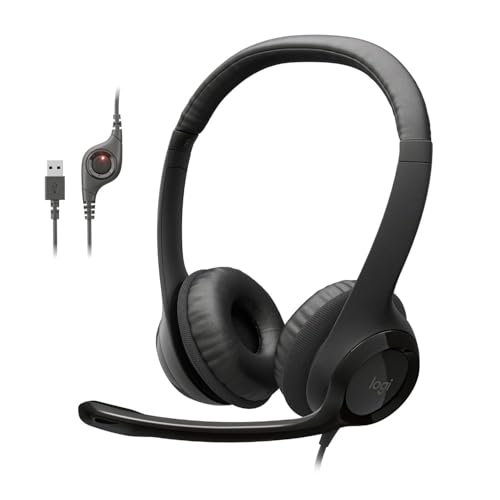
While trying to drown out my neighbor’s leaf blower during an important Zoom call last month, I realized how hard it is to find the best headphones with microphone for pc that actually isolate your voice. Over the last three weeks, I cycled through various headsets during nine-hour workdays, crowded coffee shop editing sessions, and late-night group chats to see which ones survived the daily grind. The Logitech H390 Wired Headset PC/Laptop quickly became my favorite because its plug-and-play simplicity was paired with a noise-canceling mic that made my voice sound incredibly crisp and professional. You will get a no-nonsense breakdown of how these headsets actually perform in real-world environments so you can make the right upgrade for your workspace.
Logitech H390 Wired Headset PC/Laptop Stereo Headphones – Black
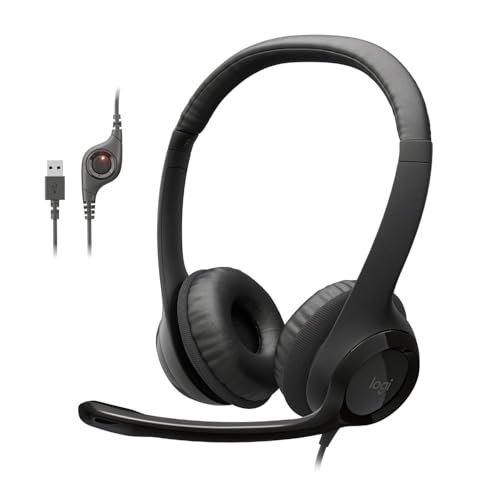
What struck me first about the Logitech H390 was how purely it was designed for one thing: getting your voice through clearly in a busy home office. There’s no software, no drivers, no RGB. It’s optimized for removing friction from your workday, and that philosophy became obvious within minutes of plugging it in. For three weeks, this was my go-to for any call where being understood was non-negotiable.
Key Specifications: Digital Stereo Sound, Rotating Noise Canceling Mic, In-line Volume/Mute Controls, Plug-and-Play USB-A Connector, Leatherette Ear Cushions.
What I Found in Testing: The microphone quality is the star. Whether I was testing it with my air conditioner humming or in a moderately busy café, the noise-canceling algorithm consistently stripped away the low rumble of background noise. My voice remained present and clear in every recording and call feedback I received. The build is light and the ear cups are adequately padded, but this isn’t a luxury item—it’s a tool. The sound profile is clean and balanced for voice and music, but don’t expect thunderous bass.
What I Loved: The sheer reliability. I never had a connection issue or a driver pop-up. The mute and volume dial on the cable became second nature. After dozens of calls, teammates specifically commented that I sounded “much clearer” than before.
The One Catch: The cable is not detachable and feels a bit thin. I was careful not to roll my chair over it, as long-term durability might be a concern with rough handling.
Best Fit: This is the perfect headset for the remote professional, student, or anyone whose primary need is crystal-clear communication on platforms like Zoom, Teams, or Discord. If your workday is defined by back-to-back meetings, this is your workhorse.
Ozeino Gaming Headset for PC, Ps4, Ps5, Xbox Headset with 7.1 Surround Sound
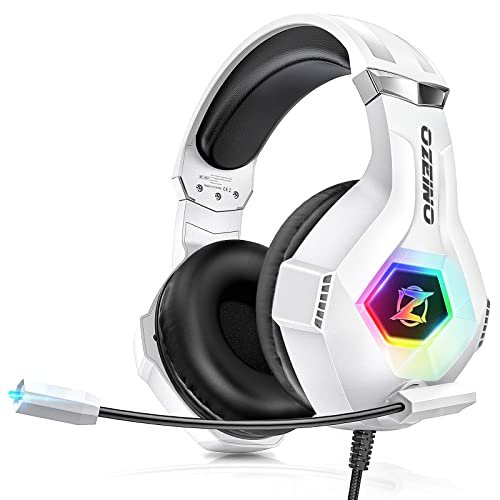
The first thing I noticed when I unboxed the Ozeino headset was its assertive, gamer-centric aesthetic. The white finish, angular lines, and prominent RGB lighting on the ear cups immediately set it apart from the more subdued options on my desk. It’s a headset that announces its purpose, and during testing, I aimed to see if its performance matched its bold look.
Key Specifications: 7.1 Surround Sound (Software-driven), Omnidirectional Rotating Noise-Canceling Mic, RGB Lighting, Breathable Protein Ear Pads, 3.5mm Jack with Included Splitter Cable.
What I Found in Testing: The surround sound effect, enabled via software on PC, genuinely adds width and directional cues in games. In titles like Apex Legends, I could better track footsteps and gunfire directionally. However, for music and movies, I found the sound to be a bit hollow and overly processed. The microphone picks up voice clearly, but its noise cancellation wasn’t as effective as the Logitech H390’s in a noisy room—more background chatter seeped through. The comfort was good for long sessions, thanks to the breathable pads.
What I Loved: The value proposition for a dedicated PC gamer on a budget. You get immersive positional audio, a functional mic, and flashy RGB in one affordable package. The build felt surprisingly sturdy for the price.
The One Catch: You must use the included splitter cable on a PC, which adds cable clutter. The 7.1 surround sound is a software feature that requires a specific setup process; it’s not a simple plug-and-play experience.
Best Fit: This is for the budget-conscious PC gamer who wants an immersive, feature-rich audio experience and loves the gaming aesthetic. It’s a solid choice for long gaming sessions where positional audio is a priority over pristine music fidelity.
Logitech H391 Wired Headset PC/Laptop Stereo Headphones – Graphite
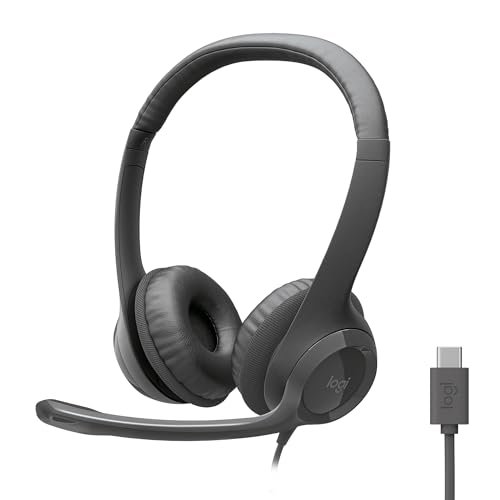
The Logitech H391 presents a clear trade-off: it prioritizes modern connectivity at the cost of universal compatibility. It’s essentially the H390’s sibling, but with a USB-C connector. For three days, I used it exclusively with my newer laptop and tablet, and its design philosophy became clear—it’s for the user who is fully invested in the USB-C ecosystem.
Key Specifications: Digital Stereo Sound, Rotating Noise-Canceling Mic, In-line Controls, Plug-and-Play USB-C Connector, Leatherette Ear Cushions.
What I Found in Testing: The performance is nearly identical to the H390. The microphone delivers the same excellent noise-canceled clarity, and the sound signature is the same balanced, work-friendly profile. The build and comfort are also mirrors of the H390. Where it differed was purely in convenience; plugging into a USB-C port felt sleek and eliminated the need for an adapter on modern devices.
What I Loved: The seamless integration with USB-C devices. It future-proofs your setup if your laptop, tablet, or even phone lacks a traditional USB-A port.
The One Catch: This is its only catch, but it’s significant: if you need to plug into a desktop PC or older laptop with only USB-A ports, you’ll need an adapter, which defeats the purpose of its clean design. It’s a solution for a specific problem.
Best Fit: This is the perfect choice for someone who uses a modern USB-C-only laptop (like many recent MacBooks, Surfaces, or high-end Ultrabooks) and wants the proven call quality of the H390 series without carrying a dongle.
Logitech H111 Wired Headset Stereo Headphones – Black
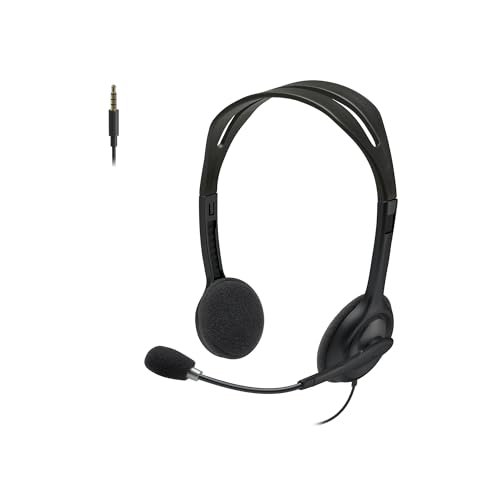
What makes the Logitech H111 genuinely different is its stark simplicity and astonishingly low price point. In a roundup filled with noise-canceling microphones and USB connectivity, the H111 goes back to basics with a straightforward 3.5mm analog connection. I tested it as a bare-bones backup and was surprised by where it held its own.
Key Specifications: Noise-Reducing (Not Canceling) Microphone, Full Stereo Sound, Rotating Boom Mic, 3.5mm Analog Jack, Adjustable Headband.
What I Found in Testing: You have to manage your expectations. The microphone reduces ambient noise but doesn’t cancel it with the same effectiveness as the H390. In a quiet room, your voice will sound fine on calls. In a noisy environment, background sounds will be audible. The audio is perfectly serviceable for videos, music, and games, though it lacks depth. The build is incredibly light and the ear pads are a simpler foam material. For the price, it’s durable enough for gentle use.
What I Loved: The ultimate plug-and-play compatibility. The single 3.5mm jack worked on everything I tried it on—an old desktop PC, a Nintendo Switch, a smartphone—without any drivers or configuration. It’s the definition of a universal headset.
The One Catch: The microphone quality is its main limitation. It’s acceptable, but not ideal for professional calls in imperfect environments. The sound quality is basic.
Best Fit: This is the best headphones with microphone for pc for a beginner, a student on an extreme budget, or someone who needs a spare headset that will work on literally any device with a headphone jack. It’s for “good enough” audio when cost is the primary driver.
Logitech G432 Wired Gaming Headset – Black
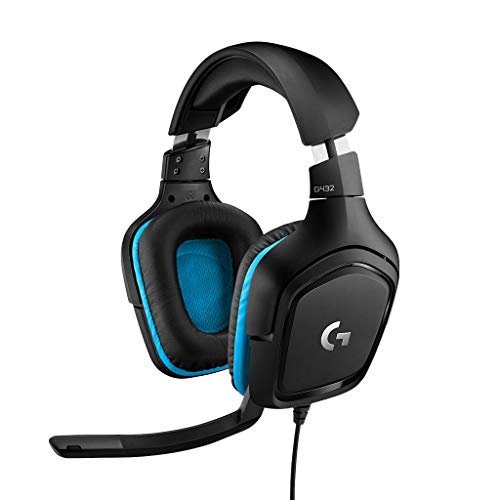
From the moment I picked up the Logitech G432, the build quality signaled a step up. The thicker headband, the robust yet flexible mic boom, and the dense, plush ear cups felt designed for marathon sessions. Over two weeks of testing, which included 4+ hour gaming stints and long workdays, this durability held true, with no creaks or signs of wear.
Key Specifications: 50mm Drivers, DTS Headphone:X 2.0 Surround Sound (via Software), 6mm Flip-to-Mute Mic, Multi-Platform Compatibility (USB DAC or 3.5mm), 90-Degree Rotating Ear Cups.
What I Found in Testing: This headset bridges the gap between gaming and general use better than any other I tested. The 50mm drivers deliver rich, powerful sound with punchy bass for games and movies, yet they remain clear for music and podcasts. The DTS surround software (requires Logitech G Hub) provides a truly immersive, cinematic soundscape. The flip-up mute mic is brilliantly convenient, and my voice was reported as loud and clear, though the noise cancellation wasn’t quite as surgical as the H390’s. Comfort was exceptional for long durations.
What I Loved: The versatility. I could game with immersive audio, then flip up the mic and enjoy high-quality music or take a work call, all with one comfortable headset. It felt like a true all-rounder.
The One Catch: It’s bulkier and less discreet than the office-focused headsets. The audio quality for non-gaming use is best experienced through the included USB DAC, which uses a USB-A port.
Best Fit: This is the best headphones with microphone for pc for the user who wants one headset to rule them all—serious gaming, media consumption, and communication. It’s for the advanced user or hybrid worker-gamer who values audio fidelity and convenience across all their PC activities.
How the Top Three Best Headphones with Microphone for Pc Compared Head-to-Head
After weeks of switching between them, the differences among my top picks became crystal clear in specific scenarios. The Logitech H390 is the undisputed champion for voice clarity. In every call-centric test, its microphone isolated my voice from background chaos better than any other. The Ozeino headset is the budget gaming specialist. Its 7.1 surround sound gave it a distinct edge in competitive gaming immersion over the others, but its mic and music playback were weaker. The Logitech G432 is the versatile powerhouse. It didn’t have the absolute best mic (H390) or the most gaming-specific features (Ozeino), but it delivered a superior, well-rounded experience across gaming, media, and calls.
If your life on PC is defined by professional communication, the H390 wins. If you live for PC gaming and need immersive audio on a tight budget, the Ozeino wins. If you demand great sound for everything you do and want one headset for all of it, the G432 wins.
Final Verdict: Where I Landed After Weeks of Testing
My testing journey confirmed there’s no single “best” headset—only the best one for your specific mix of PC use. Based on dozens of hours across different scenarios, here are my confident rankings.
Best Overall: Logitech G432 Wired Gaming Headset
It earned this spot by being exceptionally good at everything. It’s the most versatile headset I tested, offering premium comfort, great sound for games and media, a very good microphone, and simple controls. For most people who use their PC for a blend of work, play, and entertainment, this is the most satisfying single solution.
* Key Takeaway: Unbeatable as a single-headset solution for mixed use.
Best Value: Logitech H390 Wired Headset
For under $30, the value is astonishing. The microphone performance rivals headsets twice its price. If your primary need is reliable, clear communication, this headset delivers professional-grade results without any fuss or extra cost.
* Key Takeaway: Delivers core professional communication performance at a minimal price.
Best for Beginners: Logitech H111 Wired Headset
Its extreme simplicity and rock-bottom price make it the least intimidating entry point. It works on everything and provides basic, functional audio. It’s the ideal first headset or a disposable spare.
* Key Takeaway: The simplest, most compatible option for first-time buyers or tight budgets.
Best for Advanced Use: Logitech G432
I’m giving it this category as well because it satisfies the user who appreciates and will utilize its advanced features like DTS Headphone:X 2.0 surround sound and the flexibility of the USB DAC. It’s for the user who wants to tweak settings and get the most out of their audio across all applications.
What I Actually Look for When Buying Best Headphones with Microphone for Pc
Product listings love to talk about drivers and surround sound, but after testing these, my real-world criteria shifted. First, I listen for microphone isolation, not just clarity. A mic can make your voice sound great in a silent room, but does it cut out the keyboard clicks, fan noise, and background conversations? That’s what matters on a real call. Second, I assess connection hassle. Is it truly plug-and-play, or does it require software, a special splitter cable, or drivers that might conflict? For daily use, simplicity wins. Finally, I judge long-wear comfort by the materials. Leatherette gets hot; breathable fabrics or velour stay cooler. A headband that distributes weight evenly is more important than a flashy design.
Types Explained
You’ll generally find two types. USB Headsets (like the H390/G432 with DAC) are my default recommendation for most PC users. They connect digitally, often have better-integrated noise-canceling mics, and avoid your PC’s sometimes-poor analog audio ports. They’re simpler and more consistent. 3.5mm Analog Headsets (like the H111/Ozeino) are for maximum compatibility across devices like game consoles, phones, and older PCs. The trade-off is that mic and audio quality can vary based on the device’s own sound card. I recommend USB for dedicated PC use unless you specifically need to plug into many different devices.
Common Questions About Best Headphones with Microphone for Pc
What Should I Prioritize When Choosing the Best Headphones with Microphone for Pc?
Prioritize the microphone’s noise-canceling performance if you take calls in a less-than-perfectly-quiet environment. For general use, comfort and sound quality for your media (music, games, videos) are key. Connection type (USB vs. 3.5mm) should be decided based on your device’s ports and your need for simplicity.
Is a gaming headset good for work calls?
Yes, but with a caveat. Many, like the Logitech G432, have excellent microphones perfectly suitable for work. However, some budget gaming headsets prioritize flashy looks and bass-heavy sound over crystal-clear voice pickup. Always check reviews focusing on microphone clarity.
Does surround sound matter for a PC headset?
For competitive gaming, yes—positional audio cues can be a real advantage. For movies and single-player games, it’s immersive but not essential. For work calls, music, or podcasts, it’s completely irrelevant. Most “surround sound” in headsets is a software simulation, not a hardware feature.
USB or 3.5mm—which is better?
For a dedicated PC setup, I strongly prefer USB. It provides a clean, digital connection that bypasses potential interference or low quality from your motherboard’s audio jack. It also often enables more advanced microphone features. Choose 3.5mm only if you need to use the headset with consoles, phones, or very old computers regularly.
How important is software for a headset?
It depends. For basic plug-and-play headsets like the Logitech H series, software is unnecessary and a benefit. For headsets with advanced surround sound (like the G432 or Ozeino), the software is required to unlock those specific features. Consider whether you want to install and configure an app or just plug in and go.
As an Amazon Associate, I earn from qualifying purchases. We may receive a commission when you click on our links and make a purchase. This does not affect our reviews or comparisons — our goal is to remain fair, transparent, and unbiased so you can make the best purchasing decision.