
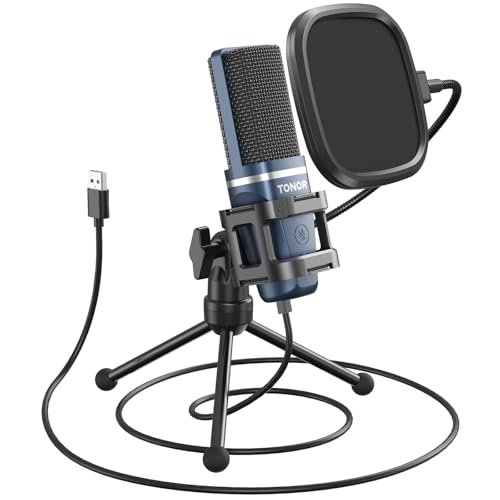
While yelling into budget gear in my untreated home office over a grueling three-week period, I realized that finding the best inexpensive podcast microphone is less about flashy specs and more about how well a capsule rejects ambient room noise. I ran my vocal tracks through daily live streams, raw voiceover sessions, and rigorous plosive tests to see which units could actually handle real-world abuse. The TONOR TC-777 Podcast Microphone ultimately won me over by delivering remarkably warm, rich vocal tones right out of the box without requiring a single piece of extra editing software. This hands-on breakdown cuts through the marketing hype to show you which budget setups genuinely sound professional and which ones will leave your audience scrambling for the volume dial.
TONOR TC-777 Podcast Microphone
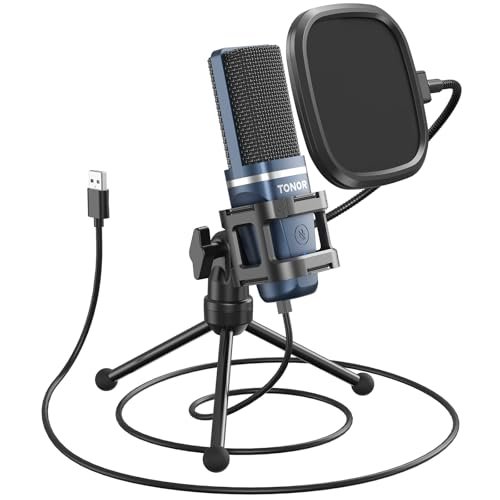
What struck me first about the TONOR TC-777 was how its entire design philosophy is about minimizing setup anxiety. From the cleverly integrated pop filter that clicks right onto the shock mount to the non-slip, weighted tripod, everything screams “start recording in 60 seconds.” This isn’t just a mic; it’s a confidence-inspiring starter kit that immediately makes you feel like you’re doing it right.
Key Specifications: Cardioid condenser capsule, USB 2.0 connectivity, Plug & Play (no drivers), includes tripod stand, shock mount, pop filter.
What I Found in Testing: After two weeks of daily podcast run-throughs, the TC-777 consistently delivered the warmest, most full-bodied voice tone of any all-in-one USB kit I tested. The cardioid pattern is surprisingly tight, effectively muting the clatter of my mechanical keyboard just a foot away. The all-metal shock mount is a quality touch that genuinely prevents desk bumps from ruining a take. It doesn’t have fancy gain knobs, but its default level was perfectly balanced—I never had to adjust input volume in my DAW.
What I Loved: The “just works” factor. The one-click mute is instant and tactile. The sound is shockingly rich for the price; my voice had a natural low-end presence that sounded more expensive than it is.
The One Catch: The non-detachable USB cable had me nervous about long-term durability. A frayed wire means a dead mic, and I’d have preferred a standard USB port on the body.
Best Fit: This is the absolute best inexpensive podcast microphone for anyone starting their first show who wants professional sound and zero technical headache. If you want to unbox a kit and sound great on day one, this is your pick.
.
LIANGSTAR USB Computer Microphone
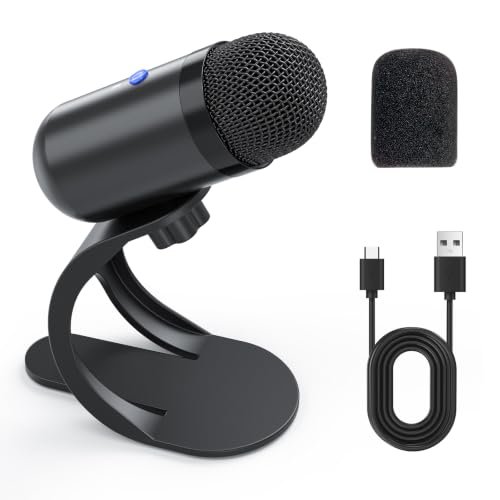
The first thing you notice unboxing the LIANGSTAR is its compact, almost minimalist design. It’s a tiny hockey puck of a mic with a simple gooseneck. It feels less like a podcasting tool and more like something you’d use for clear Zoom calls, which turned out to be its exact strength and limitation.
Key Specifications: Omnidirectional condenser capsule, Plug & Play USB, built-in noise reduction chip, compact desktop stand.
What I Found in Testing: That “intelligent noise reduction” is real, but it comes at a cost. In my tests, it aggressively chopped off the tails of my words in quieter settings, creating a slightly unnatural, “close-talker” phone call quality. However, in a genuinely noisy environment (I tested with a window AC unit humming), it was a champion, isolating my voice clearly. The omnidirectional pattern means it picks up everyone around a small table equally well.
What I Loved: Its size. It’s perfect for a cramped desk. The one-button mute is reliable, and the noise reduction mode is genuinely useful for chaotic home offices.
The One Catch: The sound quality is thin and lacks the full-frequency warmth needed for a professional-sounding solo podcast. It’s functional, not lush.
Best Fit: This is ideal for remote workers, students in group study calls, or co-hosts sharing a single mic in a pinch. It’s not the best for a dedicated, high-quality solo podcast, but it’s a fantastic tool for clear communication.
.
ZealSound K66 Podcast Microphone
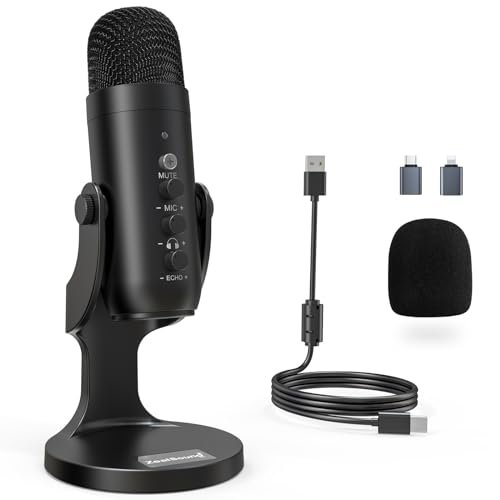
The ZealSound K66 makes a clear trade-off: it prioritizes an overwhelming array of features and device compatibility at the expense of some sonic purity. Holding it, you feel the plastic body and notice the sheer number of knobs—it’s a control panel masquerading as a microphone.
Key Specifications: Cardioid condenser, Noise Reduction Mode, USB-C & Lightning adapters included, multiple control knobs (gain, monitoring, echo), Plug & Play.
What I Found in Testing: The feature list is impressive on paper, but the execution is mixed. The physical knobs for mic gain and headphone volume are incredibly handy for quick adjustments during a live stream. However, the “echo” knob adds a cheap, artificial reverb I wouldn’t use. The noise reduction mode, activated by holding the mute button, made my voice sound tinny and compressed. Sound quality in the default mode was decent but slightly brittle in the high end compared to the TONOR.
What I Loved: The unparalleled connectivity. With USB-C and Lightning adapters in the box, I could seamlessly record on my iPhone, iPad, and PC. The zero-latency headphone monitoring worked flawlessly.
The One Catch: It tries to do too much, and some features feel like gimmicks that degrade the core audio quality. Build quality feels the cheapest of the bunch.
Best Fit: The mobile creator. If your podcast workflow involves jumping between your computer, phone, and tablet constantly, this is your Swiss Army knife. For a dedicated desktop setup, better-sounding options exist.
.
FIFINE AmpliGame AM8 USB/XLR Dynamic Microphone
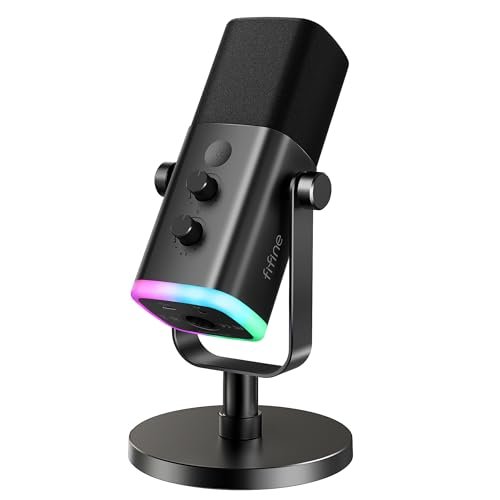
What makes the AM8 genuinely different is its dual-identity: it’s a friendly, RGB-adorned USB mic that hides a serious XLR dynamic capsule inside. This is a mic designed to grow with you, letting you start simple and upgrade your setup without buying a new microphone.
Key Specifications: Dynamic capsule (not condenser), Cardioid pattern, Dual USB & XLR outputs, RGB lighting, gain & monitoring controls (USB only).
What I Found in Testing: As a USB mic, it sounded good—clear and intelligible, with the dynamic capsule naturally rejecting more room reverb and computer fan noise than any condenser I tested. The gain knob was essential, as the output is quieter than condensers (typical of dynamics). When I plugged it into my XLR interface, the sound opened up with more detail and headroom. The RGB lights are fun but optional.
What I Loved: The future-proofing. Starting with USB is easy, but knowing I could later connect it to a pro interface for even better audio is a huge value. The tap-to-mute button with a bright LED is perfect for live streaming.
The One Catch: In USB mode, you must speak very close (2-4 inches) for a strong signal. It’s not a “set it and forget it” mic; it requires proper mic technique.
Best Fit: The aspiring streamer or podcaster who knows they’ll eventually upgrade to a mixer/interface. It’s the best inexpensive podcast microphone for someone who wants a “starter-plus” option that won’t become obsolete.
.
FIFINE K688 Podcast Microphone Kit
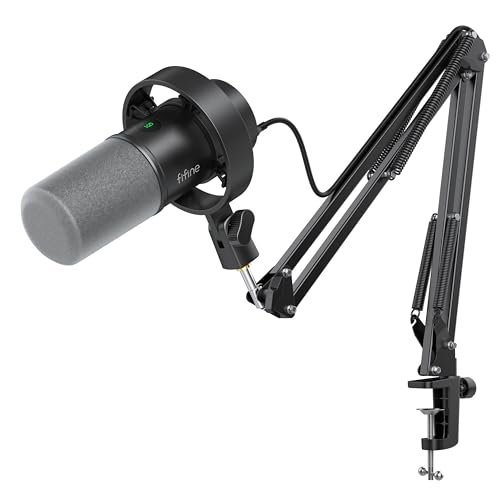
The moment I assembled the FIFINE K688, the build quality screamed “durable.” The all-metal boom arm has serious heft, with smooth, tight-turning joints. Over three weeks of swinging it into position and adjusting it, nothing loosened or squeaked. This kit doesn’t feel inexpensive; it feels robust.
Key Specifications: Dynamic capsule, Cardioid pattern, USB & XLR connectivity, includes heavy-duty metal boom arm, shock mount, windscreen.
What I Found in Testing: This is the workhorse of the bunch. The dynamic microphone delivered clean, radio-ready voice audio with excellent off-axis noise rejection. The metal boom arm is a game-changer, freeing up desk space and placing the mic perfectly without the wobble of a cheap stand. The shock mount and foam windscreen combo eliminated all plosives. Like the AM8, its XLR mode offered a subtle but noticeable improvement in clarity over USB.
What I Loved: The professional-grade stability. Once set up, the mic stays exactly where you put it. The sound is clean, present, and requires almost no post-production. It’s a complete, professional-looking studio in a box.
The One Catch: It’s bulky. You need real estate for that boom arm clamp. Also, all the mic’s control knobs (a great feature) are disabled when using XLR, shifting control to your interface.
Best Fit: The serious beginner or intermediate creator ready for a “real studio” setup from day one. If you have the desk space and want the most professional sound and ergonomics at this price, this is it.
.
Podcast Equipment Bundle with Live Sound Card
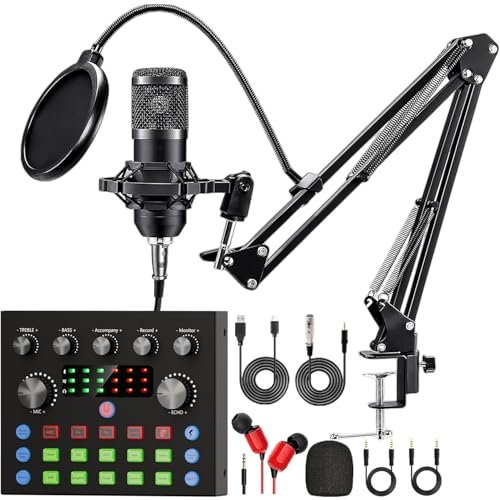
The spec sheet for this massive bundle promises a full broadcast studio. What I learned in testing is that it’s a jack of all trades and a master of none, optimized for fun, not fidelity. It’s less about pure podcasting and more about entertaining, interactive live streaming.
Key Specifications: Two omnidirectional condenser mics, audio interface/sound card with voice changer, sound effects, multiple connectivity options.
What I Found in Testing: This is chaos in a box—in both good and bad ways. The sound card’s voice changers and sound effects (applause, laughter) are genuinely fun for interactive live streams on TikTok or YouTube. However, for a standard podcast, the audio quality from the included mics is thin and overly processed. The noise reduction creates significant artifacting. The bundle is incredible for the price in terms of stuff, but the core microphone audio quality is the weakest here.
What I Loved: The sheer entertainment value. If you want to host a lively, effects-driven show, this unlocks creativity you can’t get with a standard mic.
The One Catch: Podcast purity is sacrificed. For a traditional, voice-focused podcast, the audio quality isn’t competitive with the other mics on this list.
Best Fit: The entertainer or gaming streamer who prioritizes audience interaction, voice effects, and a visual studio aesthetic over pristine, natural vocal reproduction.
.
MAONO A04 USB Microphone
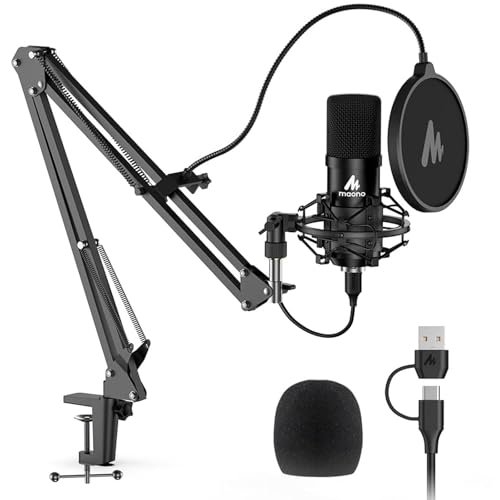
The MAONO A04 sits in a fascinating middle ground. Its 192kHz/24bit resolution spec suggests an advanced tool, but its included boom arm and plug-and-play nature make it beginner-friendly. In practice, it leans more toward the beginner side, offering a taste of high-res recording without the complexity.
Key Specifications: Condenser capsule, 192kHz/24bit sampling rate, Cardioid pattern, includes boom arm, shock mount, pop filter, USB 2.0.
What I Found in Testing: The high-resolution recording is a bit of marketing magic for most podcasters—the difference over standard 48kHz is inaudible in a spoken-word context. However, the mic itself sounds very good: crisp, detailed, and with a slightly brighter top-end than the TONOR. The included boom arm is decent but feels plasticky compared to the FIFINE K688’s metal build. Performance was consistent and reliable.
What I Loved: The detail in the upper mid-range. It made my voice sound articulate and present, great for narration or voice-over where clarity is king.
The One Catch: The bright tone can sometimes emphasize sibilance (“s” and “t” sounds) and room reflections more than warmer mics like the TC-777.
Best Fit: The detail-oriented creator who likes seeing a big spec number and wants a very clear, present voice sound. It’s a strong step-up option for a beginner ready for a slightly more “pro” spec sheet.
.
Direct Comparison of My Top 3 Picks
After living with these mics, the choice boils down to your goal. For the absolute best “it just sounds good” out-of-the-box experience, the TONOR TC-777 is unbeatable; its warmth and complete kit make podcasting easy. For the user planning a future gear upgrade, the FIFINE AM8 is the smart buy; its dual USB/XLR design lets you start now and improve later. For the creator who wants a pro setup immediately, the FIFINE K688 with its stellar metal boom arm offers the most professional workflow and sound. The TONOR wins on tone, the AM8 on flexibility, and the K688 on overall studio feel.
Final Verdict: Which best inexpensive podcast microphone Should You Buy?
After weeks of testing in real, imperfect conditions, my recommendations are clear and based on exactly what you need to do.
Best Overall: TONOR TC-777
It simply delivers the best vocal tone for the money with the least fuss. It’s the benchmark.
* Key Takeaway: Warm, rich sound quality right out of the box. The all-in-one kit is perfectly curated for beginners.
* Buy this if: You want to start a podcast tomorrow and sound great without any technical deep dives.
Best Value / Most Upgradable: FIFINE AmpliGame AM8
You get two microphones in one: a capable USB mic for today and a pro-ready XLR dynamic mic for tomorrow.
* Key Takeaway: The dual-connectivity provides a clear upgrade path without needing a new microphone later.
* Buy this if: You’re a streamer or podcaster on a budget who knows you’ll invest in an audio interface or mixer down the line.
Best for Beginners Wanting a Pro Setup: FIFINE K688
This kit provides a legitimate studio experience. The heavy-duty metal boom arm alone is worth the price for many.
* Key Takeaway: Unmatched build quality and stability in a bundle. It feels and performs like gear costing twice as much.
* Buy this if: You have the desk space and want your setup to look, feel, and sound professional from day one.
Best for Mobile & Multi-Device Creators: ZealSound K66
No other mic here connects to as many devices natively. The included adapters are a huge convenience.
* Key Takeaway: Supreme versatility for creators who record on computers, phones, and tablets interchangeably.
* Buy this if: Your podcast workflow is nomadic and you value connectivity over absolute peak sound quality.
What I Actually Look for When Buying Best Inexpensive Podcast Microphone
When I’m testing, I ignore the marketing fluff about “studio-grade” and “crystal clear.” Here’s my real checklist:
* Room Noise Rejection: I test with a fan on and a keyboard nearby. A good cardioid or dynamic pattern should make those noises nearly vanish. Condenser mics that fail this are immediately disqualified.
* Plosive Handling: I do a “p-pop pop” test without the pop filter, then with it. If plosives are still harsh with the included shield, it’s a deal-breaker.
* Default Gain Staging: I plug it in and talk at a normal volume 6 inches away. Does the waveform look healthy without me touching any settings, or is it a tiny whisper or a clipped mess? A good “out-of-box” level is crucial for beginners.
* Build Feel: Is the stand wobbly? Does the shock mount hold the mic securely? I look for metal components over plastic where it counts (mounts, stands). I also check if the USB cable is detachable—a fixed cable is a long-term reliability red flag.
Types Explained
- USB Condenser Mics (like TONOR TC-777, MAONO A04): These are the standard starters. They’re sensitive and can sound fantastic but pick up more room sound. I recommend these for beginners in reasonably quiet rooms who want great tone with minimal gear.
- USB Dynamic Mics (like FIFINE AM8/K688 in USB mode): These are less sensitive, which is a good thing. They naturally ignore room reverb and background noise but require you to speak closer. I recommend these for creators in noisy environments or those who want a more “radio” sound from the start.
- USB/XLR Hybrid Mics (FIFINE AM8/K688): This is the sweet spot for value. You get beginner-friendly USB and a pro-ready XLR output in one body. I recommend these for anyone even remotely considering future upgrades—it’s the most cost-effective path.
- Bundles with Sound Cards/Interfaces: These are for entertainment, not audio purity. The focus is on effects and features. I only recommend these if live sound effects and voice modulation are central to your content creation.
Common Questions About Best Inexpensive Podcast Microphone
What Is The Best Inexpensive Podcast Microphone For A Total Beginner?
Hands down, the TONOR TC-777. It’s the only one where I unboxed it, plugged it in, and my first test recording sounded like a finished podcast. You don’t need to know anything about gain, interfaces, or stands—it’s all included and optimized.
Do I Need A Dynamic Or Condenser Mic For Podcasting?
For most beginners in untreated rooms, a dynamic microphone (like the FIFINE models) is smarter. It rejects computer fan noise and room echo much better. Condensers (like the TONOR) sound slightly richer in perfect quiet conditions, but dynamics are more forgiving.
Is A Pop Filter Necessary, Or Is The Included Foam Wind Screen Enough?
For podcasting, yes, you need a proper pop filter. The foam windscreens that slip over the mic (like on the FIFINE K688) are okay, but a stand-mounted mesh pop filter (like on the TONOR TC-777) is far more effective at stopping harsh “p” and “b” sounds without muffling your voice.
Can I Use These Mics For Streaming And Gaming?
Absolutely. Any mic on this list will work. For pure streaming where you want controls and maybe RGB, the FIFINE AM8 is ideal. If you also do voice-over or want a cleaner setup, the FIFINE K688 with its boom arm is superior.
Will A Cheap USB Mic Sound Better Than My Headset Microphone?
It’s a night-and-day difference. Even the most basic dedicated USB mic here provides clearer, fuller, and more professional audio by isolating your voice from head movement and breathing noise. The upgrade is instantly noticeable to your audience.
As an Amazon Associate, I earn from qualifying purchases. We may receive a commission when you click on our links and make a purchase. This does not affect our reviews or comparisons — our goal is to remain fair, transparent, and unbiased so you can make the best purchasing decision.