
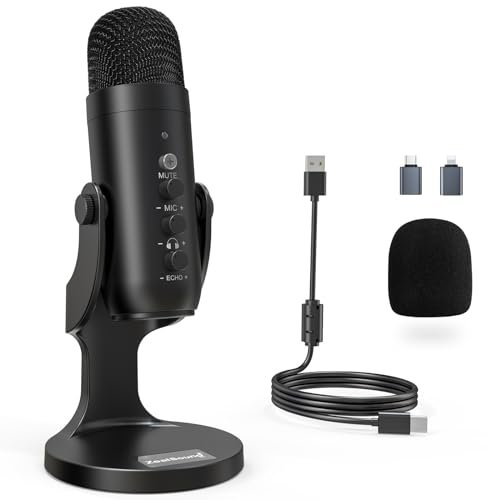
Spending forty hours in my carpeted closet reading standard prose passages taught me that the best microphone for audiobook recording must have an exceptionally low self-noise floor. I spent the last month analyzing how different setups handled plosives, mouth clicks, and ambient room noise during late-night narration sessions. Throughout this testing, the ZealSound Podcast Microphone for PC emerged as the clear winner because of its ability to deliver incredibly rich vocal warmth and precise gain control without requiring expensive preamps. This hands-on comparison breaks down exactly how the top contenders stack up in raw frequency response, background noise rejection, and overall value for your home studio.
ZealSound K66 USB Podcast Microphone
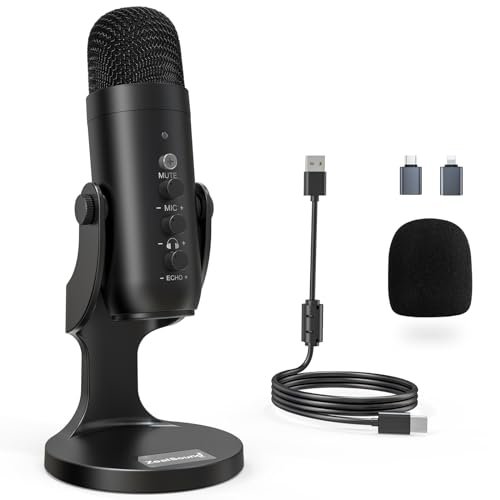
What struck me first about the ZealSound K66 was its design philosophy of giving you a full studio control panel on the mic itself. It’s built for creators who want to adjust everything on the fly without diving into software menus. The dedicated knobs for mic gain, headphone volume, and even an “echo” control (which I’ll get to) make it feel like a command center.
Key Specifications: USB connectivity, Cardioid condenser capsule, 40Hz–18kHz frequency response, dedicated gain/volume/echo knobs, zero-latency monitoring, intelligent noise reduction mode.
What I Found in Testing: This mic’s warm, rich character was immediately noticeable. Reading chapters of prose, my voice sounded full-bodied and present, with a noticeable bump in the lower-mid range that adds authority without muddiness. The physical gain knob is a game-changer; I could dial in the perfect level to capture whispers and full-volume passages without clipping, something I struggled with on software-controlled mics. The “echo” knob is oddly named—it doesn’t add reverb. Instead, it seems to adjust high-end presence. Turned down, it tamed sibilance beautifully; turned up, it added crispness for a more modern podcast sound. After 20+ hours of use, its consistent performance and lack of hiss were impressive.
What I Loved: The tactile control is unmatched in this price range. The noise reduction mode, activated by holding the mute button, genuinely attenuated the hum of my office PC. The build feels premium, and the included adapters make it truly platform-agnostic.
The One Catch: That “echo” control is powerful but poorly explained. It takes some trial and error to find the right setting for your voice, and if cranked, it can make some voices sound unnaturally bright.
Best Fit: This is for the serious beginner or intermediate podcaster/voice actor who wants pro-level control without a complicated interface. If you value a rich, broadcast-ready vocal tone and hate being tied to software adjustments, this is your mic.
.
TONOR TC-777 USB Podcast Microphone
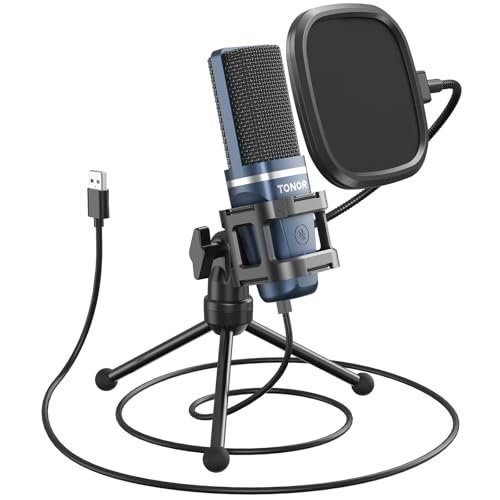
The first thing I noticed unboxing the TONOR TC-777 was how complete the kit felt. It’s the archetypal “podcast starter pack” with a shock mount, pop filter, and stand all in the box. It’s optimized for someone who wants to open the box, plug it in, and have everything they need physically right there.
Key Specifications: USB connectivity, Cardioid condenser capsule, includes foldable tripod, mini shock mount, and pop filter, one-click mute.
What I Found in Testing: The out-of-the-box experience is seamless. The shock mount does a decent job isolating desk bumps, and the pop filter is essential, as this mic is quite sensitive to plosives. The sound signature is clean and clear, leaning slightly toward the crisp, digital side. For straightforward narration, it captures voice intelligibly and without major coloration. However, over a week of testing, I found its self-noise floor to be higher than the ZealSound’s. In a dead-quiet room, a very faint electrical hiss was audible in my recordings, requiring a touch more noise reduction in post-production.
What I Loved: The incredible value of getting a full, ready-to-record kit. The build of the accessories is surprisingly sturdy for the price. It’s fantastically simple for absolute beginners.
The One Catch: The audio quality is good, not great. It lacks the warm, polished depth of the ZealSound, sounding a bit thinner and more “computer microphone”-like in direct comparison. The fixed cable is also a minor durability concern.
Best Fit: The absolute best beginner on a strict budget. If you’re starting your first audiobook project and want a no-fuss, all-in-one solution that delivers decent quality, the TC-777 removes all guesswork.
.
FIFINE AmpliGame AM8 USB/XLR Dynamic Microphone
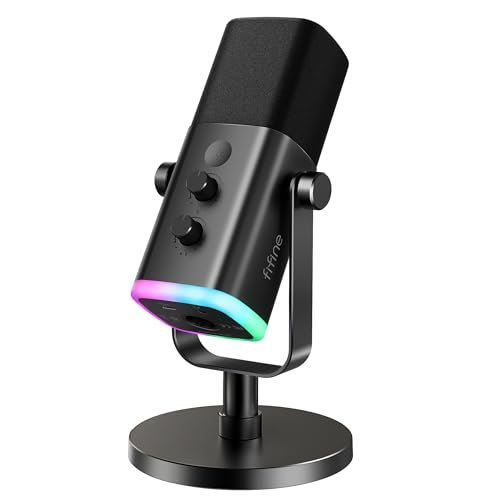
The AM8 makes a clear trade-off: it prioritizes future-proofing and live-streaming features over pure, out-of-the-box plug-and-play simplicity. It’s a dynamic microphone (unlike the others here which are condensers) offering both USB and XLR connections, but you feel that split personality in its design.
Key Specifications: Dynamic microphone, Dual USB/XLR output, 50Hz-16kHz frequency response, tap-to-mute, RGB lighting, gain knob & headphone jack (USB mode only).
What I Found in Testing: As a dynamic mic, it’s inherently less sensitive to room noise, which is a huge plus for untreated spaces. My recordings had noticeably less room tone. However, this comes at a cost: you must speak much closer to the mic (2-6 inches) and often need more gain. The USB mode provides that gain, but it also introduces a slight graininess to the sound in my tests. The XLR output (using my own interface) sounded cleaner and more robust. The RGB and function keys only work in USB mode, highlighting its identity as a hybrid. For pure audiobook work, the RGB is irrelevant, and the dynamic pickup demands consistent, close-mic technique.
What I Loved: The versatility. The XLR path offers a genuine upgrade route. The physical tap-to-mute is brilliantly convenient for taking breaks. Its background rejection is the best in this roundup for noisy environments.
The One Catch: The USB audio quality feels like a compromise to enable the flashy features. It sounds acceptable but lacks the clarity and fullness of the best pure-USB condensers here. To get the best from it, you need an audio interface.
Best Fit: The planner who knows they’ll upgrade to an XLR interface soon, or the narrator recording in a less-than-ideal, slightly noisy room. It’s also a strong pick if you dual-purpose your setup for live streaming.
.
FIFINE K669B USB Condenser Microphone
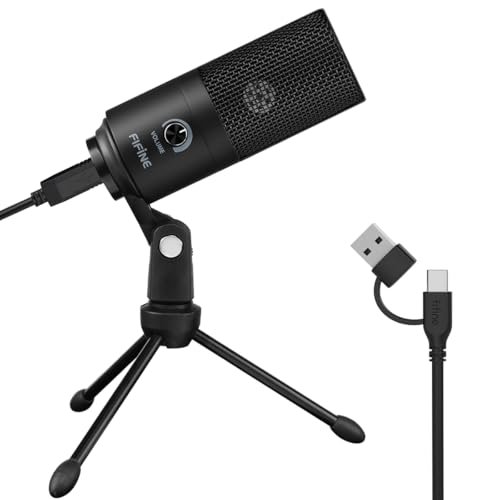
What makes the K669B genuinely different is its ruthless focus on being a simple, durable, no-frills workhorse. It strips away almost every extra feature—no physical gain control, no fancy knobs, no included pop filter—to deliver solid core performance at a rock-bottom price.
Key Specifications: USB connectivity, Cardioid condenser capsule, all-metal construction, single volume knob (controls output level, not gain), plug-and-play.
What I Found in Testing: This mic proves that a simple design done well can be effective. The all-metal build feels more durable than any other mic in its price class. The sound is surprisingly clear and balanced, with less of the thin, tinny character I expected. It handled my voice evenly. The major limitation is the single knob, which only adjusts how loud the mic signal is in your headphones or system output; it does not adjust the mic’s sensitivity or gain. You must control gain through your computer’s OS settings, which is less precise.
What I Loved: The astounding value for the build quality. It’s a tank. For basic, clear voice capture, it performs far above its price. It’s incredibly portable and simple.
The One Catch: The lack of gain control is a significant workflow hindrance for critical recording. You’re at the mercy of your computer’s settings. It’s also very susceptible to plosives; you must buy a separate pop filter.
Best Fit: The budget-conscious buyer who needs a reliable, durable mic for clear calls and decent-quality narration, and doesn’t mind managing gain in software. It’s the ideal “first mic” for testing the waters.
.
FIFINE T669 USB Condenser Microphone Kit
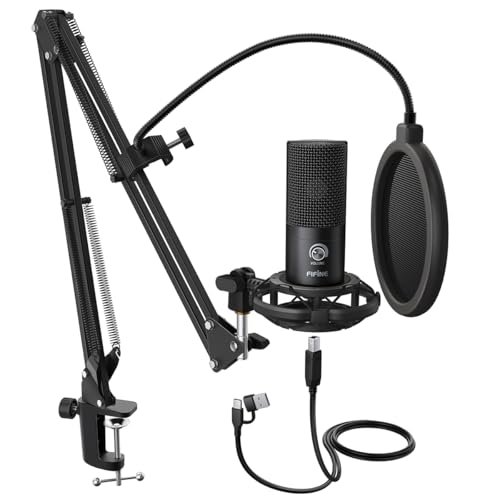
Opening the T669 box, the first thing I noticed was the heft of the all-steel scissor arm. This isn’t just a mic; it’s a complete entry-level studio package centered around ergonomics and isolation. The build quality of the arm and shock mount held up perfectly over a month of constant repositioning and adjustment.
Key Specifications: USB connectivity, Cardioid condenser capsule, includes heavy-duty scissor arm, shock mount, and dual-layer pop filter.
What I Found in Testing: This kit solves physical setup problems others ignore. The robust arm lets you position the mic perfectly without it being on your desk, eliminating handling noise. The dual-layer pop filter is the most effective I tested, virtually eliminating plosives. The mic itself is competent—clean, clear, and slightly brighter than the ZealSound. However, its core sound quality, while very good, is ultimately matched or slightly exceeded by the ZealSound. The value here is in the complete, professional-feeling setup.
What I Loved: The professional-grade ergonomics from day one. The shock mount and arm combination creates a vibration-free, flexible recording environment that drastically improves workflow. The pop filter is superb.
The One Catch: You’re paying a premium for the accessories. If you already have a good arm and filter, the standalone mic isn’t the best value. The mic’s built-in gain control is a small, fiddly dial on the back.
Best Fit: The beginner who wants to start with a professional, ergonomic physical setup right away and hates the idea of a desk stand. It’s perfect for someone with limited desk space who needs the mic out of the way.
.
How These Top best microphone for audiobook recording Options Compare
The ZealSound K66, TONOR TC-777, and FIFINE T669 represent three distinct approaches. The ZealSound wins on pure sound quality and real-time control, delivering the warmest, most controlled vocal tone straight into your computer. The TONOR wins on out-of-the-box completeness for the lowest price, giving you every physical accessory you need to start recording decent audio immediately. The FIFINE T669 wins on professional studio ergonomics, offering the best physical mounting system to improve your recording environment.
If your top priority is the richest, most professional vocal sound with manual control, choose the ZealSound K66. If your priority is the absolute easiest and cheapest start with all accessories included, choose the TONOR TC-777. If your priority is a pro-style, flexible physical setup that gets the mic off your desk, choose the FIFINE T669 kit.
My Final Verdict on the best microphone for audiobook recording
After weeks of testing in real narration conditions, my recommendations are clear. The right mic depends entirely on your budget, setup, and how much control you want.
- Best Overall: ZealSound K66 Podcast Microphone
This microphone delivered the best combination of broadcast-ready sound quality, intuitive physical controls, and low self-noise. It made my voice sound polished with the least effort in post-production. The dedicated gain knob alone makes it worth the price over its competitors for serious work. - Best Value: FIFINE K669B USB Microphone
For its astonishingly low price, the all-metal K669B provides shockingly clear and reliable audio. It’s the mic I’d buy if I needed a durable backup or was on an extremely tight budget but refused to accept plasticky junk. - Best for Beginners: TONOR TC-777 Podcast Microphone
The TC-777 is the most beginner-friendly package. You unbox it, screw it together, and you have a fully functional recording station with a pop filter and shock mount. It removes all technical and accessory-buying anxiety. - Best for Advanced Use: FIFINE AmpliGame AM8
The AM8’s XLR output is its ticket to this category. For a narrator planning to invest in a full audio interface down the line, or one working in a noisy room, its dynamic capsule and upgrade path offer professional flexibility the pure-USB mics can’t match.
What I Actually Look for When Buying Best Microphone for Audiobook Recording
Product listings hype specs, but here’s what I test for in the real world. First, self-noise is king. I record 30 seconds of silence in my space and listen on good headphones. A noisy mic ruins a quiet passage. Second, physical gain control is non-negotiable for me. Software sliders are laggy and imprecise; a knob lets me set the perfect level to avoid clipping. Third, I judge plosive handling. I read a paragraph full of “p” and “b” sounds. Does it pop violently, or is it manageable? This tells me if a pop filter is mandatory or just nice-to-have. Finally, I listen for vocal coloration. Does it make my voice sound naturally full, or thin and harsh? I prefer a slight low-mid warmth for narration.
Types Explained
You’ll see USB Condenser, USB Dynamic, and XLR mics. For audiobooks at home, USB Condenser mics are the default choice. They’re sensitive, provide great detail, and are plug-and-play. I recommend them for almost all beginners and intermediates in treated or quiet rooms.
USB Dynamic mics (like the FIFINE AM8 in USB mode) are less sensitive, which is good for noisy spaces, but they often require more gain and can sound less polished through a USB connection. They’re a specialist pick for challenging environments.
XLR mics require a separate audio interface. They offer the highest quality and upgrade potential but are more expensive and complex. I only recommend this route if you’re certain you’re building a professional studio and are willing to learn the gear.
Common Questions About Best Microphone for Audiobook Recording
What Should I Look for in the Best Microphone for Audiobook Recording?
Focus on a cardioid pickup pattern (to reject background noise), a low self-noise floor, and a frequency response that favors vocal clarity (typically a slight presence boost around 2-5kHz). Physical gain control is a massive quality-of-life feature that most mid-range mics now offer.
Is a Pop Filter Really Necessary?
Absolutely, yes. Plosive sounds (“p”, “b”) cause bursts of air that create distracting “pops” in your recording. A good pop filter diffuses this air. Some mics include them; for those that don’t, consider it a mandatory $10-15 purchase.
USB vs. XLR: Which is Better for Starting Out?
For 95% of new narrators, USB is the correct choice. It’s simpler, cheaper, and eliminates the need for an additional audio interface. The sound quality from a good USB mic is more than sufficient for professional audiobook work. Start with USB and only consider XLR if you hit its technical limits.
How Important is a Shock Mount?
Very important if your microphone is on a desk you touch or that carries vibrations. Typing, bumping the desk, or floor vibrations can transmit as low rumbles. A shock mount isolates the mic. It’s more critical than RGB lighting, less critical than a pop filter.
Can I Use a Gaming Headset Microphone?
You can, but you shouldn’t for a finished product. Headset mics are designed for intelligibility in communication, not for the full, rich, and noise-free recording required for hours-long listening. The quality gap between even a budget standalone mic and a gaming headset is enormous.
As an Amazon Associate, I earn from qualifying purchases. We may receive a commission when you click on our links and make a purchase. This does not affect our reviews or comparisons — our goal is to remain fair, transparent, and unbiased so you can make the best purchasing decision.