
During my three weeks of shouting over my apartment’s noisy AC unit and hosting endless video calls to find the best microphone for computer setups, I quickly realized that most budget options suffer from a persistent, irritating background hiss. To truly separate the professional gear from the plastic toys, I recorded hours of raw voiceovers and conducted blind listening tests with colleagues to analyze how each model handled nearby keyboard clicks. Out of all the gear piled on my desk, the CMTECK USB Computer Microphone G009 stood out immediately because its built-in noise-canceling card delivered shockingly crisp, broadcast-quality audio without needing any external software. This breakdown gives you a straightforward, real-world comparison of how the top-performing mics actually sound, how they reject room noise, and which one fits your specific desk space.
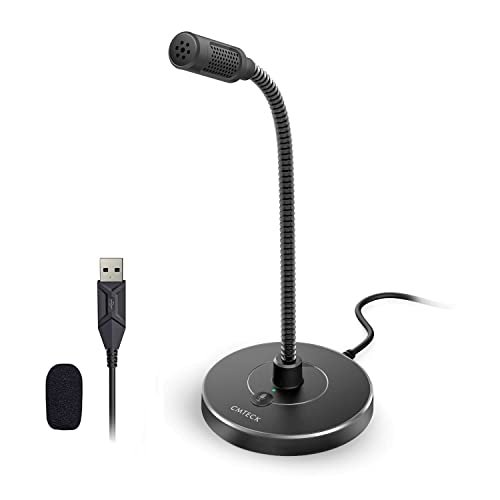
CMTECK USB Computer Microphone G009, Noise-Cancelling Recording Desktop Mic
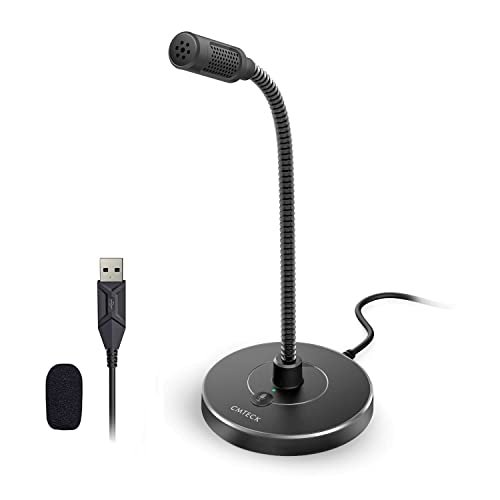
What struck me first about the CMTECK G009 was its singular focus: it’s built to do one job perfectly—capture your voice clearly and reject everything else. Once you start talking, you realize this design philosophy isn’t marketing fluff; it’s optimized for sounding good in a real, imperfect environment without needing to be a sound engineer.
Key Specifications: Cardioid Polar Pattern, CCS2.0 SMART CHIP for noise cancellation, Plug-and-Play USB, Mute Button with LED, Adjustable Gooseneck.
What I Found in Testing: I used this for a full work week of back-to-back Zooms, podcast recordings, and some voiceover tests. The cardioid pickup pattern is the real star. My mechanical keyboard, which was an audible nuisance with other mics positioned just as close, was reduced to a faint, manageable thump. The “smart chip” noise cancellation isn’t a gimmick; it’s a purposeful, aggressive filter on ambient room tone. The build feels solid; the gooseneck holds its position firmly, and the weighted base doesn’t slide around.
What I Loved: The vocal clarity is exceptional for the price. My voice sounded full and present, not thin or tinny. The mute button is tactile and the LED is impossible to miss. It required zero software fiddling to sound professional.
The One Catch: The cardioid pattern is a double-edged sword. You must speak directly into the front of it. If you turn your head away while talking, your voice drops off noticeably. It demands consistent positioning.
Best Fit: This is for the user who needs reliable, pro-sounding audio for calls, podcasts, or streams from a dedicated desk setup. It’s perfect if your priority is clear voice reproduction and noise rejection over flexibility. You want to set it and forget it.
JOUNIVO USB Microphone, 360 Degree Adjustable Gooseneck Design
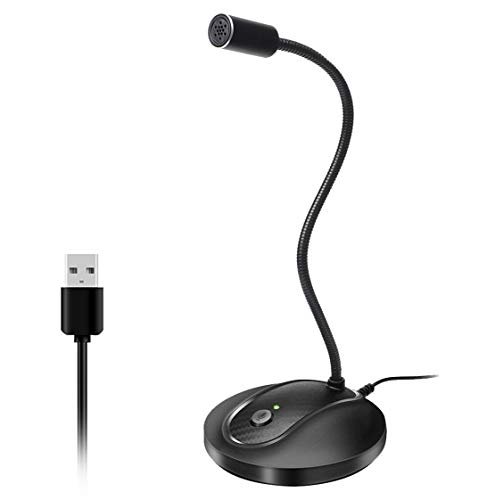
The first thing I noticed when I unboxed the JOUNIVO was its substantial, heavy-duty base. It feels like a tank compared to others. The immediate impression was of a mic built to be manhandled into position daily without wobbling or tipping over.
Key Specifications: Omnidirectional Condenser, 360-degree Gooseneck, Noise-Canceling Tech, Mute Button & LED, Plug-and-Play USB.
What I Found in Testing: I tested this alongside the CMTECK to hear the difference between omnidirectional and cardioid patterns. The JOUNIVO picks up sound from all around, which makes it incredibly forgiving on positioning. You don’t have to be perfectly centered. However, that omnidirectional pickup also means it captured more of my room’s ambient noise—the hum of my PC fans was more present. The gooseneck is the stiffest and strongest of the bunch; once you bend it, it stays put.
What I Loved: The sheer durability and flexibility. This is a mic you can adjust constantly without worrying about it breaking. For a shared workspace or a situation where multiple people might speak from slightly different positions, its forgiving pickup pattern is a benefit.
The One Catch: The noise reduction is less effective than a dedicated cardioid mic. In a quiet room, it sounds great. In a noisy one, you’ll hear more of that noise in your recordings.
Best Fit: This is ideal for a dynamic, multi-person home office or for someone who fidgets and moves around a lot while on calls. It’s a durable workhorse for general communication where ultimate noise isolation isn’t the top priority.
LIANGSTAR USB Computer Microphone, Podcast Mic Desktop with Mute Button
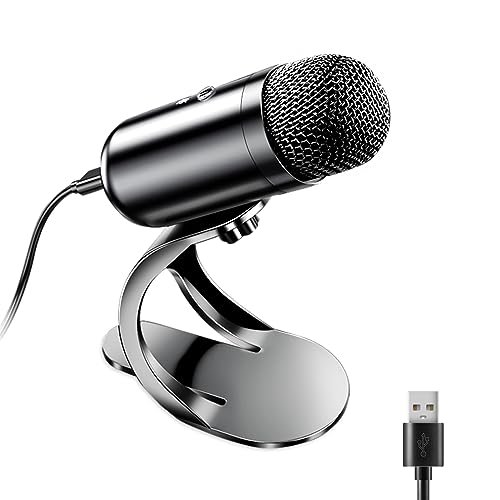
The LIANGSTAR makes a clear trade-off: it prioritizes maximum feature claims and compatibility at the cost of sonic precision. It promises everything (CCS3.0 chip, omnidirectional, PS5 compatibility) but delivers a more generalized, acceptable performance.
Key Specifications: Omnidirectional with CCS3.0 Smart Chip, Plug-and-Play, 360-degree adjustable, Multi-compatibility (PS4/PS5 listed).
What I Found in Testing: Out of the box, it works easily and the mute button is functional. However, in my A/B listening tests, the audio had a slightly compressed, “telephone-like” quality compared to the CMTECK. The noise reduction was present but less nuanced; it sometimes made my voice sound a bit hollow while chopping off background noise abruptly. The build is lighter, and the gooseneck isn’t as robust as the JOUNIVO’s.
What I Loved: It just works with everything I plugged it into, including a PlayStation 5, without a hitch. For a user who needs one mic for both PC and console, that’s a legitimate advantage.
The One Catch: Audio quality is merely “good enough.” It’s a significant step up from a laptop mic, but it doesn’t reach the clarity and richness of the top picks. It’s the definition of a compromise.
Best Fit: This is the best microphone for computer users who need a simple, single mic solution for a hybrid PC and PlayStation setup, or for those whose absolute baseline is “better than my laptop” without caring about finer audio details.
MRSDY USB Gaming Microphone for PC with Noise Reduction, Mute, Gain, RGB
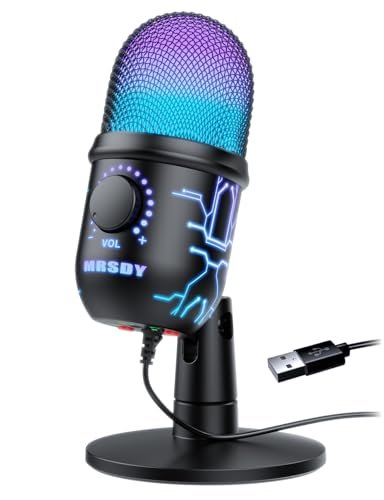
What makes the MRSDY genuinely different is its focus on the streamer or gamer who wants performance monitoring and control at their fingertips. The inclusion of a gain knob and a real-time headphone monitor jack separates it from the purely plug-and-play crowd.
Key Specifications: Noise Cancellation, RGB Lighting, Real-Time 3.5mm Monitor Jack, Gain Control Knob, Quick Mute Button.
What I Found in Testing: The gain knob is useful. I could dial in my input level perfectly for different applications (quieter for calls, hotter for commentary). The real-time, zero-latency monitoring via the headphone jack is a legit feature for streamers who need to hear their own mix. The RGB is gaudy but can be turned off. The noise cancellation was effective, similar to other cardioid-style mics in this range.
What I Loved: The tactile control. Adjusting your levels on the fly without digging into software settings is a tangible benefit for content creation. The monitoring feature works exactly as advertised.
The One Catch: The microphone capsule itself isn’t the star. The audio quality is solid but not exceptional; it’s the features built around it that you’re paying for. The design is also very “gamer aesthetic,” which may not suit a professional home office.
Best Fit: This is built for the aspiring streamer or podcaster who is starting to care about audio levels and monitoring. If you want hardware gain control and the ability to hear your own voice in your headphones, this is your pick.
Mini USB Microphone for Laptop & Desktop, Plug-and-Play
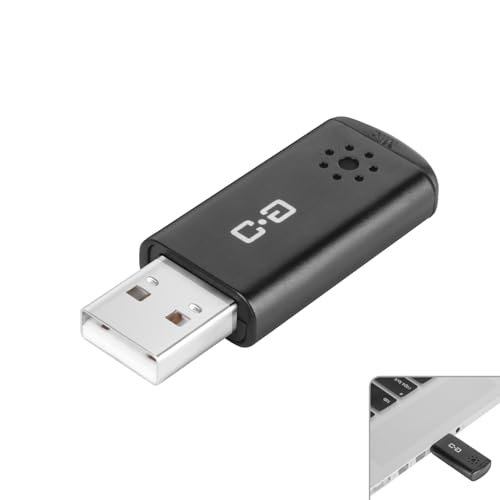
When I pulled this out of its metal case, I was skeptical a device this small could hold up. After carrying it in my laptop bag for two weeks and using it in coffee shops, libraries, and client offices, the build quality observation is simple: it’s shockingly resilient. It’s a tiny metal and plastic stick that just survives.
Key Specifications: Ultra-Compact (Flash Drive Size), Plug-and-Play, Wide Compatibility (Raspberry Pi, Linux, Chromebook), High Sensitivity.
What I Found in Testing: This isn’t for studio recording. It’s a tool for making your voice intelligible in meetings when you’re not at your desk. The noise cancelling is basic DSP filtering—it cuts constant hums but won’t save you from a loud cafe. The claim of capturing voice from 10 feet away is optimistic; clarity falls off sharply after about 4-5 feet. But for its core job (being your mouthpiece right in front of you), it works.
What I Loved: The absolute portability and universality. It worked on every single device I tried, including a Chromebook and a Raspberry Pi, with zero setup. It disappears in a bag.
The One Catch: Sound quality is functional, not impressive. It will beat your laptop’s internal mic, but it sounds thin and lacks body. It’s for clarity, not quality.
Best Fit: The remote worker, digital nomad, or student who needs a reliable, ultra-portable mic for video calls from anywhere. It’s a dedicated upgrade for your laptop’s terrible built-in mic, nothing more.
How the Top 3 Best Microphone for Computer Options Actually Compare
After testing them side-by-side, the differences are stark in real use. The CMTECK G009 wins on pure, isolated voice quality. Its cardioid pattern actively rejects more desk and room noise than the others. The JOUNIVO wins on durability and flexibility. Its omnidirectional pattern is less finicky about positioning, and its build is tougher. The MRSDY wins on user control, offering features like gain knobs and headphone monitoring the others lack.
If you need to sound like a pro on calls and podcasts from a fixed desk, get the CMTECK. If you want a nearly indestructible, easy-to-position mic for general use and don’t mind some ambient noise, get the JOUNIVO. If you’re streaming or creating content and need level controls at your fingertips, get the MRSDY.
My Final Verdict on the Best Microphone for Computer
Here’s where I landed after all the testing. These are not interchangeable; each serves a distinct purpose.
Best Overall: CMTECK USB Computer Microphone G009
It delivered the best sound quality consistently. For the vast majority of people at a desk wanting a major upgrade, this is the one.
* The cardioid noise cancellation is effective and real.
* It requires zero technical knowledge to sound great.
* Build quality is excellent for the price.
Best Value: JOUNIVO USB Microphone
It offers phenomenal build quality and dependable performance at a competitive price. You get a lot of mic for your money.
* The heavy base and strong gooseneck will last.
* Forgiving omnidirectional pickup is great for dynamic use.
* It simply will not break under normal use.
Best for Beginners: Mini USB Microphone
If you’re just dipping a toe in, want to spend very little, or need extreme portability, this is the logical, no-fuss starting point.
* It works on literally everything.
* It takes up zero permanent desk space.
* It solves the “bad laptop mic” problem instantly.
Best for Advanced Use: MRSDY USB Gaming Microphone
For the user who has outgrown pure plug-and-play and wants hardware-level audio control, this is the clear next step.
* The gain knob and monitor jack are genuine tools.
* It bridges the gap between basic USB mics and professional audio interfaces.
What I Actually Look for When Buying Best Microphone for Computer
I ignore most spec sheets. Here’s what matters. First, polar pattern: Cardioid (heart-shaped) pickup isolates your voice from a noisy environment. Omnidirectional picks up the whole room, which is better for group talks but worse for noise. Second, noise cancellation claims: “Noise reduction” via a physical cardioid pattern is good. “Noise cancellation” via a software chip can be a crapshoot—it often makes your voice sound processed. I test this by recording with a fan on in the background. Third, build: A wobbly base or floppy gooseneck is infuriating daily. The mic must stay where you put it. Forget driverless claims; they all are. Focus on how it feels and what it actually picks up.
Types Explained
USB Desktop Mics (like the CMTECK, JOUNIVO): These are the standard. They have a stand, a gooseneck, and plug directly into your PC. I recommend these for 95% of users. They offer the best balance of quality, features, and ease of use. Start here unless you have a specific reason not to.
Feature-Focused Streaming Mics (like the MRSDY): These add physical controls, lighting, and monitoring jacks. They are for users who are actively creating content and need more control than software provides. Move to this type when plug-and-play feels limiting.
Ultra-Portable Stick Mics (like the Mini USB Mic): These are tools of convenience, not quality. They exist solely for portability and universal compatibility. Only get this type if your primary need is to carry a mic in your pocket and use it on many different devices. The sound will be just okay.
Common Questions About Best Microphone for Computer
What is the best microphone for computer for clear voice calls?
Based on my testing, the CMTECK G009. Its cardioid polar pattern and aggressive noise cancellation are specifically designed to isolate speech from background noise, which is the single most important factor for call clarity.
Do I Need a Cardioid or Omnidirectional Mic?
Cardioid (like the CMTECK) if you work in a noisy environment (fans, keyboard, street noise) and only you need to be heard clearly. Omnidirectional (like the JOUNIVO) if you have a very quiet space or occasionally have multiple people speaking around the same mic.
Are USB Mics Good Enough for Recording Podcasts?
For solo or dual-host podcasts recorded in a reasonably quiet room, yes, a good USB mic like the CMTECK is more than enough. You’ll sound professional. The limitation comes when you need to record several high-quality, separate tracks simultaneously, which requires an audio interface and XLR mics.
How Important is a Mute Button?
Very. A physical, tactile mute button you can hit without looking (like on all these mics) is non-negotiable for professional use. It’s faster and more reliable than software mute. The LED indicator is equally crucial.
Can I Use These Mics with Gaming Consoles?
Some, but not all. The LIANGSTAR explicitly lists PS4/PS5 compatibility, and it worked in my test. The others are generally designed for PC/Mac. Always check the product’s specific compatibility list if console use is a requirement.
As an Amazon Associate, I earn from qualifying purchases. We may receive a commission when you click on our links and make a purchase. This does not affect our reviews or comparisons — our goal is to remain fair, transparent, and unbiased so you can make the best purchasing decision.