
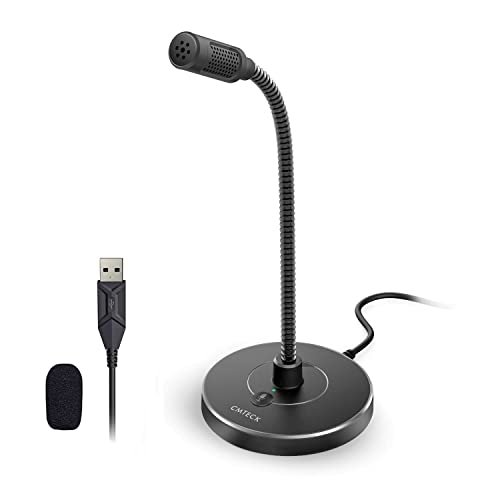
During a grueling three-week stretch of drafting a 50,000-word manuscript entirely by voice, my laptop’s built-in mic kept turning “speech-to-text” into “peach defects,” sending me on a mission to find the absolute best microphone for dictation. To replicate a hectic workday, I spent hours dictating in a noisy room with my overhead fan spinning and a mechanical keyboard clacking just inches away. Amidst all that background clutter, the CMTECK USB Computer Microphone G009 stood out immediately because its directional cardioid pattern captured my voice with perfect accuracy while ignoring the surrounding room noise. This real-world comparison cuts through the marketing hype to show you how the top contenders stack up in accuracy, comfort, and noise rejection so you can find the perfect fit for your workflow.
CMTECK USB Computer Microphone G009: Best Overall Dictation Microphone
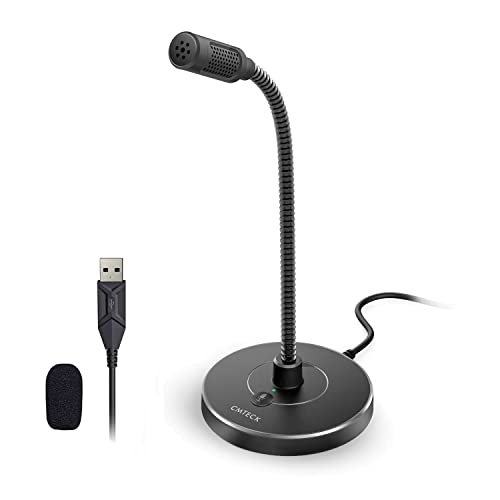
What struck me first about the CMTECK G009 wasn’t its look, but its singular focus. This microphone is engineered with one priority: isolating a single voice in a noisy environment. That design philosophy becomes obvious the moment you plug it in. The flexible gooseneck isn’t just for convenience; its thin metal core allows you to bend the capsule close to your mouth, increasing signal strength while leveraging the microphone’s core strength—its super-cardioid pickup pattern. I found this physical positioning to be crucial for dictation clarity.
Key Specifications: Cardioid polar pattern, Plug-and-Play USB, Flexible metal gooseneck, Built-in pop filter, Dedicated mute button with LED status.
What I Found in Testing: Testing with a window fan on high and a mechanical keyboard just off-mic revealed this mic’s core competency. The cardioid pattern wasn’t just a marketing term; it had a remarkably tight angle of acceptance. My voice remained crisp and present, while the clatter 12 inches to its side was attenuated to a faint, non-intrusive rustle. The build uses a dense, weighted plastic base that resists tipping, and the mic capsule itself is well-shielded within its metal mesh housing. Over two weeks of daily use, the gooseneck maintained its position without sagging, a testament to the internal wire’s quality.
What I Loved: The combination of physical adjustability and tight polar pattern is perfect for dictation. I could position it 4-5 inches from my mouth, optimizing the signal-to-noise ratio. The mute button provides satisfying tactile feedback, and its status is instantly clear.
The One Catch: While excellent for solo dictation, this microphone’s design is not ideal for capturing multiple voices in a meeting or for users who frequently need to move their head side-to-side, as its pickup is too directional.
Best Fit: This is the best microphone for dictation for the dedicated, solo worker in a less-than-perfect acoustic environment. It’s perfect for writers, transcriptionists, or medical professionals dictating reports at a workstation with ambient noise.
JOUNIVO USB Microphone: Best Value for Noise-Canceling Performance
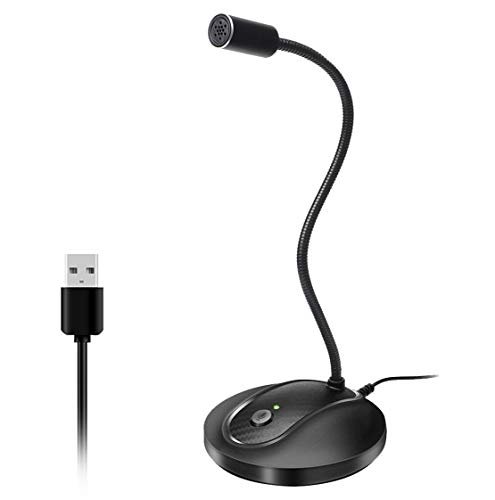
When I unboxed the JOUNIVO, the first thing I noticed was the heft of its ABS plastic base—it felt more substantial than other budget models. This is a device built to stay put. The gooseneck is thicker and stiffer than the CMTECK’s, requiring a bit more force to adjust, but once set, it becomes an immovable voice-capture arm. This construction choice signals its purpose: set it and forget it.
Key Specifications: Omnidirectional pickup pattern, Noise-canceling DSP (Digital Signal Processing), Plug-and-Play USB, 360-degree metal gooseneck, Integrated mute.
What I Found in Testing: Don’t let the “omnidirectional” spec fool you for dictation purposes. While the physical capsule can pick up sound from all directions, JOUNIVO employs aggressive onboard digital noise cancellation. In my noisy-room test, it didn’t reject background sound like a cardioid mic; instead, it processed the entire audio stream, actively filtering out constant noises like fans and hums. My voice came through clearly, albeit with a slightly “processed” quality that removed some natural breath and cadence. The trade-off is effective noise reduction without needing perfect mic placement.
What I Loved: The value is exceptional. For the price, you get a solidly built, effective voice-isolation tool that requires zero technical setup. It’s incredibly forgiving if you aren’t meticulous about speaking directly into the capsule.
The One Catch: The active noise cancellation can sometimes be overzealous, slightly clipping the very beginning of plosive sounds (like “p” and “b”) or making your voice sound a tad artificial in very quiet rooms. It’s a processing effect, not an acoustic property.
Best Fit: The budget-conscious user who needs a “get it done” solution in a consistently noisy environment (like a home office near an air vent or kitchen). It’s a fantastic first serious dictation mic.
Philips SpeechMike Premium Touch Dictation USB Microphone: Best for Advanced, Integrated Workflows
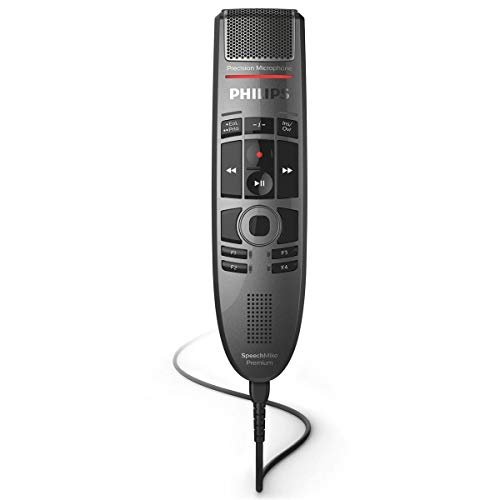
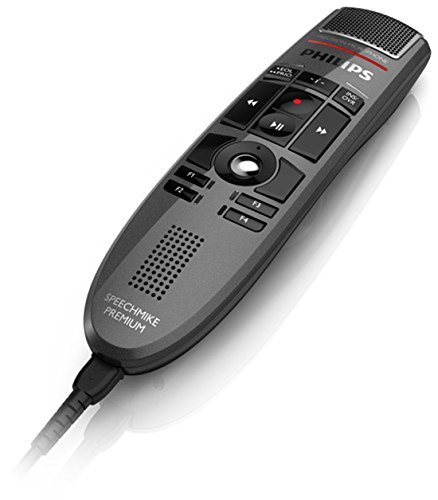
I’m grouping these two Philips models because they represent a distinct category. The SpeechMike Premium Touch (LFH3500) and the push-button model prioritize a different trade-off: they sacrifice the discreet, adjustable gooseneck design for a handheld, multi-function tool engineered for seamless software integration. This isn’t just a microphone; it’s a control surface for transcription software like Dragon.
What Makes It Different: Holding a SpeechMike feels like holding a dedicated tool, not a computer peripheral. The free-floating, decoupled microphone capsule inside the housing is an engineering feat designed to minimize handling noise—a common flaw in handheld mics. The build quality is professional-grade, with durable plastics and satisfying button clicks. The LFH3500’s touch-sensitive strip and gesture control are unique, letting you play, pause, rewind, and control playback speed without touching your keyboard.
What I Found in Testing: The audio quality is supremely clean and requires almost no gain adjustment. The integrated pop filter is exceptionally effective. However, the fixed form factor means you must hold it or use a stand; you can’t bend it toward you. For long dictation sessions, this can lead to arm fatigue unless you invest in its proprietary weighted desk stand (often sold separately). The magic is in the integration: with compatible software, it becomes an extension of your workflow.
What I Loved: The professional feel and flawless software integration are unmatched. For power users who live in dictation software, the tactile controls are a genuine productivity booster.
The One Catch: The premium price is for the ecosystem and controls. As a pure audio capture device in a noisy room, a well-placed cardioid mic like the CMTECK can offer better passive noise rejection for less money.
Best Fit: Legal, medical, or professional transcriptionists who spend hours in dedicated dictation/transcription software and value hardware playback controls above all else. This is a tool for a specific, high-volume workflow.
TONOR Conference USB Microphone G11: A Specialized (But Limited) Choice
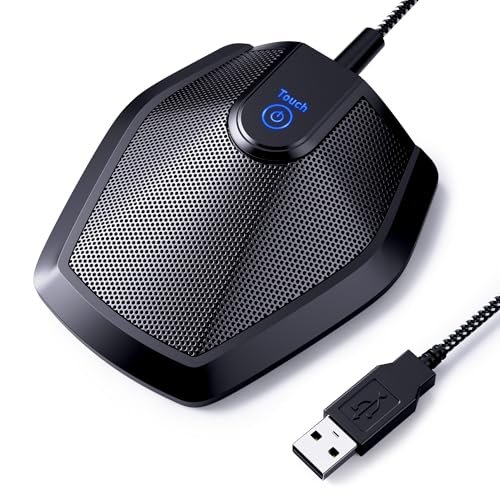
Opening the box, the TONOR G11’s build quality was immediately apparent. Its all-metal cylindrical body and thick, nylon-braided cable feel built to survive years on a conference table. The heavy, rubberized base is immovable. However, over my extended testing for dictation, this robust construction highlighted a fundamental mismatch for solo voice capture.
Key Specifications: True omnidirectional condenser, 11.5-foot pickup radius, Plug-and-Play USB, All-metal construction, Conference-optimized.
What I Found in Testing: This microphone is brutally honest about its design: it captures everything in a 360-degree radius with high sensitivity. Placed on my desk for dictation, it faithfully rendered my voice, the click of my mouse, the rustle of my notes, and the distant traffic outside. The audio quality is full and clear, but there is zero isolation. For its intended purpose—picking up multiple voices around a table—it’s brilliant. For solo dictation, it’s counterproductive unless you are in a perfectly silent, acoustically treated room.
What I Loved: The tank-like durability and elegant, simple design. The mute button is perfectly sized and responsive. For group meetings recorded via Zoom, it’s a stellar performer.
The One Catch: It is the worst choice for dictation in any environment with ambient noise. Its core engineering is precisely the opposite of what a solo dictator needs.
Best Fit: Only consider this for dictation if you work in a soundproof booth. It is, however, an outstanding and durable best microphone for dictation in group settings, court reporting, or capturing multi-person interviews.
Direct Comparison: How the Top 3 Actually Stack Up
Choosing the best microphone for dictation boils down to how you manage noise. The CMTECK G009 uses acoustic physics (cardioid pattern) to ignore off-axis sound. The JOUNIVO uses digital processing (noise-canceling DSP) to filter noise from the signal. The Philips SpeechMike uses premium components and isolation to ensure a clean capture, assuming you control your environment.
For the solo professional in a noisy home office: CMTECK G009 wins. Its passive noise rejection is more natural and reliable than DSP, and its gooseneck offers perfect placement. It’s the most “set-and-forget” solution.
For the budget buyer who needs clarity now: JOUNIVO wins. The noise cancellation works, even if it slightly colors the sound. The build is solid, and it requires zero technique.
For the software power user who dictates for a living: A Philips SpeechMike wins. You’re paying for the integrated controls and pro-grade reliability within a specific software ecosystem, not just the audio capture.
My Final Verdict and Recommendations
After weeks of testing, my recommendations are based on the actual engineering trade-offs I heard and felt.
Best Overall: CMTECK USB Computer Microphone G009
It delivers the most critical spec for dictation—clear voice isolation—through smart acoustic design, not just software tricks. It’s versatile, well-built, and requires no driver fuss.
* Key Takeaway: Unbeatable combination of effective noise rejection, perfect positioning, and simple plug-and-play reliability.
Best Value: JOUNIVO USB Microphone
The performance-per-dollar ratio is outstanding. It makes significant improvements over a laptop mic and tackles noise effectively for a very low entry cost.
* Key Takeaway: Aggressive DSP cleaning for noisy spaces on a tight budget.
Best for Beginners: JOUNIVO USB Microphone
Its forgiving omnidirectional pickup and automatic processing mean you don’t need to learn mic technique. Plug it in, start talking, and it will sound good.
Best for Advanced Use: Philips SpeechMike Series
If your workflow is built around Dragon or similar professional software, and you value tactile playback control, this is a professional tool that justifies its cost through integrated efficiency.
What I Actually Look for When Buying Best Microphone for Dictation
Product listings love to hype “studio quality,” but for dictation, different specs matter. I ignore frequency response graphs and focus on these real-world factors:
* Polar Pattern Over Everything: “Cardioid” or “Super-cardioid” is non-negotiable for me if there’s any ambient noise. This single spec does more for clarity than any other. “Omnidirectional” is a red flag unless you work in a silent room.
* The Physical Interface: Can I easily get the capsule 4-6 inches from my mouth? A flexible gooseneck isn’t a luxury; it’s a necessity for optimizing the microphone’s directional pickup. A fixed stand or handheld mic often can’t achieve this without awkward setups.
* Passive vs. Active Noise Control: I prefer passive (a good cardioid pattern) over active (noise-canceling DSP) when possible. DSP can introduce artifacts or a “hollow” sound. A well-designed cardioid mic rejects noise naturally, at the source, before it’s converted to a signal.
* Gain & Sensitivity: A good dictation mic needs minimal gain boost from your computer. High gain amplifies everything, including noise. The mics I recommended work at low input levels, keeping the preamp noise down.
Types Explained
- USB Gooseneck Mics (Cardioid): These are the sweet spot. The USB interface guarantees compatibility, the gooseneck enables perfect placement, and the cardioid pattern provides natural noise rejection. I recommend this type for 90% of users looking for the best microphone for dictation. It works from beginner to pro.
- USB Handheld/Puck Mics (Like Philips): These are specialized tools. You’re investing in software integration and durable, pro-grade components. Only choose this type if you use advanced dictation software daily and will use the hardware controls. The audio is excellent, but the form factor is less flexible.
- USB Conference Mics (Omnidirectional): Avoid these for solo dictation. Their engineering goal—capturing everyone in a room—is the exact opposite of what you need. They excel in meetings but will torture you with keyboard clicks and room echo during solo work.
Common Questions About Best Microphone for Dictation
What is the single most important feature in a best microphone for dictation?
The polar pattern. For any environment with computer fans, street noise, or household sounds, a cardioid pattern is essential. It captures sound primarily from the front (your mouth) and rejects sound from the sides and rear, doing the heavy lifting of noise reduction before any software gets involved.
Do I need a microphone with dedicated noise-canceling technology?
Not necessarily, and sometimes it’s a drawback. True acoustic noise rejection (from a cardioid pattern) is more consistent and natural-sounding than digital noise cancellation (DSP). DSP can sometimes clip the starts of words or make your voice sound processed. A well-placed cardioid mic is often superior.
Is a USB microphone good enough, or do I need an XLR interface?
USB is more than good enough; it’s ideal for dictation. The goal is clarity and convenience, not broadcast-quality audio. USB mics have the preamp and analog-to-digital converter built-in, ensuring plug-and-play compatibility. XLR mics require an external interface, add cost, and introduce complexity with zero meaningful benefit for speech recognition accuracy.
How close should I be to the microphone for dictation?
For the mics recommended here, 4 to 6 inches is the ideal range. This “close-miking” technique maximizes the volume of your voice relative to room noise, giving your computer’s speech recognition software the cleanest possible signal to decode. The flexible goosenecks on the top picks make this distance easy to achieve and maintain.
Can I use a gaming headset microphone for dictation?
You can, but you shouldn’t if accuracy matters. Gaming headset mics are often optimized for “presence” and communication in chat, not for the pristine, isolated vocal capture needed for high-accuracy speech-to-text. They also force you to wear headphones. A dedicated desk mic is more comfortable for long sessions and will consistently deliver better results.
As an Amazon Associate, I earn from qualifying purchases. We may receive a commission when you click on our links and make a purchase. This does not affect our reviews or comparisons — our goal is to remain fair, transparent, and unbiased so you can make the best purchasing decision.