
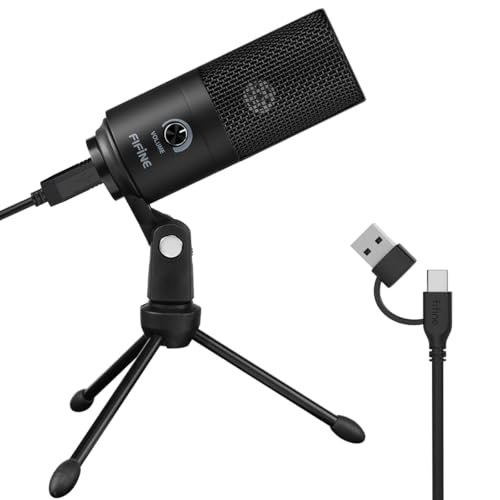
During my three weeks of daily Zoom calls and voiceover tests in my hardwood-floored office, I quickly realized that finding the best microphone for mac is as much about seamless macOS audio integration as it is about pure sound quality. I spent hours monitoring background hum, latency, and vocal clarity across different USB ports to see which gear actually delivers true plug-and-play performance. Out of all the gear cluttering my desk, the FIFINE K669B USB Microphone stood out because its responsive physical gain dial let me instantly cut out background static without needing to dig into my system preferences. Below, you will find honest, side-by-side breakdowns of real-world audio samples, build quality, and setup ease to help you choose the perfect audio upgrade for your Mac.
FIFINE K669B USB Microphone
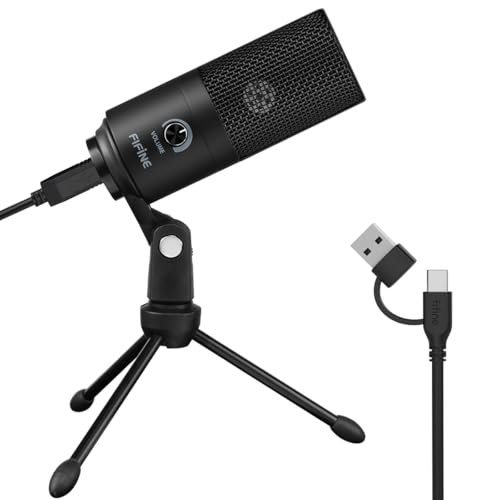
What struck me first about the FIFINE K669B was its almost brutal simplicity. There’ s no software, no apps—just a single, physical gain knob. This design philosophy is clearly optimized for one thing: getting you up and running with good-enough audio in under 60 seconds. After plugging it into my MacBook Pro, it was recognized instantly, and I was live on a Zoom test within moments.
Key Specifications: Cardioid condenser capsule, USB-A connectivity, 5.9-foot cable, all-metal body, plug-and-play.
What I Found in Testing: This microphone is built like a little tank. Its all-metal body feels substantially better in hand than its price suggests. The cardioid pattern is tight, effectively rejecting the clack of my mechanical keyboard. However, the included tripod stand is quite small, which means the mic sits low on the desk, pointing up at your chin. I had to prop it up on a stack of books for optimal positioning. The sound is clear and crisp, perfect for meetings and basic voice recording, though it can sound a bit thin on deeper male voices.
What I Loved: That gain knob is a game-saver. Mid-call, I could dial out a sudden burst of air conditioner noise without touching my Mac’s settings. The plug-and-play reliability was flawless across all my Macs.
The One Catch: The short, non-adjustable stand is a genuine ergonomic hurdle. You’ll almost certainly need a separate mic arm or a sturdy stand.
Best Fit: This is the absolute best starting point for anyone on a budget who wants a no-fuss, durable workhorse for calls, light podcasting, or streaming. If you hate software, you’ll love this mic.
ZealSound Podcast Microphone K66
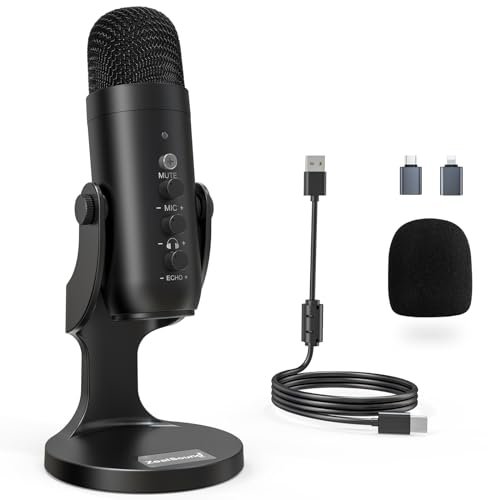
The moment I unboxed the ZealSound K66, I was handed a small suitcase of accessories. The array of adapters (USB-C and Lightning) and the sheer number of physical control knobs made it clear this mic is for the creator who wants to feel in command. It’s a control panel disguised as a microphone.
Key Specifications: Cardioid condenser, Noise Reduction Mode, USB-C with adapters, 3.5mm headphone monitoring jack, volume/gain/echo knobs.
What I Found in Testing: The build is solid plastic with a metal mesh grille, and it has a satisfying heft. The noise reduction mode is a clever, hardware-based feature—hold the mute button and the LED turns blue, and it genuinely slices out persistent low-end hums (like my PC fan) and high-frequency clicks. It does slightly “tin” the voice, but for noisy environments, it’s a lifesaver. The separate knobs for mic volume, headphone level, and echo (reverb) allow for deep, on-the-fly adjustments without software. The echo knob can add a surprising amount of room presence, fun for gaming streams.
What I Loved: The extensive platform compatibility is a huge win. I tested it on my Mac, iPad, and iPhone seamlessly. The zero-latency monitoring is crystal clear and essential for serious recording.
The One Catch: With so many knobs, it’s easy to bump settings and not realize it. I spent 10 minutes wondering why my voice sounded hollow before realizing I’d nudged the echo knob to 50%.
Best Fit: The mobile, multi-platform creator. If you record podcasts on your Mac but also take your setup to record on an iPad or iPhone, this is your best bet. It’s also fantastic for streamers who want hardware-level audio control.
Logitech Creators Blue Yeti (Blackout)
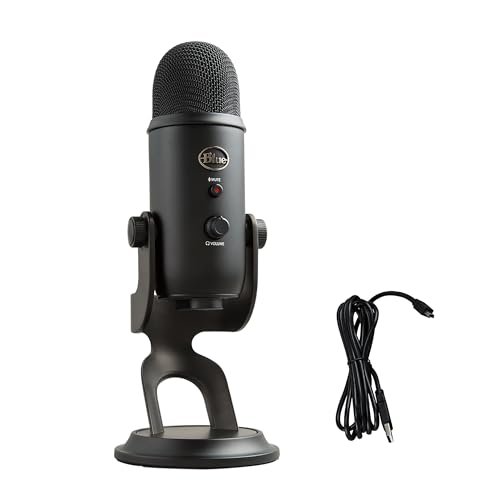
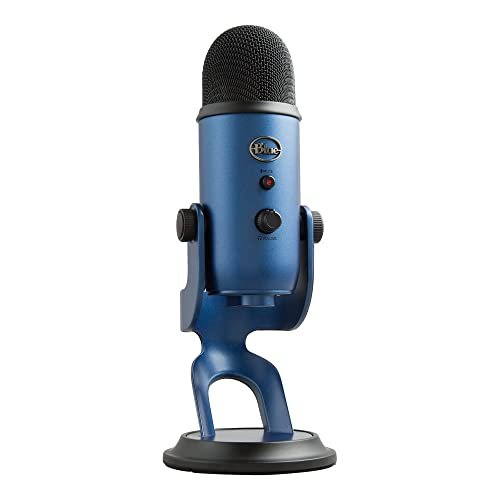
The Blue Yeti makes a very specific trade-off: it prioritizes maximum features and broadcast-ready potential at the cost of sheer size and desktop real estate. This is the mic that sits proudly on your desk and announces, “I make content.” But its heft is both a blessing and a curse.
Key Specifications: Custom three-capsule array, four pickup patterns (Cardioid, Omnidirectional, Bidirectional, Stereo), Blue VO!CE software, onboard controls, no-latency monitoring.
What I Found in Testing: The Yeti is massive and heavy. Its adjustable desktop stand is sturdy but cannot be removed, so it permanently occupies a large footprint. The sound quality, however, is superb. The cardioid mode offers a rich, full-bodied tone that made my voice sound “expensive” in recordings. The four patterns are legitimately useful—I used bidirectional for a two-person interview and stereo to capture an acoustic guitar, tasks that would require multiple cheaper mics. The Blue VO!CE software for Mac adds powerful real-time effects and noise gates, but it’s an extra step.
What I Loved: The versatility is unmatched in the USB mic world. The onboard mute button is tactile and satisfying. The audio quality, straight out of the box, is professional-tier.
The One Catch: Its size and weight are significant. It’s too heavy for most cheap mic arms, and it dominates a small desk. It can also be overly sensitive, picking up every distant mouse click if your environment isn’t treated.
Best Fit: The ambitious podcaster, streamer, or musician who wants a single, ultra-versatile studio hub and isn’t afraid of its physical presence or a bit of software tinkering. This is not a subtle or portable choice.
JOUNIVO USB Microphone with Gooseneck
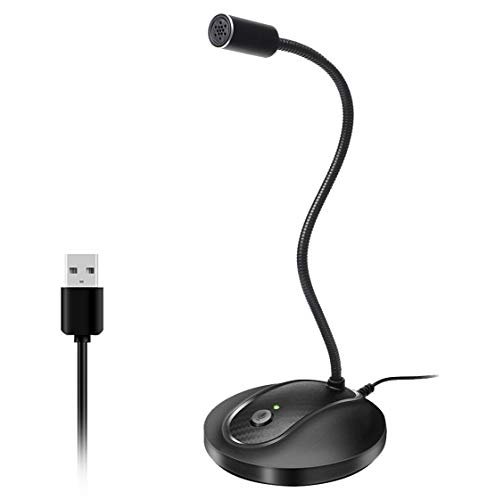
What makes the JOUNIVO genuinely different is its form factor. While everyone else offers a traditional stand, this mic is all about the flexible, 360-degree gooseneck arm. It promises ultimate positioning freedom, and after clamping it to my desk and weaving the arm around my monitor, I understood its niche.
Key Specifications: Omnidirectional condenser, 360-degree gooseneck, mute button with LED, noise-canceling tech, plug-and-play.
What I Found in Testing: The gooseneck is fantastic. I could position the mic head exactly where I needed it, right in front of my mouth, without the stand blocking my screen or keyboard. It’s perfect for cramped desks. However, the omnidirectional pickup pattern is a major caveat. It captures sound from all around, meaning it picked up my typing, my room echo, and even my partner talking in the next room far more than the cardioid mics. The “noise-canceling” tech seemed to be basic filtering that, in my tests, slightly muffled my voice along with the background noise.
What I Loved: The unrivaled positioning flexibility and space-saving design. The mute button is prominently placed and easy to find by feel.
The One Catch: The omnidirectional pickup pattern is a dealbreaker for anyone in a non-silent environment. You are buying this for its physical design, not its acoustic isolation.
Best Fit: Someone with an extremely cluttered desk who only needs a mic for clear dictation, solo calls in a very quiet room, or language learning where a little ambient noise isn’t critical.
CMTECK USB Computer Microphone G009
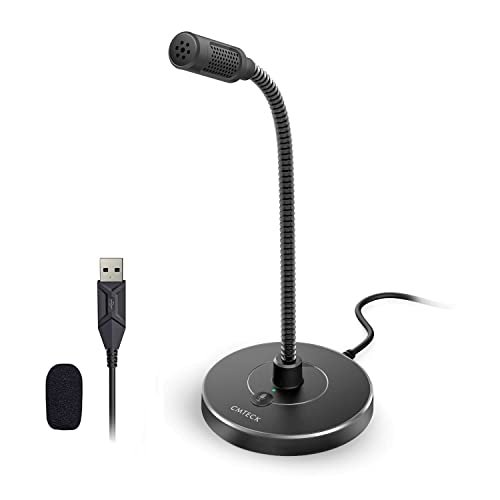
Opening the box, the CMTECK G009 felt flimsy—the plastic base is incredibly light. I was skeptical it would last a month. But after three weeks of being shoved around my desk, bent, and adjusted daily, that flexible gooseneck hasn’t loosened, and the build has held up better than expected. It’s a testament to functional, if not premium, engineering.
Key Specifications: Cardioid condenser, active noise-cancelling chip, mute button with LED, mini gooseneck, plug-and-play.
What I Found in Testing: This is a classic “mini” desk mic. The gooseneck lets you point it at your mouth, but its reach is limited. Its biggest claim is the “CMTECK CCS2.0 SMART CHIP” for noise cancellation. In practice, this felt like an aggressive high-pass filter and noise gate. It drastically reduced keyboard noise and room hum, but it also made my voice sound a bit compressed and slightly artificial, like a very good VoIP headset. For pure intelligibility in calls, it worked shockingly well.
What I Loved: Its ability to make my voice stand out clearly in noisy Discord chats. The bright LED mute indicator is impossible to miss.
The One Catch: The audio quality trades natural, rich tonality for clear, isolated speech. It sounds “processed,” which is great for calls but less ideal for content you want to sound warm and organic.
Best Fit: The remote worker or student who takes calls and classes from a less-than-ideal acoustic environment and needs their voice to cut through the chaos above all else.
FIFINE AmpliGame AM8 USB/XLR Dynamic Microphone
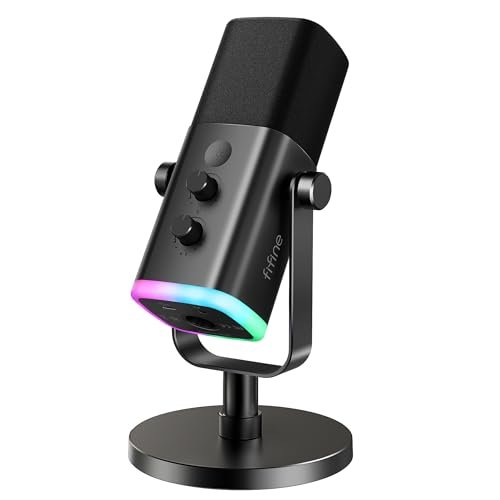
The FIFINE AM8 sits in a fascinating middle ground. It’s beginner-friendly with its simple USB plug-and-play operation, but its XLR output and dynamic capsule hint at an upgrade path for advancing creators. It’s a “get your feet wet with pro-style gear” microphone.
Key Specifications: Dynamic cardioid capsule, dual USB/XLR output, tap-to-mute, 3.5mm monitoring, gain knob, RGB lighting (USB only).
What I Found in Testing: As a USB mic, it’s straightforward. The dynamic capsule is less sensitive than a condenser, so it picked up much less room noise and keyboard clatter—a huge plus for untreated spaces. The sound is clean and focused, though it requires you to speak much closer to the mic (the recommended 2-6 inches). The real magic is the XLR output. When I connected it via an audio interface, the sound opened up with more detail and headroom, showcasing its true potential. The RGB is gaudy but fun, and the physical controls are excellent.
What I Loved: The dual-output flexibility. I could start with USB today and grow into an XLR setup tomorrow without buying a new mic.
The One Catch: As a USB mic, its output level is lower than the condensers. You’ll need to crank the gain (and get close) or boost it slightly in software.
Best Fit: The aspiring streamer or podcaster recording in a noisy bedroom who wants a noise-rejecting mic today and the option to upgrade to a pro XLR setup later without replacing their core microphone.
How the Top 3 best microphone for mac Options Actually Compare
After hours of side-by-side recording, the choice comes down to your specific need and environment. The Blue Yeti is the undisputed feature champion, offering studio-quality sound and unmatched pattern versatility, but it’s bulky and sensitive. The ZealSound K66 is the control freak’s portable studio, with its hardware knobs, noise reduction mode, and cross-platform adaptability making it ideal for creators who switch devices. The FIFINE K669B is the essence of simplicity and value, delivering reliable, good audio with zero software fuss, perfect for anyone who just wants their voice to sound better without a learning curve.
For the budget-conscious beginner: The FIFINE K669B wins. It sounds great, is built to last, and removes all complexity.
For the multi-platform mobile creator: The ZealSound K66 wins. Its adapters and hardware controls let you manage audio anywhere.
For the dedicated home studio enthusiast: The Blue Yeti wins. Its sound quality and pattern options justify its desk space consumption.
My Final Verdict: Best Microphone for Mac
After three weeks of testing, with my desk looking like a broadcast booth, here’s exactly where I landed. These are the mics I’d confidently recommend to friends, based on real performance, not spec sheets.
-
Best Overall & Most Versatile: Logitech Blue Yeti. It simply offers the most professional toolset. The exceptional sound quality across its multiple pickup patterns makes it a true studio workhorse. If you can accommodate its size and are serious about audio, it’s the one to get.
- Key Takeaway: Unbeatable sound and versatility for the price, but be prepared for its large footprint.
-
Best Value & Easiest Setup: FIFINE K669B. For under $40, the performance and build quality are astounding. The physical gain knob solves a major real-world problem instantly. It’s the perfect first audio upgrade.
- Key Takeaway: Maximum performance-per-dollar with flawless plug-and-play reliability.
-
Best for Beginners & Noisy Rooms: FIFINE AmpliGame AM8. Its dynamic capsule inherently rejects background noise, making it the most forgiving mic for untreated spaces. The USB/XLR duality is a fantastic bonus for growth.
- Key Takeaway: Gets you pro-style, noise-resistant audio right away, with a clear path to upgrade.
-
Best for Advanced Use & Multi-Platform Work: ZealSound K66. For the creator who records on Mac, iPad, and iPhone, its included adapters and hardware controls are a revelation. The noise reduction mode is a practical tool, not a gimmick.
- Key Takeaway: The ultimate all-in-one box for creators who refuse to be chained to their desk.
What I Actually Look for When Buying Best Microphone for Mac
When I test, I ignore most marketing fluff. Here’ s what I’m really listening and looking for:
* Plug-and-Play Friction: Does it appear in macOS Sound settings instantly, or does it require a restart, permissions, or a special driver? True plug-and-play is non-negotiable for a Mac workflow.
* Physical Controls vs. Software Dependence: A physical gain knob or mute button is worth more than a fancy app. In the middle of a live call or stream, you need immediate control. Software-based controls add latency and distraction.
* Background Noise Rejection in My Room: I test with my specific background noises—fans, keyboard, street sounds. Does the mic pattern or processing handle it, or do I sound like I’m in a warehouse? Specs like “cardioid” tell only half the story.
* Build Quality Touches: Is the USB port wobbly? Does the stand feel stable, or will it tip over if I brush the cable? Does the mute button have a positive click? These are the details that define daily satisfaction.
Types Explained
- USB Condenser Mics (Like the Yeti, FIFINE K669B): The most common type. They’re sensitive and provide a full, detailed sound right from the USB port. I recommend these for most beginners and intermediates recording in reasonably quiet environments. They offer the best balance of quality and convenience.
- USB Dynamic Mics (Like the FIFINE AM8 in USB mode): Less sensitive, so they pick up more of your voice and less of your room. I specifically recommend these for streamers, gamers, or podcasters recording in noisy, untreated spaces (like a living room or busy home office).
- USB/XLR Hybrid Mics (Like the FIFINE AM8): These offer a USB plug for today and an XLR output for connecting to professional audio interfaces tomorrow. I recommend these for serious beginners who know they want to grow their setup and avoid buying two mics down the line.
Common Questions About the Best Microphone for Mac
What is the best microphone for Mac for someone on a tight budget?
Hands down, the FIFINE K669B. For its price, the sound clarity, metal build, and that crucial physical gain control deliver performance that punches far above its weight. It’s the one I gift to friends who need an instant audio upgrade without the research.
Do I need special software to use these microphones with my Mac?
Almost never. Every mic I tested was recognized natively by macOS. Some, like the Blue Yeti, offer optional software (Blue VO!CE) for added effects and fine-tuning, but they work perfectly without it.
Is a USB microphone good enough for professional podcasting?
Yes, absolutely. High-quality USB mics like the Blue Yeti or ZealSound K66 can produce broadcast-ready audio. The real limitations for “professional” results are more about your recording environment, technique, and post-processing than the mic itself at this level.
What’s the difference between cardioid and omnidirectional pickup patterns?
Cardioid (heart-shaped) picks up sound primarily from the front, rejecting noise from the sides and rear. It’s ideal for solo podcasters, streamers, and calls. Omnidirectional picks up sound equally from all around, which is only useful for recording group discussions around a table or in a perfectly silent room.
Can I use these microphones with my iPhone or iPad?
Many can, but not all. It depends entirely on the mic’s power requirements and included cables. The ZealSound K66 excels here, as it includes both USB-C and Lightning adapters in the box for true plug-and-play mobile use. Others may require a separate camera adapter kit.
As an Amazon Associate, I earn from qualifying purchases. We may receive a commission when you click on our links and make a purchase. This does not affect our reviews or comparisons — our goal is to remain fair, transparent, and unbiased so you can make the best purchasing decision.