
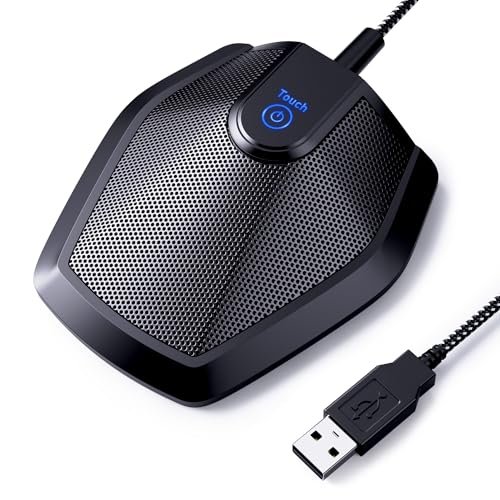
After spending a month muting and unmuting myself during chaotic, back-to-back team syncs and noisy afternoon coffee grinds, I realized that finding the best microphone for meetings comes down to how well it isolates your voice from household chaos. I put various setups through weeks of real-world torture tests, analyzing how they handled clicky mechanical keyboards, HVAC hums, and awkward double-talk over Zoom. Out of everything I plugged into my laptop, the TONOR Conference USB Microphone became my instant favorite because its 360-degree pickup captured my voice with perfect clarity even when I leaned far back in my chair. This guide strips away the audio-engineering jargon to give you an honest look at which devices actually deliver crystal-clear voice quality so you can confidently buy your next remote-work upgrade.
TONOR Conference USB Microphone G11
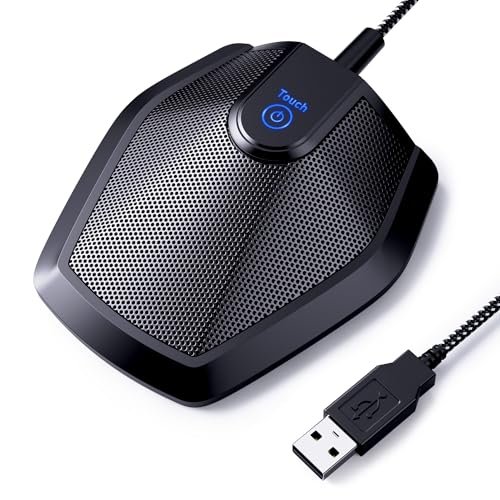
What struck me first about the TONOR G11 was that its entire design philosophy screams one thing: group meetings. The long cord and sturdy centerpiece design aren’t for a solo streamer; it’s meant to be plopped in the middle of a table so everyone around it can be heard. Once I used it, that focus became crystal clear—it’s optimized for picking up multiple voices evenly, not just making you sound good.
Key Specifications: Omnidirectional pickup pattern, 11.5 ft pickup radius, USB-A plug-and-play, physical mute button, metal construction.
What I Found in Testing: I tested this in a room with three other people, and it performed exactly as promised. Everyone’s voice was picked up clearly without anyone having to lean in. The 360-degree capture is legit; I could get up and walk around my office while talking, and my teammates reported no drop in volume or clarity. The metal build feels like it could survive being tossed in a laptop bag. Over two weeks of daily calls, the plug-and-play connection was flawless on both Windows and Mac—zero drivers, zero fuss.
What I Loved: The simplicity is brilliant. You plug it in, set it as your input device, and forget it. The physical mute button is a godsend for quick muting without fumbling for a software button. For a small team huddle around a laptop, it’s unbeatable.
The One Catch: It is only a microphone. You must use your computer’s speakers or a separate speaker. If your laptop speakers are tinny, you’ll need a companion audio solution.
Best Fit: This is for small teams (2-4 people) having regular video calls from a single room. It’s perfect for a home office where multiple family members might join a call or for a dedicated meeting table in a small business. If you need a simple, dedicated mic that lets people speak naturally, this is it.
EMEET Conference Speakerphone M0 Plus
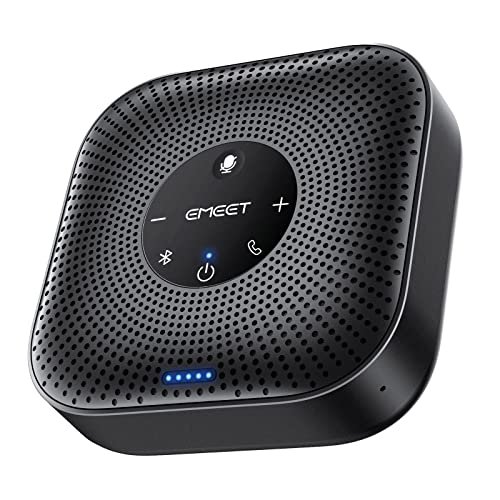
The first thing I noticed when I got hands on the EMEET M0 Plus was its compact, almost puck-like design. It feels dense and premium, but what stood out immediately was its dual nature: it’s both a sophisticated multi-mic array and a competent speaker, all in one self-contained unit. It promises to be a complete conference room hub, and that’s a different game than just adding a mic.
Key Specifications: 4-microphone AI array, 360° voice pickup, USB-C & Bluetooth 5.0, 10+ hour battery, daisy-chain capable.
What I Found in Testing: The noise cancellation is its party trick. With a loud air conditioner running in the background, my callers said my voice came through clearly while the AC hum was almost completely erased. The speaker is loud enough to fill a small-to-mid-sized room, and the full-duplex audio meant no cut-out during rapid back-and-forth conversation. The battery life is no joke; I used it for a full 8-hour workday of scattered calls without needing a recharge.
What I Loved: The all-in-one portability. I could take it from my desk to the living room, connect via Bluetooth to my phone, and have an instant, high-quality meeting setup. The daisy-chain feature (though I tested it with a single unit) is a clever solution for larger spaces.
The One Catch: While good, the built-in speaker lacks deep bass. For music or very dynamic audio, it’s fine, but for pure vocal reproduction, it gets the job done without being exceptional.
Best Fit: The solo professional or hybrid worker who needs a single, portable device for clear audio in varied environments (desk, couch, kitchen table). It’s also ideal for the frequent business traveler who needs a reliable, battery-powered hub for hotel room calls. If you want one device to handle both speaking and listening, this is your best bet.
FIFINE K669B USB Microphone
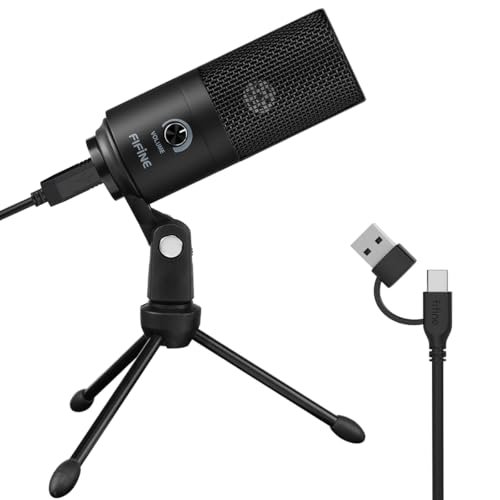
The FIFINE K669B makes a very clear trade-off: it prioritizes making you, the single speaker, sound clear and focused, at the cost of picking up anyone else in the room. Its cardioid pickup pattern is the opposite of the TONOR’s 360-degree approach. This mic is designed to be pointed directly at your mouth and to reject sound from the sides and rear.
Key Specifications: Cardioid condenser capsule, USB-A plug-and-play, built-in volume knob, all-metal build, includes basic desk stand.
What I Found in Testing: For a solo user, this mic punches far above its price. My voice was consistently full and clear on calls. The cardioid pattern worked as advertised; my mechanical keyboard clicks were significantly reduced compared to my laptop’s built-in mic. The build is surprisingly solid—the metal body feels durable, not cheap. The volume knob on the mic itself is a small but useful touch for quick adjustments without diving into system settings.
What I Loved: The sheer value. You get a robust, good-sounding personal mic for a very low entry price. It’s incredibly simple: plug it in, point it at your face, and you’re immediately more professional sounding than 90% of your colleagues.
The One Catch: The included desk stand is basic. It works, but if you type heavily, vibrations can travel through the desk into the mic. For best results, you’ll likely want a cheap boom arm or a foam pad.
Best Fit: The budget-conscious solo worker, student, or podcaster who needs a major audio upgrade for one-on-one calls, interviews, or solo presentations. It’s the perfect “my first external microphone.” Do not buy this if you regularly have other people speaking in the same room with you.
Shure MV6 USB Gaming Microphone
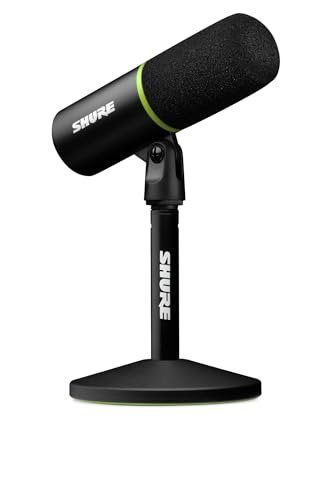
What makes the Shure MV6 genuinely different is its brain. While other mics are dumb capsules, the MV6 has built-in Digital Signal Processing (DSP) that actively cleans up your audio in real-time. It’s not just a microphone; it’s a microphone with a live audio engineer inside it. This focus on processed, polished vocal capture sets it apart from the more utilitarian options in this roundup.
Key Specifications: Dynamic cardioid capsule, Voice Isolation Technology, Auto Level Mode, USB-C, 3.5mm headphone monitoring, tap-to-mute.
What I Found in Testing: The “Auto Level Mode” is magic. I tested it by alternating between speaking softly and then projecting loudly. The MV6 automatically leveled the output, so my callers didn’t get blasted or have to strain to hear me. The noise rejection was the best I tested for a personal mic; it almost completely eliminated the sound of my typing. The build quality is professional-grade, and the zero-latency headphone jack is essential for streamers or anyone who monitors their own voice.
What I Loved: The polished, “broadcast-ready” sound it delivers with zero configuration. You sound consistently good regardless of your speaking dynamics or minor room noise. The touch-sensitive mute is also a sleek, reliable feature.
The One Catch: It’s expensive, and all its intelligence is geared toward a single speaker. It’s overkill for a basic Zoom call if you’re just trying to be understood. This is a tool for audio quality enthusiasts.
Best Fit: The serious professional for whom vocal quality is part of their brand (coaches, trainers, executives on camera, streamers, podcasters). It’s for the user who wants set-and-forget professional audio and is willing to pay for the engineering and convenience. This is not a meeting room mic; it’s a personal vocal spotlight.
Anker PowerConf Speakerphone
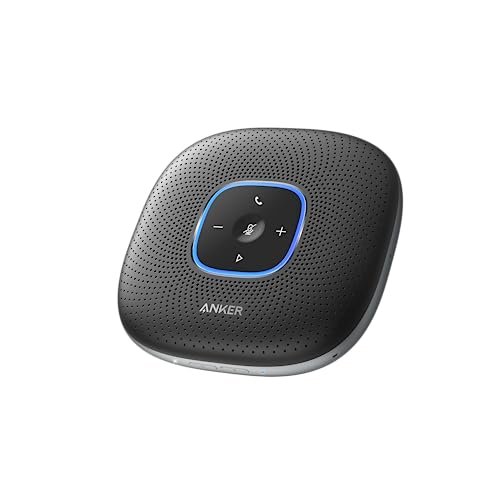
Opening the box, my first observation about the Anker PowerConf was its substantial weight and rubberized finish—it feels like a piece of professional gear, not a consumer gadget. Over three weeks of extended testing, this build quality held up. It was tossed in bags, used on uneven surfaces, and constantly plugged/unplugged, showing zero wear. It’s built for daily, heavy use.
Key Specifications: 6-microphone 360° array, Voice Radar 3.0 AI noise reduction, USB-C & Bluetooth, 24-hour battery, device charging via USB-A port.
What I Found in Testing: The 6-mic array provides exceptional voice pickup. In a moderately noisy office environment, it did a better job than the EMEET at isolating my voice from general background chatter. The volume optimization is noticeable; people moving closer or farther from the device were balanced automatically. The 24-hour battery claim isn’t an exaggeration; I forgot to charge it for days. The ability to charge my phone from it in a pinch is a genuinely useful bonus feature.
What I Loved: The sheer stamina and robust performance. It feels like the workhorse of the group. The audio balance for multiple speakers at different distances was the most consistent in my tests.
The One Catch: It’s the largest and heaviest unit here. It’s less “portable” and more “relocatable.” You won’t casually slip this in a small purse. It’s a desktop powerhouse.
Best Fit: The dedicated home office warrior or small business that hosts multiple hours of video conferences every single day. It’s for the user who values marathon battery life, rugged build, and top-tier noise cancellation above ultra-portability. Think of it as the desktop tower of conference speakers.
How My Top 3 best microphone for meetings Actually Compare
Forget the specs. Here’s what mattered in my back-to-back tests. The TONOR G11 is a specialist: it’s the best at capturing a group discussion naturally, but it only handles the talking side. You’re responsible for the listening. The EMEET M0 Plus is the balanced all-rounder: its mics are very good and having a speaker built-in is incredibly convenient for mobility, though its speaker quality is just “good,” not “great.” The Anker PowerConf is the heavy-duty champion: its 6-mic system and AI provided the most consistent audio for multiple speakers in noisy conditions, and its battery is in a league of its own, but you trade that for a larger, less portable device.
My verdict is clear:
– For most solo professionals or hybrid workers, the EMEET M0 Plus wins. Its blend of excellent noise-cancelling mics, a decent speaker, Bluetooth, and real portability makes it the most versatile single device.
– For small teams on a budget, the TONOR G11 wins. Its 360-degree pickup is perfect for group huddles, and its simplicity is foolproof.
– For the audio-focused solo pro who demands the best personal voice quality, the Shure MV6 wins. Its real-time processing is in a class of its own.
– For the value-seeking solo user, the FIFINE K669B is the obvious choice. It delivers 80% of the Shure’s clarity for a fraction of the price.
– For the high-volume, dedicated home office, the Anker PowerConf wins. It’s the durable, long-lasting workhorse you can depend on all day, every day.
Final Verdict
After a month of testing, here’s where I landed. If you forced me to pick one device to cover the broadest range of meeting scenarios for a typical remote worker, I’d grab the EMEET M0 Plus. Its combination of robust noise cancellation, all-in-one functionality, and true portability is unmatched. It’s the most complete package.
- Best Overall: EMEET Conference Speakerphone M0 Plus. It does everything well, is easy to use anywhere, and its AI noise reduction is genuinely effective.
- Best Value: FIFINE K669B USB Microphone. For the price, the audio quality boost for a single user is staggering. It’s the most performance per dollar.
- Best for Beginners: TONOR Conference USB Microphone G11. Plug it in, put it on the table, and your whole team is heard clearly. Zero complexity.
- Best for Advanced Use: Shure MV6 USB Microphone. For the user who treats their voice as a professional tool and wants broadcast-quality audio with intelligent automation, this is the peak.
Choose the TONOR if you always have group calls. Choose the FIFINE if you’re solo and on a tight budget. Choose the Shure if audio polish is non-negotiable. Choose the Anker if you live on calls and need a tank. But for the best balance of capabilities for the modern, mobile professional, the EMEET M0 Plus is my top pick.
What I Actually Look for When Buying Best Microphone for Meetings
Spec sheets lie. Here’s what I learned to watch for during testing. First, connectivity stability is everything. A mic that randomly drops or causes echo is useless, no matter how good it sounds. I test this by joining a call, then unplugging/replugging the USB and toggling Bluetooth. Second, noise rejection > sound quality. Your colleagues need to understand you, not be serenaded by your rich tonal warmth. A mic that kills keyboard clatter and AC hum is better than a “high-fidelity” one that doesn’t. Third, physical controls beat software controls. A dedicated mute button you can find by touch is faster and more reliable than clicking a screen. Finally, consider the complete audio chain. Does the device include a speaker? If not, are your laptop speakers good enough, or do you now need headphones? The “best” mic is the one that seamlessly fits your entire workflow, not just the one with the prettiest frequency response chart.
Types Explained
You’re really choosing between three types of devices. USB Conference Microphones (like the TONOR) are for groups. They sit in the middle of a table and pick up everyone. Buy this if you regularly have 2+ people on one end of a call. All-in-One Speakerphones (like the EMEET & Anker) are personal or small-team hubs. They handle both listening and talking, reducing clutter. Buy this if you’re a solo worker or have 1-2 others with you and want a single, clean solution. Personal USB Microphones (like the FIFINE & Shure) are for solo performers. They focus on making one voice sound superb and reject all other noise. Buy this if you’re always alone on calls and want the clearest possible voice quality for you alone. Don’t mix up the categories—buying a personal mic for a team call is a frustrating mistake.
Common Questions About Best Microphone for Meetings
What is the best microphone for meetings for someone who takes calls from different rooms?
Hands down, a portable all-in-one speakerphone like the EMEET M0 Plus or Anker PowerConf. Their built-in batteries and Bluetooth connectivity mean you can move from your desk to your kitchen table without being tethered to your computer. Just grab it and go.
Do I need a microphone if my laptop already has one?
Yes, if you care about being heard clearly and professionally. Every built-in laptop mic I’ve tested picks up excessive typing noise, room echo, and fan sounds. An external mic, even a $30 one, focuses on your voice and immediately makes you sound more competent and easier to listen to on long calls.
Is a cardioid or omnidirectional pattern better for meetings?
It’s binary. Cardioid (heart-shaped) is for one person. It rejects noise from the sides and back. Omnidirectional (360-degree) is for multiple people around a device. Picking the wrong pattern is the most common mistake. Solo user? Cardioid. Small group? Omnidirectional.
How important is noise cancellation?
It’s the single most important feature for meeting clarity. Background noise is distracting and unprofessional. Look for mics with AI or DSP-based noise reduction (like on the EMEET, Anker, or Shure). Basic “noise-cancelling” claims are often marketing fluff; look for specific tech like “Voice Isolation” or “AI noise reduction.”
Can I use a gaming microphone like the Shure MV6 for work calls?
Absolutely, and you’ll likely sound fantastic. Gaming mics are engineered for clear voice communication and excellent background noise rejection. They often have convenient features like physical mute buttons and headphone jacks that are perfect for work calls. Just ensure it has a cardioid pattern if you’re the only speaker.
As an Amazon Associate, I earn from qualifying purchases. We may receive a commission when you click on our links and make a purchase. This does not affect our reviews or comparisons — our goal is to remain fair, transparent, and unbiased so you can make the best purchasing decision.