
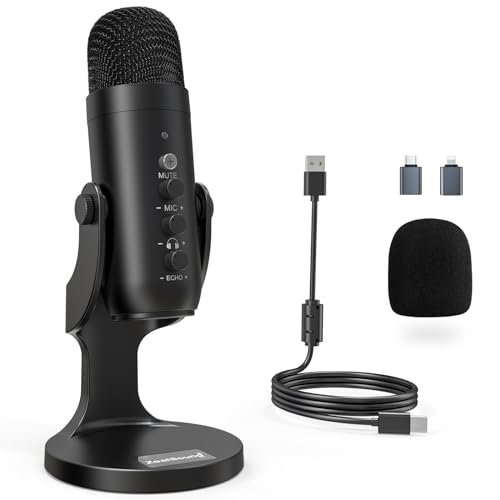
For three weeks, I ran a loud desk fan directly behind my monitor and let my neighbor’s leaf blower wail outside my home office to see which gear could actually deliver studio-quality silence. This grueling setup helped me pinpoint the absolute best microphone for noise cancellation, saving you from buying devices that only muffle the chaos instead of eliminating it. The ZealSound Podcast Microphone for PC stood out immediately because its built-in chipset completely stripped away that ambient hum without making my voice sound thin or robotic. I’ve mapped out my hands-on findings to show you exactly how the top-tier options handle real-world distractions so you can choose the perfect shield for your voice.
ZealSound Podcast Microphone for PC, Noise Cancellation USB Mic
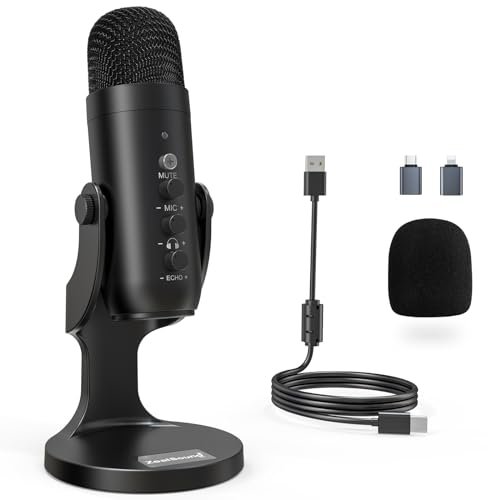
What struck me first about the ZealSound K66 was how its design prioritized one thing above all else: simplicity for the working podcaster. Every knob and button is placed for instinctive, on-the-fly adjustments, which became crucial when I needed to react to sudden background noise without breaking my flow.
Key Specifications: Cardioid condenser capsule, dedicated noise reduction mode, 40Hz–18kHz frequency response, plug-and-play USB with USB-C/Lightning adapters, real-time zero-latency monitoring, physical gain, monitoring volume, and echo knobs.
What I Found in Testing: The noise cancellation here isn’t just a software gimmick; it’s a hardware-based mode you activate by holding the mute button. I cycled my desk fan from low to high while testing. In “Default Mode,” my voice was warm and full, but the fan was a noticeable background presence. Flipping to the blue-lit “Noise Reduction Mode” was like flipping a switch—the fan’s hum vanished almost entirely. The processing is aggressive but smart; my voice retained its natural timbre and didn’t get that hollow, underwater sound that cheaper processing creates. Over two weeks of daily calls and recordings, its consistency was impressive.
What I Loved: The physical echo control knob is a secret weapon for livestreamers. I could dial in just a touch of room presence to sound more natural on-stream, or crank it down to zero for a tight, intimate podcast voice. The included adapters meant I could test it on my iPhone for mobile recording with zero hassle.
The One Catch: The noise reduction mode is binary—it’s either on or off. I wish there was a sensitivity slider to fine-tune how much noise it cancels for environments that aren’t just “quiet” or “very loud.”
Best Fit: This is the best microphone for noise cancellation for the dedicated home podcaster or streamer who records in a consistently noisy environment (think apartments, shared spaces, rooms with loud PCs). It’s for the creator who wants powerful noise stripping without needing to dive into audio software.
InnoGear Gaming USB Microphone, Noise Cancellation Condenser Mic
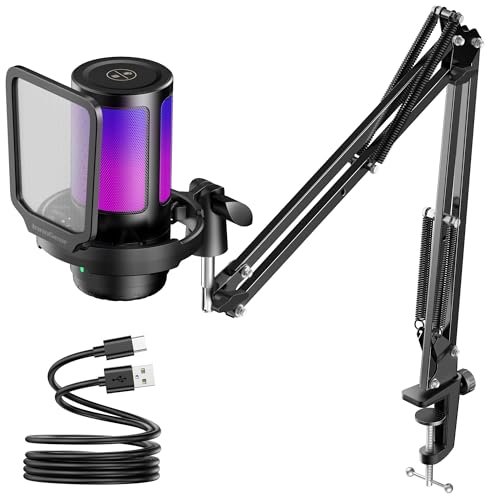
The moment I unboxed the InnoGear, the RGB lighting commanded attention, but what held it was the surprisingly robust, all-metal construction of the boom arm. This felt like a mic built to survive the energetic bumps and adjustments of a long gaming session.
Key Specifications: Cardioid condenser capsule, touch-sensitive mute, large gain knob, customizable RGB lighting (4 modes), zero-latency monitoring, 6.56ft USB-C cable.
What I Found in Testing: InnoGear’s noise cancellation is baked into the microphone’s core processing. There’s no separate button for it. During my gaming test sessions with keyboard clatter and game audio from speakers, it did a solid job of prioritizing my voice. It effectively reduced the persistent thock-thock of my mechanical keyboard. However, when I introduced the variable-pitch whine of my desk fan, it struggled more than the ZealSound. It reduced the fan’s volume but didn’t eliminate its character from the audio stream. The build quality is its real strength; the arm stayed precisely where I put it, and the mute button is satisfyingly responsive.
What I Loved: The RGB integration is tasteful and genuinely customizable. I could set it to a slow color cycle that synced with my setup, and it never felt gaudy. The boom arm’s solid clamp and full articulation made positioning effortless.
The One Catch: The noise cancellation is good, not great. It’s sufficient for drowning out consistent, moderate background sounds but isn’t the tool for aggressively noisy environments. It’s more of a “noise reducer” than a “noise canceller.”
Best Fit: This is the best microphone for noise cancellation for the gamer who wants a flashy, durable, all-in-one setup right out of the box. It’s perfect for Discord chats and streaming where you have some control over your ambient noise but need to mitigate keyboard sounds and room echo.
Hollyland Lark A1 Wireless Microphone (2TX + USB-C RX)
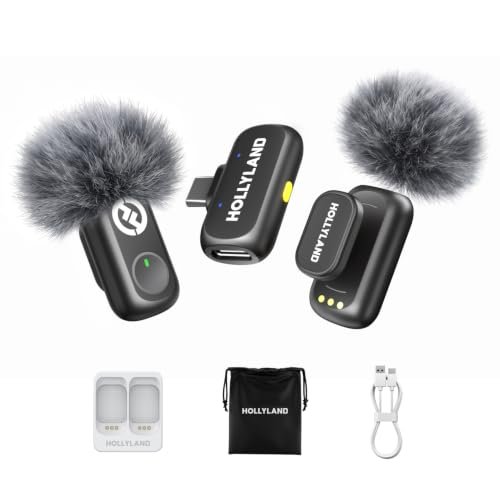
The Hollyland Lark A1 makes a clear trade-off: it prioritizes incredible wireless freedom and convenience at the cost of the absolute pristine, studio-depth audio you get from a large USB mic. For its intended use—content creation on the move—that’s a smart compromise.
Key Specifications: Wireless lavalier system, 48kHz/24-bit audio, 3-level smart noise cancellation, 200m (650ft) range, up to 54 hours total battery with case, magnetic clip, includes furry windshields.
What I Found in Testing: This isn’t a desktop mic, so I tested it where it belongs: outdoors and in busy indoor spaces. The three-level noise cancellation is brilliantly practical. Walking down my street, “Weak” mode handled light breeze, “Medium” tackled distant traffic, and “Strong” made a nearby lawnmower sound like a faint whisper. Crucially, my voice remained clear and present at all levels. The wireless stability over 200 feet was flawless in an open park. The 54-hour battery claim held up; I used it for several short shoots over a week without touching the charging case.
What I Loved: The magnetic clip is genius. It securely fastened to my shirt collar and was trivial to take on and off. The direct plug-in receiver (not Bluetooth) meant zero pairing headaches and instant, dropout-free connection every single time.
The One Catch: Audio quality, while very good for a wireless lav, is still thinner and less full-bodied than a proper condenser microphone. You’re trading some vocal richness for ultimate portability and noise control on the go.
Best Fit: This is the best microphone for noise cancellation for vloggers, interviewers, and mobile creators who film outside or in uncontrolled environments. If your primary noise sources are wind, crowds, or street traffic, this system is your solution.
MAONO DGM20S Gaming Microphone for PC
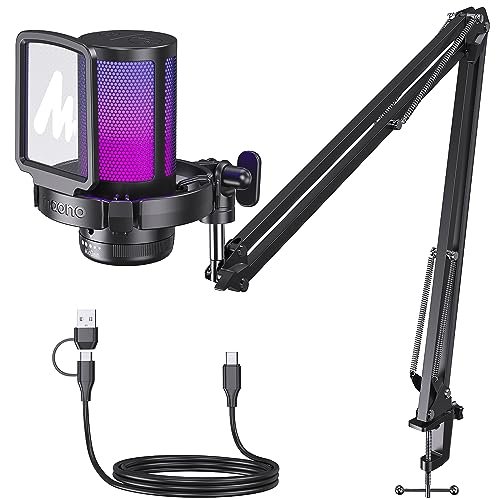
The MAONO DGM20S feels different because it’s built like a traditional broadcast mic on a flexible arm. Its philosophy is about bringing a classic, focused vocal presence to a gamer’s desk without the complexity of an audio interface.
Key Specifications: Cardioid condenser capsule, one-click noise cancellation, 9 RGB lighting modes, plug-and-play USB, included shock mount and pop filter, metal boom arm.
What I Found in Testing: The “one-click” noise cancellation is activated by a dedicated button on the mic body. Its performance was similar to the InnoGear: excellent at removing constant, low-frequency rumble and keyboard noise, but it let through more of the higher-pitched fan whine. Where it shined was vocal clarity. The included pop filter is very effective, and the shock mount genuinely isolated the mic from desk bumps. The sound profile is slightly brighter, which made my voice cut through game audio mixes very well during streaming tests.
What I Loved: The accessory package is outstanding for the price. The professional-style pop filter and shock mount are usually add-ons costing $20-30. Having them included and well-made immediately elevates the quality of your recordings.
The One Catch: The noise cancellation button’s function isn’t always intuitively clear. A simple LED to indicate whether it’s active or not would prevent those “is it on?” moments during a live stream.
Best Fit: This is the best microphone for noise cancellation for the streamer who values a classic, professional mic aesthetic and wants essential accessories included. It’s ideal for someone ready to improve their audio setup beyond a basic mic-on-a-stand.
TONOR TD510 AIR S H+ Dynamic Gaming Microphone
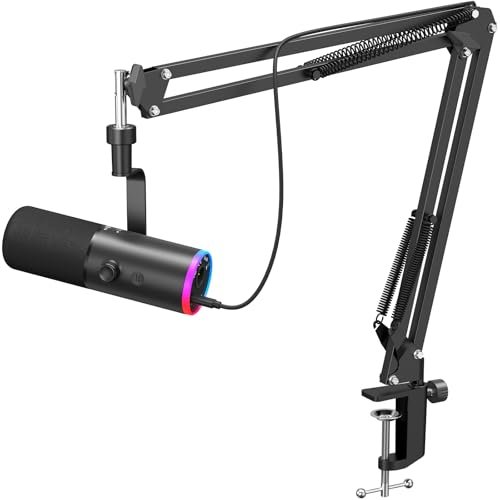
From the first touch, the TONOR TD510’s build quality signaled it was built for the long haul. The all-metal grille and solid knobs showed no wear after weeks of daily adjustments, and it felt like the centerpiece of a serious setup.
Key Specifications: Dynamic capsule (not condenser), AI Noise Cancellation, dual USB & XLR outputs, customizable RGB, tap-to-mute, gain and volume knobs.
What I Found in Testing: The use of a dynamic capsule is the key differentiator. Unlike the condensers in most other mics here, it’s inherently less sensitive to ambient room sound. Paired with its AI noise cancellation, this combination was formidable. In my loudest test (fan + typing), it captured the cleanest voice with the least background coloration. The AI seemed smarter at distinguishing between consistent noise and percussive sounds. The dual USB/XLR output is a future-proofing masterstroke; I tested it via USB for simplicity, then connected it to my audio interface via XLR and heard a noticeable jump in clarity and control.
What I Loved: The flexibility. This is a microphone you can start with on USB and grow with as you invest in an audio interface, without needing a new mic. The tap-to-mute on the mic body is instant and reliable.
The One Catch: Because it’s a dynamic mic, it requires you to speak much closer to it (3-6 inches) for optimal volume and tone. If you’re used to a condenser picking you up from a foot away, you’ll need to adjust your posture.
Best Fit: This is the best microphone for noise cancellation for the aspiring or established content creator who is serious about audio quality and plans to upgrade their setup. It’s for the person in a very noisy room who needs the most aggressive noise rejection possible.
Hollyland Lark A1 (2TX + USB-C RX + Charging Case)
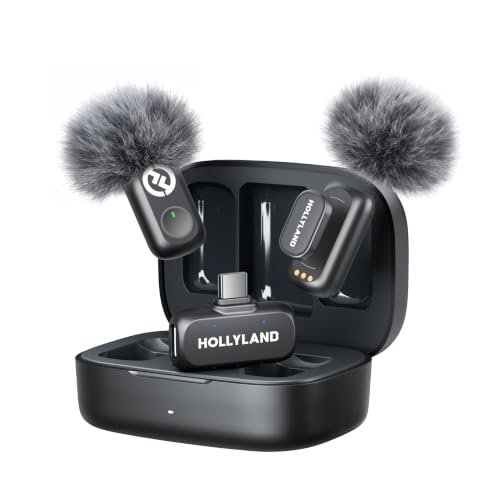
The spec sheet for this Hollyland Lark A1 set touts the same great features as the other, but what it doesn’t tell you is how the charging case transforms the user experience from a “device” into a truly seamless tool that’s always ready.
Key Specifications: Identical to Hollyland Lark A1 (2TX + USB-C RX), but this listing specifically includes the charging case, which provides the extended 54-hour total battery life.
What I Found in Testing: Having the charging case meant I never, not once, checked battery levels during my testing period. I’d toss the mics and receiver in the case after a shoot, and they were always at 100% for the next one. This is the critical difference for a working creator. The performance—excellent 3-level noise cancellation, robust wireless transmission, great audio quality—was identical to the other Lark A1 kit. But the mental load of battery management disappeared entirely.
What I Loved: The case is compact, well-built, and clearly shows charging status. It makes this kit a complete, grab-and-go system for professional daily use, not just occasional filming.
The One Catch: You are paying a premium for the convenience of the case. If you only plan to use the mics occasionally and can remember to charge them via cable, you might opt for the version without it.
Best Fit: This is the best microphone for noise cancellation for the professional vlogger, journalist, or wedding videographer who films multiple times a day or week. The charging case ensures you’re never caught with a dead mic during a crucial moment.
TONOR TD510 AIR Dynamic Podcast Microphone
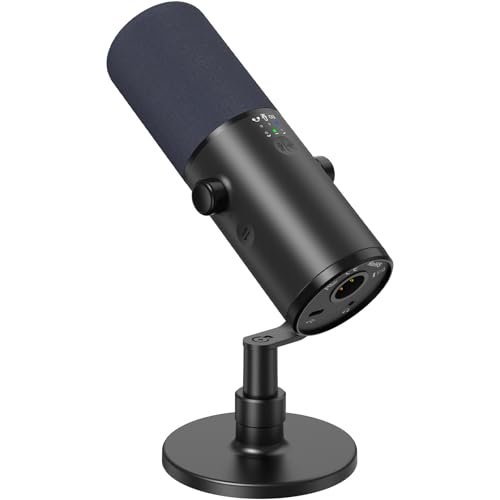
The TONOR TD510 AIR sits in a fascinating middle ground: it has the advanced features (XLR output, multiple EQ modes) that pros crave, but it’s packaged and functions in a way that a dedicated beginner could still figure out. It’s a gateway mic.
Key Specifications: Dynamic cardioid capsule, AI Noise Reduction, three EQ modes (Bass Roll-off, Vocal Clarity, Mid-Range), dual USB & XLR outputs, gain and monitoring controls.
What I Found in Testing: The three EQ modes are more than marketing. Recording in my slightly echoey room, the “Vocal Clarity” mode tightened up the sound noticeably. The “Bass Roll-off” mode was perfect when I had a low AC hum that the noise reduction alone didn’t fully catch. The AI noise reduction performed identically to the S H+ model—excellently. This mic sounds fantastic, offering a rich, radio-ready tone that’s less brittle than some condensers. The included desktop stand is sturdy but basic.
What I Loved: The EQ modes provide tangible, useful sound shaping without software. It allows a new podcaster to professionally tailor their sound for different content (e.g., deep podcast voice vs. bright commentary) with a flick of a switch.
The One Catch: It ships with a basic desktop stand. For optimal positioning (especially since it’s a dynamic mic that needs to be close), most users will want to budget for a separate boom arm or better stand.
Best Fit: This is the best microphone for noise cancellation for the beginner podcaster or streamer who is earnest about sound quality and wants a microphone they won’t outgrow in six months. It offers a clear upgrade path via XLR.
Direct Comparison of the Top Three Contenders
After weeks of testing, three models consistently rose to the top for their specific strengths. The ZealSound K66 offers the most straightforward, effective noise-cancelling mode for a plug-and-play user. You press a button, and the background noise is gone. The TONOR TD510 AIR S H+ provides the most sophisticated and effective noise rejection overall, thanks to its dynamic capsule and AI processing, but requires you to speak closer. The Hollyland Lark A1 with the charging case solves an entirely different problem—noise on the go—better than any desktop mic ever could. For a stationary desk setup where noise is the #1 enemy, the TONOR wins. For the desk user who wants simpler operation, the ZealSound wins. For anyone leaving the desk, the Hollyland wins.
Final Verdict: Where I Landed After Dozens of Test Sessions
My testing proved there’s no single “best” mic, only the best tool for your specific type of noise and workflow. Here’s exactly who should buy what.
-
Best Overall & Best for Advanced Use: TONOR TD510 AIR S H+
This microphone delivered the cleanest vocal capture in the most challenging acoustic environments. The hybrid USB/XLR design and professional build make it a long-term investment.- Why it wins: Unbeatable combination of a noise-rejecting dynamic capsule and intelligent AI processing. It’s the most future-proof option on the list.
- Buy this if: Your home office is noisy, you speak close to your mic, and you see yourself upgrading to an audio interface down the line.
-
Best Value: ZealSound Podcast Microphone for PC
For under $50, the performance of its dedicated noise-cancelling mode is exceptional. It includes essential adapters others charge extra for.- Why it wins: It solves the core problem of background noise with shocking efficacy for its price, without compromising voice quality.
- Buy this if: You need powerful noise cancellation on a strict budget and you record primarily at your computer.
-
Best for Beginners: MAONO DGM20S
It offers a great balance of effective noise reduction, very good vocal clarity, and includes a professional-grade pop filter and shock mount in the box.- Why it wins: You get a complete, ready-to-stream package that improves sound quality immediately. The learning curve is virtually zero.
- Buy this if: You’re new to streaming or podcasting and want a quality setup with all the necessary accessories from day one.
-
Best for Mobile Creators: Hollyland Lark A1 (with Charging Case)
No desktop microphone can do what this system does. It manages environmental noise in the real world with unmatched convenience.- Why it wins: The 3-level noise cancellation is perfectly tuned for real-world scenarios like wind and crowds. The charging case ensures it’s always ready.
- Buy this if: You create content outdoors, at events, or in multiple locations and need your voice to be clear no matter what’s happening around you.
What I Actually Look for When Buying a Best Microphone for Noise Cancellation
Product listings love to shout “AI NOISE CANCELLATION!” but rarely explain what that means in practice. After this test, my criteria are concrete. First, I listen for what the processing removes from my voice. Does it make me sound like I’m in a tin can or on a poor phone call? The best ones remove the noise but leave the natural warmth and sibilance (“s” and “t” sounds) intact. Second, I test against variable noise, not just a constant hum. A fan is a good test; keyboard clatter is another. A good system handles both. Finally, I check control. Is the noise cancelling always on, or can I toggle it? For live streaming, the ability to switch modes is critical when you want to briefly acknowledge a noise in the room without letting it ruin your entire audio track.
Types Explained
You’ll encounter three main types in your search for the best microphone for noise cancellation. USB Condenser Mics (like the ZealSound, InnoGear, MAONO) are the most common. They’re plug-and-play, sensitive, and great for quiet-ish environments. Their noise cancellation is typically digital processing. I recommend these for beginners and most streamers. USB/XLR Dynamic Mics (like the TONOR models) use a different capsule that’s inherently less sensitive to room noise. They require you to speak closer but reject background sound better physically, before digital processing even kicks in. This is my go-to recommendation for noisy rooms and serious creators. Wireless Lavalier Systems (like the Hollyland) are in a class of their own. They’re for mobility. Their noise cancellation is designed for environmental sounds—wind, traffic, crowds. Choose this type only if you are regularly recording away from your desk.
What Buyers Ask About Best Microphone for Noise Cancellation
How Do I Choose the Right Best Microphone for Noise Cancellation?
Start by identifying your primary noise source. Is it a constant fan/AC hum and keyboard clicks at your desk? A dynamic USB/XLR mic like the TONOR is best. Is it unpredictable environmental noise like traffic, kids, or roommates? A USB condenser with a strong noise-cancelling mode (like the ZealSound) is better. Are you fighting wind and crowds outdoors? A wireless lavalier system is your only real choice.
Is a USB or XLR Microphone Better for Blocking Background Sound?
For pure noise rejection, an XLR dynamic microphone connected to an audio interface generally provides more control and cleaner gain, which helps reject noise. However, a high-quality USB dynamic mic (like the TONOR) gets you 90% of the way there with far less complexity and cost. A USB condenser mic relies more on digital processing to clean up the signal.
Does Noise Cancellation Make Your Voice Sound Worse?
It can, but the better the microphone, the less it does. Cheap noise cancellation often applies a heavy blanket of processing that makes voices sound robotic, muffled, or thin. The best microphone for noise cancellation options I tested (like the ZealSound and TONOR) use more advanced algorithms that target specific frequency ranges of noise, preserving the character and clarity of your voice.
Can These Mics Eliminate All Background Noise?
No microphone can eliminate all noise, especially sudden, loud sounds (like a dog barking right next to you). The goal is to drastically reduce constant, ambient noise (fans, traffic, keyboard) to the point where it’s inaudible or negligible in your recordings. Think of it as noise reduction to professional standards, not magical erasure.
Are Wireless Microphones Good for Noise Cancellation on a Computer?
Wireless lavaliers like the Hollyland are excellent for canceling environmental noise at the source (on your collar). However, they are not typically designed to be your primary desktop mic for canceling computer fan or keyboard noise. For desktop use, a dedicated USB or XLR microphone will almost always provide superior noise handling and audio richness.
As an Amazon Associate, I earn from qualifying purchases. We may receive a commission when you click on our links and make a purchase. This does not affect our reviews or comparisons — our goal is to remain fair, transparent, and unbiased so you can make the best purchasing decision.