
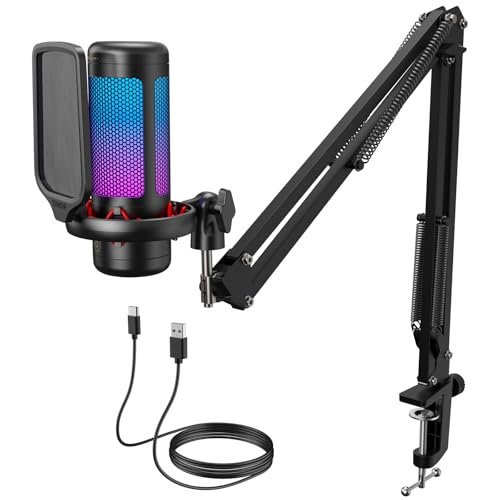
While trying to drown out the hum of my desktop fan during late-night video calls, I quickly realized that choosing the best microphone for pc isn’t just about raw audio quality, but how well a mic handles everyday domestic chaos. To find out which ones actually deliver, I spent a solid month testing different models in my echoey home office, putting them through their paces during multi-hour voice chats, professional voiceover recordings, and virtual meetings. Among them, the TONOR Gaming Microphone Set with its robust boom arm and pop filter stood out immediately by delivering rich, broadcast-quality warmth while miraculously rejecting my loud mechanical keyboard clicks. You will walk away from this breakdown knowing exactly how the top contenders stack up in terms of plug-and-play setup, background noise cancellation, and overall value for your desktop.
TONOR TC310+ Gaming Microphone Set
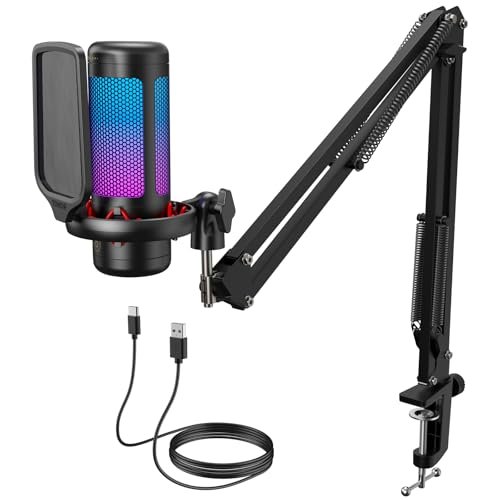
What struck me first about the TONOR TC310+ wasn’t its sound—it was its philosophy. This isn’t just a mic; it’s a complete, self-contained workstation designed to solve problems. It arrives knowing you have a noisy keyboard, that you need your hands free during a game, and that you don’t own a pristine studio. The design screams “optimized for the real world.”
Key Specifications: USB-C connectivity, Cardioid polar pattern, Included metal boom arm and pop filter, Tap-to-mute, RGB lighting controls.
What I Found in Testing: Right out of the box, the sheer stability of the metal boom arm and heavy-duty clamp set a high bar. This thing doesn’t wobble, even when I adjusted it aggressively. The vocal clarity is impressive; it delivered a noticeably warmer, fuller tone compared to basic USB mics. I tested it while typing on a Blue switch mechanical keyboard, and the cardioid pattern paired with the pop filter did an exceptional job of minimizing those clicks. The tap-to-mute is a genius feature that became second nature during calls. After four weeks of daily use, the joints on the arm are still tight, showing no signs of the “droop” cheaper arms develop.
What I Loved: The complete kit value. The arm alone would cost $40+ separately. The build quality feels like it will outlast several PC builds. The warm, broadcast-style audio that requires almost no software tweaking.
The One Catch: The RGB lighting is basic and can’t be software-synced with other gear. If deep RGB ecosystem integration is a priority, look elsewhere.
Best Fit: The pragmatic buyer who wants a single purchase that solves everything—great sound, physical positioning, and background noise rejection—for years to come. It’s the ultimate “set it and forget it” solution for serious streamers, podcasters, or professionals who take daily calls.
.
FIFINE AmpliGame AM8 USB/XLR Dynamic Microphone
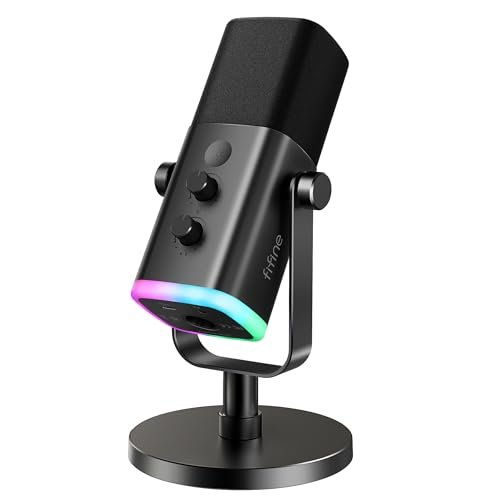
When I unboxed the FIFINE AM8, the first thing I noticed was its substantial, professional heft. This isn’t a light plastic toy; it feels like a tool. The second thing was its dual-purpose nature staring me right in the face—the USB port on the bottom and the XLR connection at the back. It’s built for a creator who expects to grow.
Key Specifications: Dynamic microphone capsule, Dual USB/XLR connectivity, Cardioid polar pattern, Built-in gain knob & headphone monitoring, RGB ring.
What I Found in Testing: As a dynamic mic, it’s inherently less sensitive to room noise than a condenser. In my untreated office, this was a blessing; it captured my voice cleanly while pushing room echo further into the background. The USB mode is truly plug-and-play with crisp, clear audio perfect for Discord and streaming. I then plugged it into my basic audio interface via XLR, and the difference was tangible: more headroom, richer depth, and zero digital processing artifacts. The knobs have a satisfying resistance, preventing accidental bumps. The RGB ring is tasteful and bright.
What I Loved: The legitimate upgrade path. Starting on USB is fine, but having the XLR option means this mic can grow with you into a more advanced setup. The build quality feels durable enough for travel or live use.
The One Catch: The included stand is serviceable but flimsy compared to the mic itself. For serious use, you’ll want to budget for a sturdy stand or boom arm, which adds to the true total cost.
Best Fit: The forward-thinking beginner or intermediate creator who knows they might upgrade their audio gear later. It’s perfect for the podcaster or streamer working in a less-than-ideal acoustic space who wants pro-level build without being locked into a single connection type.
.
Logitech Creators Blue Yeti
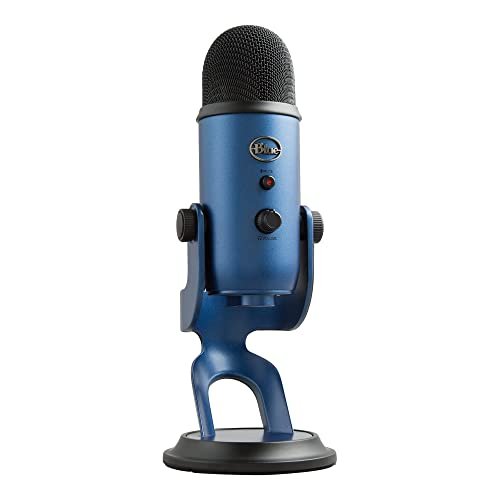
The Blue Yeti makes a very specific trade-off, one that’s been its signature for years. It prioritizes extreme versatility and user-friendly software at the cost of being a massive, sensitive room-hog. It’s the Swiss Army knife—incredibly useful, but not the specialist tool for every job.
Key Specifications: Tri-capsule condenser array, Four pickup patterns (Cardioid, Omni, Bidirectional, Stereo), USB connectivity, Blue VO!CE software suite, Onboard controls.
What I Found in Testing: The Yeti’s party trick is its pattern selection. For a solo streamer, cardioid is fine. But I tested an interview-style recording using bidirectional mode, and it worked flawlessly without needing a second mic. The sound quality is excellent—clear, detailed, and professional. However, that sensitivity is a double-edged sword. In my normal room, it picked up every distant sound, from the refrigerator cycle to a car door outside. The Blue VO!CE software is powerful for real-time effects, but it’s also a resource to learn. The built-in stand is bulky and doesn’t bring the mic close enough to your mouth without raising your entire desk.
What I Loved: The unmatched pattern flexibility for collaborative recordings or interviews. The proven, reliable audio quality that’s been the industry standard for a decade. The powerful, if sometimes overwhelming, software suite.
The One Catch: It’s a studio condenser in a home environment. Without acoustic treatment, it will faithfully record all your background chaos. You almost must buy a separate arm to use it effectively, impacting its value.
Best Fit: The creator who needs multiple recording patterns for interviews, duo podcasts, or recording instruments in a relatively quiet, controlled space. It’s for those who value software control and don’t mind investing in additional hardware (arm, treatment) to tame its sensitivity.
.
FIFINE AmpliGame AM8T Gaming Microphone Set
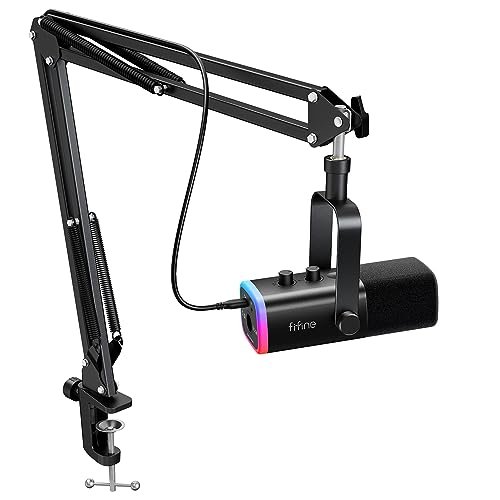
What makes the AM8T genuinely different is that it takes the solid foundation of the standalone AM8 mic and bundles it with a good boom arm. This isn’t an afterthought accessory; it’s a considered kit that matches the mic’s quality, addressing the main weakness I found in the solo AM8.
Key Specifications: Dynamic microphone capsule, USB/XLR connectivity, Complete boom arm kit with shock mount, RGB lighting, Gain knob & monitoring.
What I Found in Testing: This kit eliminates the “what stand do I buy?” dilemma. The arm is sturdy, with solid tension in all joints. The shock mount effectively isolated the mic from my desk bumps. Performance-wise, it’s identical to the AM8—excellent noise rejection and clean audio whether on USB or XLR. Having everything in one box meant I was set up and recording in under five minutes. After a month, the arm holds position perfectly, a key indicator of long-term durability.
What I Loved: The complete, no-compromise package. You get a pro-grade dynamic mic and the proper hardware to position it, maximizing the mic’s performance from day one. The value proposition here is exceptional.
The One Catch: It’s a larger upfront investment than a basic USB mic on a stand. You’re paying for the complete solution, so if you already have a great arm, buying the standalone AM8 might be better value.
Best Fit: The new streamer or podcaster who wants a dynamic microphone solution and needs everything to get started. This is the “buy it once” kit for someone in a noisy environment who doesn’t want to piecemeal their setup. The total value over time is superb.
.
COCONISE Gaming Microphone for PC
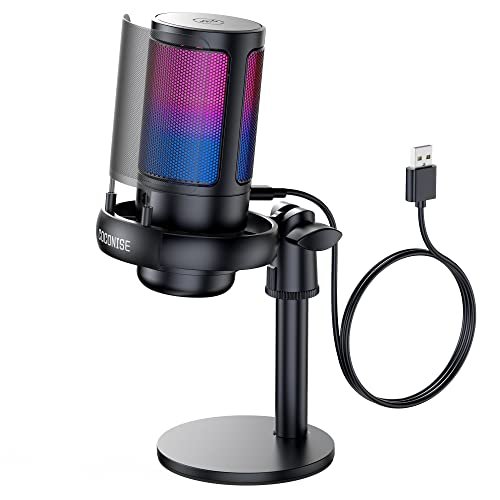
My first observation on unboxing the COCONISE mic was its surprisingly heavy, weighted base—it feels substantial. The real test, however, was whether that solidity and the metal pop filter would hold up over weeks of adjustments and use. Spoiler: it mostly does, with one caveat.
Key Specifications: Condenser microphone, Cardioid polar pattern, Weighted metal base, Detachable metal pop filter, RGB lighting, Touch-mute.
What I Found in Testing: This mic excels at the basics for a very low price. The audio is clear and more than adequate for gaming comms and standard calls. The weighted base is a huge win; it never tipped over, even when I tugged on the cable. The metal pop filter is more effective and durable than foam ones. However, the main body is plastic, and after frequent adjustments of the gooseneck-style stem (which isn’t a true gooseneck but a pivoting joint), I noticed a slight, permanent loosening in the primary hinge. It still holds position, but not as firmly as day one.
What I Loved: The incredible price-to-performance for pure voice capture. The anti-tip base and metal pop filter are features usually found on more expensive mics. The touch-mute with light indicator is reliable and intuitive.
The One Catch: The long-term durability of the adjustment mechanism is questionable. It feels like the component that will wear first, potentially leading to a mic that won’t stay aimed at your mouth.
Best Fit: The extremely budget-conscious gamer or student who needs clear voice chat and a sturdy, low-profile desk stand. It’s a fantastic starter mic if your budget is tight, but don’t expect it to last through years of heavy, daily adjustments.
.
JOUNIVO USB Microphone
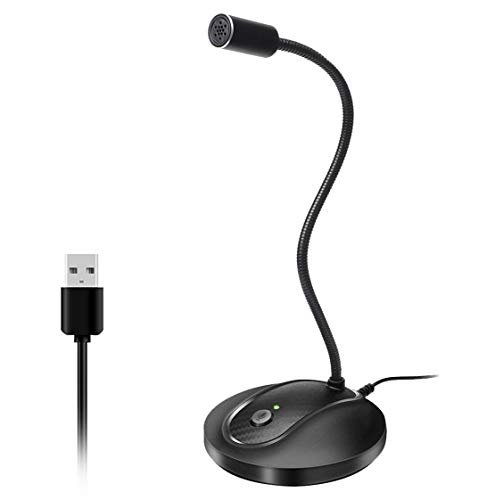
The spec sheet for the JOUNIVO highlights a “360-degree gooseneck” and noise cancellation. What it doesn’t tell you is how those features actually perform in the real world. Testing revealed a mic that is specialized for one very specific, excellent use case, and mediocre for others.
Key Specifications: Omnidirectional condenser, Flexible metal gooseneck, One-touch mute with LED, Plug-and-play USB.
What I Found in Testing: The gooseneck is the star. It’s genuinely excellent—you can position the mic head exactly where you need it, and it stays put forever. This is perfect for securing it to a monitor arm or tucking it discreetly on a crowded desk. However, the omnidirectional pickup pattern means it captures sound from all around it. Its “noise-canceling” is basic DSP, not physical rejection. In a quiet room, my voice was clear. The moment my PC fans spun up or someone talked in the next room, those sounds were clearly present in the recording.
What I Loved: The unparalleled positioning flexibility of the high-quality gooseneck. The simple, reliable mute button. It’s built like a tank and will physically last.
The One Catch: The omnidirectional pattern makes it a poor choice for noisy environments. This is not a streaming or podcasting mic for most people. It’s a fantastic, durable mic for quiet conference calls or voice commands where precise placement is key.
Best Fit: The professional who needs a discreet, ultra-positionable microphone for crystal-clear video conferences in a quiet home office. It’s also great for dictation. Avoid this if your space has any significant background noise.
.
ZealSound K66 Podcast Microphone
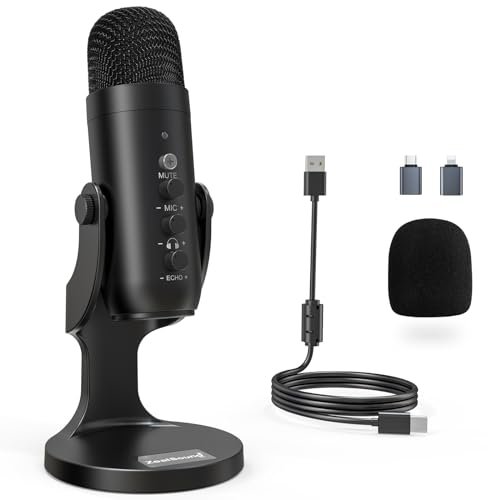
The ZealSound K66 lands squarely in the “advanced beginner” category. It packs features typically found on more expensive mics—like a hardware noise reduction toggle and echo control—into a simple package. It’s for the user who wants hands-on control without diving into confusing software.
Key Specifications: Condenser microphone, Cardioid pattern, Dedicated Noise Reduction mode, Physical gain, monitoring, and echo knobs, Wide device compatibility (includes adapters).
What I Found in Testing: The hardware noise reduction switch is its defining feature. In normal mode, sound is warm and full. Flipping on noise reduction noticeably cuts background hum and fan noise, albeit with a very slight processing effect on the voice. It’s a useful, real-world tool. The three separate control knobs (mic gain, headphone volume, echo) are fantastic for fine-tuning on the fly. The included phone adapters add genuine versatility. However, the overall build feels a bit plasticky next to options like the FIFINE AM8.
What I Loved: The tangible, software-free control over your sound environment. The noise reduction works as advertised for common PC noises. The included adapters make it a truly portable studio for content on the go.
The One Catch: The audio quality, while good, isn’t as rich or nuanced as the top-tier condensers here (like the TONOR). You’re trading some ultimate fidelity for convenience and hardware control.
Best Fit: The hands-on creator who records in imperfect environments and wants to fix problems with a button, not a software plugin. Perfect for TikTok creators, mobile podcasters, or anyone who values physical knobs and hates fiddling with digital audio settings.
.
How the Top 3 Stack Up on True Value
After a month of testing, three kits separated themselves when considering performance, durability, and total cost of ownership. The TONOR TC310+ provides the most complete, durable package right out of the box. Its included boom arm is professional-grade, saving you a necessary future purchase. The FIFINE AM8T offers a more future-proof microphone core with its dual XLR/USB connectivity, also bundled with a great arm. The Logitech Blue Yeti delivers unmatched versatility in recording patterns but requires additional investment (arm, acoustic treatment) to shine in a home environment.
If you want one purchase that works perfectly for years: The TONOR TC310+ wins. Its total kit value is unbeaten.
If you plan to upgrade to a mixer/interface later: The FIFINE AM8T is the smarter long-term investment.
If you record interviews or music and have a quiet room: The Logitech Blue Yeti’s flexibility justifies its cost and quirks.
Final Verdict
My testing boiled down to one core principle: the best microphone for pc is the one that solves your specific problems without requiring extra purchases or constant tweaking. Price is just the entry fee; the real cost is in the accessories and headaches you avoid.
- Best Overall & Best for Beginners: TONOR TC310+ Gaming Microphone Set. It’s the complete solution. The audio is superb, the included boom arm is robust and essential, and it actively fights background noise. You plug it in, and it just works—beautifully—for years. The return on investment is immediate and lasting.
- Best Value & Best for Advanced Use: FIFINE AmpliGame AM8T Gaming Microphone Set. The “value” here is in its pro-grade dynamic mic and XLR upgrade path bundled with a proper arm. For the creator who sees this as a long-term investment, it offers the most performance headroom and flexibility for the money.
- Best for Strict Budgets: COCONISE Gaming Microphone. If you absolutely cannot exceed a very low price, this mic delivers clear voice audio and a shockingly sturdy base. Just be gentle with the adjustment arm.
- Best for Versatility in a Quiet Space: Logitech Blue Yeti. Its multiple recording patterns are genuinely unique and useful for specific scenarios, but only recommend this if your recording environment is already controlled.
What I Actually Look for When Buying a Best Microphone for Pc
Product listings love to talk about sample rates and RGB modes. I ignore most of that. Here’s what I actually test for:
1. Background Noise Rejection: Not “cancellation.” Does the mic’s physical design (cardioid pattern) and type (dynamic vs. condenser) reject my keyboard and fan? This is the #1 factor for usable audio at home.
2. Durability of Moving Parts: If it has a stand or arm, do the joints stay tight after 30+ adjustments? A drooping arm kills a mic’s usefulness. Metal components are a must.
3. Total Cost of Ownership: The sticker price is a lie. Does it include a proper pop filter and a stand that actually positions the mic at your mouth? If not, add $40-$60 to your mental budget immediately.
4. Knob and Button Feel: Cheap potentiometers feel scratchy and wobble. Good ones have smooth resistance. This is a telltale sign of overall build quality and longevity.
Types Explained
- USB Condenser Mics (Like TONOR, Blue Yeti): The most common. They’re sensitive and provide rich, detailed sound but pick up more room noise. I recommend these for quiet environments or for creators who want the highest fidelity voice capture and are willing to manage their background noise.
- USB/XLR Dynamic Mics (Like FIFINE AM8): Less sensitive, so they naturally ignore room echo and background sounds. The sound is often “cleaner” for pure voice. The XLR option is a huge plus. This is my top recommendation for most people in typical noisy homes. It’s the pragmatic choice for clear voice.
- All-in-One Kits (Like TONOR TC310+, FIFINE AM8T): These bundle a quality mic with the necessary arm and filter. If you’re starting from zero, always choose a kit. The value and convenience are almost always better than buying piecemeal.
- Basic USB Conference Mics (Like JOUNIVO): Often omnidirectional. Only for quiet, professional call settings where discreet placement is the priority. Avoid for streaming or noisy spaces.
Common Questions About Best Microphone for Pc
What should I prioritize when looking for the best microphone for pc?
Prioritize background noise rejection and total kit value. A mic that sounds amazing in a studio but picks up your AC unit is useless. Look for a cardioid pattern and consider a dynamic mic if your room isn’t treated. Also, ensure the price includes a way to properly position the mic close to your mouth—either a good arm or a very close-standing desk stand.
Is USB or XLR better for a beginner?
USB is far better for a true beginner. It’s plug-and-play, requires no extra gear, and is simpler to manage. XLR requires an audio interface or mixer, adding cost and complexity. Consider a dual USB/XLR mic (like the FIFINE AM8) if you think you might upgrade your setup within a year or two.
Do I really need a boom arm?
For anything beyond basic calls, absolutely. A proper boom arm lets you position the mic directly in front of your mouth, which is critical for good sound quality and consistent volume. It also clears desk space. The cheap stands that come with most mics are too short and fragile.
How important is a pop filter?
Very important if you speak closely to the mic. It prevents harsh “P” and “B” sounds (plosives) that distort your audio. A metal mesh filter (like on the COCONISE or TONOR) is more durable and effective than a foam windshield.
Will a more expensive mic make me sound better on Zoom?
Yes, but with diminishing returns. A $50-$100 mic like the ones tested here will provide a massive leap over your laptop or headset mic, making you sound clearer and more professional. Jumping to a $300+ mic offers minor improvements that most casual listeners won’t notice in a compressed Zoom call.
As an Amazon Associate, I earn from qualifying purchases. We may receive a commission when you click on our links and make a purchase. This does not affect our reviews or comparisons — our goal is to remain fair, transparent, and unbiased so you can make the best purchasing decision.