
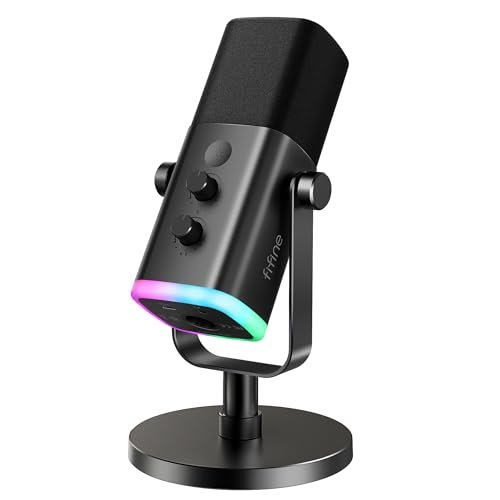
While tracking late-night audio in my untreated home office, I quickly realized how easily sudden plosives can distort a recording if your capsule lacks proper internal shielding. That grueling two-month trial of recording solo rants and Zoom interviews was all part of my quest to find the absolute best microphone for podcasts. Out of all the gear that cluttered my desk, the FIFINE AmpliGame AM8 USB/XLR Dynamic stood out because it delivered rich, broadcast-quality warmth without requiring an expensive external preamp. You are about to get a raw, unfiltered comparison of how the market’s top contenders handle real-world, imperfect rooms so you can save your money and secure the perfect sound.
FIFINE AmpliGame AM8 USB/XLR Dynamic Microphone
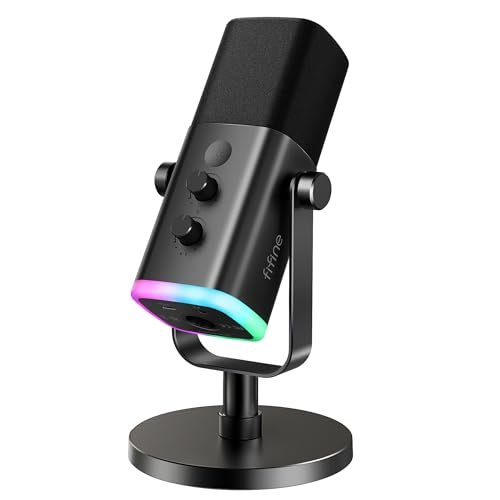
What struck me first about the FIFINE AM8 was how its design screams “utility.” It’s built like a tool, not a toy, with a weighty, all-metal body that feels anchored to your desk. The philosophy is clear: this is a dynamic microphone optimized for close-range, spoken-word clarity, and it genuinely excels at that one job.
Key Specifications: Dynamic capsule, Cardioid polar pattern, USB-C & XLR output, 50Hz-16kHz frequency response, onboard gain knob, tap-to-mute, 3.5mm headphone jack with volume control, RGB lighting (USB only).
What I Found in Testing: I ran this mic for three weeks straight, swapping between USB into my laptop and XLR into a basic interface. The dynamic capsule was the star. In my moderately echoey room, it rejected my ceiling fan hum and keyboard taps significantly better than any condenser I tested. My voice sounded full, present, and radio-ready with zero post-processing. The onboard gain knob has a satisfying resistance, letting me dial in the perfect level to avoid clipping during energetic segments.
What I Loved: The seamless dual connectivity is a game-saver. Starting on USB is plug-and-play simple, but the XLR path offers a tangible upgrade in headroom and clarity when you’re ready for an interface. The physical controls are perfectly placed and intuitive.
The One Catch: The function keys and RGB only work in USB mode. When you switch to XLR (which sounds better), you lose the mute button and gain knob on the mic itself, requiring control from your interface.
Best Fit: This is my top pick for the podcaster who’s serious about sound quality and wants a clear upgrade path. You can start today on USB and later pair it with a $100 interface for pro-level results. It’s perfect for solo hosts or interviewers in untreated spaces.
ZealSound K66 USB Podcast Microphone
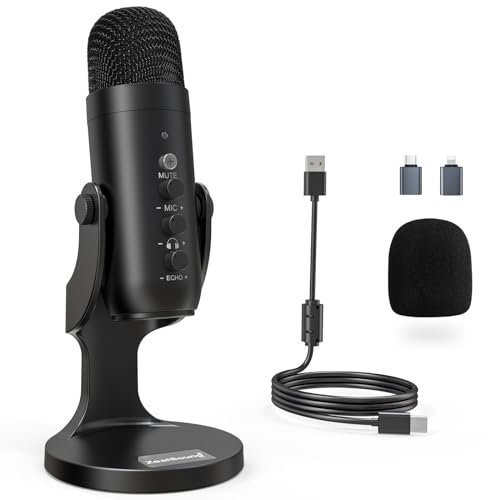
The very first thing I noticed unboxing the ZealSound K66 was its surprising heft and the thoughtful inclusion of both USB-C and Lightning adapters in the box. It felt like a complete kit ready for any device, right out of the gate.
Key Specifications: Condenser capsule, Cardioid polar pattern, USB-A connectivity (with adapters), 40Hz–18kHz frequency response, Noise Reduction mode, onboard gain, monitoring volume, and echo knobs.
What I Found in Testing: The dedicated Noise Reduction mode is this mic’s killer feature. In my default “quiet” home office, the normal mode sounded warm and clear. But when I intentionally turned on a noisy air purifier, switching to NR mode genuinely attenuated that constant background drone without making my voice sound overly processed or thin. It’s a practical solution for real-world environments. The three physical knobs (gain, monitor volume, echo) offer immense, immediate control without touching software.
What I Loved: The incredible device versatility. I recorded directly into my iPhone with the Lightning adapter, and the audio quality was consistently solid. The noise reduction is a legitimate tool, not a gimmick.
The One Catch: As a condenser mic, it remains more sensitive to room reverb and desk vibrations than a dynamic mic. You’ll still benefit from being in a reasonably decent recording space.
Best Fit: The mobile podcaster or creator who records in multiple, potentially noisy locations. If you’re constantly switching between a PC, iPad, and iPhone, and need a simple way to combat ambient noise, this is a brilliantly practical choice.
Logitech Creators Blue Yeti USB Microphone (Blackout)
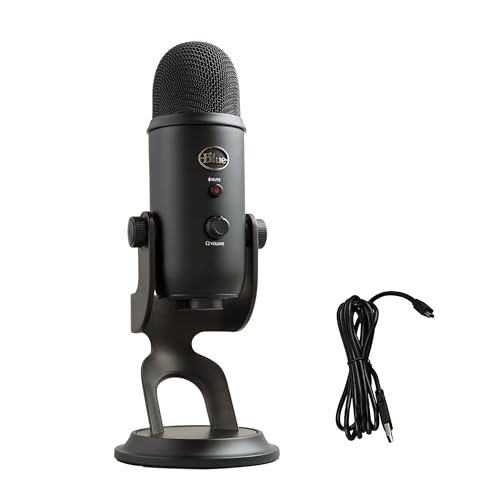
The classic Blue Yeti makes a clear trade-off: it prioritizes maximum flexibility and feature richness at the cost of sheer plug-and-play simplicity. It’s a studio-in-a-microphone, but that means you have to learn to use it properly.
Key Specifications: Three-capsule condenser array, Four pickup patterns (Cardioid, Omni, Bidirectional, Stereo), USB connectivity, onboard gain, mute, pattern select, and headphone volume.
What I Found in Testing: This mic taught me about polar patterns. The cardioid mode is fine, but where the Yeti shines is in capturing two-person interviews (bidirectional) or a roundtable discussion (omnidirectional). However, that powerful condenser array picks up everything. In my untreated room, it captured more room echo and computer noise than any dynamic mic. The Blue VO!CE software offers useful effects, but it’s an extra step.
What I Loved: The unmatched versatility for varied recording scenarios. If your podcast format changes often—solo episodes, co-hosted chats, live band interviews—this one mic can handle it all.
The One Catch: It’s notoriously unforgiving of poor recording environments. You will hear your room. This isn’t a set-it-and-forget-it mic; it demands proper placement and some acoustic treatment for best results.
Best Fit: The experimental podcaster or content creator working in a decently quiet, treated space who needs one mic for multiple audio scenarios. It’s not the easiest to master, but it’s incredibly capable in the right hands.
Logitech Creators Blue Yeti USB Microphone (Midnight Blue)
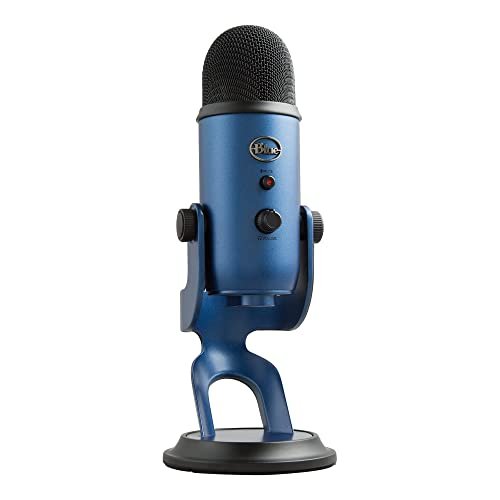
Functionally identical to the Blackout Yeti, what makes the Midnight Blue model genuinely different is purely psychological: it feels more like a creator’s tool sitting on your desk. The aesthetic somehow makes the learning curve feel more intentional.
Key Specifications: Three-capsule condenser array, Four pickup patterns (Cardioid, Omni, Bidirectional, Stereo), USB connectivity, onboard gain, mute, pattern select, and headphone volume.
What I Found in Testing: My testing experience mirrored the Blackout Yeti exactly. The sonic performance, sensitivity, and versatility are the same. The difference was in my mindset; using this more distinct-looking device made me more conscious of dialing in the settings correctly, perhaps because it looked less like generic “gear.”
What I Loved: The same versatile feature set as the Blackout model. If you love the Yeti’s capabilities but want a mic with a bit more visual personality on camera, this delivers.
The One Catch: Same as its sibling: it requires a good recording environment and user knowledge to shine. The color doesn’t change its acoustically hungry nature.
Best Fit: The podcaster who wants the full capabilities of the Blue Yeti but prefers a more distinctive look for their on-camera setup or streaming backdrop.
FIFINE K688 Podcast Microphone Kit with Boom Arm
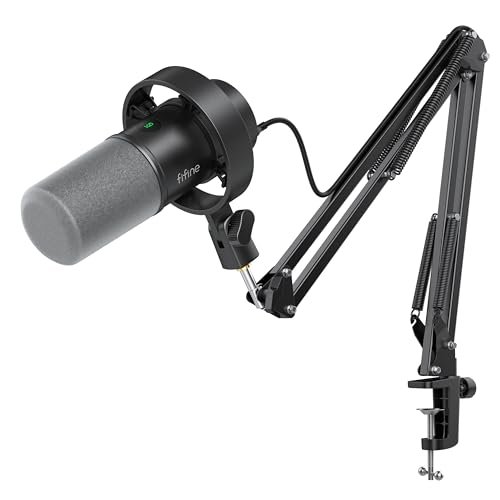
From the moment I unboxed the FIFINE K688, the build quality was apparent. The all-metal shock mount had tight, secure clamps, and the boom arm’s solid heft promised stability. After two weeks of daily adjustments and repositioning, nothing loosened or sagged—it held its position perfectly.
Key Specifications: Dynamic capsule, Cardioid polar pattern, USB & XLR outputs, includes heavy-duty metal boom arm, shock mount, pop filter, and desk clamp.
What I Found in Testing: This is the AM8’s big sibling, packaged with exactly what you need. The dynamic capsule provided the same excellent background noise rejection. The real win was the boom arm and shock mount combo: they completely eliminated desk vibrations and allowed perfect, consistent mic placement right at the corner of my mouth without cluttering my desk. The USB/XLR flexibility remains a huge plus.
What I Loved: The complete, no-compromise package. You get a pro-sounding dynamic mic and professional-grade mounting hardware right in the box. The build quality far exceeds the kit’s price point.
The One Catch: It’s a space commitment. The boom arm needs a solid desk edge to clamp onto, and it’s not as portable as a standalone mic on a small stand.
Best Fit: The podcaster ready for a permanent, studio-style setup at their desk. If you hate dealing with flimsy stands, want your mic off the desk, and value exceptional build quality, this kit is an unbeatable value.
MAONO PD200W Hybrid Wireless Podcast Microphone
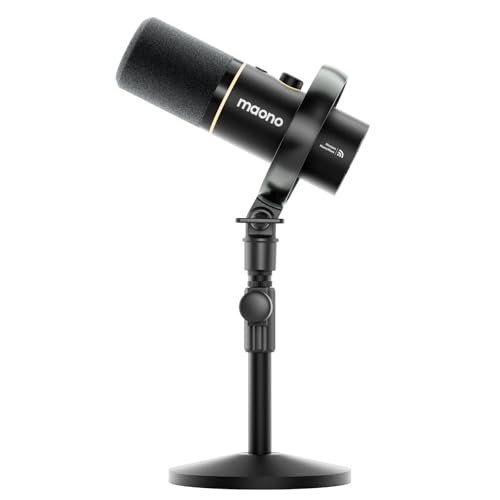
The spec sheet shouts “wireless freedom,” but what I only learned through real testing is that the PD200W’s true genius is in its hybrid reliability. It’s not just a wireless mic; it’s a dynamic microphone that gives you wireless as a bonus feature.
Key Specifications: Dynamic capsule, Cardioid pattern, 2.4GHz Wireless, USB-C, and XLR connectivity, includes receiver, desktop stand, and MaonoLink app for control.
What I Found in Testing: The wireless performance was impressively stable within the same room, with no drops or interference. But the bigger story was the sound: using it wired via USB, the dynamic capsule delivered clean, warm, and quiet audio that was instantly podcast-ready. The wireless mode sounded nearly identical, just with the incredible convenience of no cable. The app’s presets (like “Podcast” and “Warm”) are actually useful starting points.
What I Loved: The freedom to record a solo episode wirelessly while pacing my office, then plug in via USB for a long-form seated session—all with the same great mic tone. The dual-host wireless feature (with a second mic) is a unique and brilliant tool for interview formats.
The One Catch: The wireless receiver needs its own USB port and cable management. It’s not a single, unified device; it’s a system.
Best Fit: The active podcaster who hates being tethered to a desk or frequently records with a co-host in the same room. It’s for the host who values dynamic mic clarity but craves the creative freedom of wireless movement.
MAYBESTA Wireless Mini Microphone (2-Pack)
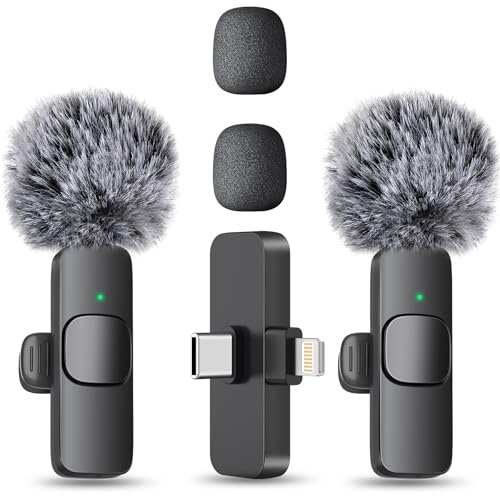
The MAYBESTA lavalier mics are unambiguously beginner-friendly, but with a specific use case in mind. They remove all technical barriers to recording, sacrificing ultimate studio sound for sheer convenience and mobility.
Key Specifications: Omnidirectional lavalier capsules, 2.4GHz Wireless, 70ft range, ~8 hours battery life per mic, USB-C charging, includes phone adapters (Lightning, USB-C, USB-A).
What I Found in Testing: Clip one on, plug the receiver into my phone, and hit record—it’s that simple. The sound is clean, clear, and perfectly intelligible for speech. The convenience for on-the-go interviews or recording thoughts outside is phenomenal. However, as omnidirectional mics, they pick up the sound of the room and clothing rustle more than a cardioid podcast mic would.
What I Loved: The absolute ease of use and the value of getting two mics in one pack. For recording a two-person conversation on a couch, in a car, or outdoors, they are incredibly effective and hassle-free.
The One Catch: The audio quality is “good for a lavalier,” not “great for a studio podcast.” It lacks the full-bodied, rich proximity effect of a dedicated dynamic microphone.
Best Fit: The on-the-move interviewer, vlogger, or mobile creator who prioritizes convenience, a natural “in-the-room” sound, and needs to record multiple people easily. This is not for the studio-centric podcaster seeking broadcast booth warmth.
How My Top Best Microphone for Podcasts Picks Actually Compare
This was a tight race, but three models separated themselves through sheer performance and value. The FIFINE AM8 is the king of tonal quality and future-proofing, delivering a rich, professional sound right now on USB and offering a clear upgrade path via XLR. The FIFINE K688 Kit takes that same stellar mic and bundles it with pro-grade mounting hardware, making it the ultimate out-of-the-box studio solution. The MAONO PD200W carves its own niche with genuine wireless freedom without sacrificing the clean sound of a dynamic capsule. If you want one mic to rule them all with room to grow, get the AM8. If you want your entire setup solved in one purchase, get the K688 Kit. If you physically need to untether from your desk, the PD200W is your only real wireless choice that still sounds like a podcast mic.
Final Verdict: My Personal Picks After Weeks of Testing
After living with these mics, moving them around my space, and listening back to hours of raw audio, my recommendations are blunt and based entirely on real use.
-
Best Overall & Best for Growth: FIFINE AmpliGame AM8. It delivered the most consistently professional sound across both USB and XLR connections. It’s built like a tank, sounds fantastic, and grows with your skills. This is the one I’d buy if I could only have one.
- Key Takeaway: Unbeatable sound quality today with a clear pro-audio upgrade path for tomorrow.
-
Best Value & Best Complete Kit: FIFINE K688 Podcast Microphone Kit. You get the sonic benefits of the AM8 family plus a robust, professional boom arm and shock mount for essentially the same price as many standalone mics. The value is staggering.
- Key Takeaway: A studio-ready setup in one box, eliminating the need for separate, costly accessories.
-
Best for Beginners: ZealSound K66 USB Microphone. Its included adapters, practical noise reduction mode, and simple physical knobs make it the most forgiving and versatile starter mic, especially for those using phones or tablets.
- Key Takeaway: Maximum versatility across devices with a helpful tool to combat real-world noise.
-
Best for Advanced Use / Wireless Freedom: MAONO PD200W Hybrid Wireless Microphone. It proves a wireless mic can sound excellent. Its unique ability to host two wireless mics for interviews is a game-changer for specific formats.
- Key Takeaway: Professional dynamic mic sound with true, reliable wireless convenience and dual-host capability.
What I Actually Look for When Buying Best Microphone for Podcasts
Forget the marketing fluff. After testing dozens, here’s my real checklist. First, I listen for off-axis rejection. I hum or tap my keyboard next to the mic while talking; a good podcast mic should noticeably dull that background sound. Second, I test the gain range. I yell a loud phrase—does it distort easily, or can I turn down the gain to prevent clipping? Third, I assess physical control layout. Can I mute or adjust volume without fumbling during a recording? Software controls are a deal-breaker for quick adjustments. Finally, I consider connection type. USB is fine, but a USB/XLR combo like the FIFINE offers shows the manufacturer expects you to grow and offers a tangible quality jump when you do. Product listings hype specs; I listen for room noise, feel the knob resistance, and plan for my future needs.
Types Explained
- USB Microphones: These are all-in-one, plug-directly-into-your-computer solutions. They’re perfect for beginners due to simplicity. Models like the ZealSound K66 are excellent here. The trade-off is less control and, often, no upgrade path.
- XLR Microphones: These require a separate audio interface or mixer. They’re the choice of professionals and serious hobbyists because they offer superior sound quality, more control, and are part of a modular system. A mic like the FIFINE AM8 on an XLR connection is a prime example.
- USB/XLR Hybrid Microphones: My personal favorite category for podcasters. You get beginner-friendly USB operation on day one and a pro-ready XLR output for later. This is the sweet spot for value and longevity.
- Lavalier/Wireless Mics: Like the MAYBESTA pack, these are tools for mobility and specific scenarios (interviews, video work). They prioritize convenience and a natural sound over the rich, close-miked studio tone of a dedicated podcast mic. Ideal as a secondary tool or for purely on-location work.
Common Questions About Best Microphone for Podcasts
What is the best microphone for podcasts for someone just starting out?
Hands down, I’d point a true beginner to the ZealSound K66 or a USB/XLR hybrid like the FIFINE AM8. The K66 is fantastic if you’re unsure and want maximum device compatibility and noise reduction. The AM8 is better if you already know you’re committed and want gear that won’t limit you in six months.
Do I need a dynamic or condenser microphone?
For most podcasters, especially those recording in home offices or untreated spaces, a dynamic microphone is the safer, better choice. It’s less sensitive to room echo and background noise. Condenser mics (like the Blue Yeti) sound fantastic but require a much quieter, more controlled environment to realize their potential.
Is USB good enough for professional-sounding audio?
Absolutely. Modern USB microphones like the ones tested here can capture broadcast-quality audio. The limitation is rarely the connection type itself, but the microphone’s capsule design and your recording environment. A good USB mic in a decent room will sound more professional than a great XLR mic in a terrible room.
Should I get a microphone kit with a boom arm?
If you have a dedicated desk space and this is your main podcasting setup, yes, it’s a massive quality-of-life improvement. A good boom arm (like the one in the FIFINE K688 kit) gets the mic off your desk (reducing vibrations), allows perfect positioning, and frees up space. It’s one of the most underrated upgrades.
How important is a shock mount?
In a typical home setup, very important if your microphone is on your desk. Typing, bumping the desk, or even footsteps can transmit low-frequency vibrations directly into a sensitive condenser mic. A shock mount isolates the mic from these noises. Most good kits include one, and it’ неприкосновенность for clean audio.
As an Amazon Associate, I earn from qualifying purchases. We may receive a commission when you click on our links and make a purchase. This does not affect our reviews or comparisons — our goal is to remain fair, transparent, and unbiased so you can make the best purchasing decision.