
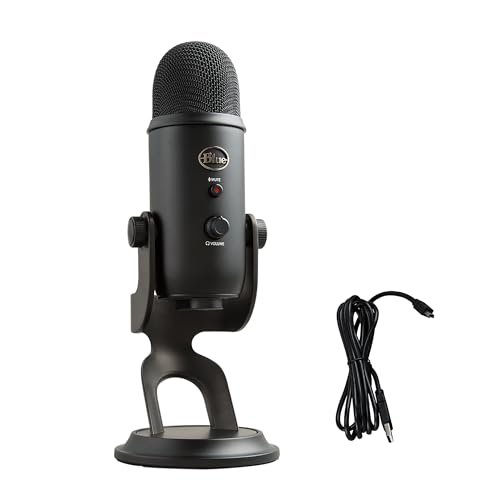
During three months of back-to-back Zoom negotiations in my hardwood-floored home office, I quickly realized that muffled audio is the ultimate professional deal-breaker. Finding the best microphone for video calls required more than just reading spec sheets, so I spent weeks recording test calls under noisy conditions like leaf-blowers buzzing outside and my dog barking downstairs. Through all the chaos, the Logitech Creators Blue Yeti USB stood out because its multi-pattern pickup captured my natural voice with incredible warmth while successfully ignoring my clicky mechanical keyboard. This hands-on comparison cuts through the marketing hype to show you how the top performers actually sound in messy, real-world workspaces, making it easy to find your perfect audio upgrade.
Logitech Creators Blue Yeti USB Microphone
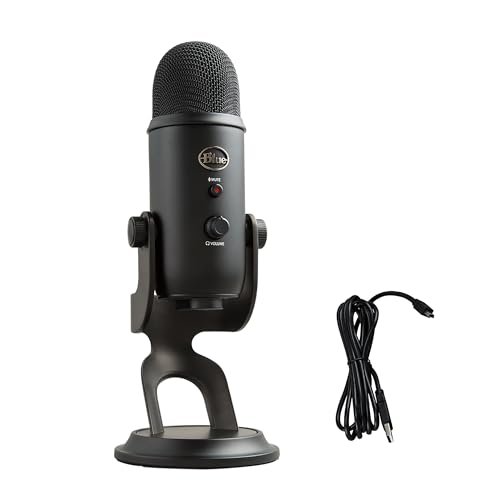
What struck me first about the Blue Yeti wasn’t the sound—it was the sheer, undeniable heft of it. This isn’t a peripheral; it’s a piece of studio hardware. The design philosophy is clear: it’s engineered as a broadcast-grade tool first, and its versatility for video calls is a happy byproduct of that quality. The all-metal construction, from the grill to the solid base, telegraphs durability and eliminates any hollow, plasticky resonance you get with cheaper builds.
Key Specifications: Tri-capsule condenser array, Four pickup patterns (Cardioid, Omni, Bidirectional, Stereo), Built-in gain control & headphone amp with zero-latency monitoring, USB connectivity.
What I Found in Testing: The engineering here is in the capsule array. Most USB mics use a single capsule, but the Yeti uses three, which is why its pattern selection isn’t a software gimmick—it’s a physical reconfiguration of how those capsules work together. In cardioid mode (the one I used 95% of the time for calls), the side and rear rejection was superb. My mechanical keyboard, positioned just behind the mic, was reduced to a faint, non-distracting texture. The sound profile is inherently warm and full-bodied, adding a professional polish to my voice that laptop mics simply can’t replicate.
What I Loved: The onboard gain knob was a game-changer. I could dial in the perfect input level in seconds without diving into software settings, preventing clipping when I got animated. The zero-latency monitoring via the headphone jack let me hear exactly how I sounded on the call in real-time.
The One Catch: It’s large, heavy, and requires significant desk real estate. Its sensitivity also means it will pick up every ambient sound in a truly noisy, untreated room if you don’t position it correctly.
Best Fit: This is for the serious user—the podcaster, streamer, or professional who regularly presents and needs broadcast-quality audio that can adapt to different recording scenarios. It’s an investment in your vocal presence.
.
TONOR Conference USB Microphone G11
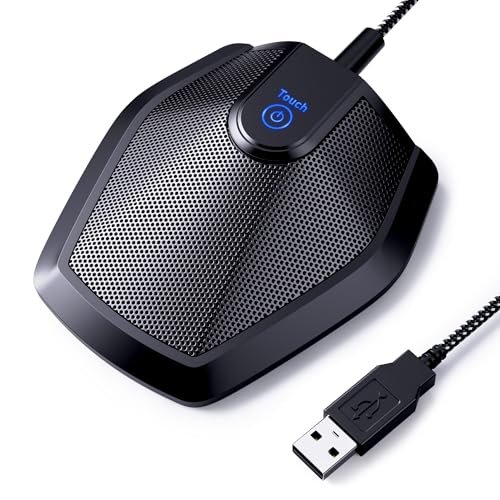
My first thought unboxing the TONOR G11 was, “This is built like a tank.” The cylindrical metal body feels incredibly dense and cool to the touch, and the wide, weighted base with its rubber foot is unshakable. It’s immediately obvious this mic prioritizes functional, meeting-friendly durability over flashy aesthetics. The simple, single-button design communicates its purpose: reliable, omnidirectional pickup for group conversations.
Key Specifications: Omnidirectional condenser capsule, ~11.5 ft pickup radius, Single-touch mute button with LED, USB plug-and-play, All-metal construction.
What I Found in Testing: The omnidirectional pattern is the core of its design. This mic isn’t trying to isolate your voice; it’s engineered to capture a room. For a small team huddled around a laptop, it works remarkably well, providing even coverage without a “hot spot” for the person sitting directly in front of it. The metal body does an excellent job of damping handling noise. However, this pattern is also its limitation for solo calls—it will faithfully capture every air conditioner hum, keyboard clack, and paper shuffle in the room with you.
What I Loved: The physical mute button is satisfyingly clicky and immediate, with a bright blue LED that leaves no doubt about your mute status. For conference etiquette, this is invaluable.
The One Catch: The omnidirectional pattern is a double-edged sword. For solo video calls in a typical home office, it introduces more ambient noise than a cardioid mic, which can be distracting for listeners.
Best Fit: This is genuinely perfect for its stated purpose: small to medium conference rooms or team huddles. It’s a poor choice for a solo user in a noisy environment but an excellent, durable tool for capturing group discussion.
.
CMTECK USB Computer Microphone G009
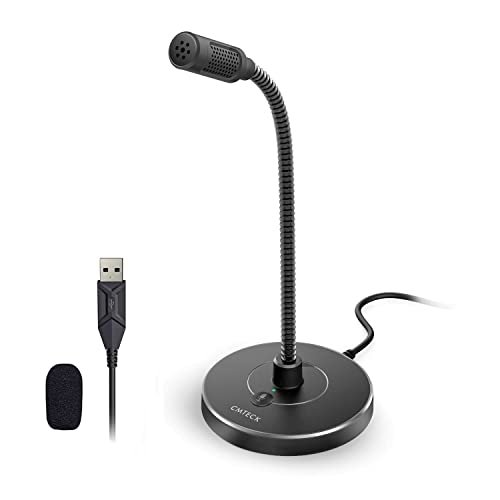
The CMTECK G009 makes a clear trade-off: it prioritizes ultra-compact, flexible positioning and active noise cancellation, sacrificing some audio richness and build material quality in the process. The entire package feels designed for the user who needs a mic to get out of the way both physically and audibly, but doesn’t demand studio-level tonal depth.
Key Specifications: Cardioid condenser capsule, “CCS2.0 Smart Chip” for noise cancellation, Gooseneck arm, Plug-and-play USB, Miniature desktop base.
What I Found in Testing: The noise-cancelling is effective but aggressive. It uses processing (that “smart chip”) to strip out consistent background noises like fans, which it did well. The trade-off is that it can sometimes make my voice sound slightly thin or processed compared to a pure analog signal path like the Yeti’s. The gooseneck is its best feature—it’s genuinely useful for getting the capsule exactly 4-6 inches from your mouth, which is crucial for clarity. However, the plastic base is very light, requiring careful cable management to avoid pulling it over.
What I Loved: The form factor. When not in use, I could bend it completely out of my sightline. For a minimalist desk setup, this is a huge win. The mute button with its red/green LED is simple and effective.
The One Catch: The audio quality is “good enough” for clear intelligibility but lacks the warmth and full frequency response of more premium mics. It solves the noise problem practically, but not beautifully.
Best Fit: The budget-conscious user, student, or remote worker in a consistently noisy environment (like a shared living space) who needs a clear voice signal above all else and values a tiny footprint.
.
ZealSound Podcast Microphone K66
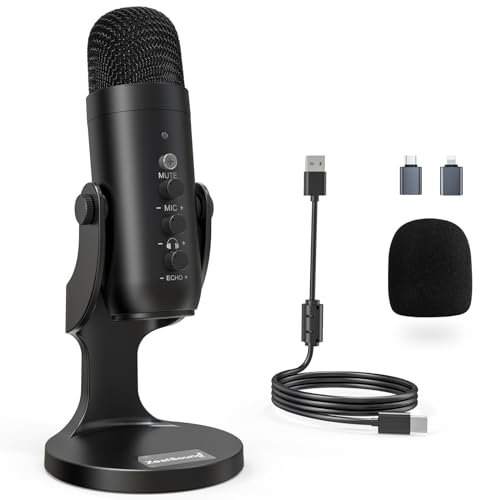
What makes the ZealSound K66 genuinely different is its dual-mode noise reduction system, which is a tangible hardware/software engineering choice you can feel and hear. Flicking between its “Default” and “Noise Reduction” modes with a long-press of the mute button produces an audible change in the background noise floor. It’s a mic built for the modern creator who records in imperfect spaces and wants on-the-fly control without software.
Key Specifications: Cardioid condenser capsule, Selectable Noise Reduction Mode, Dedicated physical knobs for gain, monitoring volume, and echo, Real-time zero-latency monitoring, Includes USB-C and Lightning adapters.
What I Found in Testing: The physical control knobs are a standout. The ability to tweak mic gain and headphone monitoring volume on the unit itself is incredibly convenient for dialing in levels before a call. The Noise Reduction Mode is more nuanced than the CMTECK’s; it didn’t strip as much body from my voice while still taming my keyboard. The inclusion of mobile adapters isn’t an afterthought—I tested it with my iPad and it performed identically, a huge plus for hybrid device users.
What I Loved: The echo adjustment knob. While gimmicky for pure speech, it’s a fun tool that demonstrates the mic’s processing capability. For voiceovers or adding a touch of presence, it’s uniquely handy in this price range.
The One Catch: The build, while solid, uses more plastic in the housing than the all-metal TONOR or Yeti. It feels durable, but not as indestructible.
Best Fit: The versatile content creator or professional who uses multiple devices (PC, Mac, iPhone) and wants prosumer-level control and features (like physical knobs and a noise reduction toggle) without stepping into the Yeti’s price bracket.
.
JOUNIVO USB Microphone
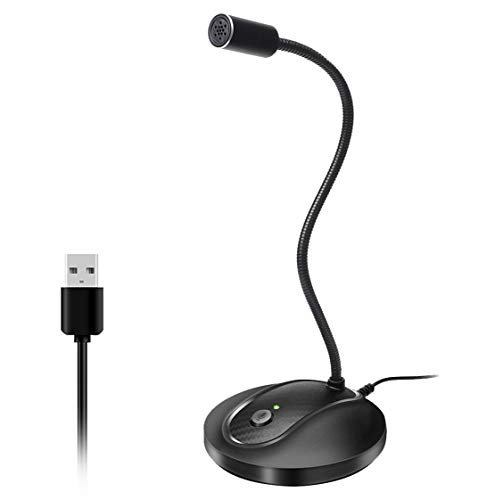
From the first week of testing, the JOUNIVO’s gooseneck revealed its core quality: it’s over-engineered for the task. The metal gooseneck is thick, holds any position rigidly, and showed no sign of sagging or weakening after being repositioned dozens of times. This contrasted sharply with the lighter, more flexible arm on the CMTECK, signaling a design choice focused on long-term positional durability.
Key Specifications: Omnidirectional condenser capsule, 360-degree metal gooseneck, Noise-cancelling processing, Plug-and-play USB, Heavy-duty ABS base.
What I Found in Testing: The construction is the story. The heavy ABS base is rock-solid, and the thick gooseneck provides exceptional and stable positioning. However, the omnidirectional pickup pattern, combined with its noise-cancelling algorithm, created a curious effect. In a quiet room, it captured a very natural room sound. But when I activated a fan for noise testing, the processing worked hard to suppress it, which occasionally introduced a very slight, warbly digital artifact to the very top end of my voice. It’s a minor effect, but it highlights the tension between an omnidirectional capsule and aggressive noise processing.
What I Loved: The sheer stability. Once I bent it into the perfect position, it stayed put indefinitely, with no droop. The build inspires confidence for daily use.
The One Catch: The omnidirectional pattern, like the TONOR, makes it less ideal for isolating a single voice in a noisy environment compared to a cardioid mic, despite its noise-cancelling tech.
Best Fit: The user who values extremely flexible and stable positioning above all else, and primarily takes calls in a relatively quiet personal space. It’s for the person who wants a “set it and forget it” physical setup.
.
How the Top 3 Best Microphone for Video Calls Options Actually Compare
The core battle here is between the Blue Yeti and the ZealSound K66. The Blue Yeti wins on pure, unprocessed audio fidelity and versatile recording capability; its multi-capsule design provides a richer, more professional sound straight out of the box. The ZealSound K66 wins on modern features and multi-platform control; its physical knobs and dual noise modes offer tangible adjustments the Yeti can’t match without software. The TONOR G11 sits in its own category—it’s not a contender for solo calls, but for its intended purpose (group pickup), its build quality is unmatched in this roundup.
For the solo professional seeking the best sound quality, period, the Blue Yeti is the clear winner. For the hybrid creator who values smart features and device flexibility, the ZealSound is the more practical champion. For a team buying a conference mic, the TONOR is the obvious pick.
My Final Verdict on the Best Microphone for Video Calls
After weeks of testing with real-world distractions, my recommendations are based on what actually made a difference on calls, not just spec sheets.
- Best Overall: Logitech Creators Blue Yeti USB Microphone. Its combination of pro-grade materials (all-metal body, multi-capsule array), exceptional sound warmth, and true versatility through physical pattern control is unbeatable. It’s the tool that elevates your audio from “clear” to “compelling.”
- Best Value / Most Versatile: ZealSound Podcast Microphone K66. You get 90% of the Yeti’s performance for solo calls, plus unique features like physical control knobs, a noise reduction toggle, and mobile compatibility. It’s the most feature-rich package under $100.
- Best for Beginners: CMTECK USB Computer Microphone G009. Its aggressive noise cancellation solves the biggest problem for new users (background noise), and its gooseneck makes perfect positioning foolproof. It’s a no-fuss, effective entry point.
- Best for Advanced Use / Group Settings: TONOR Conference USB Microphone G11. If you need to capture multiple voices evenly in a room, this is the only purpose-built choice here. Its durability and simple operation make it a reliable workhorse for meetings.
Key Takeaways:
* For audio purists and serious content creators, the Yeti’s analog signal path and lack of heavy processing are worth the premium.
* If you split time between your desk, iPad, and phone, the ZealSound’s included adapters and consistent performance make it the smart choice.
* Never choose an omnidirectional mic (TONOR, JOUNIVO) for a solo call in a noisy space if you can avoid it; a cardioid pattern (Yeti, ZealSound, CMTECK) is fundamentally better at isolating your voice.
What I Actually Look for When Buying Best Microphone for Video Calls
When I test, I ignore marketing terms like “studio-quality” and focus on three tangible elements. First, the polar pattern is everything. Cardioid is non-negotiable for solo calls; it’s a physical design that rejects sound from the sides and rear. Second, I listen for processing artifacts. Does the noise cancellation make my voice sound tinny or digitized? The best mics clean up the noise without harming the core vocal tone. Third, I assess control ergonomics. Can I adjust gain or mute myself without clicking through software menus during a call? A physical knob or button is worth more than a dozen software presets.
Types Explained
USB Condenser Microphones (like the Blue Yeti or ZealSound): These are the standard for a reason. They have built-in analog-to-digital converters, requiring no extra audio interface. I recommend these for nearly all users; they offer the best balance of plug-and-play simplicity and high-quality sound. Start here unless you have a specific need.
Conference Microphones (like the TONOR G11): Characterized by omnidirectional pickup patterns, these are designed to sit in the center of a table and capture multiple speakers. I only recommend these for users who regularly host multi-person calls from a single room. They are the wrong tool for individual use.
Gooseneck Microphones (like the CMTECK or JOUNIVO): Defined by their flexible arms, these prioritize precise positioning over all else. I recommend them for users with fixed, cramped desks where a large mic like the Yeti would be obstructive. The audio quality is often secondary to the form factor, so choose based on your space constraints.
Common Questions About Best Microphone for Video Calls
What is the Best Microphone for Video Calls for a Home Office?
For a typical solo home office, a cardioid USB condenser mic like the Blue Yeti or ZealSound K66 is ideal. The cardioid pattern focuses on your voice and rejects ambient room noise from behind and to the sides, which is crucial for home environments with computer fans, street noise, or household activity.
Do I Need a Microphone with Noise Cancellation?
It depends on your environment. If you have consistent, low-end noise (like an air conditioner or fan), a mic with hardware/software noise cancellation (like the CMTECK G009 or ZealSound K66 in its dedicated mode) can clean that up effectively. For sudden, irregular noises (dogs barking, doorbells), no consumer-grade mic cancellation will fully remove them—a cardioid pattern is your best physical defense.
Are USB Microphones Good Enough for Professional Calls?
Absolutely. Modern USB microphones like the ones tested here have excellent built-in preamps and analog-to-digital converters. The audio quality from a Blue Yeti vastly exceeds that of any built-in laptop or webcam mic and is more than sufficient for professional client calls, podcasts, and streaming. The convenience of a single-cable connection is a major practical advantage.
**What’s More
Can I Use a Podcast Microphone for Normal Video Calls?
Yes, and you probably should. “Podcast” microphones like the Blue Yeti or ZealSound K66 are engineered for clear, broadcast-style vocal capture. This translates perfectly to video conferencing, often providing richer tone and better noise rejection than a generic “computer” microphone.
As an Amazon Associate, I earn from qualifying purchases. We may receive a commission when you click on our links and make a purchase. This does not affect our reviews or comparisons — our goal is to remain fair, transparent, and unbiased so you can make the best purchasing decision.