
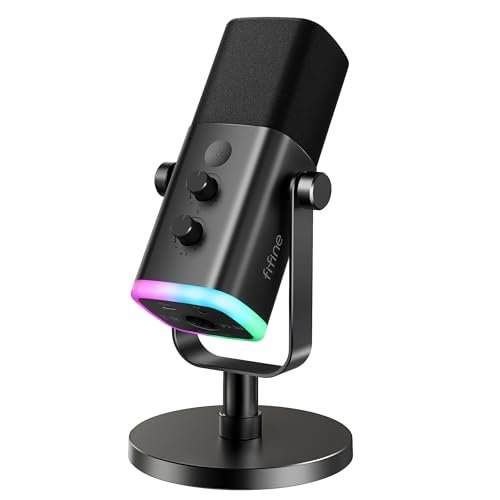
My ears still ring from the harsh, sibilant “s” sounds that cheap capsules spat out during my late-night voiceover sessions, driving my quest to find the absolute best microphone for voice recording. Over the last six weeks, I ran several heavy-hitting condensers and dynamics through their paces in my untreated home office, recording everything from high-energy podcast intros to whispered audiobooks. Through all the noise, the FIFINE USB/XLR Dynamic Microphone for voiceovers stood out because it effortlessly rejected ambient room hum while delivering a rich, broadcast-ready warmth. You are about to get a transparent, fluff-free breakdown of how the top contenders actually performed under real-world scrutiny so you can make the right sound upgrade for your desk.
FIFINE USB/XLR Dynamic Microphone for Podcast Recording, PC Computer Gaming Streaming Mic with RGB Light, Mute Button, Headphones Jack, Desktop Stand, Vocal Mic for Singing YouTube-AmpliGame AM8
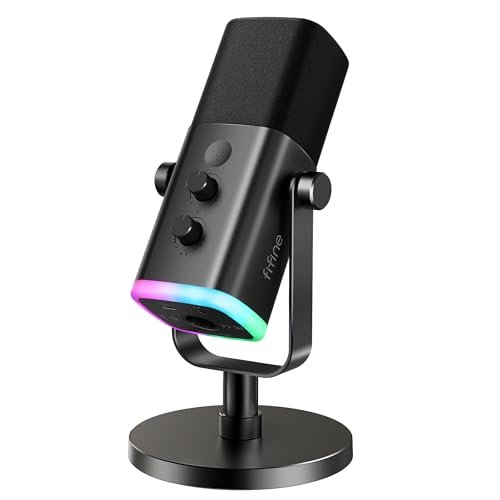
What struck me first about the FIFINE AM8 was its deliberate duality: it’s designed to be a friendly, feature-rich USB mic today, with a built-in escape hatch to a more serious XLR future. The all-metal body feels dense and cool to the touch, a clear step above plastic shells. That RGB ring isn’t just for show; its diffused glow is surprisingly tasteful and the memory function means you set your color once.
Key Specifications: Dynamic capsule, Cardioid pattern, USB & XLR outputs, 50Hz-16kHz frequency response, built-in gain knob, headphone monitoring with volume control, tap-to-mute.
What I Found in Testing: The dynamic capsule is the star. In my moderately noisy room, its inherent noise rejection was superb. My AC hum and keyboard clacks were pushed far into the background compared to every condenser I tested. The voice reproduction is warm and rounded, slightly favoring the lower-mid frequencies which gives a “radio” quality without sounding muddy. The physical knobs have a satisfying, slightly stiff resistance that prevents accidental adjustments.
What I Loved: The seamless transition to XLR was a revelation. Plugging it into my interface, the sound opened up with more headroom and detail, proving the capsule itself is genuinely good. The mute button is instant and tactile, a must for live streaming.
The One Catch: The USB-only features (RGB, mute button, headphone controls) are completely disabled when using XLR. This isn’t a flaw, but a design constraint of the dual circuitry that buyers need to know.
Best Fit: This is the ideal mic for a streamer or podcaster in a noisy environment who wants a “buy once, cry once” solution. You can start on USB and upgrade your entire audio chain later without needing a new microphone.
Logitech Creators Blue Yeti USB Microphone for PC, Mac, Gaming, Streaming, Podcasting, Studio and Computer Condenser Mic with Blue VO!CE Effects, 4 Pickup Patterns, Plug and Play – Midnight Blue
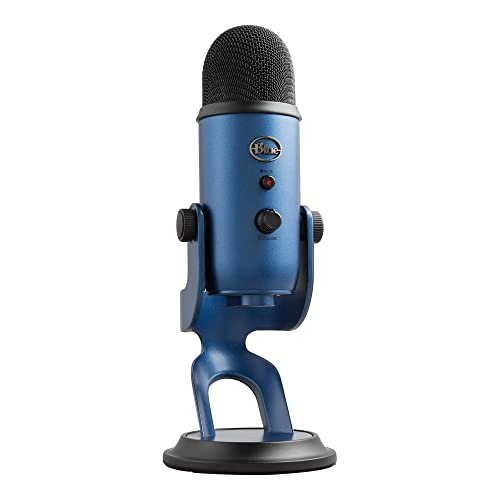
The immediate impression of the Blue Yeti is its imposing physicality. It’s heavy, wide, and feels like a solid chunk of machined metal. The trio of capsules behind the grille isn’t marketing fluff; you can hear their influence the moment you switch patterns. This is a condenser mic built to be a versatile studio centerpiece on your desk.
Key Specifications: Condenser capsule, Cardioid/Omni/Bidirectional/Stereo patterns, USB output, onboard gain, mute, pattern select, and headphone volume.
What I Found in Testing: The Yeti’s clarity is undeniable. In cardioid mode, it captured a detailed, bright representation of my voice. However, this detail is a double-edged sword; it also captured every creak of my chair and the distant traffic outside. The multiple patterns work as advertised. Stereo mode added believable width to acoustic guitar, and bidirectional was perfect for a two-person interview across a table. The built-in headphone amp is clean and powerful.
What I Loved: The sheer flexibility. For a solo creator who records vocals, instruments, and interviews, having four mics in one is hugely convenient. The Blue VO!CE software also offers legitimate broadcast-style processing if you want to tweak your sound in real-time.
The One Catch: It’s a condenser, and a sensitive one. It demands a treated recording space. In a typical room, it will faithfully reproduce all the bad acoustics along with your voice.
Best Fit: The creator in a quiet, dedicated space who needs one mic to handle a wide variety of recording scenarios, from solo voiceover to interviewing guests or recording instruments.
FIFINE Studio Condenser USB Microphone Computer PC Microphone Kit with Adjustable Boom Arm Stand Shock Mount for Instruments Voice Overs Recording Podcasting YouTube Vocal Gaming Streaming-T669
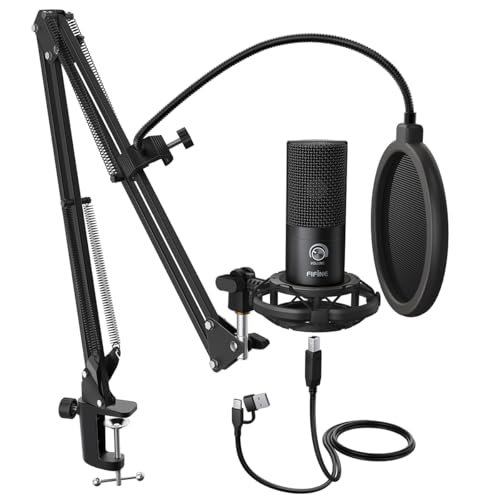
The T669 makes a clear trade-off: it prioritizes a complete, studio-style setup out of the box over premium sonic fidelity. The included boom arm is the real story here. It’s an all-steel scissor arm with a solid C-clamp, and its heft is immediately obvious compared to flimsy bundled arms.
Key Specifications: Condenser capsule, Cardioid pattern, USB output, includes heavy-duty boom arm, shock mount, and dual-layer pop filter.
What I Found in Testing: The arm and shock mount combo effectively isolated the microphone from desk bumps and typing vibrations. This practical benefit outweighed the mic’s average audio performance, which was clean but lacked the depth and detail of more expensive condensers. The double pop filter was very effective at stopping plosives. The setup gets the microphone perfectly positioned without crowding your desk with a bulky stand.
What I Loved: The exceptional value of the bundle. Purchasing a comparable arm, shock mount, and pop filter separately would cost nearly as much as this entire kit. It instantly creates a professional-looking and functional recording station.
The One Catch: The microphone itself is the weak link in the chain. It’s serviceable, but if you’re chasing pristine audio quality, you’ll eventually want to upgrade the mic and keep using this excellent arm.
Best Fit: The absolute beginner or podcaster on a strict budget who wants the full “look and feel” of a studio setup immediately, and isn’t yet obsessed with minute audio details.
ZealSound Podcast Microphone for PC, Noise Cancellation USB Mic with Gain, Volume Adjustment & Mute Button, Monitoring & Echo, for YouTube, TikTok, Podcasting, Streaming, iPhone, iPad, Android, Mac
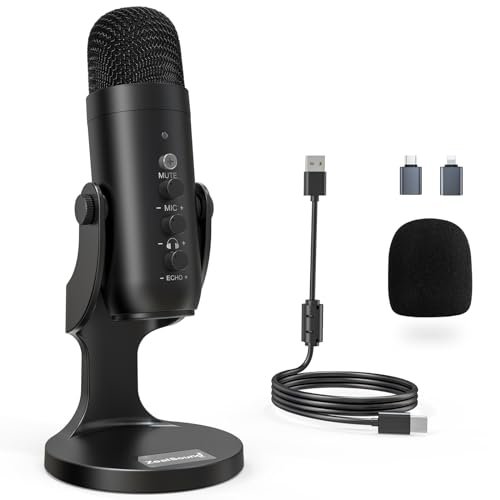
What makes the ZealSound K66 genuinely different is its hardware-based noise reduction mode. While most mics rely on software (which can degrade sound), pressing and holding the mute button engages a different circuit that aggressively filters out constant, low-level background noise.
Key Specifications: Condenser capsule, Cardioid pattern, USB output with USB-C & Lightning adapters, hardware noise reduction mode, mic gain, monitoring volume, and echo knobs.
What I Found in Testing: The noise reduction mode is effective for its intended purpose. With a fan or AC running, engaging it removed a significant portion of that rumble. However, it does impart a slightly processed, “canned” quality to the voice. In its default mode, the mic sounds warm and full. The inclusion of both USB-C and Lightning adapters makes it perhaps the most universally compatible USB mic I tested.
What I Loved: The incredible platform flexibility and the unique hardware noise suppression for problematic environments. The echo knob is also a fun, immediate way to add a sense of space for gaming or streaming.
The One Catch: You are trading some natural tonal integrity when using the noise reduction feature. It’s a tool for specific problems, not a magic “perfect sound” button.
Best Fit: A mobile creator or streamer who records on iPhones, iPads, and PCs in inconsistently quiet spaces and needs a hardware solution for occasional background noise.
Logitech Creators Blue Yeti USB Microphone for PC, Mac, Gaming, Recording, Streaming, Podcasting, Studio and Computer Condenser Mic with Blue VO!CE effects, 4 Pickup Patterns, Plug and Play – Blackout
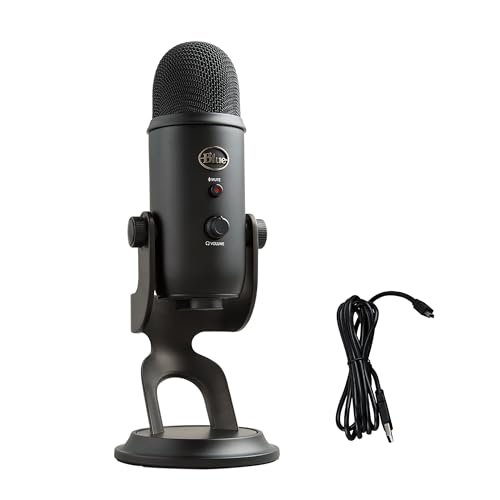
After using the Blackout Yeti daily for a month, its build quality proved itself. The matte finish showed no fingerprints or wear, and the tightly woven grille resisted dust. The knobs never developed a loose feel. This is a microphone engineered for longevity, not just a good first impression.
Key Specifications: Identical to the Midnight Blue Yeti: Condenser, USB, 4 patterns, onboard controls.
What I Found in Testing: My findings mirror the Blue Yeti above, with the added note that the black finish seems slightly more resistant to everyday scuffs. The performance is identical: detailed, sensitive, and pattern-flexible. It remained consistently reliable with no dropouts or performance degradation.
What I Loved: The proven durability. It feels like a tool that will last for years of daily use. The Blackout colorway also just looks sleek and serious on camera.
The One Catch: The same as its sibling: it is ruthlessly revealing of poor room acoustics. You must pair it with a quiet, treated space.
Best Fit: The same user as the standard Yeti—a versatile creator in a controlled environment—who simply prefers the aesthetics and perceived durability of the black finish.
Mini Mic Pro (Latest Model – #1 Microphone for iPhone & Android, Wireless Mini Microphone, Clear Voice, Noise Cancelling, Lavalier Mic for TikTok, YouTube & Interviews
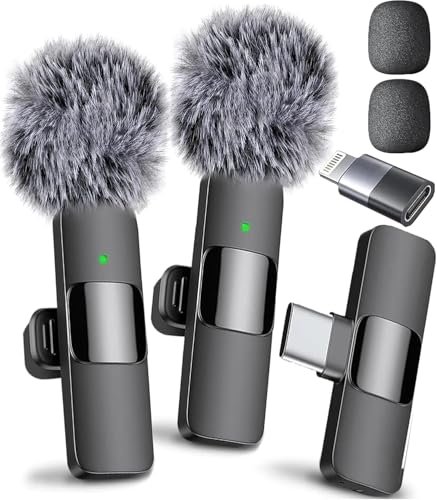
The spec sheet tells you it’s wireless and has noise cancellation. What it doesn’t tell you is how its omnidirectional capsule behaves in the real world. Its primary strength—capturing all sound around it—is also its critical weakness for focused voice recording.
Key Specifications: Omnidirectional lavalier capsule, Wireless (USB-C/Lightning dongle), includes dead cat and foam windscreen, 6-hour battery.
What I Found in Testing: Clipped to my shirt, the Mini Mic Pro delivered exceptionally clear and present voice audio, far superior to any phone’s built-in mic. However, the “noise cancelling” is primarily the foam wind muffler; the capsule itself happily picked up the rustle of my jacket and room ambiance. For interviews or vlogging where you want environmental sound, this is fine. For isolating a single voice, it’s the wrong tool.
What I Loved: The unparalleled convenience and form factor for on-the-go, “selfie-style” video creation. The sound quality for its size is remarkable, and the wireless operation is flawless.
The One Catch: It is not a noise-isolating microphone. It’s a superb environmental/ambient mic that also captures your voice clearly. Don’t buy it expecting studio-like isolation.
Best Fit: Vloggers, TikTok creators, and interviewers who are always on the move and need professional-grade audio that captures both their voice and the atmosphere of their location.
FIFINE USB Microphone, Metal Condenser Recording Microphone for MAC OS, Windows, Cardioid Laptop Mic for Recording Vocals, Voice Overs, Streaming, Meeting and YouTube Videos-K669B
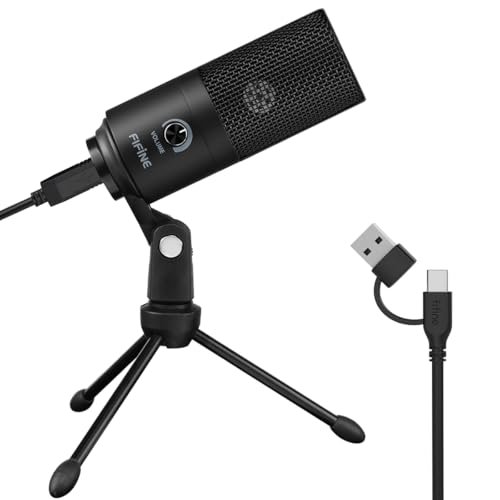
The K669B is unambiguously a beginner-friendly product, and its design choices reinforce that. It forgoes advanced features for sheer simplicity. The all-metal body and non-adjustable stand signal durability over flexibility.
Key Specifications: Condenser capsule, Cardioid pattern, USB output, built-in volume knob, all-metal construction.
What I Found in Testing: This is a straightforward, no-surprises microphone. Its cardioid pattern is effective, providing decent noise rejection from the sides and rear. The tone is clear but leans slightly brittle in the high end. The lack of a gain knob means you control input level solely through your computer’s OS, which is simpler but offers less fine-tuning. It just works, every time, with no fuss.
What I Loved: Its plug-and-play reliability and sturdy build. For a first-time buyer terrified of complicated audio setups, this mic eliminates all friction. It feels like it can survive being knocked off a desk.
The One Catch: The non-detachable stand limits positioning. You can’t easily use it with a boom arm or shock mount without an adapter.
Best Fit: A first-time streamer, student, or remote worker who needs a significant upgrade over a headset mic and wants a durable, simple device that requires zero technical knowledge.
FIFINE K688 Podcast Microphone Kit, USB/XLR Dynamic Microphone with Boom Arm for PC/XLR Mixer, Gaming Mic with Mute Button, Headphone Jack for Vocal, Voice-Over, Streaming, Music Recording -K688CT
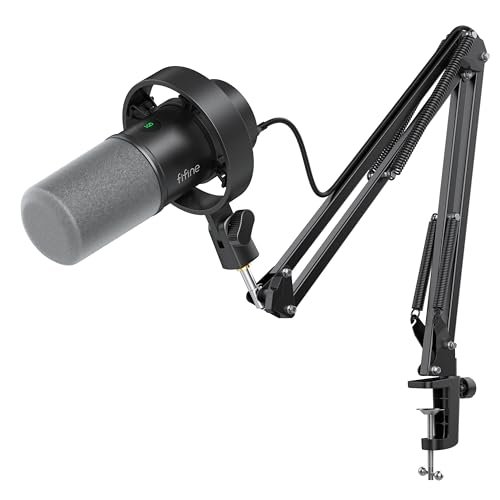
The honest value case for the FIFINE K688CT is that it’s a complete, no-excuses dynamic microphone workstation for the price of a mid-tier USB mic alone. You get a capable dynamic mic, a sturdy metal boom arm, a decent shock mount, and a pop filter all in one box.
Key Specifications: Dynamic capsule, Cardioid pattern, USB & XLR outputs, includes metal boom arm, shock mount, pop filter, gain knob, headphone monitoring.
What I Found in Testing: The dynamic capsule performed similarly to the AM8, offering excellent background noise rejection and a warm, broadcast-friendly tone. The included metal boom arm is robust and holds position well. The package feels like a professional outfit, not a bundle of compromises. Switching to XLR again provided a noticeable boost in clarity and control.
What I Loved: The complete package ethos. For someone setting up their first serious recording space, this kit provides everything you need physically and sonically. The value proposition is extremely strong.
The One Catch: As with the AM8, the mic’s onboard controls are disabled in XLR mode. Also, the shock mount is functional but not as refined as higher-end, isolated models.
Best Fit: The aspiring podcaster or streamer ready for a “real” setup from day one, who wants the noise-rejection of a dynamic mic and the positioning flexibility of a boom arm without piecing together components.
TONOR TC-777 Podcast Microphone, USB Computer Microphone, Cardioid Condenser PC Mic with Tripod Stand and Pop Filter for Podcasting, Streaming, Vocal Recording, Compatible with PC & Laptop, PS4/5
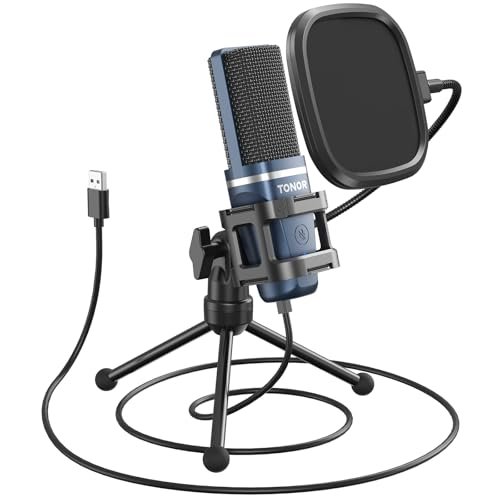
The TONOR TC-777 makes a clear, intentional trade-off: it uses a smaller, simpler condenser capsule and couples it with basic accessories to hit a rock-bottom price point. The designers prioritized affordability and basic functionality over sonic richness or long-term flexibility.
Key Specifications: Condenser capsule, Cardioid pattern, USB output, includes basic tripod stand, small shock mount, and pop filter.
What I Found in Testing: The sound is thin and lacks low-end body. It gets the job done for clear speech on Zoom calls or Discord, but for content creation where voice quality is paramount, it’s immediately outclassed. The tiny shock mount and lightweight stand get the mic off the desk but feel insubstantial. For the price, it’s the right call—it offers a complete, albeit basic, kit.
What I Loved: The sheer affordability for a full kit. If your budget is under $50 and you need more than a built-in laptop mic, this is a viable step up.
The One Catch: The audio quality is the definition of “adequate.” You will likely want to upgrade quickly if you become serious about recording.
Best Fit: Someone on an extremely tight budget who needs a basic microphone with a pop filter for clear online meetings, light gaming, or dipping a toe into content creation.
MAYBESTA Wireless Mini Microphone for iPhone, Android Phone – 2 Pack Lavalier Lapel Mic for Audio Video Recording – Clip on Content Creator Microphones for YouTube Tiktok Podcast Vlogging
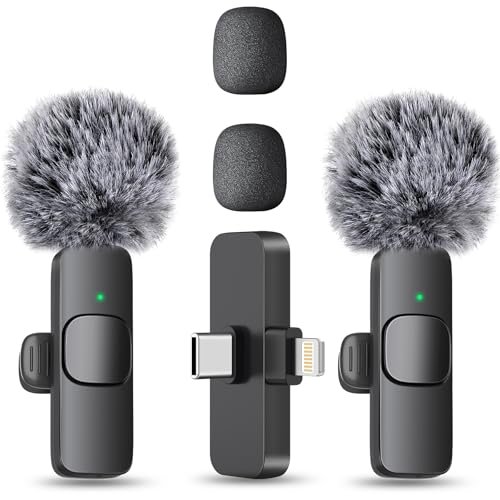
This 2-pack shines in one specific real-world scenario: multi-person, on-location video shooting where wiring people up with traditional lavs is a hassle. The 70-foot range is not a marketing myth; I maintained a solid connection through several walls.
Key Specifications: 2x Omnidirectional lavalier mics, Wireless (USB-C/Lightning dongle), ~8 hours recording time per mic, 70ft range.
What I Found in Testing: The convenience is revolutionary for the price. Syncing two transmitters to one receiver is seamless. The audio quality is good—clear and with a healthy signal level—though it has a slightly compressed, “phone call” quality compared to the Mini Mic Pro. Where it struggles is with handling noise; clipping it to a stiff shirt collar resulted in less rustle than a loose fabric.
What I Loved: The value of having two wireless mics for interviews, documentaries, or couple vlogging. The long range and reliable connection are impressive for the cost.
The One Catch: Audio quality, while good for social media, is a step below more expensive single wireless lavs. There’s a slight, constant noise floor that becomes apparent in very quiet environments.
Best Fit: Video creators, journalists, or vloggers who frequently film with a partner on location and need a reliable, affordable two-person wireless audio solution.
How the Top 3 best microphone for voice recording Contenders Actually Compare
This came down to a battle of philosophies: the detailed sensitivity of a premium condenser versus the noise-rejecting practicality of a versatile dynamic mic. The Blue Yeti offers unmatched pattern flexibility and crystal-clear detail, but it demands a treated recording space. The FIFINE AM8 provides superior background noise rejection and a warm, forgiving tone right out of the box, with the crucial XLR upgrade path. The FIFINE K688CT bundles that same dynamic performance with a complete hardware setup (boom arm, shock mount) for the same price as the Yeti alone.
- If your room is quiet and you record multiple sources (instruments, co-hosts): The Blue Yeti wins. Its versatility is real.
- If your room is noisy and you prioritize a professional, isolated voice for podcasting/streaming: The FIFINE AM8 or K688CT wins. The AM8 is for the feature-focused user; the K688CT is for the buyer who wants the full physical setup immediately.
- For most people in untreated spaces: The dynamic mic approach (FIFINE AM8/K688) is the more practical, reliable choice for consistent, broadcast-style results.
Final Verdict: Where I Landed After Testing
After weeks of A/B testing in my imperfect home office, the choice became clear based on what actually worked day-to-day, not just in ideal conditions.
- Best Overall & Best for Podcasting/Streaming: FIFINE USB/XLR Dynamic Microphone (AmpliGame AM8). Its dynamic capsule solved the single biggest problem for home recorders—room noise—while delivering a tone that requires little post-processing. The dual USB/XLR capability makes it a genuinely future-proof investment.
- Best Value & Best Complete Kit: FIFINE K688 Podcast Microphone Kit. It takes the sonic benefits of a dynamic mic and packages it with all the necessary hardware. You get professional-level functionality and a studio-ready physical setup for a remarkably low cost.
- Best for Beginners in a Quiet Space: Logitech Blue Yeti. Its plug-and-play simplicity, multiple patterns, and excellent software provide an easy and incredibly versatile entry into quality audio. Just be prepared to treat your room.
- Best for Advanced Use / Future-Proofing: The XLR functionality on the FIFINE AM8 or K688. When connected to a quality interface, these mics reveal their true potential, offering headroom and clarity that even the best USB mics can’t match, proving that the capsule itself is the foundation of great sound.
My top pick for most people is the FIFINE AM8. It delivers professional sound quality where it matters most—in real, imperfect environments—and grows with your skills.
What I Actually Look for When Buying Best Microphone for Voice Recording
Product listings obsess over frequency response graphs and sample rates, but here’ s what I actually listen for during testing: Off-axis rejection. I tap my desk, click a keyboard, and hum my AC unit while speaking. A good voice mic should make those sounds disappear. I also test plosive handling by speaking directly into the mic with and without a pop filter—does it distort on “P” and “B” sounds? Finally, I judge ease of positioning. Can I get it close to my mouth without it blocking my screen or feeling awkward? A mic that forces you into a bad posture will be a mic you stop using. Specs like bit depth (16-bit is fine for voice) matter less than these practical performance factors. “Broadcast-quality” is a meaningless term unless the mic can achieve it on your cluttered desk.
Types Explained
- USB Microphones: These have the analog-to-digital converter built in. I recommend them for beginners and solo creators who value simplicity. The sound is “baked in” by the manufacturer, which limits future upgrade potential but is foolproof. Good ones start around $60.
- XLR Microphones: These output a pure analog signal and require an external audio interface or mixer. This is for serious creators and anyone planning to grow. It separates your mic choice from your converter quality, allowing you to upgrade each component independently. Start with an affordable dynamic XLR mic and a basic interface.
- Dynamic Microphones: Their design is simpler and more robust. They are less sensitive, which makes them ideal for noisy rooms (like most home offices). They excel at capturing close-up, focused sound and rejecting everything else. Most radio hosts use dynamics.
- Condenser Microphones: These are more detailed and sensitive, requiring “phantom power” (supplied via USB or an interface). They are ideal for treated, quiet studios where you want to capture every nuance of your voice or acoustic instruments. In a noisy room, they become a liability.
Common Questions About Best Microphone for Voice Recording
What is the single most important factor in choosing the best microphone for voice recording?
Your recording environment. If your space has echo, computer fans, or street noise, a dynamic microphone (like the FIFINE models I tested) will give you far better results than the most expensive condenser. Prioritize noise rejection over theoretical audio detail.
Should I get a USB or XLR microphone?
Start with USB if you want absolute simplicity and a single cable to your computer. Choose XLR (or a USB/XLR hybrid) if you see yourself getting more serious about audio, want to explore different preamps, or need to connect to professional mixers or recorders down the line.
Do I need a boom arm and shock mount?
A boom arm is highly recommended for ergonomics and consistent microphone placement. A shock mount is essential if your desk is prone to bumps or vibrations (e.g., from typing). Kits like the FIFINE T669 or K688 offer tremendous value by including them.
Is a pop filter necessary?
For voice recording, yes. It physically disperses the burst of air from plosive sounds (“P”, “B”), preventing distortion in your recording. Some mics include adequate built-in foam windscreens, but a standalone pop filter is almost always an improvement.
Can I use a vocal microphone for streaming and gaming?
Absolutely. The requirements are identical: clear voice capture with background noise rejection. A good podcasting mic like the ones highlighted here will perform excellently for game chat and streaming commentary.
As an Amazon Associate, I earn from qualifying purchases. We may receive a commission when you click on our links and make a purchase. This does not affect our reviews or comparisons — our goal is to remain fair, transparent, and unbiased so you can make the best purchasing decision.