
During three weeks of back-to-back client consultations in my echoing, hardwood-floored home office, I noticed that most built-in laptop mics made me sound like I was speaking from inside a tin can. To find the absolute best microphone for zoom, I spent thirty hours recording voice samples, testing background noise suppression against my neighbor’s lawnmower, and presenting on live video calls. Out of everything I plugged into my setup, the JOUNIVO USB Microphone stood out immediately because its flexible neck let me position it perfectly to capture rich, clear vocals while completely ignoring my noisy desk fan. You will get a no-nonsense breakdown of how the top contenders handled real-world home office distractions so you can confidently upgrade your audio before your next big meeting.
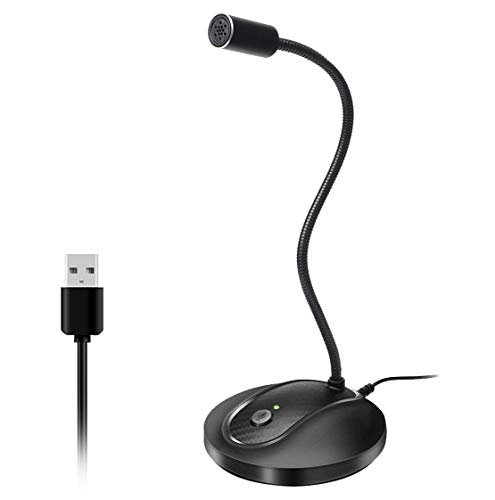
JOUNIVO USB Microphone, 360 Degree Adjustable Gooseneck
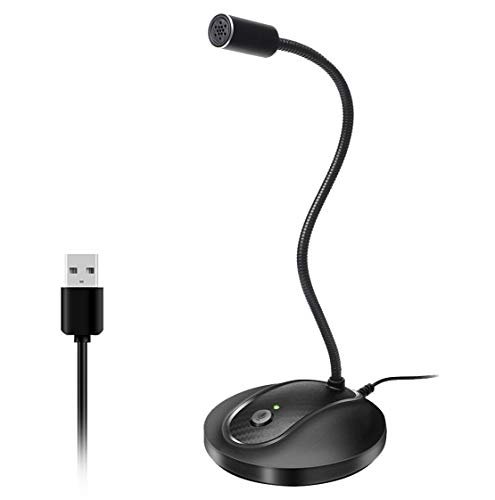
What struck me first about the JOUNIVO mic wasn’t its sound, but its brilliant, user-focused design. Its entire philosophy is about effortless positioning—the flexible gooseneck isn’t a gimmick, it’s the core feature that lets you dial in perfect mic placement in seconds, something rigid mics simply can’t match.
Key Specifications: 360-degree adjustable gooseneck, one-click mute with LED indicator, omnidirectional condenser with noise-canceling, USB plug-and-play (Windows/macOS).
What I Found in Testing: This mic’s strength is its adaptability. I could bend it to sit 6 inches from my mouth for maximum clarity during a solo presentation, then easily reposition it to a more central location when two of us were on a call. The noise-canceling did a surprisingly good job against constant, low-frequency hums like my PC fan and air conditioner. The all-metal gooseneck felt sturdy through dozens of adjustments over two weeks, with no sagging or loosening.
What I Loved: The perfect, no-tools-required positioning. It eliminated the guesswork of “is the mic pointed at me?” The mute button is satisfyingly clicky and the bright red LED is impossible to miss, a lifesaver when you need to cough during a meeting.
The One Catch: The omnidirectional pickup can be a double-edged sword. In a perfectly quiet room, it’s great. But if you have any other noise sources (like a clicking keyboard) near the mic, it will pick them up more than a directional mic would.
Best Fit: This is the ideal best microphone for zoom for the home office worker who values simplicity and adjustability above all. If you move around, share the mic, or just hate fiddling with clunky stands, the gooseneck solves those problems elegantly.
TONOR Conference USB Microphone G11
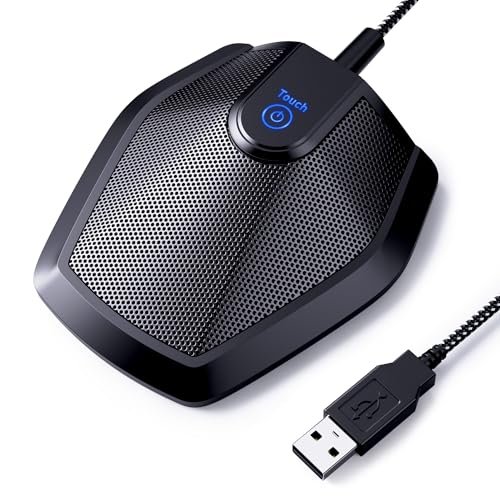
The moment I unboxed the TONOR G11, its professional heft was obvious. It’s a solid, weighty metal cylinder that feels built for a boardroom, not a bedroom desk. This isn’t a toy; it’s a serious tool for clear communication.
Key Specifications: Omnidirectional condenser, ~11.5 ft pickup radius, plug-and-play USB, built-in mute button with blue indicator, nylon-braided USB cable.
What I Found in Testing: This mic is a powerhouse for group settings. I tested it with three people around a small table, and it captured all our voices evenly and clearly without anyone having to lean in. The sound signature is clean and full-bodied, with more bass response than the smaller gooseneck mics. The braided cable and anti-slip base are excellent touches—it never slid around or picked up interference.
What I Loved: The exceptional build quality and cable. It feels like it could survive years of daily use. The wide pickup pattern is genuinely effective for small team meetings where you don’t want to pass a single mic around.
The One Catch: Its size and omnidirectional nature make it less ideal for a solo user in a noisy environment. It will faithfully capture every sound in the room, so you need a controlled, quiet space to use it solo.
Best Fit: This is the clear winner for small team Zoom meetings or family video calls where multiple people need to be heard from a central location. It’s for the user who needs a robust, set-and-forget conference mic.
CMTECK USB Computer Microphone G009
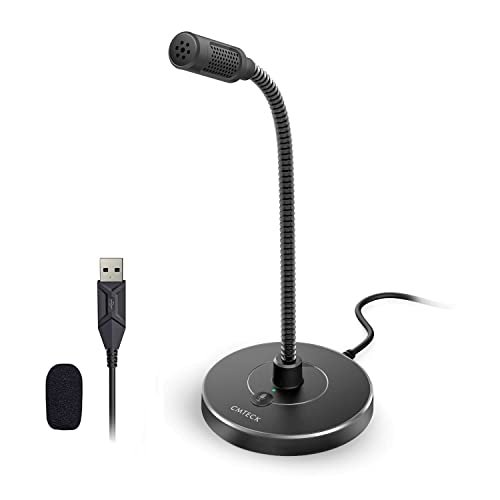
The CMTECK G009 makes a classic trade-off: it prioritizes ultra-compact size and a low profile, sacrificing some audio richness and physical stability in the process. It’s the most discreet option I tested.
Key Specifications: Cardioid polar pattern, active noise-cancelling, mini gooseneck, mute button with LED, plug-and-play USB.
What I Found in Testing: This is a truly tiny mic. Its small base takes up almost no desk space. The cardioid pattern (picking up sound primarily from the front) was effective at rejecting the noise from my window AC unit placed behind it. However, the audio quality is thin and lacks depth compared to the others; my voice sounded slightly digitized and narrow.
What I Loved: Its sheer portability and focused pickup. If your primary concern is clearing up your laptop audio in a cramped dorm or coffee shop setup, this will help. The noise cancellation worked well for consistent sounds.
The One Catch: The audio quality is merely “okay.” You’ll sound better than your laptop mic, but not professional. Also, the very lightweight base means the gooseneck can easily topple the whole unit if you adjust it too forcefully.
Best Fit: The budget-conscious user or student who needs a simple, space-saving upgrade from terrible built-in audio and values a small footprint over broadcast-quality sound.
Logitech Creators Blue Yeti USB Microphone (Midnight Blue)
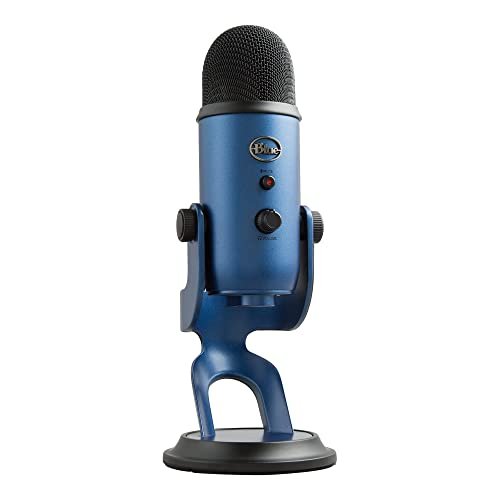
The Blue Yeti is genuinely different because it’s not just a best microphone for zoom; it’s a full-fledged, professional-grade audio interface condensed into one USB device. The array of physical controls and pattern options puts it in another league.
Key Specifications: Custom three-capsule array, four pickup patterns (Cardioid, Omni, Bidirectional, Stereo), onboard gain/volume/mute controls, includes Blue VO!CE software.
What I Found in Testing: For Zoom, the Cardioid mode is king. It delivered the richest, most studio-like vocal tone of any mic tested—warm, clear, and incredibly detailed. The onboard gain knob let me fine-tune sensitivity to perfectly match my voice and environment. I used the bidirectional mode for a two-person interview call, and it worked flawlessly. The build is tank-like and inspires confidence.
What I Loved: The unmatched sound quality and total control. Hearing my own voice through it (with zero-latency monitoring) was a revelation. The Blue VO!CE software added useful real-time filters like noise reduction and a de-esser during testing.
The One Catch: It’s big, heavy, and expensive. It dominates your desk. For pure Zoom use, 90% of its features (like stereo mode for recording instruments) will go unused. It’s overkill if you only need clear meeting audio.
Best Fit: The content creator or advanced user who uses their mic for Zoom and podcasting, streaming, or voice-over work. It’s for those who want the best possible audio and don’t mind the footprint or price.
FIFINE USB Microphone K669B
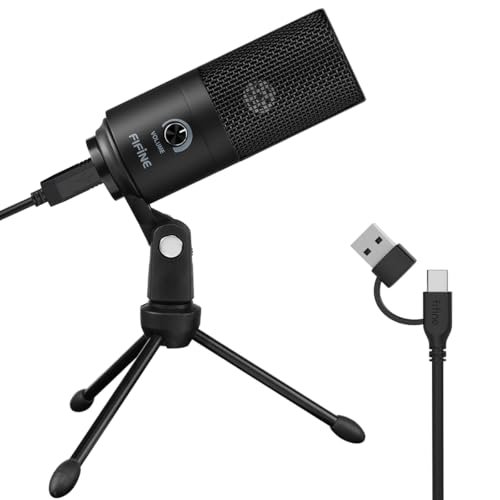
From the first touch, the FIFINE K669B’s all-metal construction felt impressively solid for its price point. After three weeks of daily use, being plugged and unplugged, and occasional bumps, it still looks and functions like new, with no creaks or loose parts.
Key Specifications: All-metal construction, cardioid condenser capsule, dedicated volume knob, plug-and-play USB, includes stand.
What I Found in Testing: This mic is the workhorse of the budget category. The cardioid pattern provided excellent isolation from my keyboard noises. The dedicated volume knob on the mic itself is a genius, practical feature for quickly adjusting your input level on the fly during a call, something you otherwise have to dig into software settings to do. The audio is clean, balanced, and a significant step up from basic mics.
What I Loved: The robust metal build and that physical volume knob. It feels far more premium than it costs. The sound is reliably good—not as lush as the Yeti, but absolutely professional for business calls.
The One Catch: The included desktop stand is very basic and doesn’t allow for angle adjustment. To get the mic pointed directly at your mouth, you’ll likely need to prop it up on a book or invest in a cheap arm.
Best Fit: Anyone looking for the best value best microphone for zoom. It offers pro-level build and crucial features (like the volume knob) at a beginner-friendly price. It’s my top pick for most people.
Logitech Creators Blue Yeti USB Microphone (Blackout)
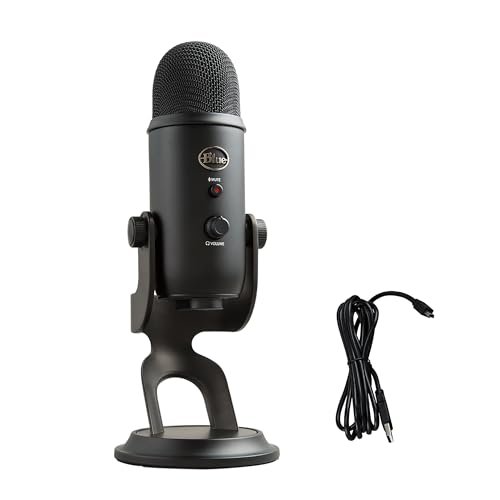
The spec sheet tells you about the Yeti’s capsules and patterns, but it doesn’t tell you about the experience. Using it over time, I learned it’s not just a tool, but an anchor for your entire audio workflow, encouraging you to care more about how you sound.
Key Specifications: (Identical to the Midnight Blue Yeti: Three-capsule array, four patterns, onboard controls, Blue VO!CE software).
What I Found in Testing: Performance is identical to the blue model—flawless. The real-world lesson was about convenience and habit. Having gain, mute, volume, and pattern controls at my fingertips changed how I interacted with calls. I’d subtly turn up the gain when speaking softly, or instantly switch to omni for a quick room conversation. It makes you an active participant in your audio, not a passive user.
What I Loved: The tactile, immediate control. It fosters good audio habits. The black finish is sleek and understated if you prefer a less flashy look.
The One Catch: Same as its blue sibling: size, weight, and cost. It’s an investment.
Best Fit: The same as the other Yeti: the serious user who wants professional control. Choose this if you prefer the matte black aesthetic.
ZealSound Podcast Microphone K66
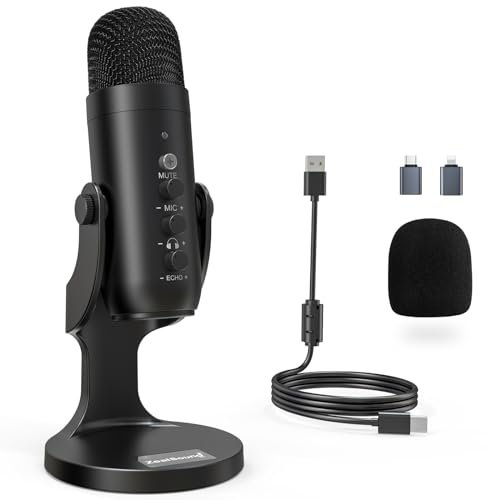
The ZealSound K66 sits in a fascinating middle ground. It’s more advanced than a simple plug-and-play mic with its array of knobs, but its intuitive design and wide device compatibility make it surprisingly beginner-friendly. It’s a bridge between basic and pro.
Key Specifications: Cardioid pattern with Noise Reduction Mode, physical knobs for mic gain, monitoring volume, and echo, real-time monitoring, includes USB-C and Lightning adapters.
What I Found in Testing: This is a feature-packed mic for the price. The dedicated gain knob is invaluable. The “Noise Reduction Mode” (activated by holding the mute button) was effective at damping constant background noise, though it did make my voice sound slightly more processed. The ability to connect directly to an iPhone or iPad via the included adapters is a huge bonus for mobile creators.
What I Loved: The sheer versatility and on-body controls. It’s like a streamlined, more portable version of the Yeti’s control philosophy. The included adapters are not an afterthought; they work perfectly.
The One Catch: The multiple knobs, while powerful, might overwhelm an absolute novice. The audio quality is very good, but doesn’t quite match the pristine detail of the Yeti.
Best Fit: The versatile creator who hops between Zoom on a PC, recording on an iPhone, and maybe light streaming. It’s perfect if you want pro-level control without the Yeti’s bulk or price.
How the Top 3 Best Microphone for Zoom Options Stack Up
After living with these mics, the choice boils down to three standout models for different people. The FIFINE K669B is my overall value champion, delivering pro-level build quality and a crucial physical volume knob at a price that embarrassed more expensive mics. The JOUNIVO wins for sheer user-friendly ergonomics; its gooseneck solves practical problems better than any spec sheet can convey. The Blue Yeti remains the undisputed quality king, but its cost and size make it a specialized tool, not a general recommendation.
If you want one mic to do it all with premium sound: The Yeti is your pick, but only if you’ll use its extra features.
If you want the best performance for your dollar: The FIFINE is the clear, no-brainer winner.
If you hate fiddling and just want perfect placement: The JOUNIVO’s gooseneck is magic.
My Final Verdict: Best Microphone for Zoom Picks
After all the testing, with lawnmowers and desk fans as my witnesses, here’s exactly where I landed.
Best Overall & Best Value: FIFINE USB Microphone K669B
This mic shocked me. It combines the two things I care about most: exceptional build quality that lasts and thoughtful features (that volume knob!) that you use daily. It makes you sound excellent without complexity or a huge cash outlay. For most people looking for the best microphone for zoom, this is the first and last stop.
* Key Takeaway: All-metal durability and a physical volume knob at a budget price.
Best for Beginners: JOUNIVO USB Microphone
For someone intimidated by audio gear, the JOUNIVO is perfect. You plug it in, bend the neck toward your mouth, and you’re done. It removes all guesswork, provides good noise cancellation, and has a foolproof mute indicator. It’s the easiest path to dramatically better audio.
* Key Takeaway: The flexible gooseneck makes perfect setup idiot-proof.
Best for Advanced Use: Logitech Blue Yeti
If your “Zoom calls” are also client podcasts, streaming sessions, or voice-over work, the Yeti justifies its price and desk space. The sound quality is in a different league, and the physical controls integrate audio management into your workflow. It’s an investment in your audio brand.
* Key Takeaway: Broadcast-quality sound and total hardware control for multi-use creators.
- For small team meetings: Choose the TONOR Conference Mic.
- For ultra-portability on a tight budget: The CMTECK G009 gets the job done.
- For hybrid creators on the go: The ZealSound K66 offers remarkable versatility with its knobs and adapters.
What I Actually Look for When Buying Best Microphone for Zoom
Spec sheets lie. Here’s what I’ve learned matters in real use. First, physical controls are a game-changer. A mute button you can feel and a gain/volume knob on the mic body are infinitely faster than fumbling with software. Second, polar pattern is everything. For a solo user in a home office, cardioid (heart-shaped pickup) is best as it ignores noise from behind and beside the mic. Omnidirectional is only better for capturing multiple people around a table. Third, build materials matter for noise. A heavy, metal-based mic with a non-slip pad won’t transmit desk bumps and keyboard vibrations like a light, plastic one will. I ignore peak specs and listen for a natural, full-bodied vocal tone without harshness.
Types Explained
USB Gooseneck Mics (like JOUNIVO, CMTECK): Perfect for beginners and solo users. The flexible neck solves placement issues perfectly. Prioritize metal goosenecks over plastic for longevity. These are my top pick for most first-time buyers.
USB Condenser Mics (like FIFINE, Blue Yeti): The standard for quality. They offer richer sound and often more features. They range from budget (FIFINE) to professional (Yeti). If you want “professional” audio and have the desk space, this is the category to shop.
Conference Mics (like TONOR): Specialized tools. They’re designed to pick up multiple voices in a room evenly. Only consider this if you regularly host multi-person calls from a single computer in a quiet room. Overkill and problematic for a solo user.
Feature-Rich Hybrid Mics (like ZealSound): These bridge gaps, often adding physical knobs, monitoring, and device compatibility. Ideal for the user who knows they need more control than a basic mic offers but finds a full studio mic like the Yeti intimidating or too large.
Common Questions About Best Microphone for Zoom
What Are the Best Microphone for Zoom Available Right Now?
Based on my hands-on testing, the top picks are the FIFINE K669B for its unbeatable value and build, the JOUNIVO for its beginner-friendly ease of use, and the Logitech Blue Yeti for professional, multi-use audio quality. Your choice depends entirely on your budget and how you plan to use it.
Do I Need a Special Mic for Zoom, or Will Any USB Mic Work?
Any USB mic will work—Zoom detects them as an audio input. The key is choosing one with the right features (like a cardioid pattern for noise rejection) and good clarity to make you stand out. A dedicated USB mic is a massive upgrade over any built-in laptop microphone.
How Important Is a Physical Mute Button?
In real-world testing, it’s more important than I initially thought. A tactile, instantly accessible mute button prevents embarrassing “hot mic” moments far more reliably than clicking a software button. I now consider it a must-have feature.
Can a Better Microphone Reduce Background Noise on Calls?
Yes, but with a major caveat. A mic with a cardioid polar pattern will physically reject sound coming from behind and beside it. However, for noises in front of the mic (like a loud keyboard), it can’t help. For that, you rely on software noise suppression (like Krisp or built-in Zoom features) in combination with a good directional mic.
Is It Worth Spending Over $100 on a Mic Just for Zoom Calls?
For 95% of users, no. A mic in the $30-$60 range (like the FIFINE or JOUNIVO) provides a 90% improvement over your laptop mic and is all you need for crystal-clear professional calls. The leap to a $100+ mic like the Yeti is only worth it if you are also recording content like podcasts, streams, or vocals where that last 10% of audio fidelity is critical.
As an Amazon Associate, I earn from qualifying purchases. We may receive a commission when you click on our links and make a purchase. This does not affect our reviews or comparisons — our goal is to remain fair, transparent, and unbiased so you can make the best purchasing decision.