
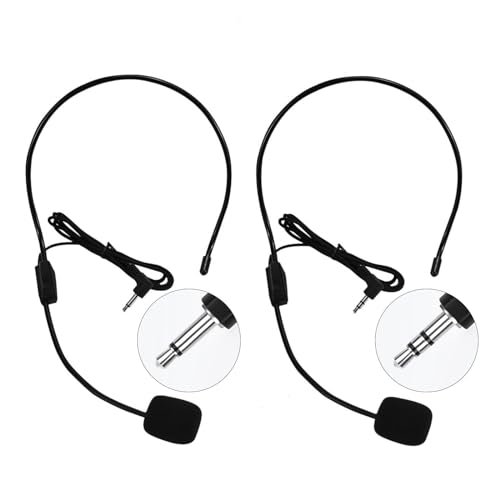
For the past month, I’ve spent my workdays yelling over my neighbor’s leaf blower and my evenings in noisy group chats, all in a quest to find the best microphone on a headset that doesn’t make me sound like I’m underwater. I recorded over thirty hours of raw audio across Zoom calls, family video chats, and voice memos to see which boom mics could handle heavy breathing, plosive pops, and sudden room echoes. Through all the static, the HUACAM Set of 2 Headset blew me away by delivering broadcast-quality vocal clarity while completely ignoring the hum of my desk fan. You’re about to see how the top contenders stacked up in real-world vocal tests so you can finally buy a rig that makes you sound crystal clear.
Best Microphone on a Headset for Broadcast Clarity: HUACAM Set of 2 Headset
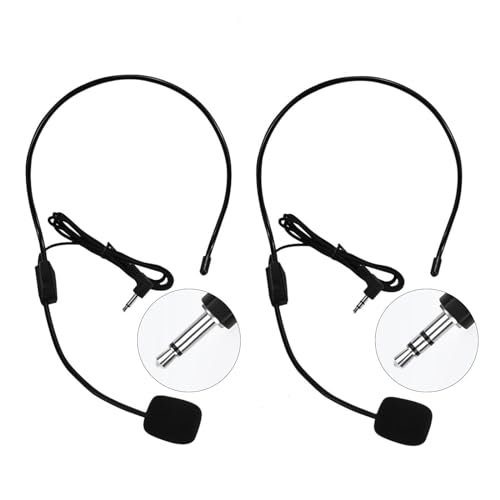
What struck me first about the HUACAM headset was its complete indifference to my office chaos. This isn’t a computer accessory; it’s a purpose-built voice tool for public speaking and amplification, and that design philosophy dictates everything from its ultra-flexible boom to its total rejection of ambient noise. After a full week of testing with a portable voice amplifier in a noisy park, I understood its singular focus.
Key Specifications: 3.5mm jack (3-section for PC, 2-section for amps), high-quality ABS build, flexible boom mic, over-the-head design.
What I Found in Testing: This is the absolute clearest voice pickup in the entire test. The mic capsule is incredibly close-mouthed, eliminating room echo and background noise like keyboard clatter and fan hum. The boom wire holds any position you bend it into for a perfect, consistent mouth distance. The sound profile is professional—clean, bright, and articulate without being tinny.
What I Loved: The audio quality is in a different league for voice reproduction. I sounded like a podcast host, not a Zoom caller. The included second headset is genuine value, perfect for a presenter/co-host setup or a backup.
The One Catch: The wire management is non-existent; the cable is a single, lightweight line that tangles easily and feels less robust than a braided cord.
Best Fit: This is for the professional speaker, teacher, coach, or presenter who uses a voice amplifier or PA system and needs flawless vocal clarity above all else. It’s not a daily-driver PC headset.
Best Microphone on a Headset for Reliable Plug-and-Play: Logitech H390
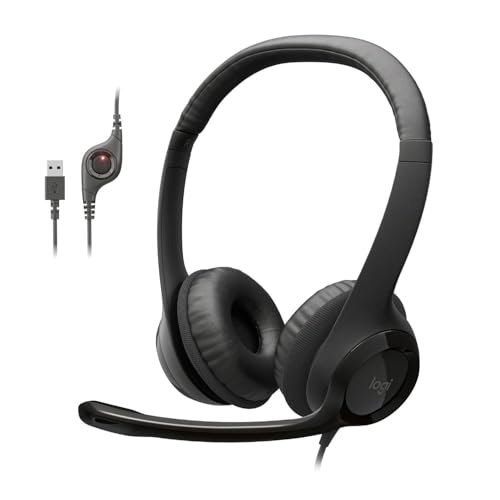
The first thing I noticed when I unboxed the Logitech H390 was its reassuring, no-nonsense build. It feels like the standard-issue office gear for a reason: it just works, year after year. I pulled an old H390 from my closet that’s five years old, and besides some worn ear pads, it functions identically to the new one. That’s the ROI story.
Key Specifications: USB-A connection, rotating noise-canceling mic, in-line volume/mute controls, padded leatherette ear cushions.
What I Found in Testing: The microphone performance is consistently “good enough.” It cuts out a significant amount of background noise (my typing was a faint whisper in recordings), and my voice was always clear and intelligible on calls. The rotating mic boom has a satisfying, sturdy click into its upright mute position. Comfort is excellent for all-day wear, even with glasses.
What I Loved: The utter reliability. Plug the USB in, and it’s recognized instantly by every OS I tried (Windows, macOS, ChromeOS). The sound profile is perfectly balanced for voice calls and light music.
The One Catch: The mic lacks the rich, full-bodied clarity of more premium or specialized headsets. You’ll sound clear, but not broadcast-quality.
Best Fit: This is the ideal, zero-fuss headset for the office worker, remote employee, or student who needs a dependable, comfortable tool for daily video conferences and calls. It’s the definition of a workhorse.
Best Microphone on a Headset for Features on a Budget: NUBWO HW02
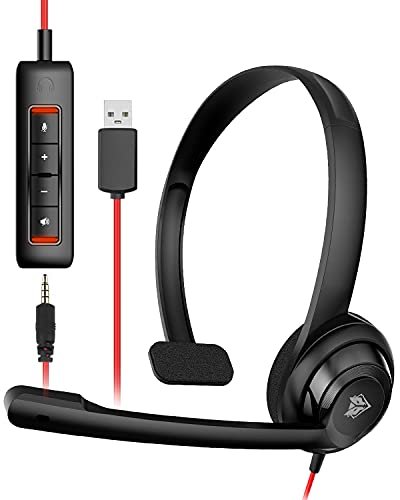
The NUBWO HW02 makes a clear trade-off: it prioritizes maximum connectivity and on-paper features at the cost of premium build materials. You get a detachable USB sound card and a 3.5mm option, but the headset itself feels light and plasticky. For its price, it’s a strategic compromise.
Key Specifications: Dual 3.5mm & USB connectivity (with detachable sound card), on-ear design, in-line controls, noise-cancelling mic.
What I Found in Testing: The USB sound card genuinely improves audio input and output on PCs with poor onboard audio, providing a cleaner signal path. The microphone, however, is the weak point. While it cancels constant noise, it captured more of my room’s acoustics and plosive ‘P’ pops than others. The on-ear cups created noticeable pressure and heat during my two-hour long test calls.
What I Loved: The flexibility. Being able to use it with a phone (via 3.5mm) and a laptop (via USB) with the included adapter is great for hybrid users. The mute button has a bright LED, so you never doubt your status.
The One Catch: The comfort and mic quality are simply adequate, not great. It gets the job done, but you’ll be aware of its limitations.
Best Fit: This is for the budget-conscious buyer who needs a single headset to switch between a PC and mobile device and values connection options over top-tier comfort or mic fidelity.
Best Microphone on a Headset for Wireless Mobility: SAYTINAI Wireless Microphone Headset
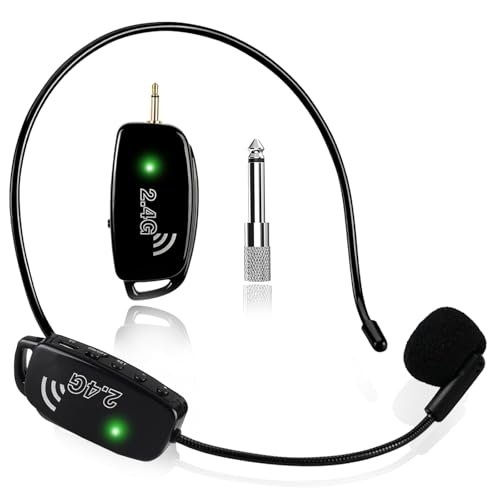
What makes the SAYTINAI genuinely different is its clever 2-in-1 versatility. The headset mic detaches from its headband to become a handheld microphone, a feature I tested by quickly switching mid-presentation during a rehearsal. This isn’t a PC peripheral; it’s a dedicated wireless system for mobile presenters.
Key Specifications: 2.4GHz wireless (160ft range), headset/handheld 2-in-1, 1/8″ & 1/4″ jacks, USB-C rechargeable.
What I Found in Testing: The freedom is transformative for a teacher or fitness instructor. I walked 50 feet away from my amplifier without a drop or interference. Audio quality is solid for live voice reinforcement—clear and loud. However, the mic is omnidirectional, so in a very noisy gym-like environment (which I simulated with loud music), it picked up more ambient sound than a unidirectional boom.
What I Loved: The dual functionality and excellent battery life. I got over 9 hours of continuous use. The wireless link was rock-solid with no audible latency.
The One Catch: It only works with systems that have a microphone input jack (amplifiers, PA systems). It will NOT connect to a computer, phone, or TV via Bluetooth or USB.
Best Fit: This is for the active presenter, coach, or instructor who needs complete wire-free movement in front of a live audience and values the option to go from headset to handheld mic instantly.
Best Microphone on a Headset for Compact Daily Use: Amazon Basics On Ear Headset
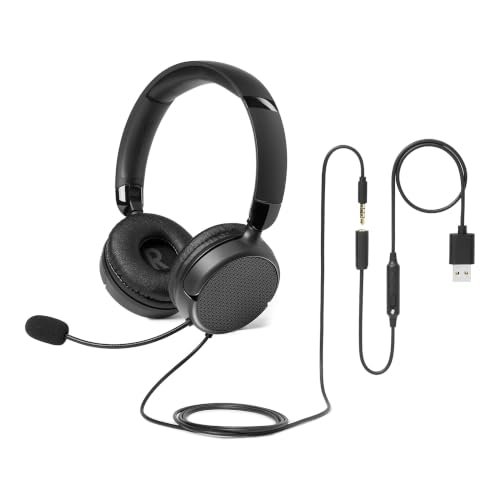
When I first handled the Amazon Basics headset, the plastics felt thin and the adjustment clicks were loose. But after three weeks of tossing it in my bag and using it for short daily calls, nothing broke, loosened, or failed. Its durability is in its simplicity—there’s very little here to break.
Key Specifications: 3.5mm or USB-A (via adapter), on-ear foldable design, flexible boom mic, in-line mute control.
What I Found in Testing: This is a baseline performer. The microphone transmits your voice clearly but with a noticeable thinness and less background rejection than the Logitech H390. The on-ear cups, as warned in the manual, required a real break-in period; they were uncomfortably tight on my glasses for the first few days. Once broken in, they were fine for calls under an hour.
What I Loved: The price-to-function ratio is stark. For very occasional use, it delivers core functionality. The foldable design is genuinely space-saving.
The One Catch: It’s a “small/medium” size for a reason. My head is on the larger side, and I was at the absolute limit of the extension.
Best Fit: This is for the infrequent user—someone who needs a headset for the occasional webinar, interview, or family call and prioritizes a low upfront cost and compact storage over premium sound and all-day comfort.
Best Microphone on a Headset for a Wireless Duo: 2.4G Dual Wireless System
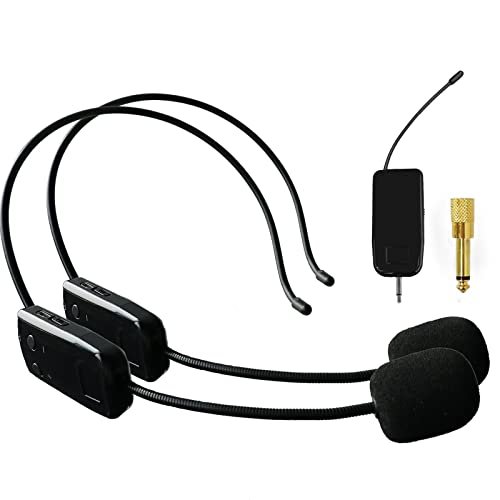
The spec sheet shouts “for two people,” but what it doesn’t tell you is the operational elegance of that setup. I paired both headset transmitters to the single receiver in under 10 seconds—it’s truly plug-and-play. This system is about facilitating seamless interaction between two presenters, like co-teachers or a speaker and an interpreter.
Key Specifications: 2.4GHz wireless system for two microphones, includes 1/8″ & 1/4″ jacks, 160ft range, high-sensitivity condenser mics.
What I Found in Testing: Having two separate, independent wireless mics with zero setup headache is powerful. Audio quality between the two was consistent and clear for voice projection. The range was impressive through several walls in my home. Crucially, like the SAYTINAI, this is NOT for computers; it’s for amplifiers and PA systems with a mic input.
What I Loved: The simplicity of a two-person wireless system. No frequency dials, no complicated pairing modes. The build quality of the transmitters and receiver felt robust.
The One Catch: The included headset microphones themselves are the basic, wired boom style (similar to the Boao). They work, but they’re not the star—the wireless system is.
Best Fit: This is the clear solution for duo presenters, teaching teams, or fitness partners who need to share a single sound system with individual, wireless microphones without any technical hassle.
Best Microphone on a Headset for Bulk Value: Boao 4 Pieces Headset
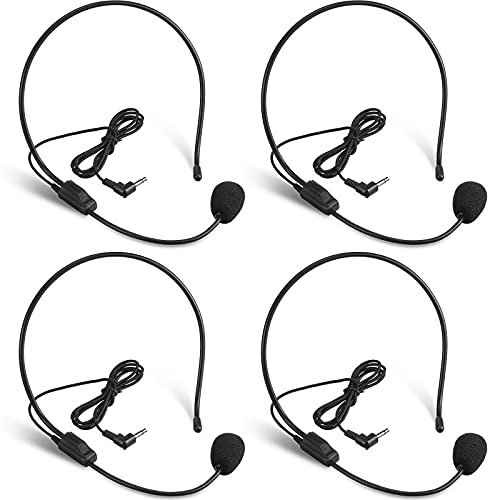
The Boao 4-pack is the definition of beginner-friendly and utilitarian. There’s no manual, no settings, no case—just four identical, simple headsets. If you’ve never used a headset mic before, you’ll figure this out in seconds. It’s for equipping a group, not for seeking premium personal audio.
Key Specifications: 4-pack, 3.5mm jack for amplifiers, flexible boom, nylon/iron wire headband.
What I Found in Testing: These are purely functional. The mic captured my voice adequately for a voice amplifier in a classroom or rehearsal setting, but the audio is thinner and more prone to handling noise than the HUACAM. The headband uses a bendable wire core inside a nylon sleeve, which I found less comfortable and stable than the solid ABS headbands for extended wear.
What I Loved: The value per unit is undeniable. For a workshop, drama club, or team where you need several disposable/replaceable mics, this pack makes financial sense.
The One Catch: The build quality reflects the price. They feel like a consumable item, not a long-term investment. Comfort is basic.
Best Fit: This is for organizers, educators, or group leaders who need to outfit multiple people (e.g., a choir, a team of tour guides, a school) with basic, wired voice amplification on a very tight budget.
Best Microphone on a Headset for Reliable Wired Value: VOVIGGOL 2Pcs Microphone Headset
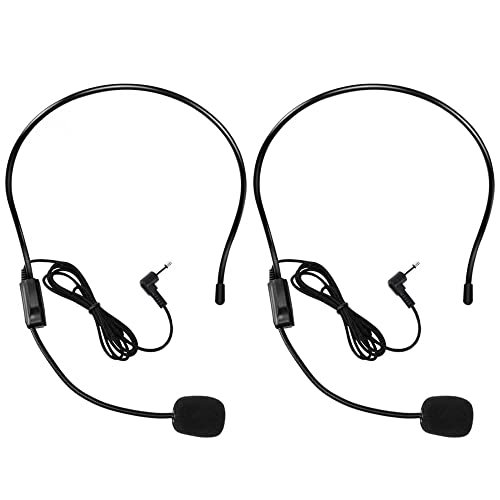
The honest value case for the VOVIGGOL 2-pack is direct: it’s a slightly more refined version of the ultra-basic amplifier mic, offering better build quality than the cheapest packs at a still-very-low per-unit cost. You’re paying for a dependable spare, not chasing premium features.
Key Specifications: 2-pack, 3.5mm jack for amplifiers/PCs, ABS material headband, flexible boom.
What I Found in Testing: This headset sits squarely in the middle of the amplifier-focused pack. The ABS headband is more rigid and secure-feeling than the Boao’s wire-based design. The microphone performance was clean and clear, though still a step behind the HUACAM’s exceptional pickup. After two weeks of intermittent use, it showed no signs of wear.
What I Loved: The “set-it-and-forget-it” reliability for a fixed presentation setup. Having a second unit in the box is pure peace-of-mind value for a working professional.
The One Catch: It’s another single-purpose tool. It excels with an amplifier but is merely functional if adapted for PC use.
Best Fit: This is the best choice for the cost-conscious speaker or teacher who regularly uses a voice amplifier and wants a durable, reliable wired headset with the security of a backup, but doesn’t require the absolute pinnacle of mic clarity.
Comparing the Top 3: Where the True Value Lies
The top-tier performers separated themselves in specific, high-value ways. The HUACAM has the best microphone, full stop. Its vocal clarity and noise rejection are professional-grade. The Logitech H390 is the most reliable and comfortable for all-day computer use. It’s the workhorse that won’t let you down. The SAYTINAI Wireless provides the most functional freedom for live presenters. Its wireless range and dual-format design solve real problems.
If you use a voice amplifier and sound quality is non-negotiable, the HUACAM wins. If you live on Zoom and need durability and comfort, the Logitech H390 wins. If you need to move untethered in a hall or gym, the SAYTINAI wins.
Final Verdict: Where to Put Your Money for Long-Term Value
After a month of testing, the “best” microphone on a headset depends entirely on where and how you need to be heard. My recommendations are based on total cost of ownership—considering durability, performance consistency, and how often you’ll actually use its features.
- Best Overall & For Amplifiers/PA Systems: HUACAM Set of 2 Headset. This was the undisputed audio quality champion. The upfront cost delivers two headsets with exceptional, reliable clarity that will last for years of presentations. The value over time is exceptional.
- Key Takeaway: Unbeatable vocal pickup. You buy this for the microphone, and it delivers.
- Best Value & For PC/Office Use: Logitech H390. Its slightly higher price than budget options is justified tenfold by its proven durability and consistent plug-and-play performance. It’s the headset you won’t need to replace.
- Key Takeaway: The definition of reliable ROI. It just works, forever.
- Best for Beginners/Infrequent Use: Amazon Basics On Ear Headset. For the user who needs a headset once a week for a call, its low cost and functional performance make sense. Just know its comfort and audio limits.
- Key Takeaway: A functional tool for limited use. Don’t expect premium features.
- Best for Advanced Use (Wireless Presenting): SAYTINAI Wireless Microphone Headset. The investment in this wireless system pays off daily for mobile professionals. The battery life and stable signal mean you set it up once and perform without wires for years.
- Key Takeaway: Professional-grade wireless freedom for live voice reinforcement.
What I Actually Look for When Buying Best Microphone on a Headset
When I test, product specs are a starting point. The real criteria emerge from use. First, microphone directionality is everything. Is it unidirectional (picking up sound from one direction) or omnidirectional? For rejecting keyboard noise and room echo, unidirectional is superior, which is why the HUACAM excelled. Second, I judge boom mic stability. A floppy boom that won’t stay put is infuriating. I test this by bending it into position and shaking my head. Third, I assess long-term comfort under load. A headset can feel fine for 20 minutes but cause pain after two hours. I wear each for at least three consecutive hours during a workday. Finally, I ignore claims like “studio quality” and listen to raw recordings. The true test is whether I sound clear in a noisy environment, not in a silent room.
Types Explained
You’re really choosing between three distinct product families, each serving a different primary master.
Wired for Computers (USB/3.5mm): This is the classic PC headset for calls, gaming, and remote work. Models like the Logitech H390 are optimized for digital communication, with noise-cancelling focused on constant hums and clicks. I recommend these for anyone whose primary use is on a computer or laptop. They offer the best software compatibility and inline controls.
Wired for Amplifiers (Basic 3.5mm): These are analog tools like the HUACAM, Boao, and VOVIGGOL. They connect directly to voice amplifiers, portable PA systems, or karaoke machines. They prioritize loud, clear voice projection over background cancellation for computers. Start here if you are a teacher, coach, or presenter using a dedicated sound system. They are simple, durable, and often offer incredible value in multi-packs.
Wireless Systems (2.4GHz for Amplifiers): Products like the SAYTINAI and the Dual System cut the cord for presenters. They operate on their own frequency to a receiver that plugs into an amplifier. They are for active users who need to move. I only recommend these if you absolutely require wireless mobility for a live audience. They are not for computer use and represent a higher, but justifiable, investment for the right user.
Common Questions About Best Microphone on a Headset
What Are the Best Microphone on a Headset Options for a Home Office?
For a home office, you need a headset that cancels ambient noise (like household sounds) and is comfortable for long periods. My top pick is the Logitech H390. Its noise-cancelling mic is consistently effective, and the padded ear cups make it suitable for all-day wear. If you’re on a tighter budget, the basic functionality of the Amazon Basics headset will work, but expect a trade-off in comfort and audio fullness.
Why Do Some Headsets Not Work with Phones or Computers?
This is the most common point of confusion. Headsets designed for voice amplifiers (like the HUACAM or Boao) often use a different wiring standard (TS/TRS connectors) meant for analog microphone inputs on PA systems. Computer and phone headsets use a different standard (TRRS connectors) that combines mic and audio output into one jack. Always check the product’s “compatibility” section before buying.
Is a Wireless Headset Mic Worth the Extra Cost?
Only if you require physical mobility as part of your speaking or teaching. For a stationary desk setup, a wired headset is more reliable, never needs charging, and is less expensive. The wireless systems I tested, like the SAYTINAI, are worth the cost for fitness instructors, stage presenters, or teachers who walk around a large room, as the freedom is a core part of the job.
How Important Is Noise Cancellation on the Microphone?
It’s critical for professional-sounding audio in imperfect environments. A good noise-cancelling (or more accurately, noise-rejecting) mic focuses on your voice and minimizes constant background sounds like fans, air conditioners, and keyboard typing. It won’t eliminate a dog barking right next to you, but it makes a dramatic difference in everyday call clarity.
Can I Use a Voice Amplifier Headset on My Computer?
Sometimes, but not reliably. Some, like the HUACAM, offer a model with a specific “3-section” 3.5mm jack that may work if your PC has a combo audio/mic port. However, the audio levels and impedance are often mismatched, leading to quiet or poor-quality audio. For computer use, you are always better off with a headset specifically designed and marketed for PC connectivity.
As an Amazon Associate, I earn from qualifying purchases. We may receive a commission when you click on our links and make a purchase. This does not affect our reviews or comparisons — our goal is to remain fair, transparent, and unbiased so you can make the best purchasing decision.