
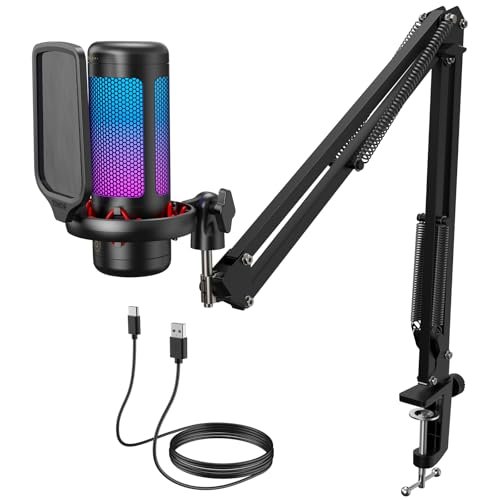
My desk gets incredibly loud when my graphics card fans kick up to 100%, making it the perfect, punishing environment to hunt for the best microphones for pc. Over three weeks of late-night video calls and voiceover tests with my AC blasting, I analyzed raw audio waveforms to find the gear that actually isolates your voice. The TONOR Gaming Microphone Set with its included boom arm emerged as my favorite because it delivered rich, broadcast-quality warmth while completely ignoring the aggressive clacks of my mechanical keyboard. You will walk away from this comparison knowing exactly which setup fits your budget and workspace without having to suffer through your own trial and error.
TONOR Gaming Microphone Set with Boom Arm, TC310+
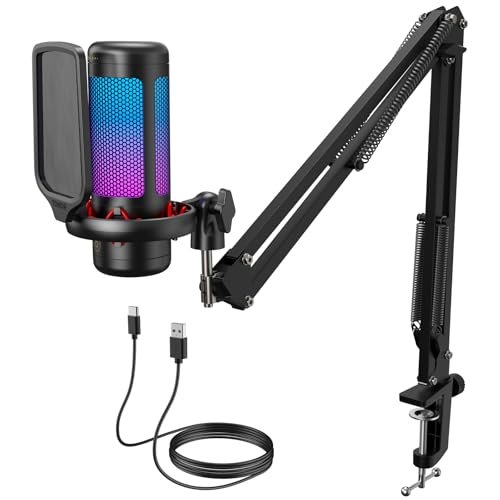
What struck me first about the TONOR TC310+ was its “complete command center” design philosophy. This isn’t just a mic; it’ understand you’re setting up a dedicated streaming or WFH station. From the moment I mounted the heavy-duty boom arm, I could see the intent: every knob, pivot, and button is placed to give you total control without ever touching your software.
Key Specifications: Cardioid condenser capsule, USB connectivity, included metal boom arm and clamp, tap-to-mute on mic head, physical gain knob, RGB lighting with brightness control.
What I Found in Testing: This microphone absolutely excelled in noisy environments. With the mic positioned correctly (about a fist’s width from my mouth, aimed slightly off-axis), my voice came through with a professional, full-bodied warmth. More impressively, the mic’s noise rejection was stellar. The clatter of my Cherry MX Blue switches, a persistent low hum from my PC fans, and even my spacebar smashes were rendered to near-silent whispers in the recording. The metal boom arm was rock-solid, holding its position perfectly for days without sagging, and the tap-mute function became second nature.
What I Loved: The physical gain knob is a game-changer. Adjusting levels in real-time during a Discord call while my teammates’ volumes fluctuated was effortless. The build quality of the entire kit—from the braided cable to the weighted desk clamp—felt premium and durable over the three-week test.
The One Catch: This is a desk-hog. The boom arm footprint is significant. If you have a small desk or share your workspace, this setup will dominate your real estate. The mic also picks up some plosives (“p” and “b” sounds) without the included foam windscreen, which is a must-use.
Best Fit: The content creator or serious work-from-home professional who needs studio-quality voice isolation and wants a complete, ready-to-roll kit out of the box. It’s perfect if you have the desk space to dedicate to it.
FIFINE USB/XLR Dynamic Microphone, AmpliGame AM8
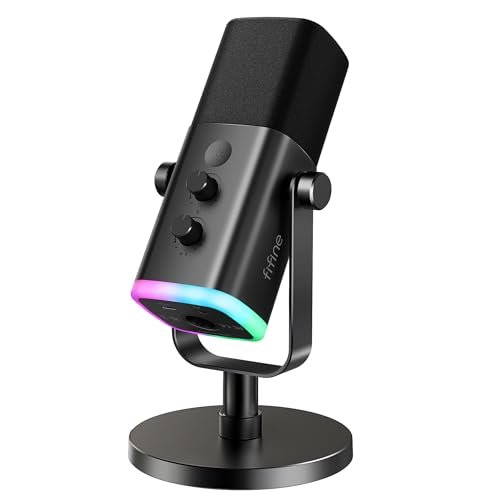
The moment I unboxed the FIFINE AM8, its hybrid nature stood out immediately. It’s not just a USB or XLR mic; it’s a “choose-your-own-adventure” audio device. The build feels like a serious broadcast tool—robust metal body, a satisfyingly heavy base, and clear, clicky controls. It announces itself as a mic for someone whose ambitions might outgrow a simple USB connection.
Key Specifications: Dynamic cardioid capsule, dual USB & XLR outputs, physical mute button & gain knob, headphone monitoring jack with volume control, RGB lighting ring (USB mode only).
What I Found in Testing: As a USB mic, it delivered crisp, clean audio that was slightly less “hyped” than the TONOR condenser. But its true personality shone in demanding scenarios. When my window AC unit roared to life, the dynamic capsule’s inherent noise rejection outperformed every condenser I tested. For pure voice clarity in a less-than-ideal room, this was a champion. Switching to XLR mode (with my Scarlett interface) unlocked another level of headroom and detail, a feature no other mic in this price range offered.
What I Loved: The flexibility is its killer feature. Starting with USB is plug-and-play simple, but the XLR path is a built-in upgrade lane for when you’re ready to step into interfaces and mixers. The headphone monitoring with zero latency was flawless for podcasting and voiceover work.
The One Catch: The RGB lighting and all function knobs only work in USB mode. When you plug in the XLR cable, it becomes a purely analog mic—no lights, no mute button, no gain control on the unit itself. You must manage those functions through your interface or software.
Best Fit: The forward-thinking streamer, podcaster, or vocalist who wants professional dynamic mic performance today with a clear, no-rebuy upgrade path for tomorrow. It’s for the user who knows they’ll dive deeper into audio.
CMTECK USB Computer Microphone G009
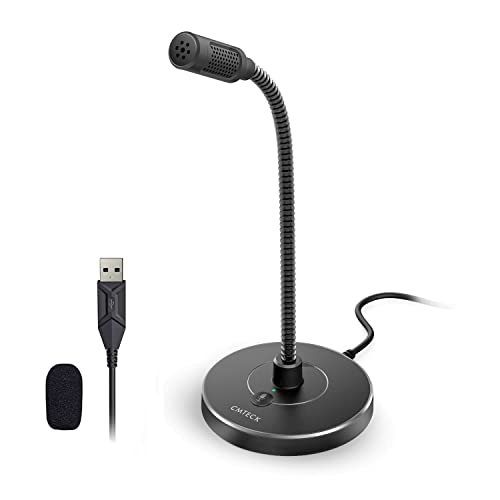
The CMTECK G009 makes a very clear trade-off: it prioritizes extreme convenience, portability, and a low profile above all else. What you gain in discreet, flexible placement, you partially sacrifice in ultimate audio richness and raw power. It’s the antithesis of the large, imposing studio mic.
Key Specifications: Cardioid condenser capsule, USB connectivity, fully flexible gooseneck, single mute button with LED, active noise cancellation chip (CMTECK CCS2.0).
What I Found in Testing: This mic is brilliant for what it is. The gooseneck is remarkably sturdy, allowing me to position the mic head exactly where I needed it—tucked behind a monitor, snaked around a laptop, or pointed directly at my mouth from the desk’s edge. The noise cancellation chip worked well for constant, low-frequency background noise like fan hum. However, for sudden, sharp noises (keyboard clicks, dog barks), it was less effective than a physical cardioid pattern. The audio was clean and intelligible for calls, but lacked the full-bodied low-end of larger mics.
What I Loved: Its footprint is virtually zero. For a cluttered desk or a shared kitchen-table workspace, this mic can be made almost invisible. The plug-and-play simplicity is absolute; there’s no learning curve. It’s the most “set it and forget it” option I tested.
The One Catch: The audio quality is functional and clear, but it’s “conference call” good, not “broadcast” good. If your primary metric is the absolute best sound reproduction, look elsewhere. This mic is about solving the problem of being heard clearly without a dedicated audio setup.
Best Fit: The student, remote worker, or casual user who needs reliable, clear audio for Zoom, Teams, or Discord on a tight budget and with minimal desk space. It’s the best “get the job done” tool.
FIFINE XLR/USB Gaming Microphone Set, AmpliGame AM8T
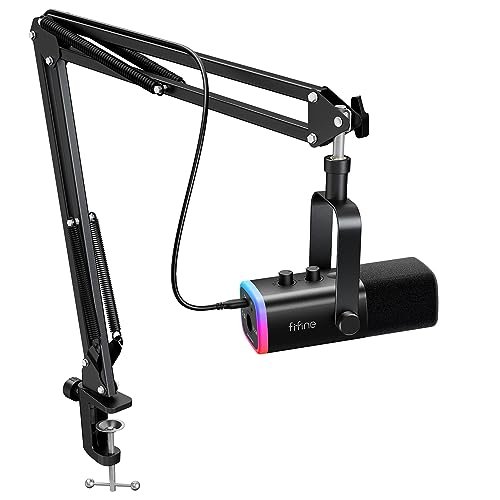
What makes the FIFINE AM8T genuinely different is that it’s not just a microphone; it’s a direct, strategic response to the most common user request: “I want the AM8, but with a boom arm included.” This kit takes the superb hybrid core of the AM8 and builds a complete, battle-ready streaming station around it, directly challenging the TONOR TC310+ on its own turf.
Key Specifications: Dynamic cardioid capsule, dual USB & XLR outputs, included boom arm, physical mute button & gain knob, headphone monitoring jack, RGB lighting (USB mode only).
What I Found in Testing: This package delivered nearly identical audio performance to the standalone AM8—excellent noise rejection and crisp vocal clarity. The included boom arm is competent, though I found its tension adjustments slightly less refined than the TONOR’s, requiring a bit more fiddling to get perfectly taut. The real value is in the bundling. Having the dynamic mic’s performance and the positioning freedom of a boom arm in one purchase is a major win.
What I Loved: It offers the same crucial USB/XLR flexibility as the AM8, but eliminates the “what stand do I buy?” question. For a dynamic mic, getting it close to your mouth is key, and this kit enables that perfectly right out of the box.
The One Catch: As with the AM8, the RGB and on-body controls are disabled in XLR mode. Also, if you only want a desktop stand mic, the included boom arm might feel like overkill, but you’re locked into the bundle.
Best Fit: The streamer or podcaster who knows they want the benefits of a dynamic microphone (for noisy environments) and desires the complete kit with a boom arm from the start, especially if future XLR upgrades are on the radar.
Gaming Microphone for PC by COCONISE
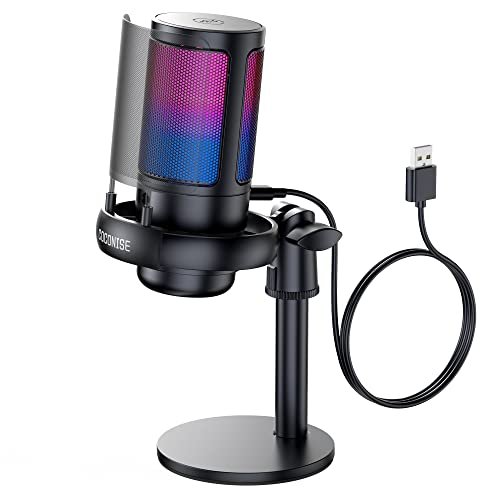
From the first heft, the COCONISE mic communicated solidity. The weighted carbon steel base is no joke—it survived multiple inadvertent desk bumps during my testing without so much as a wobble. However, over extended use, a clear picture emerged: this is a product built to look and feel premium for a gamer, with audio performance that’s good, but not exceptional.
Key Specifications: Cardioid condenser capsule, USB connectivity, metal pop filter, weighted base, tap-to-mute, physical gain knob, headphone monitoring jack, RGB lighting.
What I Found in Testing: The build is its strongest asset. The detachable metal pop filter worked well, and the shock mount did a decent job isolating desk vibrations. The audio was perfectly fine for gaming and casual calls: clear and present. However, in direct A/B tests against the TONOR or FIFINE, its recordings sounded slightly thinner and more compressed. The RGB lighting scheme is vibrant and fun, with a nice touch of muting when you tap the top.
What I Loved: It feels incredibly durable. If you have a chaotic desk environment or tend to be physically expressive while gaming, this mic will likely withstand it. The visual design and lighting effects are clearly designed with a gaming aesthetic in mind.
The One Catch: You’re paying a noticeable premium for the robust physical build and flashy RGB. The actual audio fidelity, while good, is a step behind the best-in-class options at a similar price point. It’s a style-and-substance choice, with style leading.
Best Fit: The gamer who values a bombproof, great-looking setup with vibrant RGB synergy above achieving the absolute pinnacle of voice clarity. It’s for when aesthetic integration is a primary driver.
JOUNIVO USB Microphone with Gooseneck
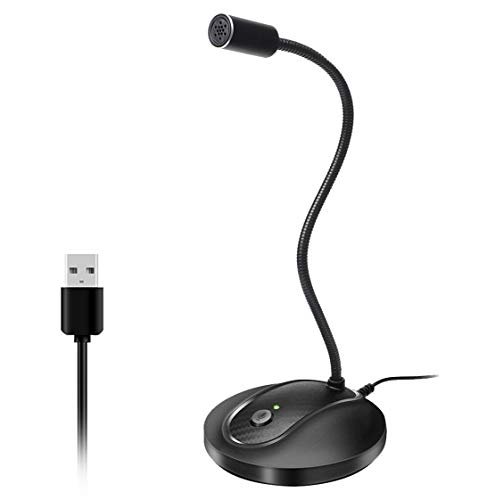
The spec sheet for the JOUNIVO will tell you about noise-canceling and a 360-degree gooseneck. What it won’t tell you—and what I only learned after a week of use—is that its “omnidirectional” nature is both its greatest strength and its core weakness. It’s designed to pick up sound evenly from all around, which is a fundamentally different goal than isolating a single voice.
Key Specifications: Omnidirectional condenser capsule, USB connectivity, flexible gooseneck, single mute button with LED, noise-canceling processing.
What I Found in Testing: In a quiet room, with the mic placed centrally on a table for a roundtable discussion or family call, it worked adequately. However, the moment I tried to use it as a personal mic in a room with any background noise (like my PC), the results were problematic. The noise-canceling algorithm couldn’t distinguish between my voice and the background hum, often suppressing both or creating a watery, digital artifact. The gooseneck is less sturdy than the CMTECK’s.
What I Loved: For its intended use—a central table mic for conference calls in a quiet environment—it’s serviceable and very affordable. The plug-and-play is truly simple.
The One Catch: Do not buy this for personal PC use if you have any ambient noise. Its omnidirectional pattern is the wrong tool for isolating a single voice in a typical home office or gaming setup. The noise cancellation is more destructive than selective.
Best Fit: Someone who needs a basic, inexpensive microphone specifically for capturing group conversations in a quiet setting. It is not recommended for solo gaming, streaming, or calls in a typical PC environment.
Logitech Creators Blue Yeti USB Microphone
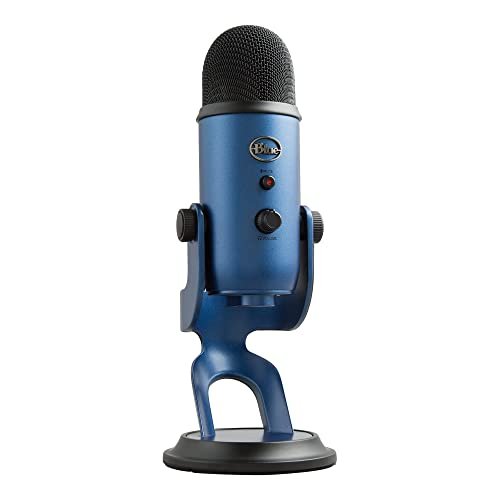
The Blue Yeti sits in a unique space: it’s beginner-friendly in setup (plug and play) but advanced in its array of features. This duality is its blessing and its curse. It offers a staggering amount of control—four pickup patterns!—which is fantastic for experimentation, but can overwhelm a new user who just wants to sound good on Discord.
Key Specifications: Tri-capsule condenser array, USB connectivity, four pickup patterns (Cardioid, Omnidirectional, Bidirectional, Stereo), physical gain/mute/pattern/headphone volume controls, includes desktop stand.
What I Found in Testing: The Yeti’s legacy is built on its flexibility. The stereo mode was fun for recording acoustic instruments, and the bidirectional pattern worked well for two-person podcast interviews sitting across a table. However, in its most common use (cardioid mode for solo voice), it was noticeably more sensitive to room noise and keyboard clatter than the dedicated cardioid mics like the TONOR. Its large diaphragm captures a wide, detailed soundscape, which includes the bad with the good unless your room is treated.
What I Loved: The sheer creative potential. If you want one mic to record your voice, a guitar, and a two-person interview, this is the only device on this list that can do all three well. The onboard controls are comprehensive and satisfying.
The One Catch: It’s a studio mic that demands a studio environment to shine. In a normal room with computer noise, it often performs worse than cheaper, more focused mics because it picks up everything. It’s also very large and heavy on its included desk stand.
Best Fit: The hobbyist creator or aspiring podcaster who wants to experiment with different recording styles (instruments, interviews, solo voice) and has a relatively quiet, controlled space to work in. It’s not the best choice for noisy gaming setups.
How The Top 3 Best Microphones for Pc Compared Head-to-Head
After weeks of testing, three products consistently rose to the top, but for distinctly different reasons. The TONOR TC310+ delivered the most consistently polished, broadcast-ready vocal tone straight out of the box and its physical controls were unmatched. The FIFINE AM8 (and its AM8T kit variant) offered the best real-world noise rejection thanks to its dynamic capsule and provided a crucial upgrade path with its dual outputs. The Blue Yeti was the undisputed king of versatility and creative experimentation with its multiple pickup patterns.
The key differences came down to environment and intent. For a noisy room where voice isolation is paramount, the dynamic FIFINE mics won. For a moderately quiet space where rich, professional vocal tone is the goal, the TONOR condenser was superior. For a quiet studio where you need one mic to wear multiple hats, the Yeti had no equal. If you will never use XLR and want a complete kit, buy the TONOR. If you anticipate advancing to professional audio gear, buy the FIFINE.
My Final Verdict After Dozens of Recording Sessions
Looking back across the chaotic weeks of testing—the fan noise, the keyboard rage, the late-night whispers—my conclusions are clear. The “best” microphone entirely depends on the battlefield you’re deploying it to.
- Best Overall & Best Kit: TONOR TC310+. It provided the best balance of sublime audio quality, incredible noise rejection for a condenser, and the most user-friendly, complete package. The physical gain knob and rock-solid boom arm sealed the deal.
- You get: Studio vocal warmth, total hardware control, and a pro-ready kit instantly.
- Best Value & Best for Future-Proofing: FIFINE AmpliGame AM8/AM8T. The standalone AM8 offers unparalleled flexibility and the best noise rejection. The AM8T kit is the value king if you want a dynamic mic and a boom arm.
- You get: Dynamic mic toughness for noisy rooms, a USB/XLR upgrade path, and clear, reliable audio.
- Best for Beginners & Small Spaces: CMTECK G009. No fuss, minimal footprint, clear enough audio for all everyday tasks. It just works without dominating your life or desk.
- Best for Advanced Use & Creative Experimentation: Logitech Blue Yeti. For the user with a quiet space who wants to record more than just their voice, its pattern versatility is still iconic and powerful.
My specific recommendations:
* If you’re serious about streaming or professional calls and have the desk space, get the TONOR TC310+.
* If you game in a noisy room or plan to get into podcasting seriously, get the FIFINE AM8T kit.
* If you just need to be heard clearly on Zoom and have no spare desk room, get the CMTECK G009.
* Avoid the JOUNIVO for solo PC use, and only consider the Blue Yeti if you have a quiet environment and specific multi-use recording needs.
What I Actually Look for When Buying Best Microphones for Pc
When I test, specs are a starting point, but the real evaluation happens in the mess of real use. Here’s what I prioritize:
* Noise Rejection Over Noise Cancellation: A physical cardioid or dynamic capsule that doesn’t pick up sound from the sides/back is infinitely better than software trying to erase noise it already captured. I test this with a keyboard clatter and a constant fan.
* The Feel of Physical Controls: A mute button you can find by muscle memory, a gain knob with tactile resistance—these matter more in a live call than any software setting. I judge how intuitively I can operate the mic in a dark room while distracted.
* Desk Footprint & Stability: Does the base shake when I type? Does the arm sag overnight? A mic that moves is a mic that fails. I look for weight, clamp strength, and joint tension.
* The “Proximity Effect” Test: I speak close to the mic, then at a normal distance. A good mic should sound full and clear at both ranges without becoming boomy or thin. This tells me about capsule quality and polar pattern accuracy.
Types Explained
You’ll see two main types in the best microphones for pc world: Condenser and Dynamic.
* Condenser Mics (like TONOR, Blue Yeti, CMTECK): They are more sensitive and capture a wider, more detailed frequency range. They sound “crisper” and more vibrant, but they will also pick up more room noise, keyboard sounds, and PC hum. I recommend these for users in already quiet environments who want the richest possible vocal sound for streaming or recording.
* Dynamic Mics (like FIFINE AM8): They are less sensitive and have a more focused pickup area. They excel at rejecting background noise and handling loud sound sources without distortion. The trade-off is that their sound can be slightly less “sparkly” out of the box. I strongly recommend these for anyone in a noisy room—gamers with loud keyboards, people in shared spaces, or those recording near a noisy PC.
Common Questions About Best Microphones for Pc
What Are The Best Microphones for Pc For A Noisy Environment?
For a truly noisy setup, a dynamic microphone is your best tool. In my testing, the FIFINE AmpliGame AM8 series excelled because its physical design inherently rejects off-axis sound. It handled keyboard clacks and fan noise far better than any condenser mic I tried.
Do I Need A Boom Arm For My Microphone?
A boom arm is not a necessity, but it is one of the single biggest upgrades for audio quality and desk ergonomics. It allows you to position the mic optimally close to your mouth (improving clarity and noise rejection) while getting the heavy base out of your way. For dedicated streamers or anyone spending hours on calls, I found it transformative.
Is USB or XLR Better For A Beginner?
USB is objectively better for a beginner. It’s plug-and-play, requires no extra gear, and is simple to configure. XLR requires an audio interface, adds cost and complexity, but offers more headroom and quality potential. I recommend starting with a high-quality USB mic (or a USB/XLR hybrid like the FIFINE) so you can learn the basics before investing in a full XLR setup.
How Important Is A Headphone Monitoring Jack On The Mic Itself?
It’s crucial for any real-time content creation. The monitoring jack provides zero-latency feedback of exactly what the mic is picking up. During my tests, this was essential for podcasting and voiceover work to catch plosives or breathing issues instantly. For pure gaming chat, it’s less critical, as you’ll hear your own voice through the game/chat software.
Can A Good Microphone Make Me Sound Better On Calls?
Absolutely, but with a caveat. A good microphone won’t change the fundamental tone of your voice, but it will capture it more accurately and clearly while minimizing distractions like breathing, plosives, and room echo. The result is that you sound more professional, articulate, and easier to listen to for extended periods. My test recordings proved that the right mic inspires more confidence in your listeners.
As an Amazon Associate, I earn from qualifying purchases. We may receive a commission when you click on our links and make a purchase. This does not affect our reviews or comparisons — our goal is to remain fair, transparent, and unbiased so you can make the best purchasing decision.