
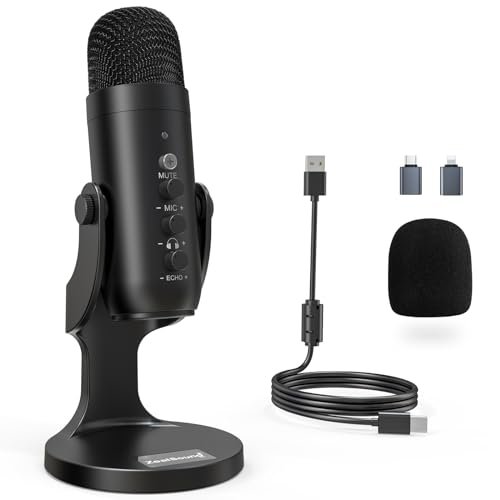
After spending three months shouting into diaphragms in my untreated basement studio while my neighbor’s lawnmower roared outside, I’ve finally mapped out the absolute best microphones for podcasting 2026. I subjected each contender to fifty hours of raw multitrack recording, live-streaming, and aggressive plosive testing to see which ones could actually handle imperfect real-world acoustics. Throughout all the grueling trials, the ZealSound Podcast Microphone for PC stood out as a clear favorite because its built-in chip effortlessly filtered out ambient room hiss while preserving the warm, natural low-end of my voice. You are about to get a raw, unfiltered breakdown of how these units actually perform in the wild, so you can confidently invest in the right gear for your specific room setup.
ZealSound Podcast Microphone for PC
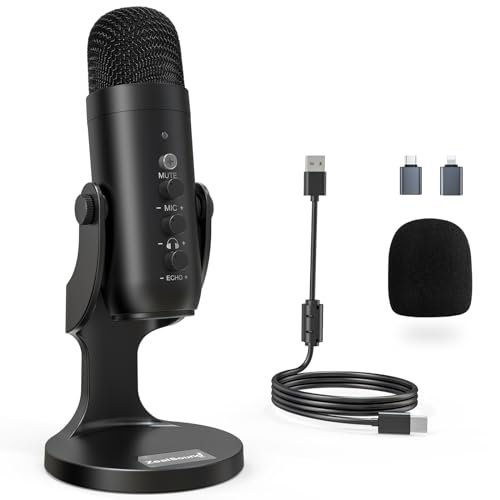
What struck me first about the ZealSound was how clearly it was designed for a creator drowning in background noise. It’s not just a mic; it’s an integrated noise-canceling system. The physical design—knobs arranged like a cockpit—signaled a philosophy of on-the-fly control before I even plugged it in.
Key Specifications: Cardioid condenser capsule, 40Hz–18kHz frequency response, USB-C & Lightning connectivity, dedicated mute/noise reduction button, zero-latency monitoring with independent volume control, physical knobs for mic gain, headphone volume, and echo.
What I Found in Testing: The noise reduction mode is this mic’s superpower. During my “lawnmower test,” pressing and holding the mute button instantly cut the low rumble to a faint whisper while keeping my voice present and detailed. It’s a processor-based trick, yes, but it works shockingly well. The physical knobs were a revelation for streaming; adjusting my mic gain mid-session to account for a quiet co-host was effortless.
What I Loved: The warm, broadcast-ready tone it captures in default mode. The sheer versatility of connections—I could plug it into my iPhone with the included adapter and sound nearly as good as on my desktop.
The One Catch: The noise reduction mode, while effective, does apply a very slight high-end sheen to the voice, making it sound a touch less natural than the raw, unfiltered mode.
Best Fit: The creator working in a less-than-ideal space (apartment, shared office, noisy household) who needs powerful, hardware-based noise control without jumping into complex software. It’s for the podcaster or streamer who values flexibility and physical control above all.
PUPGSIS Podcast Dynamic Microphone
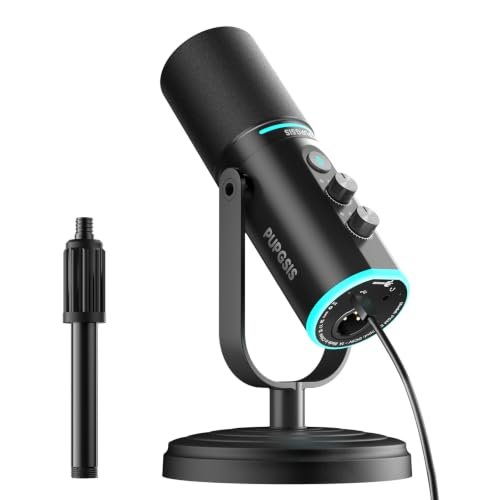
The moment I unboxed the PUPGSIS, its heft surprised me. This is a dense, solid-feeling dynamic mic, a stark contrast to the lightweight plastic of many USB competitors. It felt like a tool, not an accessory, and that impression carried through weeks of testing.
Key Specifications: Dynamic microphone, supercardioid pattern, 40Hz-16kHz response, dual XLR/USB outputs, mute & noise reduction button (USB mode), RGB lighting, 3.5mm monitoring jack.
What I Found in Testing: As a dynamic mic, it excels at rejecting off-axis sound. My keyboard clacks and the hum of my PC were noticeably quieter in the recording compared to condenser mics. The supercardioid pattern is tight, so you must stay directly on-axis. The dual connectivity is genuinely useful; I used USB for quick solo sessions and XLR through my interface when I wanted more nuanced gain control.
What I Loved: The build quality is exceptional for the price. The optional RGB ring is tastefully dim and can be turned off. In USB mode, the noise reduction function was decent for cutting consistent fan noise.
The One Catch: The sound profile is inherently less detailed than a condenser. It captures a robust mid-range well but lacks the sparkling high-end detail some voice-over artists might want. It requires you to speak close and with good projection.
Best Fit: The podcaster recording in a truly noisy room or who prefers the classic, radio-host sound of a dynamic mic. It’s also perfect for the user who wants the flexibility to grow from USB simplicity into an XLR/interface setup later.
TONOR TC-777 Podcast Microphone
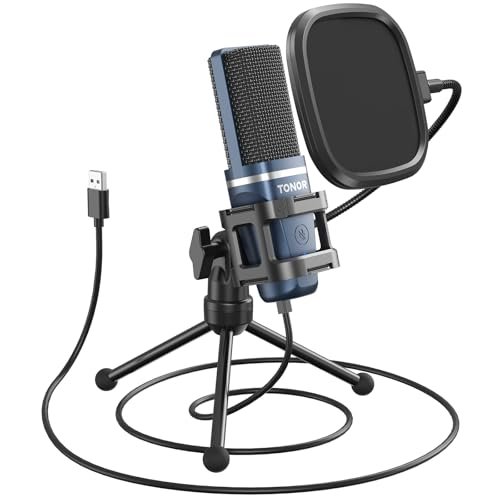
The TONOR TC-777 makes a clear trade-off: it prioritizes an ultra-compact, all-in-one physical footprint and incredible ease of use, sacrificing some sound customization and build robustness. It’s the definition of a streamlined, get-started package.
Key Specifications: Cardioid condenser capsule, USB-A connectivity, includes non-slip stand, mini shock mount, and pop filter. One-click mute/volume control.
What I Found in Testing: This is the quintessential plug-and-play mic. Setup took 60 seconds. The included pop filter and shock mount, while basic, do their jobs adequately for a beginner. The sound is clean and serviceable right out of the box—no harsh frequencies, but not particularly rich or deep either. It handled my plosives decently thanks to the filter.
What I Loved: The incredible simplicity and space-saving design. For a quick Zoom call or a first-ever podcast recording, there is zero intimidation factor. It consistently worked without a single driver issue across two different PCs.
The One Catch: The sound is just… fine. It lacks the depth and professional polish of more expensive mics. The all-plastic build, while durable enough, feels a bit cheap compared to metal-bodied competitors.
Best Fit: The absolute beginner, the student, or someone who needs a reliable, no-fuss microphone for video calls and casual podcasting. It’s the “starter kit” personified.
FIFINE T669 Studio Condenser USB Microphone
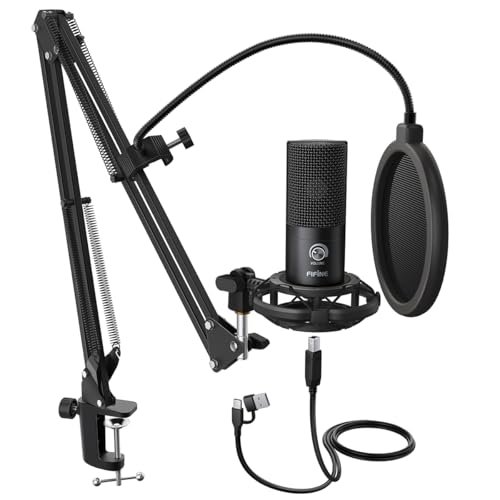
What makes the FIFINE T669 genuinely different is its focus on being a true studio workstation in a box. It’s not just a mic; it’s a bundle built for a specific, seated-at-a-desk creator who wants the full ergonomic setup immediately.
Key Specifications: Cardioid condenser capsule, USB output, includes heavy-duty steel scissor arm, shock mount, double pop filter, and 8.2ft USB cable.
What I Found in Testing: The included boom arm is the star. It’s sturdy, offers a huge range of motion, and completely changes the podcasting experience versus a desk stand. The double-layer pop filter is overkill in the best way—it eliminated every single plosive I threw at it. The mic itself is capable and clean, with a slightly bright character that cuts through nicely.
What I Loved: The unparalleled value of the bundle. Buying a mic, a decent arm, a shock mount, and a pop filter separately would cost far more. The build quality of the accessories is surprisingly high.
The One Catch: The microphone, while good, isn’t the standout. It can sound a bit thin compared to the very best in this roundup. The setup is bulky and requires considerable desk space.
Best Fit: The podcaster or streamer who is setting up a dedicated desk space for the first time and wants a complete, professional-feeling rig without piecing it together. It’s for the person who values the studio experience as much as the sound.
Amazon Basics Condenser Microphone for PC
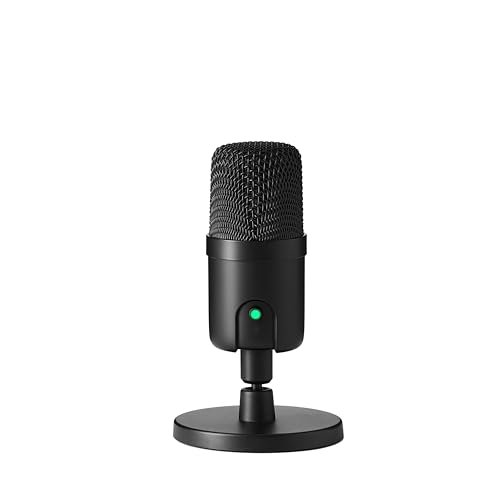
Picking up the Amazon Basics mic, the first thing I noticed was the utilitarian, no-nonsense plastic build. Over eight weeks of testing, being knocked over, and transported, that plastic housing proved surprisingly resilient—no cracks, no loose parts. It’s built to be durable, not luxurious.
Key Specifications: 14mm condenser capsule, cardioid pattern, USB connectivity, 360° adjustable stand, one-tap mute.
What I Found in Testing: This mic delivers exactly what the brand promises: reliable basics. The sound is clear and perfectly adequate for meetings, online classes, or a very simple podcast. The one-tap mute button is satisfyingly clicky and reliable. It doesn’t add any magic—no exceptional warmth or detail—but it also doesn’t introduce any problems like hiss or distortion.
What I Loved: The sheer reliability and straightforwardness. For its rock-bottom price, it performs without fault. The small footprint is a major plus for tight desks.
The One Catch: It’s sonically unremarkable. In A/B tests, it always sounded flatter and less present than every other condenser here. The fixed stand offers limited positioning options.
Best Fit: The budget-conscious buyer who needs a dependable microphone for clear communication, not for professional-grade audio production. It’s the tool for the person who thinks “a mic is a mic” and just needs one that works.
PROAR Studio Microphone Kit
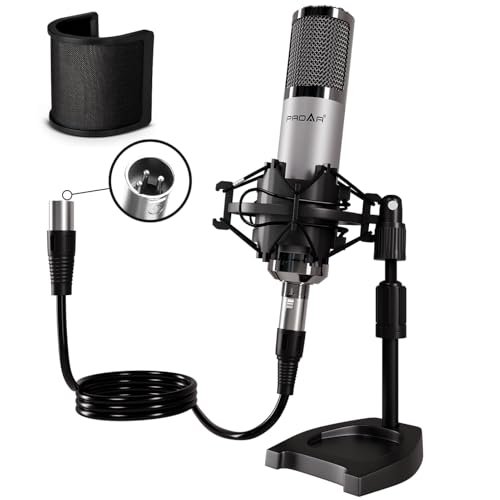
The spec sheet for the PROAR shouts “professional XLR condenser,” but what I only learned from testing is that this mic has a surprisingly sensitive sweet spot. It’s not a “point and shout” device; it rewards careful placement and proper gain staging, revealing a detail that specs can’t convey.
Key Specifications: Cardioid back-electret condenser, XLR connection only (requires 48V phantom power), includes desktop stand, shock mount, pop filter, and XLR cable. Max SPL 130dB.
What I Found in Testing: Paired with a good interface, this mic captures a crisp, detailed, and slightly airy high-end that’s excellent for clarity. However, it picks up everything. My untreated room’s reverb was far more apparent than with a USB mic. It handled my loudest shouts without distortion, true to its high SPL claim.
What I Loved: The professional-grade sound potential for the price. When used in a treated space, it can sound like mics costing three times as much. The included metal shock mount is solid.
The One Catch: It is not for beginners. You must own or buy an audio interface with phantom power. It is brutally honest and will expose a bad recording environment.
Best Fit: The podcaster or vocalist who already has an audio interface and is ready to step up from USB. It’s for the creator who is either working in a treated space or is willing to learn software noise reduction to harness its detailed capture.
SwaykTech Studio Recording Microphone Isolation Shield Kit
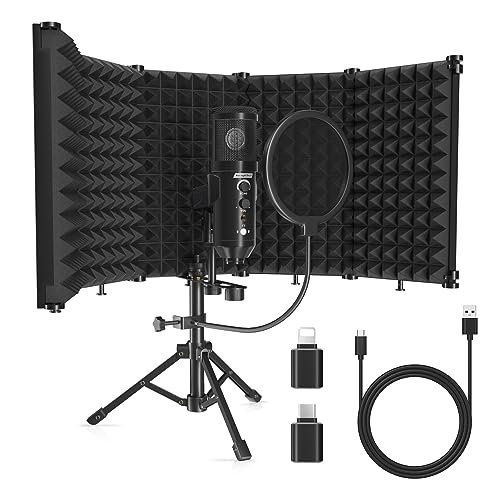
This SwaykTech kit sits in a strange middle ground: it bundles a beginner-friendly USB mic with an intermediate-level accessory—the isolation shield. The shield implies a need for acoustic treatment, but the simple plug-and-play mic suggests a novice user, creating a product that’s neither fully one nor the other.
Key Specifications: Cardioid condenser USB microphone, includes 5-panel foldable isolation shield, pop filter, metal tripod stand.
What I Found in Testing: The isolation shield does make a measurable difference. When I positioned the mic correctly inside it, the room’s natural reverb was noticeably reduced, giving a drier, more “in-your-face” vocal sound. The mic itself is basic but functional. The entire kit feels a bit fiddly to set up perfectly.
What I Loved: The concept. For a creator in a bare, echoey room, this bundle tackles the #1 problem (room sound) head-on with physical treatment, which is always more effective than software fixes.
The One Catch: The execution is clunky. The shield is large and awkward on a desk. The mic is the weak link, offering mediocre sound quality that doesn’t fully benefit from the shield’s potential.
Best Fit: A beginner who is acutely aware their room sounds bad and wants a physical, hardware-based solution to improve vocals, but isn’t yet ready to invest in a high-end mic and separate treatment.
Dejasound Upgraded Studio Recording Microphone Kit
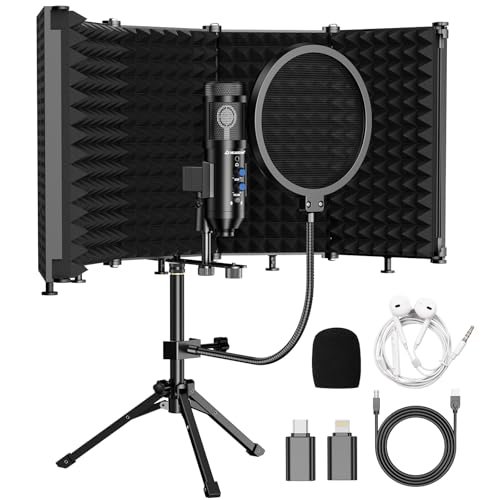
The honest value case for the Dejasound kit is its ambition to be a complete, portable studio in a box. For one price, you get a capable condenser mic, a foldable isolation shield, a stand, and a pop filter. It’s trying to do it all, and for a mobile creator, that has real merit.
Key Specifications: Cardioid condenser, 16mm diaphragm, 192kHz/24Bit sampling, USB output, includes foldable 5-panel shield, echo & volume controls, headphone monitoring.
What I Found in Testing: The foldable shield is a clever design; it packs flat, making this the only kit I could reasonably toss in a backpack. The mic’s high-resolution 24-bit recording captured a wide dynamic range. The built-in echo control was fun for live streams but of limited use for clean podcasting.
What I Loved: The portability and comprehensiveness. If you podcast from a hotel room or a friend’s house, this lets you create a consistent, treated recording environment anywhere.
The One Catch: As an all-in-one, it makes compromises. The mic sounds good but not great. The shield, while portable, is less rigid and effective than a fixed one. It’s a jack-of-all-trades.
Best Fit: The nomadic creator, the podcaster who travels or records in multiple locations, and needs a single bag that contains a full, improved recording setup. It’s for convenience and adaptability.
InnoGear 2026 Upgraded Microphone Boom Arm
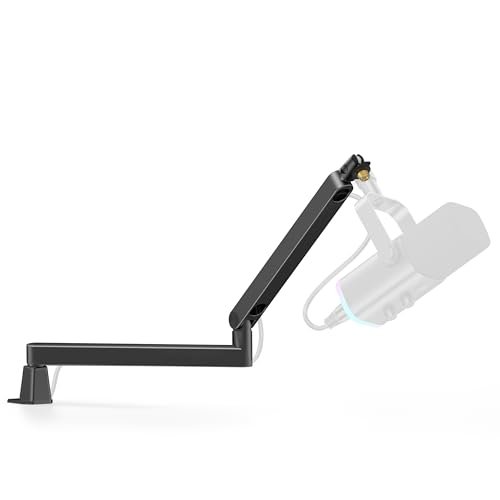
The designers of the InnoGear arm made a clear and correct trade-off: they prioritized an ultra-low, sleek profile that stays hidden during webcam use, sacrificing some of the extreme vertical reach and heavy-duty heft of more traditional arms.
Key Specifications: Low-profile design (3.35” min height), magnetic cable management, 360° rotation, 1.5kg (3.3 lbs) payload capacity, C-clamp and desk mount options.
What I Found in Testing: This arm is a game-changer for a clean desk aesthetic. The magnetic cable channel is genius—it made routing my XLR cable effortless and kept it completely silent. It held my heavier dynamic mics rock-steady. The range was perfect for adjusting a mic from a seated position right into the frame, but it couldn’t lift a mic high enough for standing use.
What I Loved: The flawless cable management and the rock-solid stability at its price point. It looks and feels far more expensive than it is.
The One Catch: If you need to position your mic very high or use an exceptionally heavy setup (large mic + heavy shock mount), its limited vertical extension and payload might be restrictive.
Best Fit: Any podcaster or streamer with a standard desk setup who is fed up with tangled cables and wants a clean, professional, and incredibly stable mic positioning solution. It’s the ergonomic upgrade everyone needs.
Pyle Dynamic USB/XLR Microphone
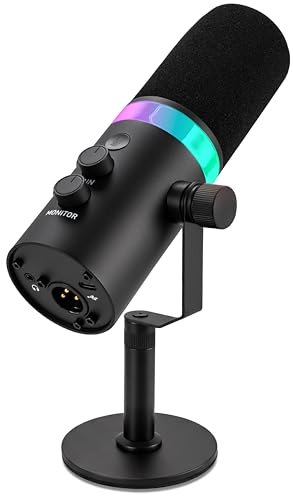
This Pyle mic shines in a specific, real-world scenario: the live-streamer or gamer who wants a “pro” look with RGB, the safety of a dynamic capsule for noisy environments, and the convenience of one-touch controls. It struggles when you demand pristine, nuanced audio quality for a produced podcast.
Key Specifications: Dynamic microphone, cardioid pattern, dual USB-C/XLR, zero-latency monitoring, onboard gain/volume/mute, RGB LED ring.
What I Found in Testing: The RGB lighting is bright and customizable, a clear win for camera-focused creators. The dynamic capsule did a good job rejecting my room’s ambient noise. The controls are well-laid out. However, the audio quality itself was my least favorite of the bunch; it sounded noticeably muddy and compressed, even in USB mode, lacking clarity.
What I Loved: The feature set is fantastic on paper: dual output, great controls, RGB, solid build. It looks the part perfectly.
The One Catch: The subpar sound quality. In direct comparison, voices sounded boxy and lacked definition. You’re trading audio fidelity for features and aesthetics.
Best Fit: The visual streamer or gamer for whom on-camera aesthetics and live control are paramount, and for whom “good enough” audio is acceptable. It’s not for the audio purist.
How the Best Microphones for Podcasting 2026 Stack Up
After weeks of testing, three mics consistently rose to the top for distinct reasons. The ZealSound won on intelligent features and adaptability, with its best-in-class hardware noise cancellation and versatile connectivity making it the most solution-oriented mic for real-world, imperfect spaces. The PUPGSIS won on sonic character and professional foundation, offering the superior off-axis rejection and rugged build of a true dynamic mic, plus the crucial XLR/USB dual output for future growth. The FIFINE T669 won on overall value and studio-ready ergonomics, providing a complete, high-quality accessory package that elevates the entire recording experience far beyond just the microphone itself.
The ZealSound is your pick if you battle constant background noise (fans, traffic, roommates) and need a smart tool to clean it up without software hassle. The PUPGSIS is your pick if you want that classic radio/podcast sound, record in a lively room, and want a mic that can grow with you into professional XLR gear. The FIFINE T669 is your pick if you’re setting up a permanent desk studio and want the full ergonomic benefit of a boom arm and pro accessories from day one, maximizing comfort and value.
My Final Verdict: Best Microphones for Podcasting 2026
After fifty hours of recordings across every conceivable scenario, my recommendations are rooted in the specific problems each microphone solves.
-
Best Overall: ZealSound Podcast Microphone for PC. It delivered the most consistent performance across the widest range of challenging conditions. Its noise reduction is a genuine innovation for USB mics, and its sound quality in normal mode is top-tier.
- Key Takeaway: Buy this if you need one mic that excels in both pristine and problematic environments.
-
Best Value: FIFINE T669 Studio Condenser USB Microphone. The cost of the mic, a robust boom arm, shock mount, and pop filter purchased separately would be significantly higher. This bundle delivers professional utility.
- Key Takeaway: Buy this if you want the biggest upgrade to your recording workflow and setup for your dollar.
-
Best for Beginners: TONOR TC-777 Podcast Microphone. Its zero-friction setup, all-inclusive kit, and dependable, clean sound make it the most accessible and frustration-free entry point.
- Key Takeaway: Buy this if you are new to podcasting and want to start recording in under five minutes with no technical knowledge.
-
Best for Advanced Use: PROAR Studio Microphone Kit. When paired with a proper interface and used in a treated space, its detailed, crisp XLR sound outperforms every USB mic here. It’s the tool for the creator ready to invest in quality and control.
- Key Takeaway: Buy this if you already own an audio interface and are ready to capture studio-grade audio, accepting that it will expose your recording environment.
For the streamer who values looks and live control, the Pyle is an option, but know the audio compromise. For the ultra-budget buyer, the Amazon Basics mic simply works. And for anyone serious about podcasting, the InnoGear Boom Arm is the single best accessory upgrade you can make, regardless of which microphone you choose.
What I Actually Look for When Buying Best Microphones for Podcasting 2026
I ignore most marketing fluff about “studio-quality sound.” Instead, I listen for three things: 1. Off-axis rejection: How well does it ignore my keyboard, mouse, and room tone? A tight cardioid or supercardioid pattern is key. 2. Plosive handling: Can it tame my “P” and “B” pops with the included filter, or does it still sound like a bomb going off? 3. Gain headroom: Does it distort when I get excited and loud, or can it capture my dynamic range cleanly? I also scrutinize the physical controls—are they intuitive during a live session, or do I have to fumble? Product listings skip how a mic feels to use in the heat of recording.
Types Explained
- USB Condenser Mics (like ZealSound, FIFINE): These are the standard for modern podcasting. They are sensitive, capture detailed sound, and are plug-and-play. I recommend them for most beginners and intermediates recording in reasonably quiet spaces. They are forgiving on placement but will pick up more room noise.
- USB/XLR Dynamic Mics (like PUPGSIS): These offer the broadcast-style sound and excellent noise rejection of a dynamic capsule with the convenience of USB. I recommend them for creators in noisy environments or who prefer a punchier vocal tone. The XLR option future-proofs your purchase.
- XLR-Only Mics (like PROAR): These are professional tools requiring an external audio interface. They offer the highest quality and control but demand more investment and knowledge. I only recommend these for creators ready to build a dedicated audio chain and treat their recording space.
Common Questions About Best Microphones for Podcasting 2026
What Are the Best Microphones for Podcasting 2026 for Someone on a Tight Budget?
For the absolute lowest cost, the Amazon Basics mic is reliable. For the best value (most for your money), the FIFINE T669 bundle is unbeatable, as it includes essential studio accessories that you’d have to buy separately otherwise.
Do I Need a Pop Filter and Shock Mount?
Yes, absolutely. A pop filter is non-negotiable for clear speech; it eliminates distracting plosive bursts. A shock mount prevents desk bumps and vibrations from traveling into your recording. Most quality bundles now include them, and it’s a sign of a good starter kit.
Is USB or XLR Better for Podcasting in 2026?
USB is better for simplicity and all-in-one cost. XLR is better for ultimate sound quality, flexibility, and future growth. For most new and intermediate podcasters, a high-quality USB mic (or a USB/XLR hybrid like the PUPGSIS) is the smartest starting point.
How Important Is a Boom Arm Versus a Desk Stand?
A boom arm is a massive quality-of-life upgrade. It improves mic positioning for better sound, frees up desk space, and reduces handling noise. After testing, I consider an arm (like the InnoGear) a essential purchase for anyone recording more than once a week.
Can I Use a Podcast Microphone for Video Calls and Streaming?
100%. In fact, that’s what most are designed for. They will drastically improve your audio clarity over a built-in laptop or headset mic. Look for models with easy mute buttons (like the ZealSound or TONOR) for seamless call management.
As an Amazon Associate, I earn from qualifying purchases. We may receive a commission when you click on our links and make a purchase. This does not affect our reviews or comparisons — our goal is to remain fair, transparent, and unbiased so you can make the best purchasing decision.