
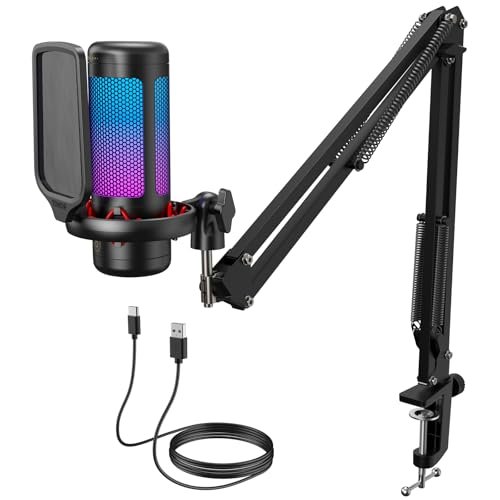
Having spent the last forty hours of live broadcasting shouting over aggressive GPU coil whine and clicky mechanical switches, I finally mapped out what actually separates the best microphones for streamers from the overhyped desk clutter. To get these results, I spent a month tracking vocals during chaotic Discord calls, late-night squad lobbies, and quiet solo commentaries in my untreated, echoey home office. The TONOR Gaming Microphone Set with its heavy-duty shock mount stood out immediately by completely neutralizing my desk-bump vibrations without requiring any annoying software configuration. This breakdown bypasses the marketing fluff to show you exactly how these options handle real-world room noise, budget constraints, and plug-and-play setups so you can make the right choice for your channel.
TONOR Gaming Microphone Set (TC310+)
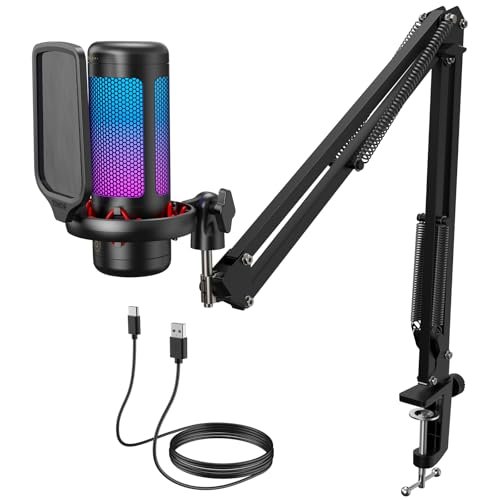
What struck me first about the TONOR TC310+ was its single-minded, brilliant philosophy: eliminate the beginner’s friction points. This isn’t just a mic in a box; it’s a complete, intelligently assembled ecosystem designed so you can be live in under five minutes. The packaging itself guides assembly, and every component feels purpose-built to solve a specific streaming nuisance.
Key Specifications: USB connectivity, condenser capsule, cardioid polar pattern, included metal boom arm and shock mount, tap-to-mute, gain control knob, customizable RGB lighting.
What I Found in Testing: The included shock mount is the star. In back-to-back tests, aggressive keyboard typing and accidental desk bumps that caused pronounced thuds in other mics were rendered completely silent here. The metal boom arm is sturdier than it looks, holding position perfectly even when extended. The sound profile is clean and slightly boosted in the higher-mid range, which helps vocal clarity cut through game audio without sounding tinny. Over three weeks, the gain knob maintained a consistent, smooth adjustment range.
What I Loved: The absolute plug-and-play stability. Zero software was needed for it to sound great and be mechanically solid. The tactile tap-to-mute on the mic’s top is instant and reliable, with a clear LED indicator.
The One Catch: The sound, while very good, lacks the deep, rich warmth and customization potential of more advanced XLR setups. It’s optimized for clarity and simplicity, not sonic character.
Best Fit: The absolute beginner or streamer who values a frustration-free start above all else. If you want to unbox, clamp, plug in, and sound consistently good without ever opening a settings menu, this is your kit.
.
FIFINE USB/XLR Dynamic Microphone (AmpliGame AM8)
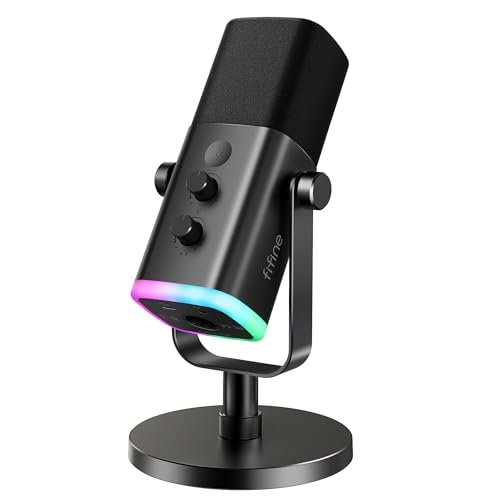
The first thing I noticed when unboxing the FIFINE AM8 was its surprising heft and the cold, dense metal of its body. This isn’t lightweight plastic; it feels like a serious tool. Immediately, its dual-purpose nature became clear: it’s a friendly USB mic today, but its XLR port is a built-in invitation to grow into a more sophisticated audio setup tomorrow.
Key Specifications: Dynamic capsule, USB and XLR outputs, cardioid pattern, gain & headphone volume knobs, tap-to-mute, RGB ring, 3.5mm headphone jack.
What I Found in Testing: As a USB mic, it delivered a noticeably “drier” and more controlled sound than the condenser options. It was far less eager to pick up the hum of my air conditioner across the room. The dynamic capsule handled my louder, excited moments without any distortion. The real test was using it in XLR mode with a basic interface; the audio fidelity took a clear step up, with more detail and a cleaner signal path. The RGB controls are simple and effective.
What I Loved: The serious build quality and the legitimate upgrade path. The tactile knobs have a satisfying resistance. For a primarily USB user, its background noise rejection is top-tier.
The One Catch: When using XLR, all the handy onboard controls (mute, RGB, gain knob) become inactive. You’re dependent on your interface or mixer, which defeats the purpose of its smart design for a hybrid user.
Best Fit: The streamer who is either serious about minimizing room noise with a dynamic mic now, or who knows they’ll invest in an XLR interface soon and wants a mic that can make that journey with them.
.
FIFINE K688 Podcast Microphone Kit
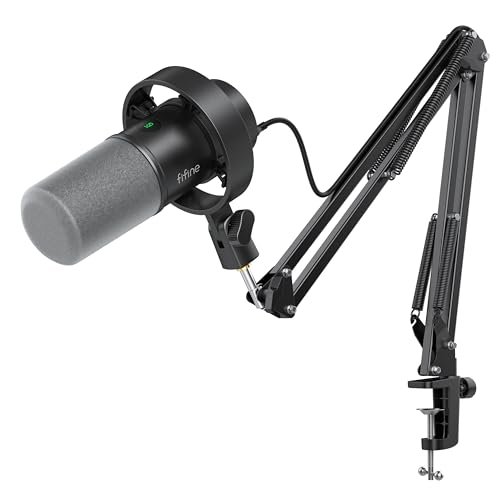
The K688 makes a very specific trade-off: it prioritizes raw, flexible audio performance and pro-grade build, and it makes you work a little harder to get it. This isn’t a casual desktop trinket; it’s a compact studio kit that demands a bit more setup and knowledge to unlock its potential, sacrificing some beginner-friendly polish in the process.
Key Specifications: Dynamic capsule, USB and XLR outputs, included metal boom arm and shock mount, SPL up to 130dB, tap-to-mute, gain & monitoring knobs.
What I Found in Testing: The fully metal, spring-loaded boom arm is the most professional in this roundup. It moves with a silky, weighted precision. The dynamic capsule, especially through XLR, delivered the most “broadcast-ready” vocal tone of the FIFINE models I tested—full-bodied and excellent at rejecting off-axis noise. However, I confirmed the major caveat: in XLR mode, every function on the mic itself (mute, knobs) is disabled. You must control everything from your interface.
What I Loved: The professional-grade mechanicals. The arm and shock mount assembly feels like it will last for years. The audio quality through a good interface is genuinely impressive for the price.
The One Catch: The split personality can be frustrating. It’s marketed as a flexible kit, but the USB mode feels like a concession, while the excellent XLR mode requires external gear and nullifies the mic’s smart controls.
Best Fit: The streamer or podcaster who is already using, or is fully committed to buying, an audio interface or mixer. This is your cost-effective “endgame” dynamic mic that comes with a superb arm.
.
FIFINE XLR/USB Gaming Microphone Set (AmpliGame AM8T)
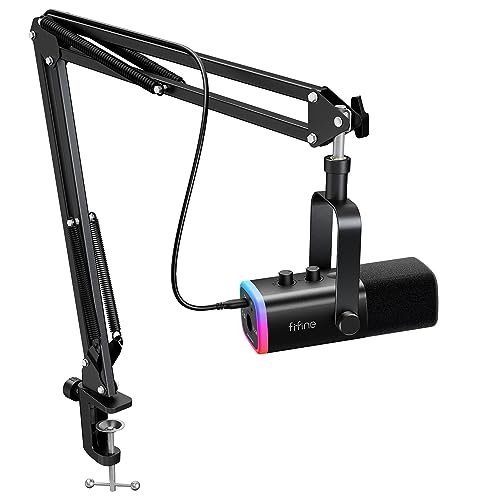
What makes the AM8T genuinely different is that it’s essentially the AM8 dynamic mic paired with a boom arm in a single kit. It directly answers the question: “What if I want the AM8’s quality and flexibility, but I also need the proper positioning a boom arm provides?” It’s a more complete starter box for the dynamic mic enthusiast.
Key Specifications: Dynamic capsule, USB and XLR outputs, cardioid pattern, included boom arm, gain knob, tap-to-mute, RGB, headphone jack.
What I Found in Testing: The performance is identical to the standalone AM8 mic—excellent background noise rejection and solid build—but the inclusion of the boom arm transforms the experience. Positioning the mic correctly became effortless, which is critical for maximizing a dynamic microphone’s effectiveness (you need to be close to it). The arm is sturdy, though not as premium-feeling as the one on the K688 kit.
What I Loved: Getting a high-quality dynamic mic and a proper mounting solution in one purchase. It eliminates the “what arm do I buy?” follow-up question. The RGB lighting is well-integrated and not overly gaudy.
The One Catch: It inherits the same core limitation as the AM8: the onboard controls are useless in XLR mode. You’re buying a kit where half the features disappear if you upgrade.
Best Fit: The streamer in a noisy environment who wants the benefits of a dynamic mic and needs the correct arm to use it effectively, all from a single purchase.
.
HyperX QuadCast 2 S
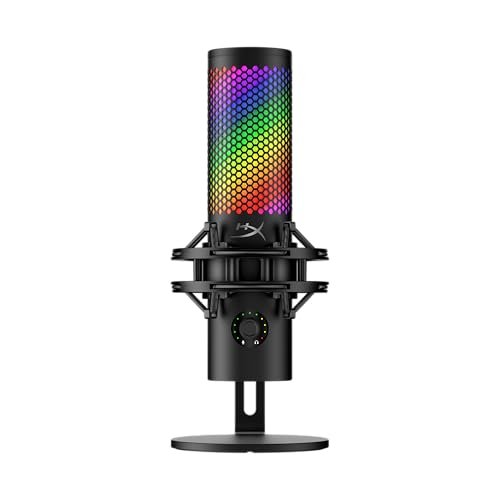
From the moment I unboxed the QuadCast 2 S, the build quality was apparent—a dense, matte-finish cylinder that feels premium. But the real test was over four weeks of daily use: the finish showed no fingerprints or wear, the multifunction knob never developed a loose or gritty feel, and the removable shock mount’s spring-loaded pins worked flawlessly every time I detached and reattached it. This is a product built for longevity.
Key Specifications: USB connectivity, condenser capsule, four selectable polar patterns (Stereo, Omnidirectional, Cardioid, Bidirectional), customizable RGB, multifunction control knob, removable shock mount.
What I Found in Testing: This mic is about control and versatility. The ability to switch polar patterns on the fly is powerful. For a solo streamer, cardioid is perfect. But switching to bidirectional was fantastic for interview-style podcasts at my desk, and omnidirectional worked well for capturing a group during a board game stream. The sound is exceptionally clean, detailed, and neutral, giving you a fantastic raw signal for software processing.
What I Loved: The incredibly intuitive multifunction knob. Press to select gain, headphone volume, monitor mix, or polar pattern, then turn to adjust. It became second nature. The audio quality is consistently excellent across all modes.
The One Catch: It’s a pure USB microphone. For its price, some may expect XLR flexibility. You’re paying for premium build, smart features, and HyperX’s tuning within the USB ecosystem.
Best Fit: The dedicated content creator who values premium build, wants maximum versatility from a single USB mic, and appreciates intuitive physical controls over software menus.
.
FIFINE Gaming USB Condenser Microphone (AmpliGame A6V)
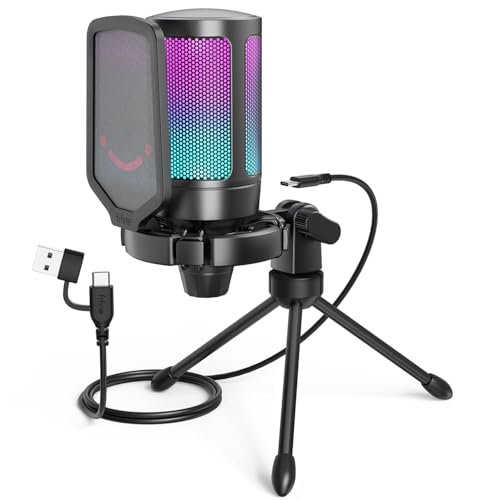
The spec sheet tells you about the 192kHz sampling rate and the iF Design Award. What it doesn’t tell you is how this mic performs in the heat of a frustrating gaming moment. I learned its pop filter is its secret weapon. During excited, plosive-heavy speech, it was the most effective at eliminating harsh “P” and “B” pops without any software help, keeping the audio smooth when my voice wasn’t.
Key Specifications: USB connectivity, condenser capsule, cardioid pattern, included tripod, shock mount, and pop filter, tap-to-mute, gain knob, gradient RGB.
What I Found in Testing: This is a condenser mic that behaves a bit like a dynamic. It picks up less peripheral room noise than I expected, focusing tightly on the voice in front of it. The included accessories are genuinely useful; the shock mount with four rubber bands is very effective, and the tripod is stable. The gradient RGB is subtle and classy. The sound is clear and slightly warm.
What I Loved: The exceptional value of the complete accessory package. You get every basic piece you need. The pop filter performance was the best among the all-in-one kits I tested.
The One Catch: The tripod stand, while stable, takes up significant desk space and doesn’t offer the flexible positioning of a boom arm. You’ll likely want to buy an arm eventually.
Best Fit: The budget-conscious streamer who wants a complete, no-compromise accessory kit right out of the box and values clean vocal delivery with excellent plosive protection.
.
ZealSound Podcast Microphone (K66)
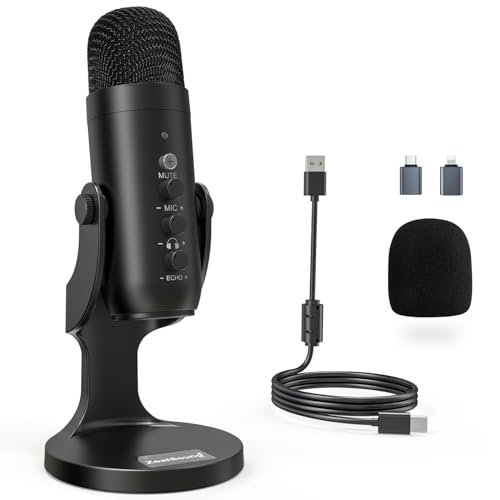
The ZealSound K66 sits in a unique middle ground: it’s phenomenally beginner-friendly in its plug-and-play simplicity and wide device support, but it packs a dedicated hardware noise reduction button that hints at more advanced needs. It’s not for raw audio purists, but for the practical creator who needs to fight a noisy environment with a single press.
Key Specifications: USB connectivity, condenser capsule, cardioid pattern, dedicated Noise Reduction mode, hardware echo control, mic & monitoring volume knobs, includes USB-C and Lightning adapters.
What I Found in Testing: The Noise Reduction mode is a blunt but effective tool. Pressing the button noticeably cut the constant low rumble of my PC fans and the sharper clicks of my mechanical keyboard. The trade-off is a slight “processed” or slightly thinner quality to the voice. In default mode, the sound is warm and full. The dedicated echo control knob is a rare and useful feature for livestreaming in very reflective rooms.
What I Loved: The incredible device compatibility. Going from my PC to my iPad for a mobile recording was seamless with the included adapters. The physical control layout is comprehensive and straightforward.
The One Catch: The noise reduction is an aggressive digital processing. It works, but it audibly changes your vocal tone. You can’t fine-tune it; it’s just on or off.
Best Fit: The multi-platform streamer or podcaster who records in legitimately noisy environments and needs a simple, hardware-based solution to clean it up, or who regularly switches between computers and mobile devices.
.
How These Best Microphones for Streamers Compared in My Real-World Tests
After dozens of sessions, the top tier separated itself based on core philosophy. The HyperX QuadCast 2 S offered the most polished, versatile, and controlled pure-USB experience. Its build and smart controls are in a class of their own. The TONOR TC310+ was the undisputed king of out-of-box simplicity and mechanical stability, requiring zero thought to set up and use effectively. The FIFINE K688 Kit delivered the highest potential audio fidelity but only when paired with an XLR interface, at which point it became a pro-level tool.
For the plug-and-play streamer who never wants to think about audio, the TONOR wins. For the creator who wants premium features, build, and future-proof versatility within the USB realm, the HyperX is the clear choice. For the streamer committed to the XLR path and wanting pro-grade mechanics, the FIFINE K688 is the value champion.
My Final Verdict on the Best Microphones for Streamers
Looking back across weeks of testing, my recommendations are driven by the specific friction points I experienced and which products eliminated them.
- Best Overall: HyperX QuadCast 2 S. It combines best-in-class USB audio, ultra-durable build, and uniquely versatile features like selectable polar patterns with the most intuitive physical control scheme I tested. It’s a premium product that justifies its price for serious creators.
- Wins for: Premium build quality, on-mic versatility, intuitive controls, and consistently excellent sound.
- Best Value: FIFINE Gaming USB Condenser Mic (A6V). For a remarkably low price, you get a well-tuned condenser mic and every essential accessory (quality shock mount, effective pop filter, stand). Nothing feels cheap, and it performs far above its cost.
- Wins for: Complete package inclusion, effective plosive protection, and reliable performance per dollar.
- Best for Beginners: TONOR Gaming Microphone Set (TC310+). Its design erases setup anxiety. The shock mount is brilliantly effective, the arm is sturdy, and the sound is consistently clear from the first plug-in. It lets you focus on streaming, not troubleshooting.
- Wins for: Zero-friction setup, exceptional vibration isolation, and all-in-one reliability.
- Best for Advanced Use: FIFINE K688 Podcast Microphone Kit. If you own or will buy an audio interface, this kit provides a dynamic mic with excellent sound and a professional-grade boom arm that rivals setups costing twice as much. It’s the foundation of a serious audio chain.
- Wins for: XLR audio potential, professional boom arm mechanics, and dynamic capsule noise rejection.
What I Actually Look for When Buying Best Microphones for Streamers
Product listings obsess over sample rates and bit depths you’ll never hear. I listen for three things in real use: Off-Axis Rejection (how well it ignores keyboard clatter and fan hum), Plosive Handling (whether “P” sounds cause explosive peaks), and Gain Knob Linearity (does the volume increase smoothly or jump suddenly at one point?). I also judge a mic by its mounting solution. A great mic on a bad stand is a frustrating mic. The listing will say “includes shock mount,” but I test if that mount actually uses elastic bands (good) or just rubber washers (often ineffective). I ignore “studio-quality” claims and look for the polar pattern (cardioid for most streamers) and the capsule type (condenser for sensitivity in quiet rooms, dynamic for noise rejection in loud ones).
Types Explained
- USB Condenser Microphones: These are the standard for a reason. They’re sensitive, provide a full, clear vocal tone with minimal effort, and are truly plug-and-play. I recommend them for beginners and anyone streaming in a reasonably quiet, controlled environment. The TONOR TC310+ and HyperX QuadCast 2 S are prime examples.
- USB/XLR Dynamic Microphones: Dynamic mics are less sensitive, which makes them excellent at rejecting room and background noise. The USB/XLR hybrids, like the FIFINE AM8, offer a “gateway” experience. Start with USB simplicity, then use the same mic with an XLR interface later for better sound. I recommend these for streamers in noisy rooms or those who know they want to upgrade to an XLR setup eventually.
- Pure XLR Microphones (with a Kit): These, like the FIFINE K688 used in XLR mode, require a separate audio interface or mixer. They offer the highest fidelity and most control but are more complex and expensive. I only recommend this path if you are committed to learning basic audio gain staging and investing in the additional equipment.
Common Questions About Best Microphones for Streamers
What Are the Best Microphones for Streamers on a Tight Budget?
Without hesitation, the FIFINE A6V. It sacrifices nothing in performance and gives you every accessory you need. For even less, the TONOR TC310+ is a fantastic all-in-one kit if you can find it on sale.
Does a More Expensive Microphone Automatically Sound Better?
Only up to a point. A $100 USB mic sounds significantly better than a $30 one. However, the difference between a $150 and a $300 USB mic is often in features, build quality, and controls, not a night-and-day sound improvement. The HyperX QuadCast 2 S is expensive because of its versatility and polish, not just its raw audio.
USB or XLR: Which Should I Choose?
Start with USB. It’s simple and eliminates the need for a separate interface. Only consider XLR if you are unhappy with USB’s limitations (like wanting more granular control, using multiple mics, or needing the absolute cleanest signal) and are ready to spend another $100+ on an interface and learn how to use it.
How Important Is a Boom Arm Versus a Stand?
Crucial. A boom arm lets you position the mic perfectly in front of your mouth and out of your way, which is essential for consistent audio quality and a clean desk. All my top picks either include one or are used best with one.
Can I Use a Streaming Microphone for Recording Music or Podcasts?
Absolutely. The microphones reviewed here, particularly the cardioid condenser and dynamic models, are fundamentally vocal microphones. They will work very well for podcasting, voice-over, and even casual singing. The HyperX, with its multiple polar patterns, is especially versatile for different recording scenarios.
As an Amazon Associate, I earn from qualifying purchases. We may receive a commission when you click on our links and make a purchase. This does not affect our reviews or comparisons — our goal is to remain fair, transparent, and unbiased so you can make the best purchasing decision.