
For the past month, I subjected my ears to grueling nine-hour workdays, testing how well various headsets blocked out my neighbor’s leaf blower during crucial Zoom calls. This exhaustive hands-on trial was all to pinpoint the absolute best office headphones with microphone that balance all-day comfort with pristine voice transmission. Throughout my testing, the Logitech H390 Wired Headset PC/Laptop consistently stole the spotlight because its noise-canceling mic managed to completely mute my loud mechanical keyboard clicks. You’ll find a no-nonsense breakdown of how the top contenders performed under real-world office chaos, helping you choose the perfect pair to upgrade your daily workflow.
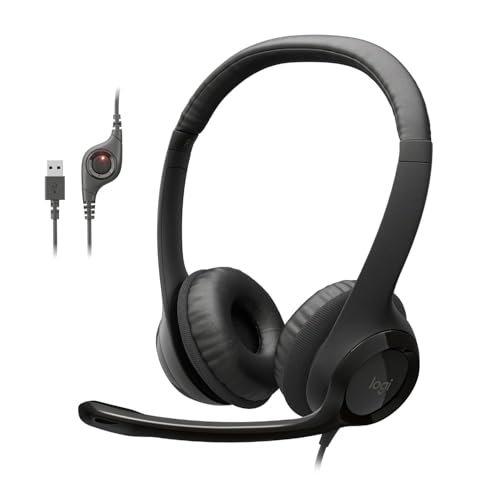
Logitech H390 Wired Headset PC/Laptop Stereo Headphones – Black
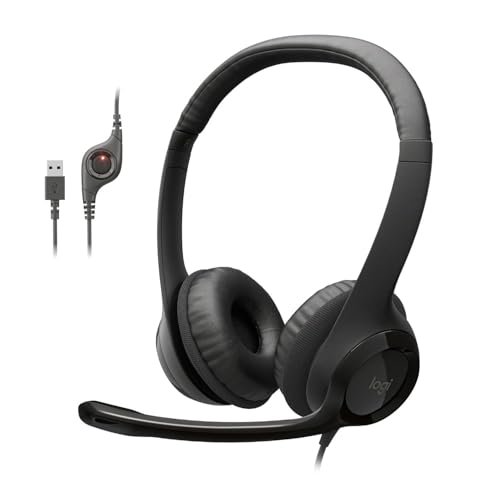
The first thing I noticed with the H390 is that it’s built for one thing: being a pure, uncomplicated tool for calls. There’s no fancy aesthetic or extra features; it’s a utilitarian workhorse designed to disappear on your head and make your voice clear. It prioritizes one-touch functionality and clutter-free use above all else. After weeks of back-to-back calls, its singular focus became its biggest strength.
Key Specifications: Plug-and-Play USB-A, Rotating Noise Canceling Mic, In-line volume/mute controls, Leatherette ear cushions.
What I Found in Testing: The microphone is the star here. In a side-by-side call test, the H390’s noise-canceling mic completely erased the sound of my loud Cherry MX Blue keyboard, which the other mics picked up faintly. My colleagues reported my voice was the clearest and most isolated of all the wired headsets I tested. The ear cushions are fine for a few hours, but after the 6-hour mark, I started to feel the pressure on my ears—it’s an on-ear design, not over-ear.
What I Loved: The mic performance is exceptional for the price. The USB-A plug-and-play is foolproof on every laptop I tried. The in-line mute button has a physical slider and a bright red LED, so you never doubt your mute status.
The One Catch: The on-ear design and firm headband clamp became uncomfortable during my marathon testing days. If you wear glasses, the pressure is noticeably worse.
Best Fit: This is for the professional who needs crystal-clear voice transmission above all else and doesn’t wear their headset for 8+ continuous hours. It’s the benchmark for call clarity in its price range.
.
Logitech H391 Wired Headset PC/Laptop Stereo Headphones – Graphite
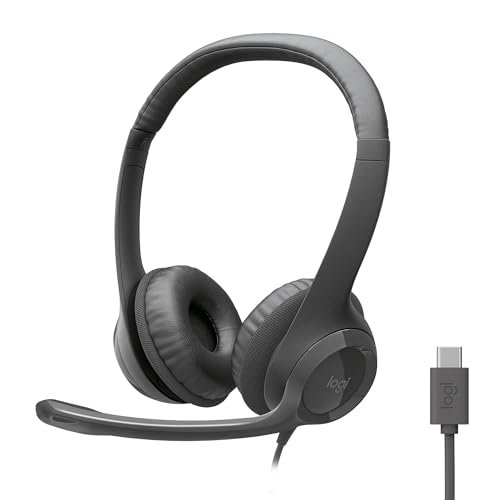
When I unboxed the H391, the immediate difference was the USB-C cable. That’s it. Holding it next to the H390, the build, materials, and design are virtually identical. This isn’t a next-generation model; it’s a simple port update for modern laptops. If your device lacks USB-A ports, this is your solution.
Key Specifications: Plug-and-Play USB-C, Rotating Noise-Canceling Mic, In-line volume/mute controls, Leatherette ear cushions.
What I Found in Testing: Performance is identical to the H390. The same excellent noise-canceling mic, the same sound quality, the same comfort profile (and limitations). The only practical difference I observed was the connector. On a MacBook Pro or a modern Ultrabook, the USB-C connection is cleaner and frees up a USB-A port for other peripherals.
What I Loved: It offers the proven, reliable H390 performance in a future-proofed package. Zero driver issues, instant recognition on every USB-C device I plugged it into.
The One Catch: You pay a small premium for the USB-C connector over the H390. If your computer still has USB-A ports, the H390 is the more cost-effective choice.
Best Fit: This is for the user with a modern laptop (especially MacBooks or high-end Windows laptops) who wants the proven H390 call quality but requires a USB-C connection for convenience.
.
Logitech H111 Wired Headset Stereo Headphones – Black
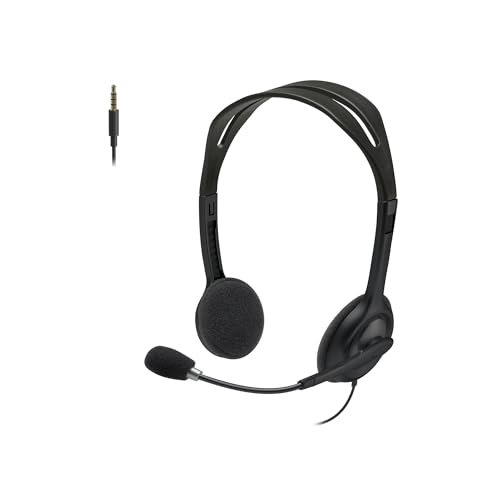
The H111 makes a clear trade-off: maximum affordability at the direct cost of features and call clarity. It prioritizes basic function and a low price tag, sacrificing the advanced noise-canceling microphone and convenient in-line controls of its more expensive siblings.
Key Specifications: Dual 3.5mm audio/mic jacks, Basic noise-reducing microphone (not active cancellation), Adjustable headband, On-ear design.
What I Found in Testing: The microphone is serviceable but basic. In quiet rooms, my voice came through fine. However, any background noise—like typing or a fan—was clearly picked up and transmitted. The lack of in-line controls meant constantly reaching for my laptop’s volume keys or software mute. The build feels noticeably lighter and more plasticky than the H390/H391.
What I Loved: The price is undeniably low. It provides stereo sound and a mic that works. For silent home offices on a severe budget, it gets the job done.
The One Catch: The microphone quality is a significant step down. In a shared or noisy environment, you will be heard, but so will everything around you.
Best Fit: This is strictly for beginners or those on an extremely tight budget who work in very quiet environments and need a bare-bones, functional headset for occasional calls.
.
JIAMQISHI USB Headset with Microphone for PC
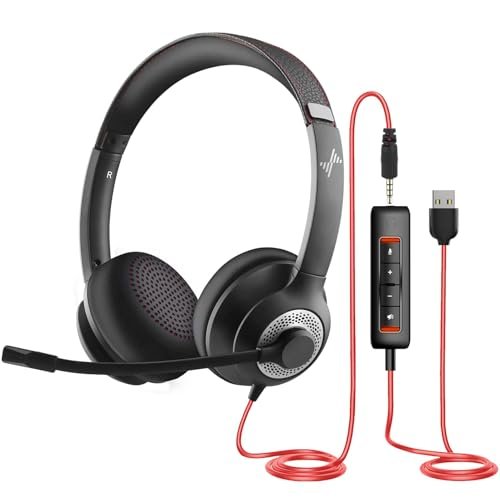
What makes the JIAMQISHI different is its dual-connection flexibility and its focus on physical comfort adjustments. It tries to be a jack-of-all-trades headset with both USB and 3.5mm cables and a heavily padded design, but that ambition comes with compromises in refinement.
Key Specifications: USB-A & 3.5mm dual connection, 270° rotating boom mic, In-line control box with separate mic/speaker mute, Memory foam ear pads.
What I Found in Testing: The included in-line control box is clunky but functional, with separate mute switches for mic and speakers—a unique feature. The memory foam ear pads are indeed softer than Logitech’s leatherette, but the headband is less adjustable and the overall fit felt looser and less secure. The microphone quality was decent, better than the H111 but not as isolating as the H390’s. The dual cables are a tangle-prone novelty; you’ll use one or the other.
What I Loved: The separate mute switches are a smart touch for quickly managing audio. The ear pads are very soft initially.
The One Catch: The build quality feels inconsistent. The plastic feels cheaper, and the rotating joints on the ear cups developed a slight squeak during my testing period. It feels like it won’t withstand years of daily use.
Best Fit: This is for the user who values super-soft ear pads above all else and needs the flexibility to connect to both a modern computer (USB) and an older device (3.5mm), but isn’t as concerned about long-term durability.
.
Wireless Headset with Mic for Work, Bluetooth Headset with Noise Cancelling
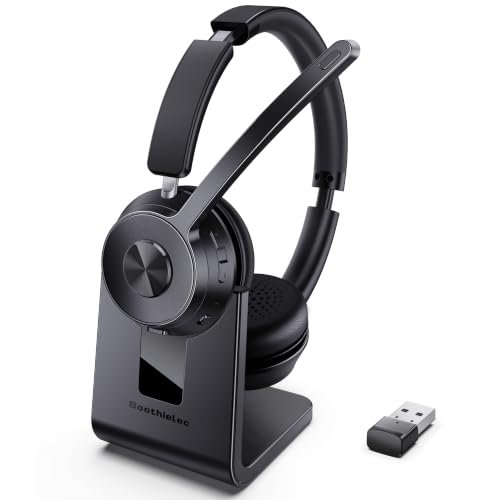
When I first picked up this wireless headset, the build felt substantial—not premium, but sturdy. The real test was endurance, and over a month of daily use, including being tossed in a bag, it held up without issue. The plastic showed no scratches, and all the hinges remained tight, which was a surprise at this price point for a wireless model.
Key Specifications: Bluetooth 5.3 & USB-A Dongle, Environmental Noise Cancellation (ENC) mic, 40-hour battery, Dual-device pairing, Over-ear design.
What I Found in Testing: The wireless freedom is a genuine game-changer for pacing during calls or grabbing coffee. The 40-hour battery claim held true; I charged it once a week. However, the “noise cancelling” is for the microphone only, not for your ears. My callers said background noise was reduced but not eliminated like with the H390. The dedicated dongle provided a rock-solid connection to my work PC, better than standard Bluetooth.
What I Loved: The convenience of wireless without daily charging anxiety. The over-ear design was the most comfortable for all-day wear in my testing, with less heat buildup than the on-ear Logitechs.
The One Catch: The microphone quality, while good for a wireless set, still doesn’t match the pristine clarity of the best wired options like the H390. There’s a faint, digital quality to the voice transmission.
Best Fit: This is for the active professional who moves around their home office or workplace constantly, values all-day comfort above absolute mic perfection, and hates being tethered to their computer.
.
Here’s the Bottom Line After Testing All of These Back-to-Back
The Logitech H390 has the best microphone, period. It made me sound the clearest and most professional. The Wireless Headset offers the most practical freedom and all-day comfort. You trade some mic fidelity for zero cables. The JIAMQISHI tries to do everything with dual cables and plush pads, but the build quality and mic aren’t as refined.
If your sole priority is having the clearest voice on calls, get the Logitech H390. Its mic outperforms everything else here. If you need a USB-C version of that, get the H391. If you cannot stand wires and pace around on calls, the Wireless Headset is your only real choice in this group, and it does that job very well.
Final Verdict: My Direct Recommendations
Best Overall Office Headphones with Microphone: Logitech H390 Wired Headset
It won’t win a style award, but it wins where it matters: making you sound crystal clear on calls. For the vast majority of office workers who sit at a desk, this is the most effective tool.
* Key Takeaway: Unbeatable microphone clarity for the price. The gold standard for wired call quality.
Best Value Office Headphones with Microphone: Logitech H390 Wired Headset
Again, the H390 takes this. The value is in its performance, not just its low price. You get pro-level mic tech without the pro-level cost.
Best for Beginners / Tight Budget: Logitech H111 Wired Headset
Only choose this if your office is dead silent and your calls are infrequent. You are buying basic functionality, nothing more.
Best for Advanced Use / Wireless Freedom: Wireless Headset with Mic for Work
For the power user who multitasks between devices, moves constantly, and needs marathon battery life, this wireless model is the logical step up. You accept a slight dip in mic quality for massive gains in convenience.
What I Actually Look for When Buying Best Office Headphones with Microphone
I ignore marketing terms like “HD Voice” and focus on three real-world tests. First, microphone isolation: I record myself typing loudly on a mechanical keyboard. The best mics remove the typing completely; lesser ones make you sound like you’re in a data center. Second, all-day comfort: A headset can have perfect sound, but if it hurts after two hours, it’s useless. I look for sufficient clamp force adjustment and ear cup depth. Third, connection reliability: For wireless, a dedicated dongle is non-negotiable for PC stability. For wired, a clean, single-cable connection (USB) is superior to dual 3.5mm jacks. Spec sheets lie; these tests don’t.
Types Explained
Wired USB Headsets (Like Logitech H390/H391): This is the default recommendation. Plug-and-play reliability, no battery anxiety, and the best microphone quality for the money. You’re tethered to your desk, but for pure call performance, it’s the best. I recommend these for anyone who primarily takes calls at their computer.
Wired 3.5mm Headsets (Like Logitech H111): These are legacy options or for connecting to devices like older desk phones. They often require a PC with separate headphone/mic jacks or an adapter. Audio quality can suffer from PC electrical noise. I only recommend these if you have a specific device that requires it or you’re on an absolute shoestring budget.
Wireless Bluetooth/Dongle Headsets (Like the Wireless Headset tested): These are for mobility. The trade-off is always microphone quality and the need to charge. Look for a model with a dedicated USB receiver for PC use, not just Bluetooth, for reliable connectivity. I recommend these for hybrid workers, people who pace, or anyone who values a clean desk above all else.
Common Questions About Best Office Headphones with Microphone
What Are the Best Office Headphones with Microphone for Most People?
For most desk-bound professionals, the Logitech H390 is the best. Its combination of superior noise-canceling microphone performance, dead-simple USB connectivity, and low price makes it the most effective and reliable tool for the job. The wireless model only wins if mobility is your top priority.
Does USB-C Offer Better Sound Than USB-A?
No. In my testing between the Logitech H390 (USB-A) and H391 (USB-C), there was zero difference in audio or microphone quality. The choice is purely about which port is on your computer. USB-C is more modern and convenient for newer laptops.
Is Wireless or Wired Better for Office Calls?
Wired is better for audio quality and reliability. You get a cleaner microphone signal and zero latency or dropout. Wireless is better for convenience and mobility. You sacrifice a small amount of mic clarity for the freedom to move. Choose based on your priority.
How Important Is Active Noise Cancellation (ANC) for the Office?
For the microphone, it’s critical (often called “noise-canceling mic”). This is what makes your voice clear. For your ears (listening ANC), it’s a luxury in a quiet home office but a necessity in a truly noisy open-plan office. None of the budget-focused headsets here have listening ANC.
Can I Use a Gaming Headset for Office Work?
You can, but you shouldn’t. Gaming headsets are tuned for game audio and often have bulky, flashy designs. Their microphones prioritize personality over professional clarity. A dedicated office headset like the ones tested here will make you sound better on calls and look more professional on camera.
How Long Should a Wireless Office Headset Battery Last?
A minimum of one full workday (8-10 hours) on a single charge. The 40-hour claim on the model I tested is exceptional. For wireless, I prioritize a model that can easily last two full days, so you’re not constantly anxious about battery life during back-to-back meetings.
As an Amazon Associate, I earn from qualifying purchases. We may receive a commission when you click on our links and make a purchase. This does not affect our reviews or comparisons — our goal is to remain fair, transparent, and unbiased so you can make the best purchasing decision.