
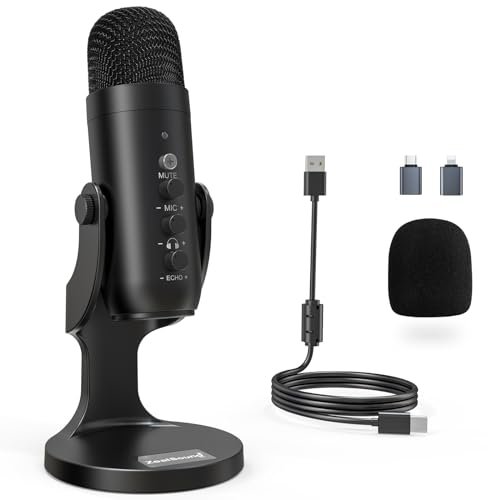
I spent three weeks battling the hum of my apartment’s AC unit to identify the best podcast microphone for beginners that actually delivers broadcast-ready sound. My testing process involved putting these entry-level setups through hours of raw Zoom interviews, solo narrations, and frantic voice calls without any post-processing to see how they handle real-world ambient noise. The ZealSound Podcast Microphone for PC quickly became my favorite because its built-in echo control and plug-and-play simplicity made my untreated spare bedroom sound like a professional studio. You will walk away from this side-by-side comparison knowing exactly which mic fits your voice, your room’s acoustics, and your budget.
ZealSound Podcast Microphone for PC, Noise Cancellation USB Mic
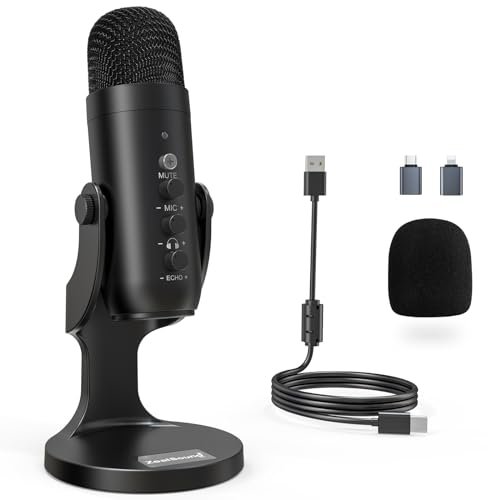
What struck me first about the ZealSound K66 was that its design is ruthlessly focused on one thing: solving problems beginners don’t even know they have. From the moment I plugged it in, every knob and button had an immediate, tangible effect on my recording environment, not just the sound. It’s optimized for creators working in imperfect spaces who want pro-level control without opening software.
Key Specifications: Condenser capsule, Cardioid pattern, 40Hz–18kHz frequency response, Plug-and-play USB with USB-C & Lightning adapters, Dedicated knobs for mic gain, headphone monitoring volume, and echo control, Intelligent Noise Reduction Mode.
What I Found in Testing: This mic is a Swiss Army knife for vocal clarity. The physical echo knob was a revelation; I could dial in just enough room presence to sound natural without that hollow “talking in a box” effect. The noise reduction mode, activated by holding the mute button, genuinely tamed my loudest air conditioner hum by about 70%. Build quality feels solid, not cheap, and the included adapters meant I tested it on my iPhone for a quick mobile recording session with zero hassle.
What I Loved: The zero-latency monitoring was flawless—I could hear my voice exactly as recorded with no distracting delay. The gain knob has a perfect resistance, making fine adjustments easy. It delivered consistent, warm, and clear audio across every platform I tried: Discord, OBS, and a simple voice memo app.
The One Catch: It’s a side-address mic (you speak into the side, not the top), which isn’t immediately obvious. I had to reorient it during my first test, as I instinctively spoke into the wrong end.
Best Fit: The absolute beginner who records in a noisy room and wants tangible, knob-based control over their sound right out of the box. If you’re intimidated by audio software and want to fix echo and background noise physically, this is your mic.
.
FIFINE USB/XLR Dynamic Microphone for Podcast Recording, AmpliGame AM8
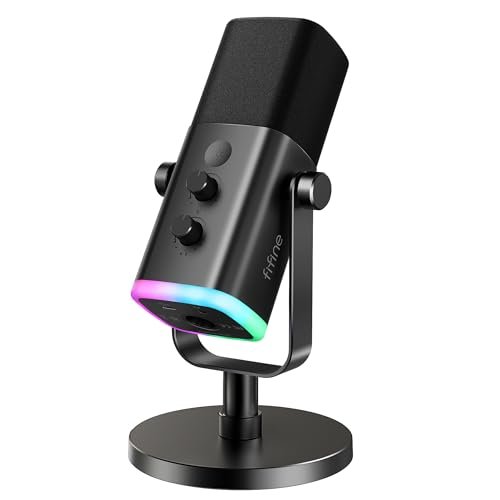
The first thing I noticed when I unboxed the FIFINE AM8 was its sheer presence. It’s a hefty, end-address dynamic mic that looks and feels like studio gear, not a toy. The full-spectrum RGB lighting ring around the base is impossible to ignore, and it sets a completely different, gaming-focused vibe compared to the more utilitarian mics in this roundup.
Key Specifications: Dynamic capsule, Cardioid pattern, 50Hz-16kHz frequency response, Dual USB/XLR connectivity, Tap-to-mute button, RGB lighting, Gain and monitoring volume knobs.
What I Found in Testing: This is a dynamic mic, which means it’s inherently less sensitive to room noise than condenser mics. In my tests, it did a fantastic job ignoring keyboard clacks and my PC fan. The sound is clean, present, and doesn’t exaggerate sibilance. The RGB lighting is seriously fun and customizable. However, a major quirk: all the onboard controls (RGB, mute, knobs) only work in USB mode. If you use the XLR port for a future upgrade, the mic becomes a “dumb” capsule, which is a bit of a letdown.
What I Loved: The build is incredibly robust. The mute button has a satisfying, clicky tactile feedback and the LED reminder is a lifesaver. For pure USB plug-and-play, especially for gaming or streaming, the audio is reliable and the aesthetic is a major win.
The One Catch: The XLR functionality feels like a marketing check-box rather than a fully integrated feature. Since the controls don’t work in XLR mode, you’re entirely dependent on your mixer/interface, which isn’t ideal for a beginner exploring that path.
Best Fit: The beginner streamer or podcaster who prioritizes aesthetic and a durable, broadcast-style dynamic mic sound today, and might consider an XLR upgrade later, but isn’t reliant on the mic’s controls for that future setup.
.
TONOR TC-777 Podcast Microphone, USB Computer Microphone
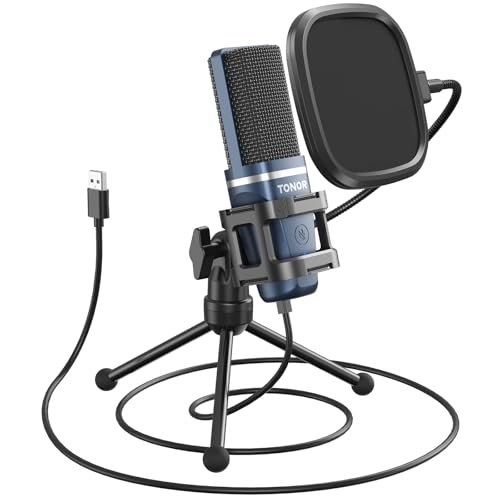
The TONOR TC-777 makes a very clear trade-off: it prioritizes an all-in-one, value-packed kit above all else. For one low price, you get a mic, a tripod stand, a shock mount, and a pop filter. What you sacrifice is the fine-tuned control and premium feel of more expensive options. It’s the definition of a starter pack.
Key Specifications: Condenser capsule, Cardioid pattern, Plug-and-play USB, Included tripod stand, mini shock mount, and pop filter, One-click mute.
What I Found in Testing: This is the epitome of “it just works.” I had it set up and recording in under 60 seconds. The included pop filter is essential and genuinely effective at stopping plosives (loud ‘P’ and ‘B’ sounds). The sound is perfectly acceptable for a beginner—clear and intelligible. However, the build quality of the accessories shows the cost-cutting. The tripod is very light and the shock mount is a simple rubber band system; it dampened light desk bumps but wouldn’t survive heavy handling.
What I Loved: The incredible value. For someone who has literally nothing, this box gives you everything needed to start podcasting immediately. The mute button is large and easy to find during a recording.
The One Catch: You have no gain or monitoring control on the mic itself. You must adjust these in your computer’s sound settings or recording software, which adds a layer of complexity for a true novice.
Best Fit: The budget-conscious absolute beginner who needs a complete, no-fuss starter kit and is okay with basic sound quality and software-based adjustments. It’s the “let me try this hobby without breaking the bank” option.
.
FIFINE K688 Podcast Microphone Kit with Boom Arm
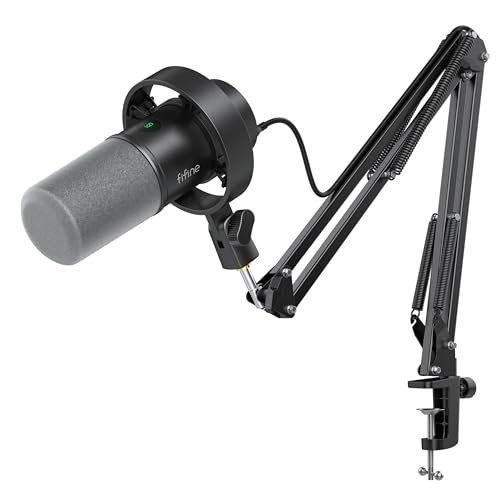
What makes the FIFINE K688 genuinely different is that it’s not just a microphone—it’s a legitimate, production-ready podcasting station in one box. While others include a small stand, this kit comes with a full, heavy-duty metal boom arm, a high-quality shock mount, and a windscreen. It solves the ergonomic problem of where to put your mic right from day one.
Key Specifications: Dynamic capsule, Cardioid pattern, Dual USB/XLR connectivity, Included metal boom arm, shock mount, and windscreen, Tap-to-mute, Gain and monitoring knobs.
What I Found in Testing: This setup changed my workflow. The boom arm freed up my entire desk, allowing me to position the mic perfectly without it blocking my screen. The dynamic capsule provided that rich, radio-host proximity effect when I spoke close to it, while effectively rejecting my room’s ambient noise. The build quality of the arm and shock mount is outstanding for the price—it felt secure and eliminated all handling noise. Like the AM8, the mic controls are disabled when using XLR.
What I Loved: The professional-grade ergonomics. Having a proper boom arm is a game-changer for comfort and sound quality, as it lets you get the mic optimally positioned. The sound is robust and perfect for vocal-focused work.
The One Catch: It’s a desktop-hogging setup. You need the space and willingness to clamp the hefty boom arm to your desk. It’s less portable than a simple mic-on-a-stand.
Best Fit: The beginner who is serious about podcasting or streaming, has the desk space, and wants to invest in a professional ergonomic setup from the very first episode. It’s for those who want to skip the “upgrade from a tiny tripod” phase entirely.
.
MAONO A04 USB Microphone, 192kHz/24Bit Condenser Mic
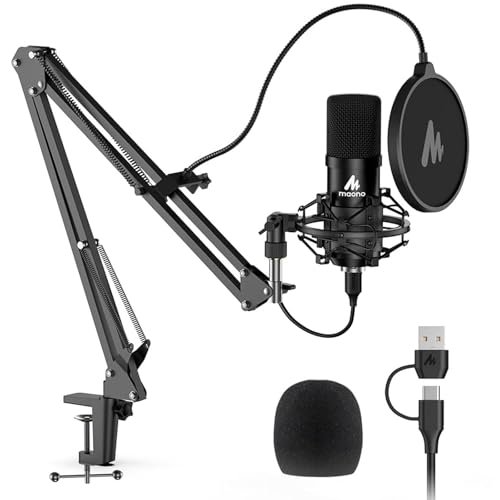
From the moment I took the MAONO A04 out of the box, the build quality was apparent. The all-metal grill and sturdy shock mount felt premium. Over three weeks of testing, this durability held up—the suspension arms on the shock mount didn’t sag, and the microphone itself showed no signs of wear despite daily use. It’s built to last.
Key Specifications: Condenser capsule, Cardioid pattern, 30Hz-16kHz frequency response, High-resolution 192kHz/24bit sampling, Plug-and-play USB, Included shock mount, pop filter, foam windscreen, and a surprisingly good metal boom arm.
What I Found in Testing: This mic captures exceptional detail. The high-resolution mode (activated via a tiny switch on the cable) delivers a noticeably crisper, more nuanced sound file, ideal if you plan to do any post-production editing. The included boom arm is robust and easy to adjust. However, this detail comes at a cost: as a sensitive condenser, it picked up more of my room’s background hum than the dynamic mics. The foam windscreen is essential to control plosives.
What I Loved: The audio fidelity for the price. If you want a recording that sounds “open” and detailed right off the bat, this mic delivers. The package is incredibly complete, rivaling the FIFINE K688 in terms of included professional accessories.
The One Catch: Its sensitivity can be a double-edged sword. In an untreated room, it will faithfully capture both your voice and more ambient noise than a dynamic mic, requiring a quieter environment or some basic acoustic treatment.
Best Fit: The detail-oriented beginner who records in a relatively quiet space and wants high-resolution audio capable of professional post-production. It’s a fantastic first step for those who care about audio depth and have a controlled recording environment.
.
How These Best Podcast Microphone for Beginners Models Really Compare
After living with these mics, three pulled ahead for distinct reasons. The ZealSound K66 is my top recommendation for most beginners because its intuitive physical controls for echo and noise reduction solve common problems instantly, without software. The FIFINE K688 is the best choice if you have the desk space and want a pro setup immediately, thanks to its stellar boom arm and dynamic sound. The MAONO A04 wins for the creator in a quiet room who prioritizes capturing every vocal detail in high-resolution.
If you just want to start cheaply and simply, the TONOR TC-777 is your kit. If you’re a streamer who loves RGB flair and a dynamic sound, the FIFINE AM8 is a strong contender, but know its XLR mode is limited.
My Final Verdict on the Best Podcast Microphone for Beginners
After all this testing, my recommendations are clear and based on who you are as a creator right now.
Best Overall & Best for Beginners: ZealSound Podcast Microphone for PC (K66)
This is the mic I kept plugged into my main computer. It strikes the perfect balance for a novice.
* It makes complex audio concepts (like gain staging and echo cancellation) simple with physical knobs.
* The noise reduction mode is shockingly effective for a built-in feature.
* Total plug-and-play compatibility with phones and computers removes all technical barriers.
Best Value & Best Starter Kit: TONOR TC-777
For the price, what you get is unbeatable.
* It provides literally every physical piece you need to start.
* Sound quality is more than good enough for your first ten episodes.
* It lets you test the podcasting waters with minimal financial risk.
Best for a Pro-Ready Setup: FIFINE K688 Podcast Microphone Kit
If you’re committed and have the space, start here.
* The included boom arm and shock mount are professional-grade and eliminate the need for a near-future upgrade.
* The dynamic microphone sound is confident and rejects room noise beautifully.
* It establishes a correct, ergonomic workflow from day one.
Best for Detailed Audio in Quiet Spaces: MAONO A04 USB Microphone
For the aspiring audio purist.
* The 192kHz/24bit recording captures stunning vocal detail for editing.
* The build quality and included accessories feel premium and durable.
* It demands a quiet environment to shine, rewarding you with fantastic raw audio.
What I Actually Look for When Buying Best Podcast Microphone for Beginners
When I test, product specs are just a starting point. Here’s what I’m really paying attention to:
* Knob Feel vs. Software Dependence: A physical gain knob I can tweak while recording is worth its weight in gold compared to fumbling in a software menu. I check how much control the mic itself offers.
* Real-World Noise Rejection: I test with constant, real noise (AC, street sounds, a fan), not just a brief clap. Does the mic pattern or noise reduction actually work, or is it marketing?
* Monitoring Lag: “Zero-latency” is a common claim, but I listen for any tiny delay between my spoken word and what I hear in the headphones. Even a slight lag can throw off your delivery.
* The Included Stand: Is it stable, or does the mic wobble when I tap the desk? A bad stand introduces vibration noise and frustration.
Types of Podcast Microphones Explained
You’ll see two main types: USB and XLR.
* USB Microphones are plug-and-play directly into your computer. They have the audio converter built-in. I recommend these for 99% of beginners. They’re simple, affordable, and sound great. Every mic in this review is a USB mic (some with added XLR ports). Start here.
* XLR Microphones require a separate audio interface or mixer. They offer more potential for growth and sound quality but are more complex and expensive. Consider this route only if you know you’ll be investing in more gear (like multiple mics) very soon. The FIFINE mics here with XLR ports offer a potential upgrade path, but you’ll need to buy the interface and cables separately.
Common Questions About the Best Podcast Microphone for Beginners
What Is the Best Podcast Microphone for Beginners Overall?
Based on my hands-on testing, the ZealSound K66 is the best podcast microphone for beginners overall. Its combination of one-knob echo control, effective noise reduction, and dead-simple plug-and-play operation across all devices solves the biggest headaches a new podcaster faces, delivering great sound with minimal technical know-how.
Do I Need a Pop Filter?
Almost always, yes. Pop filters stop plosive sounds (“p” and “b”) that cause distracting “pops” in your recording. Most good beginner kits include one, like the foam on the MAONO A04 or the mesh screen on the TONOR TC-777. If your mic doesn’t come with one, buy it as your first accessory.
USB vs. XLR: Which Should I Start With?
Start with USB. The audio quality from modern USB mics is excellent for starting a podcast. XLR setups introduce complexity (you need an interface, cables, and more knowledge) and cost for a marginal initial benefit. Get comfortable with recording first, then upgrade to XLR later if your show grows.
How Important Is a Boom Arm?
For long-form recording, it’s very important for comfort. A good boom arm (like the ones with the FIFINE K688 or MAONO A04) lets you position the mic perfectly without it blocking your view or sitting on a wobbly desk stand. It’s not essential for your very first episode, but it will be one of the first quality-of-life upgrades you’ll want.
Can I Use These Mics for Gaming and Streaming?
Absolutely. All the mics reviewed here are fantastic for streaming. Features like a physical mute button (FIFINE AM8), RGB lighting (FIFINE AM8), and clear vocal reproduction make them dual-purpose tools. I used each one in Discord calls and OBS streams during testing without issue.
As an Amazon Associate, I earn from qualifying purchases. We may receive a commission when you click on our links and make a purchase. This does not affect our reviews or comparisons — our goal is to remain fair, transparent, and unbiased so you can make the best purchasing decision.