
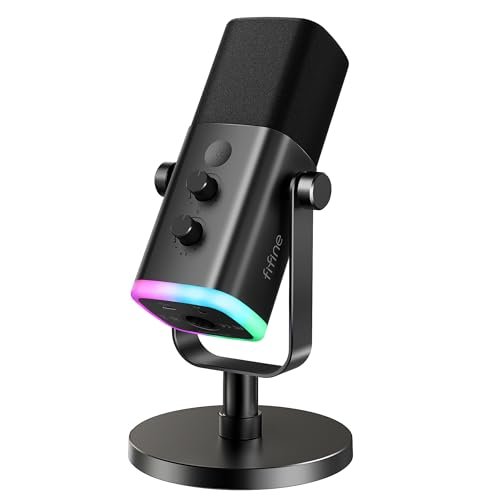
While shouting over the clatter of my mechanical keyboard during three weeks of late-night broadcasts, I realized how easily ambient background noise ruins a mix, prompting my quest for the absolute best usb microphone for streaming. I put multiple contenders through their paces, analyzing how they handled harsh plosives, sudden volume spikes, and annoying desk vibrations in a normal, untreated bedroom setup. Out of every model I plugged in, the FIFINE AmpliGame AM8 USB/XLR Dynamic stood out because of its incredible off-axis noise rejection and warm, broadcast-ready tone that rivals mics twice its price. This breakdown bypasses the marketing fluff to give you raw audio comparisons and honest hands-on insights so you can find the perfect vocal clarity for your own channel.
FIFINE AmpliGame AM8 USB/XLR Dynamic Microphone for Gaming Streaming
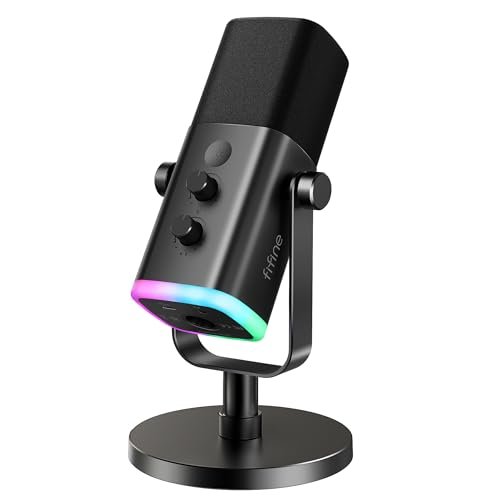
What struck me first about the AmpliGame AM8 was its unapologetic focus on being a workhorse first and a showpiece second. Its design philosophy becomes obvious after one stream: it’s optimized to isolate your voice from a noisy environment. The solid, slightly weighty build feels purposeful, not fragile.
Key Specifications: Dynamic Cardioid Capsule, USB & XLR Connectivity, 50Hz-16kHz Frequency Response, Tap-to-Mute with LED, 3.5mm Headphone Jack, RGB Lighting (USB-only), Dedicated Gain & Monitoring Knobs.
What I Found in Testing: Over two weeks of streaming near a busy street window, this mic’s off-axis noise rejection was its superpower. Car horns and keyboard clatter were dramatically minimized. The dynamic capsule handled my unpredictable volume spikes during gameplay without clipping. Switching to XLR via a basic interface delivered a noticeable bump in warmth and headroom. The physical controls have a satisfying, deliberate resistance.
What I Loved: The broadcast-style, slightly warm vocal tone right out of the box. The incredible job it did suppressing my PC fan noise. The future-proofing of XLR connectivity for when you’re ready to upgrade your audio chain.
The One Catch: It needs to be close to your mouth (within 4-6 inches) for optimal sound, which might not suit everyone’s setup or preference.
Best Fit: This is for the serious streamer who shares a space or has significant background noise. It’s perfect if you want professional-grade vocal isolation now and plan to grow into an XLR setup later. It demands a bit more precise placement but rewards you with studio-like focus.
Logitech Creators Blue Yeti USB Microphone (Blackout)
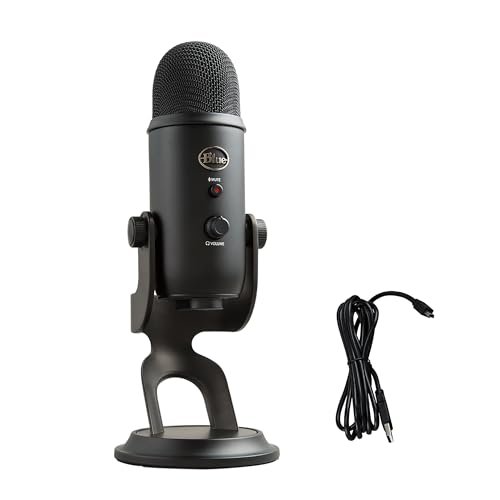
The first thing I noticed when I got hands on the Blue Yeti was its substantial, almost iconic presence on the desk. It feels heavy and premium, and the array of physical controls on the front makes it clear this is a versatile tool, not just a simple plug-in mic.
Key Specifications: Tri-Capsule Condenser Array, Cardioid/Omni/Bidirectional/Stereo Patterns, Onboard Gain & Headphone Volume, Instant Mute, Blue VO!CE Software.
What I Found in Testing: The multi-pattern flexibility is real. Cardioid mode delivered a crisp, detailed voice for solo streaming. For a co-host session, bidirectional mode captured both of us seated across a table perfectly. However, in my untreated room, its condenser sensitivity picked up more room echo and keyboard noise than dynamic mics. The included stand isn’t ideal; it transfers desk bumps easily, so I used a separate arm.
What I Loved: The sheer versatility for different recording scenarios. The rich, detailed audio quality in a quiet environment. The tactile, high-quality feeling of the knobs and switches.
The One Catch: Its sensitivity is a double-edged sword; it captures everything, making it less ideal for noisy or echo-prone rooms without treatment.
Best Fit: The streamer or podcaster in a dedicated, relatively quiet space who values versatility above all. If you do solo streams, interviews, and maybe some acoustic instrument recording, this one mic can do it all.
ZealSound K66 Podcast Microphone
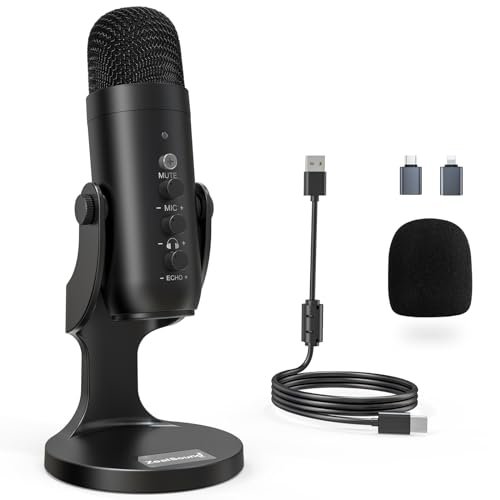
The ZealSound K66 makes a clear trade-off: it prioritizes features and device compatibility above ultimate sonic purity. For the price, the amount of physical control and included adapters is impressive, but you notice the compromise in the raw audio texture when A/B testing against more expensive mics.
Key Specifications: Condenser Cardioid Capsule, USB-C & Lightning Compatibility, Dedicated Gain/Monitoring/Echo Knobs, Noise Reduction Mode, Plug & Play.
What I Found in Testing: The “Noise Reduction Mode” (activated by holding the mute button) is a genuine software filter. It does reduce constant background hum noticeably, but it also slightly muffles the top-end clarity of my voice. The three dedicated knobs for mic gain, headphone volume, and echo are incredibly handy for on-the-fly adjustments without software.
What I Loved: The true plug-and-play compatibility with iPhones and iPads via the included Lightning adapter. The hands-on control layout is fantastic for beginners learning audio. The build feels sturdy for its class.
The One Catch: The core audio capture is good, not great. It lacks the richness and depth of the top-tier mics here, sounding a bit more processed and “USB-y.”
Best Fit: The absolute beginner or mobile creator who needs one mic to work on PC, Mac, and iPhone seamlessly. It’s a fantastic learning tool due to its physical controls and a great “everything included” package.
FIFINE K669B USB Microphone
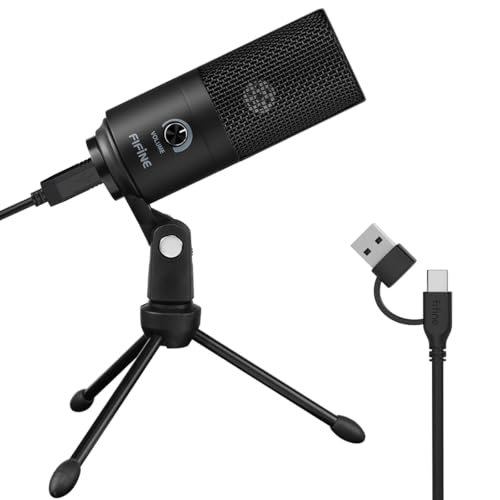
What makes the FIFINE K669B genuinely different is its stark, no-frills approach. In a roundup filled with RGB and knobs, this is a simple, solid metal capsule on a basic stand. It proves that you don’t need bells and whistles to get a clean, reliable signal for streaming.
Key Specifications: Condenser Cardioid Capsule, All-Metal Build, Single Volume Knob, Plug & Play, USB-A Connection.
What I Found in Testing: For its rock-bottom price, the clarity is shocking. It doesn’t have the bass response or warmth of more expensive mics, but my voice was always clear and intelligible. The all-metal build feels more durable than any plastic mic in its price range. It handled my normal speaking voice well but required careful gain adjustment via Windows settings to avoid clipping when I got loud.
What I Loved: The incredible value. You get a clean, usable voiceover signal for a tiny investment. The simplicity—plug it in and it just works with minimal fuss.
The One Catch: Control is limited. You have a physical volume wheel, but fine-tuning gain requires diving into your computer’s sound settings. It’s a basic tool.
Best Fit: The first-time streamer on an extreme budget, or someone needing a reliable secondary/backup mic. If you just want your voice to be clear and don’t need advanced features, this is the most cost-effective path.
FIFINE AmpliGame A6V USB Gaming Microphone
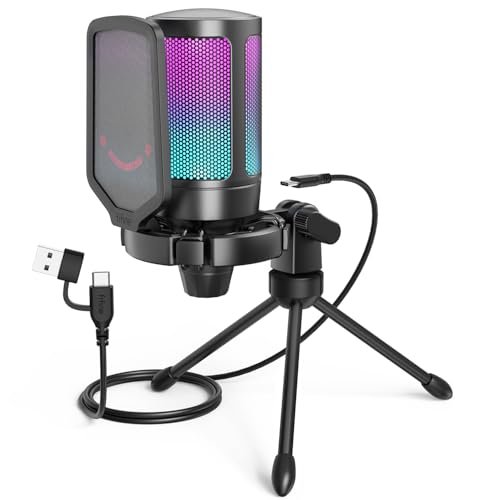
Opening the box, the A6V’s build quality was immediately apparent—the matte finish, the solid knobs, the bundled shock mount and pop filter. After a month of daily use, that impression held: nothing loosened, squeaked, or felt cheap. It’s a condenser mic built to be the centerpiece of a streaming desk.
Key Specifications: Condenser Cardioid Capsule, 192kHz/24bit Sample Rate, RGB Lighting, Dedicated Gain Knob & Mute, Included Shock Mount & Pop Filter.
What I Found in Testing: The included accessories are not gimmicks. The shock mount effectively decoupled the mic from my desk, eliminating low-frequency thuds from my hands. The pop filter made a noticeable difference on plosives. The audio is very clean and detailed, with a slight high-end brightness that makes voices cut through a game mix. The single gain knob is responsive and perfectly placed.
What I Loved: The complete “streaming kit in a box” nature. The audio quality is excellent for a USB condenser, and the thoughtful accessories solve common problems right out of the gate.
The One Catch: Like all condensers, it will pick up more room ambiance than a dynamic mic. The RGB is fixed to a color cycle; you can’t pick a static color.
Best Fit: The streamer who wants a premium, all-inclusive USB condenser setup without buying separate accessories. It’s for those in a reasonably quiet environment who value a crisp, modern sound and a polished on-desk look.
Logitech Creators Blue Yeti (Midnight Blue)
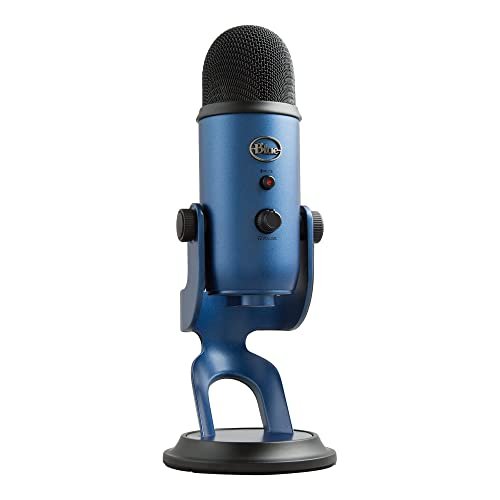
The spec sheet doesn’t tell you how the Blue Yeti’s onboard preamps behave. In real testing, I found they have plenty of clean gain, but pushing the gain knob past 50% in a noisy room also significantly amplified the noise floor. The Blue VO!CE software is also more than just a gimmick—it’s a powerful, if sometimes overbearing, tool for shaping your sound.
Key Specifications: (Identical to Blackout Model: Tri-Capsule Array, Four Patterns, Onboard Controls, Blue VO!CE Software).
What I Found in Testing: The core performance is identical to the Blackout model—excellent versatility and detail in quiet spaces. The key learning was mastering the gain staging: keeping the physical gain lower and boosting digitally in software yielded a cleaner result. Blue VO!CE offers legitimately useful broadcast presets and noise gates, but the heavier effects can make you sound overly processed.
What I Loved: The sheer amount of software control bundled for free. Finding a preset that gave my voice a radio-ready compression and EQ was a two-click process.
The One Catch: To get the best out of it, you need to engage with the software. Using it as a simple plug-and-play mic doesn’t unlock its full potential.
Best Fit: The tech-savvy streamer who doesn’t mind using software to perfect their sound. It’s ideal if you want to experiment with vocal effects, noise gates, and compression without buying separate plugins or hardware.
LIANGSTAR USB Computer Microphone
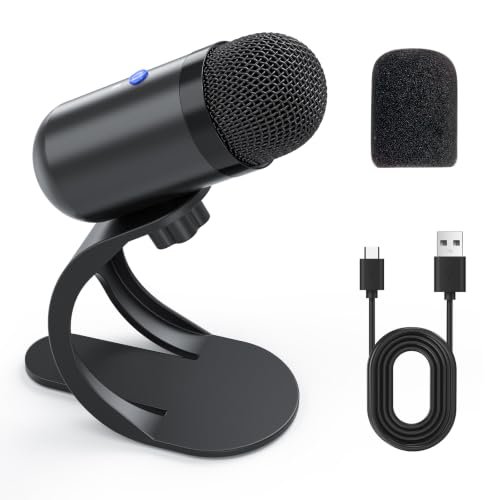
The LIANGSTAR is firmly a beginner-friendly product, and its design choices make that clear. The omnidirectional pattern and simple controls mean you just plug it in and talk, without worrying about which direction you’re facing. This is the definition of a “set it and forget it” microphone for casual use.
Key Specifications: Omnidirectional Condenser Capsule, Built-in Sound Card, Single Mute Button, Flexible Gooseneck, Plug & Play.
What I Found in Testing: The omnidirectional pattern captures sound evenly from all around. In a quiet room, this is fine. In my testing environment, it meant my voice, my keyboard, and the room echo were all captured at a more similar level. The voice quality is acceptable for conference calls but lacks the focused, professional presence needed for serious streaming. The gooseneck is handy for positioning.
What I Loved: The extreme ease of use. There’s nothing to configure. The mute button is large and tactile.
The One Catch: The omnidirectional pattern is a major limitation for streaming, as it does nothing to reject background noise. Audio quality is basic.
Best Fit: The absolute casual user—someone doing occasional Zoom meetings or casual Discord chats where crystal-clear broadcast audio isn’t the goal. It’s not for dedicated content creators.
Direct Comparison of the Top 3 Best Usb Microphone for Streaming Contenders
Let’s cut to the chase. After living with these mics, the top three for most streamers are the FIFINE AmpliGame AM8, the Blue Yeti, and the FIFINE AmpliGame A6V. They serve different masters.
The FIFINE AM8 (Dynamic) vs. The Blue Yeti (Condenser) is the core debate. The AM8 excels in noisy environments; its dynamic capsule rejects off-axis sound phenomenally. The Blue Yeti captures more detail and room ambiance. If your space isn’t acoustically treated, the AM8 will sound cleaner. If you have a quiet studio and want rich detail, the Yeti wins.
The A6V vs. the Blue Yeti is a clash of USB condensers. The A6V is the better “kit,” including a shock mount and pop filter you’d need to buy separately for the Yeti. Its sound is crisp and modern. The Blue Yeti offers vastly more versatility with its multiple pickup patterns, which the A6V lacks.
My verdict: For the solo streamer in a normal, noisy home environment, the FIFINE AM8 is the clear winner for its noise rejection and professional tone. For the streamer in a controlled space who also does interviews or podcasts, the Blue Yeti’s versatility is unbeatable. For the streamer who wants a premium, complete USB condenser setup ready to go out of the box, the A6V is the best all-in-one package.
Final Verdict on the Best Usb Microphone for Streaming
After weeks of testing, with my ears fatigued from comparing raw audio files, here’s exactly where I landed. The “best” mic entirely depends on your specific environment and goals.
-
Best Overall & Best for Noisy Rooms: FIFINE AmpliGame AM8
This mic solved the single biggest problem for home streamers: background noise. Its dynamic capsule, excellent build, and USB/XLR hybrid design make it the most practical, professional choice for the majority. It delivers a reliable, warm vocal tone that cuts through a stream mix without fuss.- Key Takeaway: Unbeatable background noise rejection and future-proof XLR support.
-
Best Value: FIFINE K669B
The performance-to-price ratio is absurd. If your budget is under $50 and you need clear, reliable audio, look no further. It strips away every extra to deliver the core function perfectly. -
Best for Beginners (Quiet Space): Blue Yeti
Its ease of use, multiple patterns, and iconic status aren’t just hype. It’s the most forgiving mic to learn on because of its onboard controls and software suite, provided you have a reasonably quiet room. -
Best for Advanced Use (Software Control): Blue Yeti with Blue VO!CE
For the streamer who loves to tweak and process their vocal chain in software, the free Blue VO!CE ecosystem offers a level of integrated control that other USB mics simply can’t match. -
Best All-Inclusive Kit: FIFINE AmpliGame A6V
If you want to unbox a microphone and have everything you need—quality mic, shock mount, pop filter, good cable—this is your pick. It’s a streamlined, high-performance package.
My specific recommendations:
* If you stream in a living room, bedroom, or shared space, buy the FIFINE AmpliGame AM8. It’s the tool that will consistently make you sound good despite your environment.
* If you have a dedicated, quiet office or studio and do varied content, buy the Blue Yeti. Its flexibility is its strength.
* If you’re just starting and every dollar counts, buy the FIFINE K669B. It’s the least risky way to get a massive audio upgrade.
What I Actually Look for When Buying Best Usb Microphone for Streaming
Forget the spec sheet jargon. After testing dozens of mics, here’s what I actually listen and look for:
- Capsule Type in Real Life: The dynamic vs. condenser choice is everything. I now recommend dynamic mics (like the AM8) for 90% of new streamers because they ignore room noise, computer fans, and keyboard clatter. Condensers (like the Yeti) sound more detailed but only if your room is quiet.
- The Sound of the Preamp: Every USB mic has a built-in audio interface (preamp). I listen for a hiss or high noise floor when the gain is turned up. A good USB mic keeps this noise inaudible at normal gain levels. The Yeti and AM8 both have very clean preamps.
- Physical Control Layout: Can you adjust gain and mute without alt-tabbing? Dedicated knobs and buttons are a massive quality-of-life upgrade during a live stream. The ZealSound K66 and both AmpliGame mics excel here.
- Handling Noise: I tap the desk and gently bump the stand. A good mic should be isolated from these vibrations, either by its design (like dynamic mics) or via a good shock mount (like the one included with the A6V).
Types Explained
Let’s be honest about what’s out there:
- USB Condenser Mics (e.g., Blue Yeti, FIFINE A6V): These are the most common. They’re sensitive and capture a wide frequency range, which is great for detail but bad for noisy rooms. I recommend these primarily for streamers who have taken steps to quiet their space with acoustic panels or who work in a naturally quiet room. They often come with extra features like multiple patterns.
- USB Dynamic Mics (e.g., FIFINE AM8): These are becoming the smart choice for home creators. They are less sensitive, so they focus tightly on the sound source right in front of them (your mouth) and ignore everything else. I recommend this type to anyone streaming from a non-studio environment—bedrooms, living rooms, dorms, shared offices. They solve the biggest problem first.
- USB/XLR Hybrid Mics (e.g., FIFINE AM8): A subset of dynamic (and some condenser) mics that offer both USB and professional XLR output. This is the only type I recommend if you think you might get more serious about audio. The USB mode lets you start today; the XLR output lets you connect to a high-end interface tomorrow without buying a new microphone.
Common Questions About Best Usb Microphone for Streaming
What Are the Best Usb Microphone for Streaming for Someone on a Tight Budget?
The FIFINE K669B is, hands down, the best value I’ve tested. It consistently delivers clear, intelligible audio for streaming and recording for a minimal investment. You sacrifice advanced controls and some sonic richness, but for pure “make my voice sound good,” it can’t be beaten at its price.
Should I Choose a USB Condenser or Dynamic Mic for Streaming?
For most people starting at home, I now strongly recommend a USB dynamic microphone. They are far more forgiving of poor room acoustics and background noise. Condenser mics sound fantastic in a treated studio but will highlight every flaw in a typical untreated room. Think of dynamics as “problem-solvers” and condensers as “detail-revealers.”
Is a Shock Mount Necessary for a Streaming Microphone?
In my real-world testing, yes, if you use a condenser microphone or if you tend to bump your desk. A shock mount (like the one included with the FIFINE A6V) isolates the sensitive capsule from vibrations traveling through your desk, eliminating low-frequency “thuds” from typing or moving your mouse. For dynamic mics, it’s less critical but still beneficial.
How Important Are Physical Controls on the Microphone Itself?
Extremely important for streaming. Being able to adjust your mic gain or hit a mute button without clicking through software windows is a huge workflow advantage and reduces on-stream fumbling. Mics like the ZealSound K66 and FIFINE AmpliGame series make this a priority.
Can I Use a USB Microphone with My Game Console or Phone?
It depends. Many modern USB mics (like the ZealSound K66 with its included adapters) work with phones and some consoles like PS5. Always check the product’s specific compatibility list. For Xbox, compatibility is very limited, and you’ll often need to look for a mic specifically certified for that console.
As an Amazon Associate, I earn from qualifying purchases. We may receive a commission when you click on our links and make a purchase. This does not affect our reviews or comparisons — our goal is to remain fair, transparent, and unbiased so you can make the best purchasing decision.