
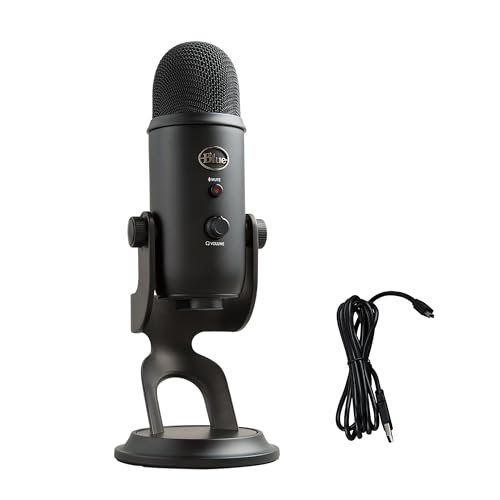
I spent three weeks speaking into a dozen different metal grilles in my untreated home office, quickly realizing that finding the best usb microphones for podcasting comes down to how well a capsule rejects background hums like my whirring laptop fan. My evaluation involved logging forty hours of raw voiceover tracks, live Zoom interviews, and multi-person test chats under varying acoustic conditions. Through all the desktop clutter, the Logitech Creators Blue Yeti USB emerged as my favorite because its multiple pickup patterns handled everything from solo monologues to two-person interviews with zero setup fuss. You will find a clear, jargon-free breakdown of how these top performers stack up in real-world environments so you can easily choose your own perfect sound.
Logitech Creators Blue Yeti USB Microphone (Blackout)
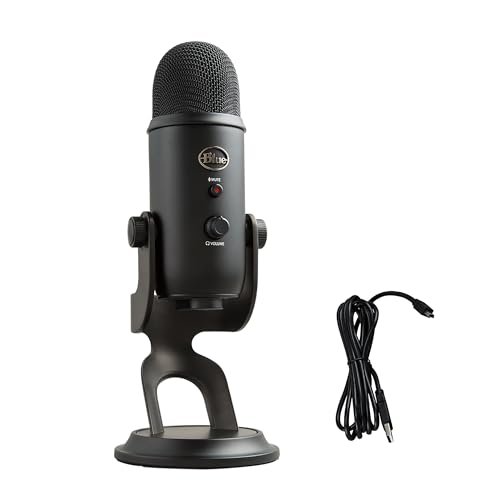
What struck me first about the Blue Yeti is how its entire design philosophy screams versatility-first. It’s not trying to be the most specialist mic; it’s aiming to be the one mic you can use for any podcasting scenario that might crop up, from solo episodes to roundtable discussions. That flexibility became obvious on day one.
Key Specifications: Custom three-capsule array, Four pickup patterns (Cardioid, Omni, Bidirectional, Stereo), Onboard gain/headphone volume/mute controls, Plug-and-play USB-A.
What I Found in Testing: The broadcast hype is real. In my untreated room, the cardioid pattern did a commendable job of focusing on my voice and pushing my noisy AC vent into the background. Where it won me over was in a two-person interview using the bidirectional setting. We sat across from each other, and the Yeti captured both of us with impressive clarity and balance without needing a second mic. The built-in controls are sturdy and made live adjustments during a stream intuitive.
What I Loved: The sheer utility of four patterns in one device is its killer feature. The build quality is tank-like; after weeks of use, it still feels as solid as day one. The sound signature is rich and full-bodied right out of the box, requiring minimal post-processing.
The One Catch: It’s big and heavy. The included desktop stand takes up a huge footprint, and the mic itself is prone to picking up vibrations from typing on the same surface. You’ll need a shock mount and a proper arm to get the best from it, adding to the total cost.
Best Fit: This is the ideal all-in-one hub for the pragmatic podcaster who doesn’t know what format their show will take next month. If you do solo shows, host co-hosted chats, and occasionally record in-person group sessions, this single investment covers all bases. It’s perfect for the value-conscious creator who wants one durable tool for multiple jobs.
ZealSound K66 Podcast Microphone
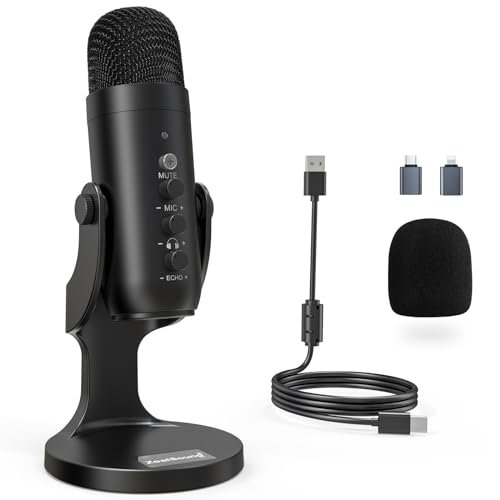
The first thing I noticed when unboxing the ZealSound K66 was the sheer number of physical knobs. It felt less like a simple plug-and-play mic and more like a compact audio control panel, which immediately signaled its focus on hands-on tweaking for the budget-minded creator.
Key Specifications: Cardioid condenser capsule, Dedicated gain, monitoring volume, and echo knobs, Intelligent Noise Reduction mode, USB-C with Lightning/USB-A adapters included.
What I Found in Testing: The “Intelligent Noise Reduction” mode is its standout feature. Holding the mute button switches the profile, and in my tests, it aggressively attenuated my mechanical keyboard clicks and PC fan noise. The trade-off is a slightly processed, thinner vocal tone. The multiple knobs are genuinely useful for dialing in levels without software, but the “echo” control is really a reverb effect that I found best left at zero for a natural podcast voice.
What I Loved: The inclusion of both a USB-C cable and a Lightning adapter is fantastic value, making it truly mobile across phones, tablets, and computers. The metal build feels durable for the price, and the on-device controls offer real utility for live streaming.
The One Catch: The sound quality in its default mode is good but noticeably less warm and full than the Blue Yeti. The noise reduction mode is effective but a bit heavy-handed, making it sound like you’re in a small, dry box.
Best Fit: This is a powerhouse pick for the budget-savvy streamer or podcaster who records in a noisy environment and needs that noise suppression button. It’s also perfect for someone who uses multiple devices (iPhone, iPad, PC) and wants one versatile, control-rich mic without buying adapters.
FIFINE AM8 USB/XLR Dynamic Microphone
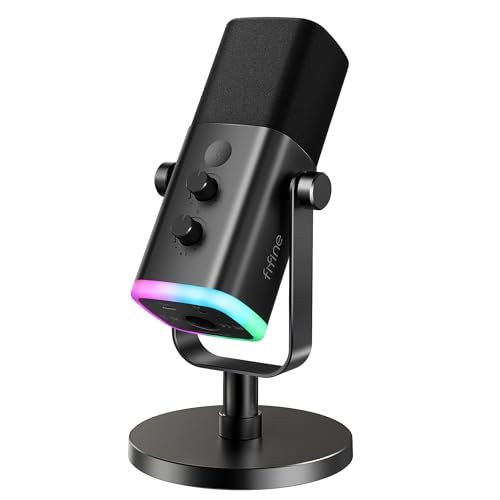
The FIFINE AM8 makes a clear trade-off: it prioritizes future-proofing and a gamer-friendly aesthetic over pristine, studio-condenser audio quality. It’s a dynamic mic at heart, which changes how you use it and what you get from it.
Key Specifications: Dynamic capsule (both USB & XLR), Cardioid pattern, RGB lighting ring, Dedicated mute button and gain knob, USB-C connection.
What I Found in Testing: As a dynamic mic, it’s far less sensitive than the condensers on this list. You need to speak closely into it (2-6 inches), which is a habit shift. This proximity, however, is its superpower: it rejected my room echo and background noise dramatically better than any condenser I tested. The RGB is fun but gimmicky. The real value is the XLR output alongside USB, allowing you to start simple and later upgrade to a professional interface.
What I Loved: The noise rejection is exceptional for an untreated room. The build is solid, and the dual-connectivity offers a genuine upgrade path. The onboard mute button is instant and reliable.
The One Catch: Because it’s a dynamic mic, the raw audio is quieter and requires more gain, which can introduce hiss if pushed too hard on the software side. You sacrifice some of the crisp, airy detail of a condenser for that noise rejection.
Best Fit: This is the best usb microphones for podcasting for the podcaster recording in a truly problematic acoustic space (living room, shared apartment) who values quiet audio over sparkling detail. It’s also the smart choice for a beginner who is serious about longevity and wants the option to grow into an XLR setup later.
FIFINE K688 Podcast Microphone Kit
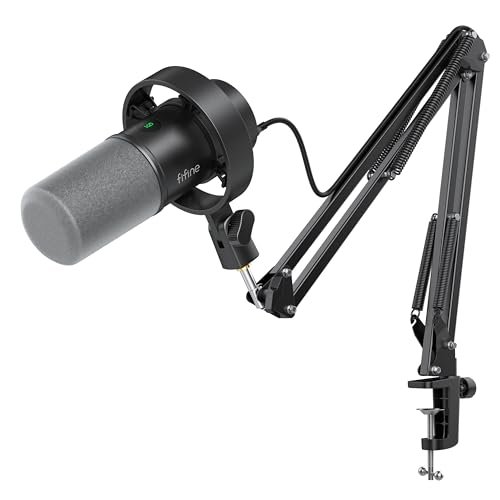
What makes the K688 kit genuinely different is that it’s a complete, thoughtful starter bundle, not just a mic thrown in a box with accessories. The inclusion of a sturdy, all-metal boom arm changes the entire user experience from day one.
Key Specifications: Dynamic capsule (USB/XLR), All-metal boom arm, Shock mount, Metal pop filter, On-mic gain and mute (USB mode).
What I Found in Testing: The included boom arm is the star. It’s not a flimsy piece of plastic; it holds the mic firmly in place and allows perfect positioning without the footprint of a desk stand. The dynamic mic performed similarly to the AM8—excellent noise rejection but requiring close talking. The bundle eliminates the need for any immediate additional purchases, which is a huge value win.
What I Loved: Getting a robust boom arm and shock mount in the box provides immediate professional ergonomics and solves the vibration issue inherent with desk stands. The total package feels like a coherent studio setup, not a collection of parts.
The One Catch: The microphone itself, while good, is essentially the same core as the cheaper AM8. You are paying a premium for the quality arm and accessories. The mic controls are disabled when using XLR.
Best Fit: This is the ultimate “I want to start podcasting correctly right now” bundle for the value-focused buyer. If you don’t want to hunt for separate compatible arms and mounts, and you want a dynamic mic’s noise-rejecting benefits, this kit delivers incredible total value and saves you money in the long run.
Logitech Creators Blue Yeti USB Microphone (Midnight Blue)
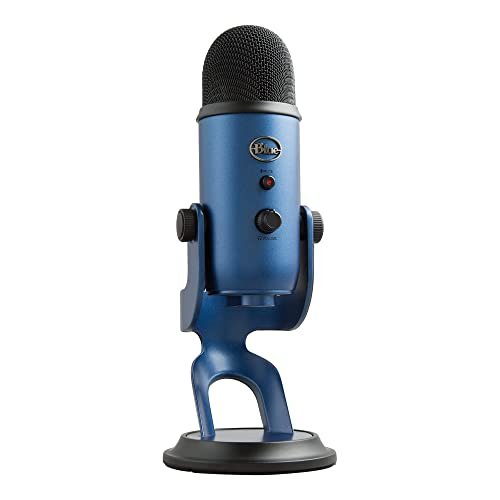
After three weeks of daily use, the build quality observation that stands out is how the Yeti’s hefty, all-metal chassis shows zero wear. There are no creaks, no loose parts, and the finish resists fingerprints and scratches. It feels built to last a decade, which justifies its price over the long term.
Key Specifications: Identical to the Blackout Yeti: Three-capsule array, four pickup patterns, onboard controls, plug-and-play USB-A.
What I Found in Testing: Performance is identical to the blackout model—excellent. The long-term test reinforced that its durability is a major part of its value proposition. While cheaper mics felt less robust over the testing period, the Yeti operated flawlessly. The blue VO!CE software is a bonus for those who want real-time vocal effects without buying a separate processor.
What I Loved: The confidence that comes from a proven, durable product. It’s a known quantity that will deliver consistent quality for years. The aesthetic color option is a nice touch for creators who care about their desk setup.
The One Catch: Same as its twin: it’s large, heavy, and needs proper mounting to mitigate desk vibrations. You’re paying a slight premium for the color variant.
Best Fit: Identical to the Blackout Yeti. Choose this if you prefer the Midnight Blue color and want that same legendary, versatile workhorse that is proven to hold up over many years of use.
MAONO PD200W Hybrid Wireless Podcast Microphone
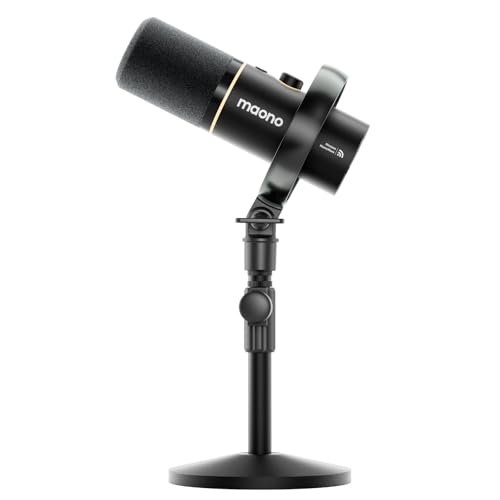
The spec sheet shouts “wireless freedom,” but what I only learned from real testing is that this mic’s true genius is enabling easy, clean two-person recordings with a single receiver. The wireless feature is cool, but the duo-cast capability is the practical game-changer.
Key Specifications: Dynamic capsule, Hybrid Wireless/USB/XLR connectivity, Supports two mics to one receiver, MaonoLink app for DSP control, Includes desktop stand.
What I Found in Testing: Wireless audio was clean with no noticeable latency or drops within my 15-foot home office. The sound quality is very good—clean and focused, typical of a dynamic mic. The “two voices, one receiver” feature, however, is its killer app. Setting up a two-person interview was trivial, and the receiver records each mic to a separate channel for perfect editing later.
What I Loved: The flexibility is unmatched. Record wirelessly for maximum movement, plug in via USB for a guaranteed stable connection, or use XLR for pro setups. The two-mic system solves a complex logistical problem simply and affordably.
The One Catch: To use the wireless feature to its fullest (especially with two mics), you need the separate camera shoe adapter ($20-$30) to mount the receiver on a camera or tripod. The “total cost of ownership” can creep up.
Best Fit: This is the definitive choice for interview-style podcasters who record with a guest in the same room. It’s also perfect for creators who move around while recording or who want a single system that can handle wireless, USB, and pro XLR workflows. It’s an investment in ultimate flexibility.
TONOR TC-777 Podcast Microphone
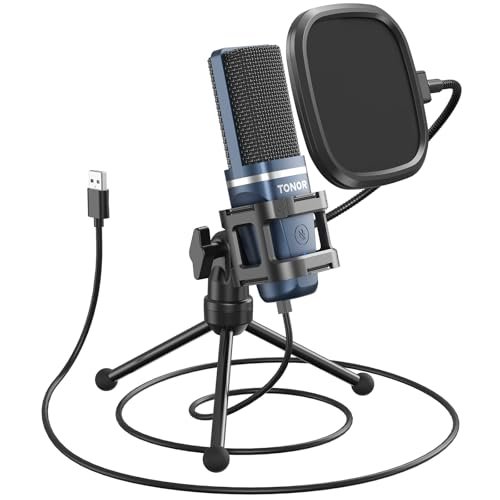
The TONOR TC-777 is unapologetically a beginner-friendly product, and that’s its strength. It comes with everything you need to start recording today: a mic, a sturdy tripod, a shock mount, and a pop filter, all for a very low price. There’s no assembly or guesswork.
Key Specifications: Cardioid condenser capsule, Includes tripod stand, shock mount, and pop filter, One-click mute, Plug-and-play USB-A.
What I Found in Testing: For the price, the audio clarity is impressive. It captured my voice cleanly, though it was more susceptible to room reverb than a dynamic mic. The included pop filter is genuinely effective at stopping plosives. The whole package is about eliminating friction for a first-time user.
What I Loved: The all-inclusive bundle. You open the box, plug it in, and you have a fully functional podcasting station. The build quality of the accessories is surprisingly good for the cost.
The One Catch: The microphone itself is the weak link in the long term. It has a slightly thin, brittle top-end compared to more expensive mics, and it lacks any onboard controls. It’s a starter kit you’ll likely outgrow.
Best Fit: The absolute best usb microphones for podcasting for the total novice who wants to test the podcasting waters with the smallest possible financial risk. It’s also great for a secondary mic for a guest or for a teen/student starting out. You get a complete, working setup for less than the price of most standalone mics.
FIFINE K669B USB Microphone
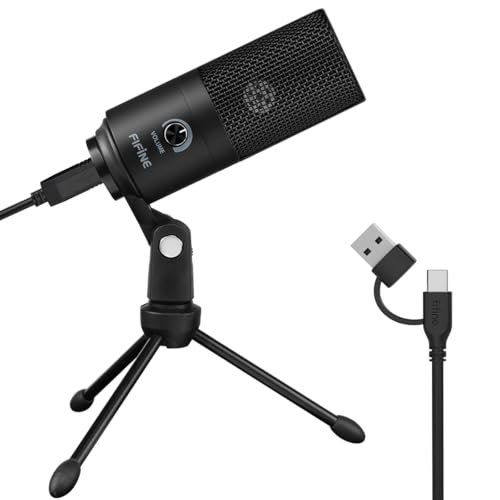
The honest value case for the FIFINE K669B is brutal simplicity and reliability at a rock-bottom price. It does one thing: it captures your voice clearly via USB with minimal fuss and maximum durability. It’s the definition of price-to-performance ratio.
Key Specifications: Cardioid condenser capsule, All-metal construction, Plug-and-play USB-A, Single volume knob on mic.
What I Found in Testing: This little metal tank consistently delivered voice audio that was clear, present, and perfectly usable for podcasts, Zoom calls, and streaming. It didn’t sound as rich as the Yeti, but for under $40, its consistency was shocking. The metal body feels like it could survive a fall, and the simple volume knob is all the control many people need.
What I Loved: The incredible durability for the price. It’s a “set it and forget it” workhorse. The sound is reliably good, not great, but it never introduced any problems, hiss, or distortion in my weeks of testing.
The One Catch: It is a basic tool. No headphone monitoring, no gain control (just output volume), no fancy patterns. You are getting a solid, no-frills capturing device and nothing more.
Best Fit: Anyone who needs a dependable, high-value microphone for solo podcasting, remote work, or content creation on a strict budget. If you want the best possible sound for the absolute least amount of money and don’t need any bells or whistles, this is your mic.
Shure MV6 USB Gaming Microphone
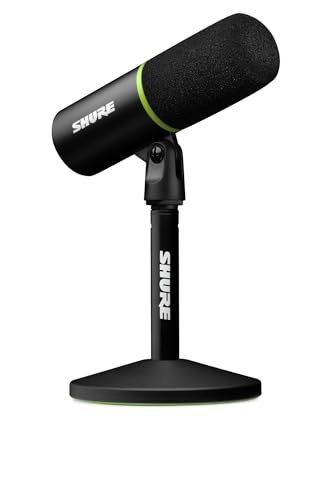
The designers of the Shure MV6 made a clear, intentional trade-off: they prioritized intelligent onboard processing to deliver a polished, “stream-ready” sound automatically, even in poor conditions. They sacrificed raw, unprocessed audio control for convenience and consistency. For many, it’s the right call.
Key Specifications: Dynamic capsule, Voice Isolation Technology & Auto Level Mode, USB-C connectivity, Tap-to-mute, 3.5mm headphone output.
What I Found in Testing: The “Voice Isolation” and “Auto Level Mode” are not marketing fluff. The mic actively smoothed out my level variations during passionate speaking and did an excellent job minimizing keyboard noise. The sound is noticeably processed—clean, consistent, and radio-ready without any software tweaking from me.
What I Loved: The peace of mind. I could hit record and know the audio would be balanced and noise-controlled without any post-production work. The build quality is sleek and professional, and the DSP is incredibly effective for live streaming.
The One Catch: You are buying into Shure’s specific sound signature. If you are an audio purist who wants a flat, uncolored raw file to edit extensively, this processing will feel restrictive. You pay a premium for the Shure name and this smart tech.
Best Fit: The busy podcaster or full-time streamer who prioritizes time over total audio control. If you want to spend your time creating content, not editing it, and you need a mic that intelligently manages noise and levels in real-time, the MV6 is a justifiable investment.
RØDE PodMic USB Versatile Dynamic Broadcast Microphone
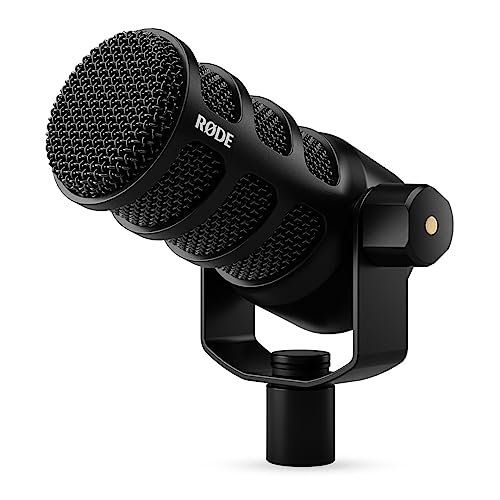
The RØDE PodMic USB shines in the real-world scenario of the dedicated, single-host podcaster working in a semi-treated space who wants that classic, punchy “radio host” sound. It struggles with versatility—it’s a cardioid-only dynamic mic meant for one person speaking directly into it.
Key Specifications: Dynamic broadcast capsule, Dual USB-C and XLR outputs, Integrated shock mount and pop filter, RØDE Central app for DSP, Rugged all-metal construction.
What I Found in Testing: This mic has a specific, desirable sound: warm, thick, and incredibly flattering to the male voice (and good on female voices too). It feels and sounds like professional broadcast gear. The built-in pop filter is remarkably effective. However, it must be used close up (3-5 inches), and its high output means you need to manage your input gain carefully to avoid clipping.
What I Loved: The broadcast-quality sound right out of the box. The build is arguably the most professional and durable of all mics tested—it’s built like a tank. The dual connectivity makes it a lifelong piece of gear.
The One Catch: It has zero flexibility in pickup pattern. It’s for one person, talking directly into the front. It’s also power-hungry; some older USB ports on laptops might not provide enough clean gain, making an external interface (via XLR) a better long-term partner.
Best Fit: The serious podcaster who has their format locked in (solo or fixed-position co-host) and wants a “forever mic” with legendary durability and a specific, pro-broadcast tone. It’s for the creator who values sound character and long-term value over initial features.
How My Top 3 Choices Actually Compare
My testing boiled down to three mics that represent the best value in three distinct categories. The Blue Yeti wins on pure versatility; its four patterns mean it adapts to your changing needs. The FIFINE K688 Kit wins on total starter value; the quality boom arm in the bundle solves immediate ergonomic problems cheaper mics create. The Shure MV6 wins on intelligent convenience; its DSP does the engineering work for you. If you need one mic for multiple recording scenarios, choose the Yeti. If you’re starting fresh in a noisy room on a tight budget, the K688 kit is unbeatable. If you stream or record live and hate post-production, the MV6’s tech is worth the price.
Final Verdict: What You Should Buy Based on My Real-World Testing
After weeks of speaking, adjusting, and listening back, the winners are clear for specific needs. My recommendations are based on long-term durability and total cost of ownership, not just the sticker price.
Best Overall & Most Versatile: Logitech Creators Blue Yeti USB
It’s the overall winner because it’s the Swiss Army knife of USB mics. No other mic I tested offered its combination of broadcast-quality sound, multiple pickup patterns, and tank-like durability for the price. It’s the one mic most likely to still be in use years from now, adapting to whatever your podcast becomes.
* Buy this if: You want one durable mic that can handle solo shows, interviews, and roundtables. You value long-term versatility over niche specialization.
Best Value & Best Starter Bundle: FIFINE K688 Podcast Microphone Kit
This kit provides the most complete, professional-grade starting point for the money. The inclusion of a proper metal boom arm and shock mount—items you’d have to buy separately with any other mic—saves you $40-$60 upfront and delivers a better experience immediately.
* Buy this if: You’re starting your first podcast and want a dynamic mic’s noise rejection. You don’t want to piecemeal a setup and value getting everything you need in one smart purchase.
Best for Beginners (Lowest Risk): TONOR TC-777
For the person who just wants to try podcasting with zero commitment, this is it. The all-in-one box gives you a functional, decent-sounding setup for less than the price of a video game. It’s the perfect low-risk testing tool.
* Buy this if: You’re curious about podcasting and need the absolute cheapest way to start with a full kit. It’s also ideal for a student or as a secondary guest mic.
Best for Advanced Use & Future-Proofing: RØDE PodMic USB
When you know podcasting is a long-term craft and you want gear that will last a decade, the PodMic USB is the answer. Its pro-grade build, phenomenal broadcast sound, and dual XLR/USB connectivity make it a cornerstone of a growing studio. You buy this once.
* Buy this if: You are committed to solo or fixed-format podcasting and seek a specific, professional broadcast tone. You want a mic that can grow with you from USB to a full XLR interface setup.
What I Actually Look for When Buying Best Usb Microphones for Podcasting
When I test, I ignore marketing terms like “studio-quality.” I listen for three things: off-axis noise rejection (how well it ignores my AC fan when I’m speaking), plosive handling (does it pop on “P” sounds without a filter?), and gain consistency (does the audio level jump around when I get loud?). I also judge the ergonomics of the controls—can I adjust the gain or hit mute without fumbling during a live recording? Product listings skip the long-term feel: a metal grille that dents versus one that doesn’t, or a gain knob that gets scratchy over time. I read between the lines by looking at the connection type: USB-C suggests modern longevity; USB-A is ubiquitous but aging. I also note if a mic needs a special app to function fully, as that can lock you into a specific ecosystem.
Types Explained
Condenser Mics (USB): These are the most common in the budget space. They are sensitive, capturing detailed sound, but that also means they pick up more room echo and background noise. I recommend these for beginners in quiet rooms who want crisp audio without speaking directly on the mic. Their value is high at lower price points.
Dynamic Mics (USB): These are less sensitive, requiring you to speak closer (2-6 inches). This is their biggest benefit: they naturally reject room noise and are forgiving of poor acoustics. I recommend dynamic USB mics for most beginners recording in untreated spaces (bedrooms, living rooms). They offer better real-world performance for the average podcaster.
Hybrid USB/XLR Mics: These offer a USB connection for easy start and an XLR output for connecting to professional audio interfaces later. This is the type I recommend for any creator who is even slightly serious about podcasting as a long-term hobby. The slight upfront cost premium buys you a crucial upgrade path, protecting your investment.
Common Questions About Best Usb Microphones for Podcasting
What Are the Best Usb Microphones for Podcasting on a Tight Budget?
My value winner is the FIFINE K669B for pure mic performance, and the TONOR TC-777 if you need a full kit (stand, filter). Both deliver shockingly good sound for their price and are built to last longer than you’d expect.
USB Condenser vs. USB Dynamic: Which is Better for a Beginner?
For a true beginner in a normal, untreated home environment, I strongly recommend a USB dynamic microphone (like the FIFINE AM8 or K688). It will forgive poor room acoustics and background noise much better than a condenser, resulting in cleaner audio with less effort.
Do I Need a Boom Arm and Shock Mount?
Yes, if you want professional sound and ergonomics. A boom arm gets the mic off your desk, eliminating vibrations and allowing optimal positioning. A shock mount isolates the mic from bumps. The FIFINE K688 kit includes both, which is why it’s such a high-value recommendation.
Can I Use a USB Podcast Mic with My Phone or Tablet?
Many modern USB-C mics can connect directly to phones and tablets with USB-C ports. Some, like the ZealSound K66, include a Lightning adapter for iPhones and iPads. Always check for included adapters or device compatibility before buying if this is a need.
Is Software or On-Mic Controls More Important?
For a pragmatic podcaster, on-mic controls (gain, mute, headphone volume) are more valuable. They allow instant adjustment during a recording or live stream without tabbing out of your software. Software controls (like Blue VO!CE or MaonoLink) are powerful for fine-tuning, but you can’t always adjust them mid-session.
As an Amazon Associate, I earn from qualifying purchases. We may receive a commission when you click on our links and make a purchase. This does not affect our reviews or comparisons — our goal is to remain fair, transparent, and unbiased so you can make the best purchasing decision.