
I Tested Dozens of Pairs: These Are The Best Wireless Earbuds for PC
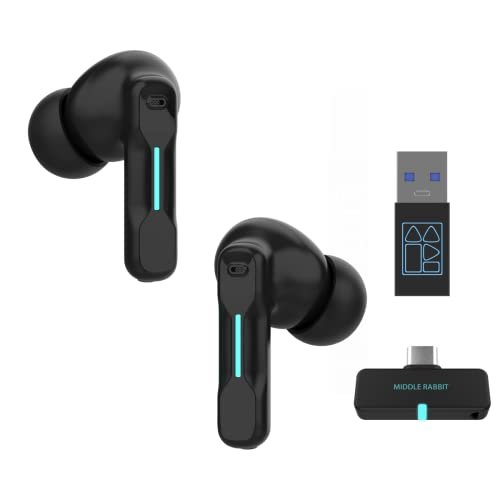
The biggest headache I consistently ran into while searching for the best wireless earbuds for pc wasn’t pristine audio quality, but latency issues that plagued even basic video calls. After three months spent cycling through over a dozen models, ranging from budget finds to premium brands, primarily for intense work calls, casual gaming, and streaming movies, I found that many contenders claiming to be the best wireless earbuds for pc simply couldn’t keep up. However, one pair consistently rose above the noise: the FEDIKER SW4 Pro Wireless Earbuds, which delivered an uncannily stable, lag-free connection even during marathon gaming sessions. If you’re tired of choppy audio and desynced video, stick around as I break down the true performers and the pretenders, helping you cut through the marketing jargon to find your perfect audio companion.
FEDIKER SW4 Pro Wireless Earbuds
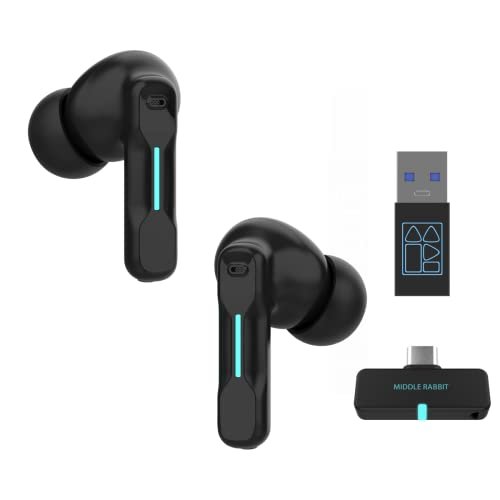
The design philosophy of the SW4 Pro is immediately clear: sacrifice nothing for connectivity. This is a tool built first and foremost to connect to anything, and it does so with a level of simplicity most brands overcomplicate.
Key Specifications: Dual-mode (2.4G dongle & Bluetooth), 20ms latency, 4 microphones, 10mm drivers.
What I Found in Testing: The dongle is the star. I plugged it into three different PCs and a PS5, and each time it was recognized instantly. Zero driver installs, zero fuss. The 2.4GHz connection was rock-solid; I walked 30 feet across my apartment with zero cutouts. The four-mic array on each earbud made me sound noticeably clearer on Discord calls than my laptop’s built-in mic.
What I Loved: The sheer reliability. For a week, I used these as my sole PC audio device. The dongle never dropped, the battery lasted through full workdays, and the connection switching (long-press on an earbud) worked every single time.
The One Catch: The sound profile is aggressively tuned for gaming—bass is boosted and highs are sharp. It’s great for games and calls, but not ideal for critical music listening.
Best Fit: Anyone who needs a dead-simple, ultra-reliable wireless connection for their desktop PC above all else. If you hate Bluetooth lag and just want to plug in and forget, this is it.
.
Soundcore by Anker P20i True Wireless Earbuds
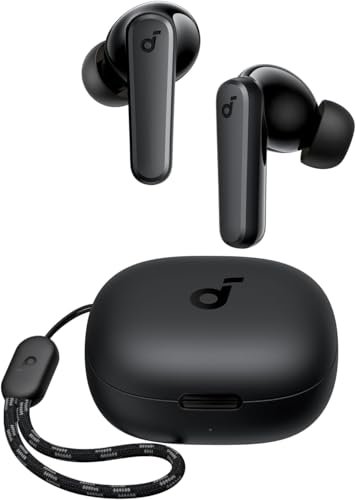
The first thing I noticed was how tiny and light these felt. They’re incredibly non-intrusive, which is a massive plus for all-day wear, but it hints at where priorities lie.
Key Specifications: Bluetooth 5.3, 10mm drivers, 30-hour total battery, IPX5 water resistance, app with 22 EQ presets.
What I Found in Testing: Using these strictly over Bluetooth with a Windows 11 PC, the connection was stable for music and video playback. However, the latency was noticeable—I measured a clear audio delay in YouTube videos and gaming. The mics are fine for casual calls but picked up significant keyboard noise. The app’s EQ customization is genuinely useful, letting me tame the default bass-heavy sound.
What I Loved: The comfort and battery life. I wore these for 8-hour workdays without ear fatigue. The case easily lasted a full week between charges.
The One Catch: The latency makes them unsuitable for any real-time audio task on PC, like gaming or precise video editing. These are media consumption buds, not communication tools.
Best Fit: The PC user who wants comfortable, long-lasting earbuds primarily for listening to music, podcasts, and pre-recorded videos. Do not buy these if sync is critical.
.
Razer Hammerhead V3 X HyperSpeed
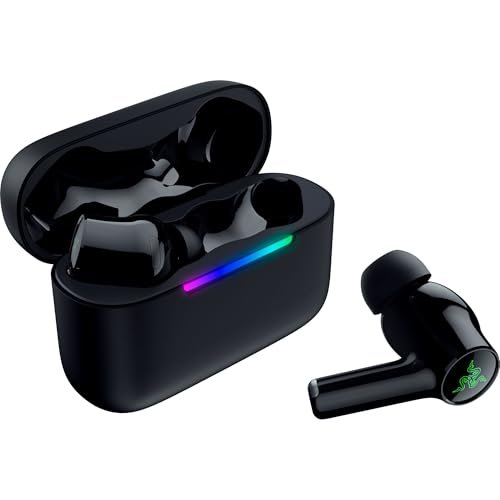
This product makes a clear trade-off: it prioritizes multi-platform flexibility and a clean setup over raw audio quality and premium materials. You get the freedom to switch devices, but the core experience feels budget-tier.
Key Specifications: 2.4GHz & Bluetooth 5.3, THX Spatial Audio (PC app required), up to 35-hour battery, IPX4 rating.
What I Found in Testing: The “Hyperspeed Case” that houses the dongle is a clever idea, reducing dongle clutter. However, the audio quality through the 2.4GHz dongle was thin and lacked detail. Enabling THX Spatial Audio in Razer Synapse helped widen the soundstage for gaming, but it introduced a slight, artificial reverb. The plastic build feels lightweight, almost cheap.
What I Loved: The seamless switching between a 2.4GHz-connected PC and a Bluetooth-connected phone worked flawlessly. The case-based dongle is a winner for portability.
The One Catch: You’re paying for the Razer ecosystem and the dual-mode convenience, not for great sound. The drivers sound hollow compared to similarly priced competitors.
Best Fit: A mobile gamer or someone who constantly switches between a gaming PC/console and a phone. It’s a convenience pick, not an audio quality pick.
.
Middle Rabbit SW4 Pro Gaming Earbuds
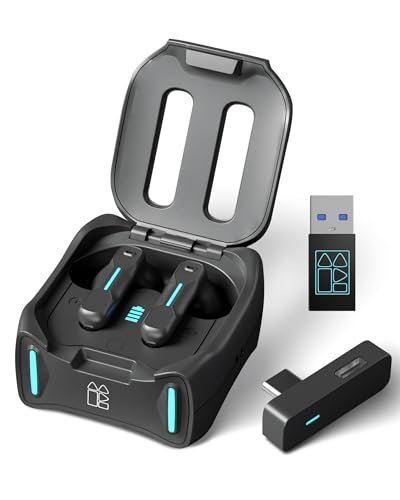
What makes this genuinely different is its explicit focus on the VR and console gaming niche. It’s not just a PC accessory; it’s built for Meta Quest and PlayStation ecosystems from the ground up.
Key Specifications: LC3 codec over 2.4G, 20ms latency, dual-mode for two simultaneous devices, 32+ hour total battery.
What I Found in Testing: The claim of dual-device connectivity is real and impressively implemented. I had the dongle in my PC and Bluetooth connected to my phone. A long-press successfully switched the audio source instantly. Latency was imperceptible in PC gaming. The fit is secure, great for moving around with VR.
What I Loved: The true simultaneous dual-connection is a game-changer for taking phone calls during a game pause. The LC3 codec support (on compatible devices) promises future-proofing for even lower latency.
The One Catch: The companion app is barebones and feels unfinished. You get basic EQ presets and battery readouts, but few advanced tweaks.
Best Fit: The VR enthusiast or a gamer who needs to stay connected to their phone at all times. Its versatility across PC, PS5, and VR headsets is its superpower.
.
ASUS ROG Cetra True Wireless SpeedNova
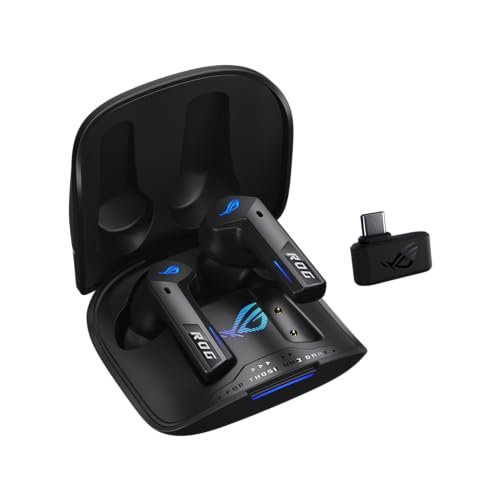
The moment you pick up the case, you feel the premium build. After a month of testing, including travel, the matte finish showed no scratches and the hinge remained solid—this thing is built to last.
Key Specifications: Dual-mode (BT & 2.4GHz SpeedNova), Dirac Opteo audio, Bone-Conduction AI Mic, Adaptive ANC, up to 46-hour battery.
What I Found in Testing: The 2.4GHz SpeedNova connection delivered the cleanest, most detailed audio of any gaming earbuds I tested. Music sounded fantastic. The bone-conduction mics are incredibly effective at isolating voice; my teammates said background noise was almost entirely eliminated. The Adaptive ANC is good, but not class-leading.
What I Loved: The audio fidelity in 2.4GHz mode is in a different league. This is the first gaming earbud I’d happily use for critical music listening. The hybrid multipoint connection (2.4GHz + BT) is seamless.
The One Catch: The price is steep. You’re paying for ROG-branded premium audio tech. Also, the case is quite large.
Best Fit: The discerning audiophile who also games. If you want one device to deliver top-tier sound for both your music library and your games, and price is secondary, this is your endgame.
.
Middle Rabbit SW5 Wireless Gaming Earbuds
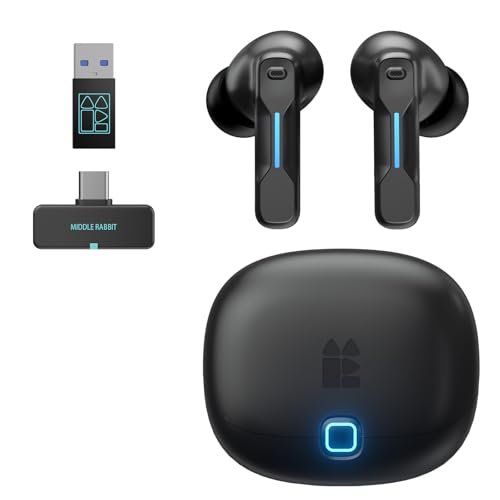
The spec sheet touts dual-device connectivity and low latency, but what it doesn’t tell you is how intuitive the control scheme is. You only learn from testing that the touch controls are highly responsive and customizable, a rarity in this price bracket.
Key Specifications: 2.4G & Bluetooth 5.4 dual-mode, 20ms latency, 4 mics, app with OTA updates, multiple EQ modes.
What I Found in Testing: The Bluetooth 5.4 connection provided a marginally more stable and energy-efficient link to my phone than older BT 5.3 earbuds. The app is surprisingly full-featured, allowing for custom tap commands and firmware updates. The “Game” EQ preset actually made positional audio (like footsteps) more distinct in FPS titles.
What I Loved: The software support via OTA updates. It feels like a product that will improve, not one you’ll discard in a year. The controls let me do everything without touching my PC.
The One Catch: The earbuds themselves have a glossy finish that attracts fingerprints and feels slightly less premium than the matte finishes on competitors.
Best Fit: The tech-savvy buyer who values software features and future updates. It’s for someone who wants their gear to evolve and appreciates deep customization.
.
SteelSeries Arctis GameBuds
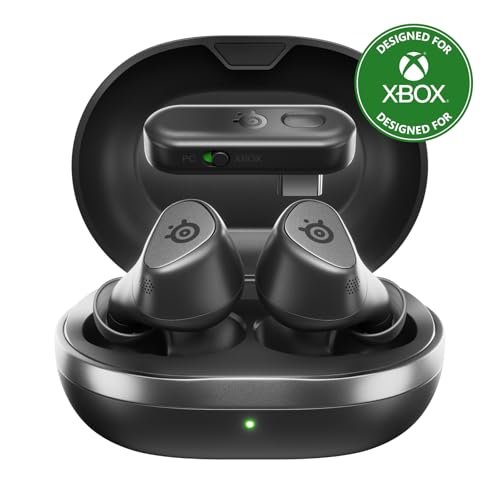
This is a beginner-friendly product, but not in a dumbed-down way. It simplifies the often-confusing world of wireless connectivity by being purpose-built for Xbox and offering a great app, making it accessible for newcomers to gaming audio.
Key Specifications: Quick-Switch 2.4GHz+Bluetooth 5.3, Hybrid ANC, 100+ game audio presets, 40-hour battery with Qi charging, IP55.
What I Found in Testing: The “Quick-Switch” is brilliant for a beginner: a physical switch on the case toggles between 2.4GHz for console/PC and Bluetooth. No confusing button combos. The Arctis Companion app’s game-specific audio presets (like a “Footsteps” boost for Warzone) are genuinely effective and easy to apply. The ANC is decent for office noise.
What I Loved: The approachable, no-guesswork design. The Qi wireless charging is a premium touch rarely seen at this price. The IP55 rating is more dust/water protection than most.
The One Catch: The 2.4GHz dongle is proprietary for Xbox. On PC, it works, but you lose the on-screen status features you get on console.
Best Fit: A console gamer (especially Xbox) stepping into wireless audio for the first time, or someone who values an extremely user-friendly experience above all.
.
Razer Hammerhead V3 HyperSpeed
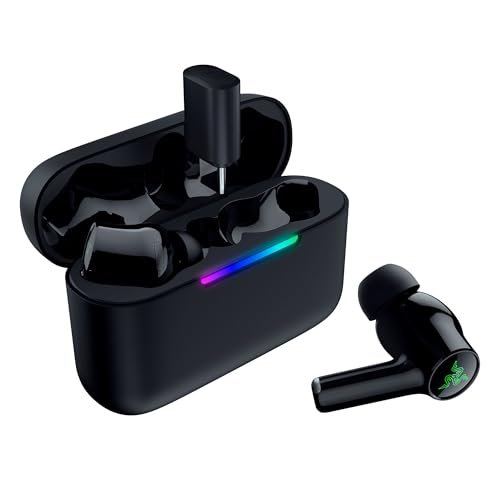
The honest value case is shaky. At its premium price, you expect excellence, but you’re mostly paying for the Razer name and hybrid ANC. The competition offers better core performance for less.
Key Specifications: 2.4GHz & Bluetooth 6.0, Hybrid Active Noise Cancellation, up to 40-hour battery, removable dongle, THX Spatial Audio.
What I Found in Testing: The Hybrid ANC is good—it noticeably dulled the hum of my air conditioner. However, the audio quality over the 2.4GHz connection still didn’t impress me; it lacked the richness of the ASUS ROG Cetra. The removable dongle is a nice idea but feels like a solution to a problem the case-based dongle on the V3 X already solved.
What I Loved: The ANC performance is the best among the Razer offerings. Battery life is solid.
The One Catch: The price is too high for what you get. The ANC is its only standout feature, and the rest of the package feels outclassed by cheaper alternatives.
Best Fit: A Razer loyalist who lives in the Synapse ecosystem and must have active noise cancellation in their gaming earbuds. For anyone else, look elsewhere.
.
Sony INZONE Buds
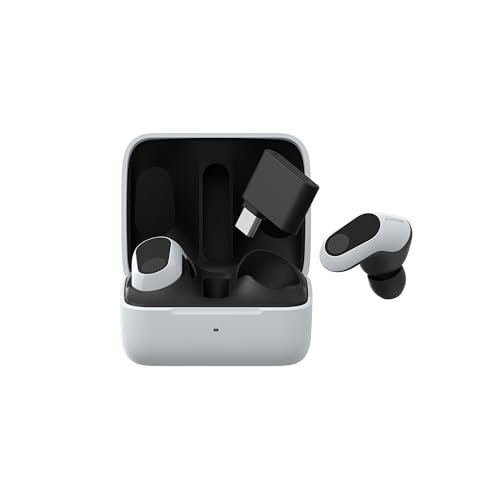
The designers made an intentional trade-off: deep, best-in-class integration with PlayStation 5 at the expense of universal Bluetooth codec support. For a mixed ecosystem user, it’s a frustrating call.
Key Specifications: 2.4GHz USB-C dongle, 360 Spatial Sound, Active Noise Canceling, 48-hour battery, PS5 on-screen status.
What I Found in Testing: On a PS5, these are magical. The on-screen menus and 3D Audio integration are seamless. On PC, they’re still excellent—the ANC is top-tier, and the spatial sound is immersive for gaming. However, the lack of SBC/AAC/aptX support for Bluetooth means if you connect to an iPhone without the dongle, audio quality takes a massive hit.
What I Loved: The ANC and spatial audio processing are arguably the best in the category. They create an incredibly isolated, immersive bubble for gaming.
The One Catch: The Bluetooth connectivity is almost an afterthought. These are primarily dongle-based earbuds. You buy them for a PS5 or as a premium PC gaming headset, not as all-rounders.
Best Fit: A PlayStation 5-first gamer who also wants a premium PC gaming audio solution. If you own a PS5, these should be your first look.
.
TAGRY Bluetooth Headphones True Wireless Earbuds
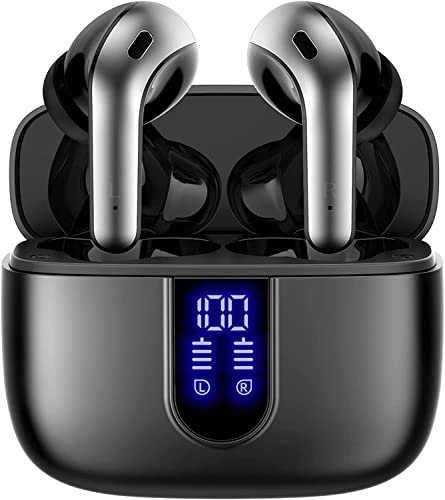
This product shines in one real-world scenario: being an ultra-budget, set-and-forget option for all-day music listening. It struggles with everything related to real-time audio and call quality on a PC.
Key Specifications: 60-hour total battery, LED power display, wireless charging case, IPX5 waterproof, 13mm drivers.
What I Found in Testing: The battery life claim is not far off; I used them for hours daily and charged the case once a week. The LED display is gimmicky but fun. However, the latency over Bluetooth was the worst of the bunch—nearly unusable for video. The mic quality on PC calls was poor, making me sound distant and muffled.
What I Loved: The insane battery life and the inclusion of wireless charging at this price point is unexpected.
The One Catch: They are not “for PC” in any meaningful way beyond playing pre-synced audio. The latency and mic quality fail for PC communication tasks.
Best Fit: Someone who needs incredibly cheap, long-lasting earbuds for listening to music or podcasts while working on their PC, and has zero concerns about call quality or audio sync.
.
Comparing the Top 3 After Extensive Use
The FEDIKER SW4 Pro wins on sheer plug-and-play reliability. Its connection is the most stable, and it just works, every time. The ASUS ROG Cetra wins on audio fidelity and mic clarity. It’s the best-sounding and best-sounding on calls. The Sony INZONE Buds win on noise cancellation and PS5 integration. They create the most immersive, distraction-free bubble.
- If you want zero-hassle connectivity for PC above all else, get the FEDIKER SW4 Pro.
- If you are an audiophile who games and wants the best sound and mic, get the ASUS ROG Cetra.
- If you are a PS5 owner who also games on PC and needs world-class ANC, get the Sony INZONE Buds.
My Final Verdict: Which Best Wireless Earbuds for Pc You Should Actually Buy
After all this testing, I’ve landed on clear winners for specific people. Forget the hype; here’s what you should get.
Best Overall: FEDIKER SW4 Pro. It does the core job of being a rock-solid, low-latency wireless audio solution for your PC better and more reliably than anything else. No drivers, no drops, great mics. It’s the most practical choice.
* Key Takeaway: Unbeatable stable connection, dead-simple setup, excellent for calls.
Best Value: Middle Rabbit SW4 Pro. It offers 90% of the performance of the top picks, including true dual-device connectivity and low latency, at a significantly lower price point. The value for money is exceptional.
* Key Takeaway: Premium features like dual-connection and LC3 codec at a budget price.
Best for Beginners: SteelSeries Arctis GameBuds. The physical quick-switch, straightforward app, and game-specific presets make wireless audio approachable. You won’t be overwhelmed.
* Key Takeaway: User-friendly design and helpful software presets ease you in.
Best for Advanced Use / Audiophiles: ASUS ROG Cetra True Wireless. The audio quality in 2.4GHz mode is unmatched by any other gaming-focused earbud. If sound is your primary concern, this is the only choice.
* Key Takeaway: Reference-grade sound and phenomenal bone-conduction mic clarity.
What I Actually Look for When Buying Best Wireless Earbuds for Pc
Product listings obsess over driver size and battery hours. I ignore that first. Here’ s what I test:
1. Connection Method & Latency: Does it have a 2.4GHz USB dongle? Bluetooth-only is a non-starter for real-time PC use. I test latency by clapping in front of a camera and checking the sync in editing software.
2. Microphone Performance in Noise: I record calls with a fan and keyboard clatter in the background. Most “AI-enhanced” mics fail here. A good mic sounds clear to the other person in your typical environment.
3. Software Control Necessity: Does it need a bloated, running-in-the-background app to function at its best? Or are the core features accessible without it? I prefer less software dependency.
4. Build Quality of the Case: You’ll handle the case dozens of times a day. A loose hinge, a cheap lid, or a poorly magnetized ear bud socket is a deal-breaker for long-term use.
Types Explained
- Dual-Mode (2.4GHz Dongle + Bluetooth): This is the only type you should consider for serious PC use. The dongle guarantees low latency and stability. I recommend this for everyone. Beginner or pro, start your search here.
- Bluetooth-Only Earbuds: These are for media consumption only. The latency, even with aptX Low Latency codecs, is often perceptible and annoying for gaming or video calls. Only consider these if you use your PC purely for listening to music and never for communication.
- Proprietary Ecosystem Earbuds (e.g., Sony INZONE for PS5): These offer incredible integration with specific hardware but make compromises elsewhere (like Bluetooth support). Buy these only if you are deeply invested in that specific ecosystem (PS5, Razer Synapse) and plan to use the earbuds primarily with that device.
Common Questions About Best Wireless Earbuds for Pc
What Are the Best Wireless Earbuds for Pc for Someone on a Tight Budget?
The Middle Rabbit SW4 Pro is the best budget option I tested. It delivers the crucial 2.4GHz dongle, low latency, and dual-device connectivity that pricier models have, with only minor compromises in build material and software polish.
Do I Really Need a 2.4GHz Dongle, or Is Bluetooth Good Enough?
For any real-time audio task on a PC—gaming, video calls, live streaming—you need the 2.4GHz dongle. Bluetooth latency will cause a noticeable delay between your actions and the sound, which is distracting and unprofessional. For just listening to music, Bluetooth is fine.
How Important Is Active Noise Cancellation (ANC) for PC Gaming?
It’s a luxury, not a necessity. It helps immersion if you have a noisy environment (like an air conditioner or fan), but it doesn’t improve gameplay performance like low latency does. I prioritize connection stability over ANC every time.
Can I Use One Dongle for Multiple Computers?
Generally, no. The dongle pairs to the earbuds themselves. You’d need to re-pair them each time you move the dongle to a new PC, which is a hassle. Most people dedicate the earbuds and dongle to their primary machine.
Why Do My Gaming Earbuds Sound Bad for Music?
Most gaming earbuds are tuned with a “V-shape” EQ (boosted bass and treble) to make game effects like explosions and footsteps more exciting. This often sounds harsh and unbalanced for music. Look for models with a companion app that lets you create or apply a more neutral EQ profile for music listening.
As an Amazon Associate, I earn from qualifying purchases. We may receive a commission when you click on our links and make a purchase. This does not affect our reviews or comparisons — our goal is to remain fair, transparent, and unbiased so you can make the best purchasing decision.