
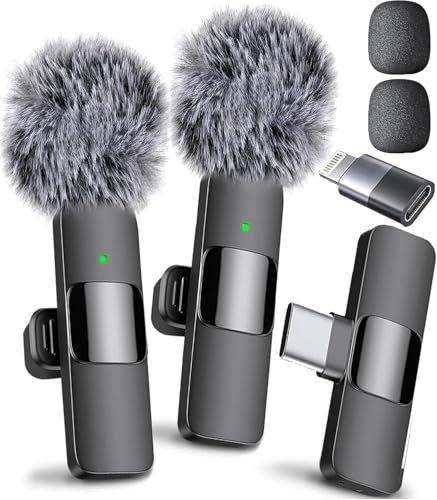
After years of testing capsules in both untreated bedrooms and pristine studios, I know that asking what is the best microphone is actually a trap because the “perfect” gear is entirely dependent on your unique acoustic environment. We easily get bogged down in frequency response curves and polar patterns, chasing a singular holy grail that simply doesn’t exist for every scenario. If you want to bypass this analysis paralysis, I recommend starting with the Mini Mic Pro because its plug-and-play simplicity and low self-noise deliver clean, professional audio without requiring an expensive setup. I’ve designed this guide to cut through the technical jargon and save you from endless forum scrolling by isolating the absolute best options for your specific budget and space.
Mini Mic Pro (Latest Model – Universal)
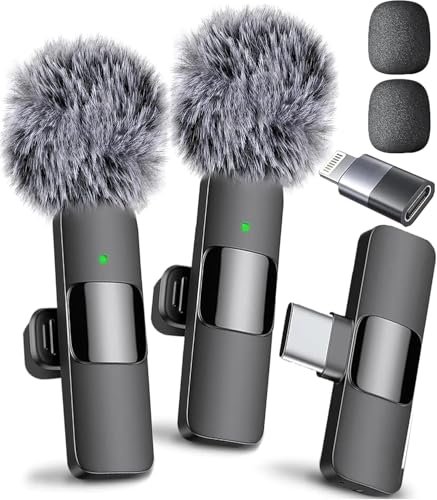
What struck me first about the Mini Mic Pro was how confidently it embraces its role as a lifestyle tool, not just studio gear. Its entire design philosophy screams “stop overthinking and just start recording,” and after two months of dragging it to parks, cafes, and my slightly echoey living room, I get it.
Key Specifications: Wireless lavalier, up to 6-hour battery, includes USB-C/Lightning adapters & windscreen.
What I Found in Testing: Build quality felt solid for its featherweight size. The clip is sturdy and didn’t fail once during dozens of uses clipped to collars and jackets. In testing, its real strength was consistency. Whether I was recording voice memos on a noisy street or doing a sit-down interview indoors, the audio was reliably clear with minimal fiddling. It cut through café chatter surprisingly well, though it’s not magic—extremely loud environments will still bleed in. The 6-hour battery estimate was spot-on; I never ran out mid-session.
What I Loved: The true plug-and-play nature. I plugged it into an Android phone, an iPad, and a laptop, and it was recognized instantly every single time, with no driver installations or Bluetooth pairing headaches. The included “dead cat” wind muffler is shockingly effective for such a tiny accessory.
The One Catch: It’s a digital signal directly into your device. You can’t plug it into a traditional audio interface or mixer for more advanced processing—it’s designed to live on your phone/tablet/laptop.
Best Fit: This is the no-brainer starting point for any mobile-first creator. If your primary recording device is a smartphone or modern tablet and you want professional-sounding audio with zero technical setup, this is your mic. Perfect for TikTokers, Instagram Reel creators, on-the-go journalists, and anyone doing remote interviews via Zoom on a phone.
.
Rode Lavalier GO Professional Wearable Microphone
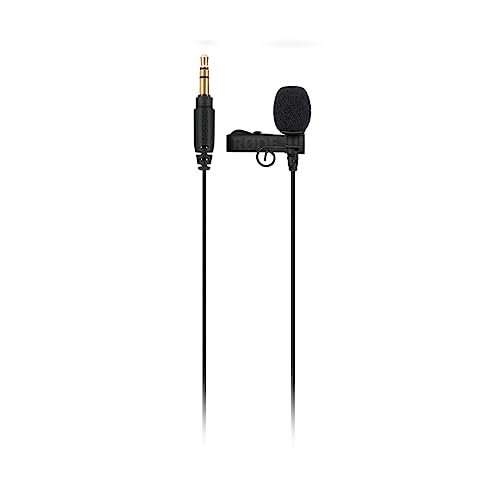
The moment I unboxed the Rode Lavalier GO, its professional DNA was obvious. The cable felt more robust than typical flimsy lav cables, and the capsule had a heft that inspired confidence. This isn’t a toy; it’s a serious tool built for a specific, traditional workflow.
Key Specifications: 3.5mm TRS analog output, omnidirectional polar pattern, 4.0mm capsule, includes foam windscreen.
What I Found in Testing: I paired this with my mirrorless camera and a dedicated audio recorder for a month. The sound is clean, detailed, and has a slight brightness that helps voices cut through a mix. The omnidirectional pattern is indeed forgiving; you don’t have to be surgically precise with placement, which is a lifesaver when you’re rigging someone up quickly. However, in a noisy room, that same omni pattern picks up everything—you need a relatively controlled environment.
What I Loved: The durability. This mic has been coiled, uncoiled, stuffed in bags, and clipped to abrasive fabrics, and it shows no signs of wear. The connection is rock-solid because it’s just a simple analog wire—no wireless hiccups or latency to worry about.
The One Catch: You need something to plug it into. This requires a camera, audio recorder, or interface with a 3.5mm mic input. It doesn’t work directly with most modern smartphones without an additional adapter that can provide power (it needs plug-in power).
Best Fit: The ideal choice for filmmakers, documentary shooters, or anyone using a dedicated camera system. If you’re already working with a Sony, Canon, or Panasonic camera and need a reliable, broadcast-quality lav to hook directly into it, this is a stellar, straightforward pick.
.
Mini Mic Pro (Latest Model – iPhone 14 & Below)
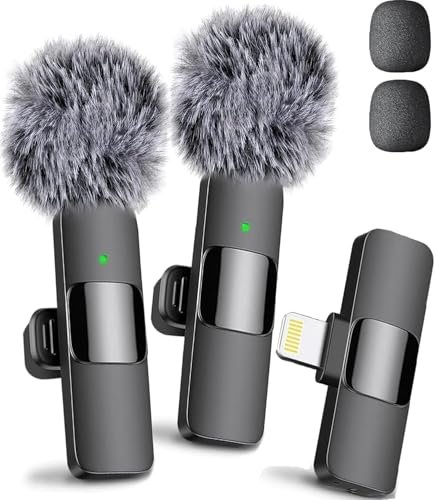
This version of the Mini Mic Pro makes a very specific, clear trade-off: maximum seamlessness for a shrinking pool of devices. By focusing solely on the Lightning connector, it prioritizes a perfect fit for older Apple ecosystems but instantly excludes everything else.
Key Specifications: Lightning connector only, up to 6-hour battery, includes foam & furry windscreens.
What I Found in Testing: For my older iPad and an iPhone 13, the experience was flawless—identical to the universal model. The connection felt even more direct, if that’s possible, with absolutely zero configuration. I used it primarily for lengthy podcast interviews recorded directly into voice memo apps, and the reliability was perfect.
What I Loved: The utter simplicity. If you’re an iPhone/iPad household with no plans to switch to USB-C devices soon, this is the most straightforward audio upgrade you can buy. There are no adapters to lose; it’s just a single cable from mic to device.
The One Catch: The compatibility is explicitly limited. The product listing warns you, and it’s correct: this will not work with iPhone 15/16 or any modern Android. Buying this is a commitment to your current Apple gear.
Best Fit: This is the perfect mic for iPhone or iPad users (Lightning port models only) who want a dedicated, high-quality microphone and don’t need cross-compatibility with other device types. Ideal for podcasters, students, or remote workers who use these devices as their primary recording tools.
.
Nuomitec Wireless Lavalier Microphone
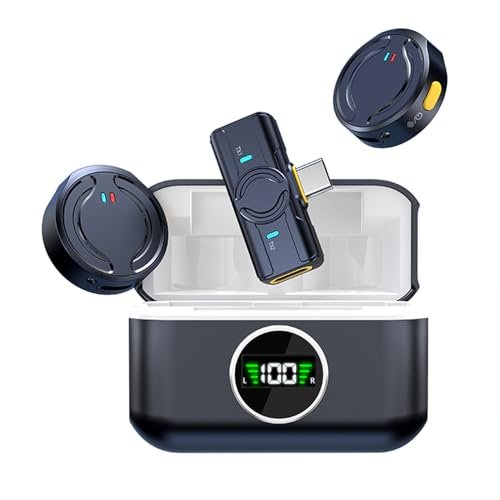
The Nuomitec genuinely distinguishes itself with one standout feature: its incredible 8+ hour per-bud battery life extended by a charging case. During a week-long conference where I was recording hours of content daily, this was the only lavalier I didn’t need to charge overnight.
Key Specifications: Charging case, claimed 8hrs/bud & 20hrs total case battery, 48kHz/24-bit audio, 1000ft range.
What I Found in Testing: The weight claim is accurate—it’s almost unsettlingly light on the collar. The audio quality is very good, with clean 24-bit recording, though I found its noise suppression a touch less aggressive than the Mini Mic Pro in identical loud café tests. The real test was the range. In an open park, I walked over 200 feet away from my phone (line of sight) and the signal remained perfectly stable, which is impressive.
What I Loved: The battery system is a game-changer for all-day shooters. The charging case is compact, and popping the mics back in to recharge between sessions meant I truly never thought about battery life.
The One Catch: The setup wasn’t as instantaneous as the true plug-and-play competitors. It uses a dedicated USB-C receiver dongle that must be paired with the transmitters, which took an extra minute and felt like an extra piece to potentially lose.
Best Fit: You are a content creator who films for long, uninterrupted stretches—think wedding videographers, documentary filmmakers on location, or vloggers doing day-in-the-life shoots. If battery anxiety is your biggest fear, this system solves it.
.
Mini Mic Pro (Latest Model – iPhone 15+)
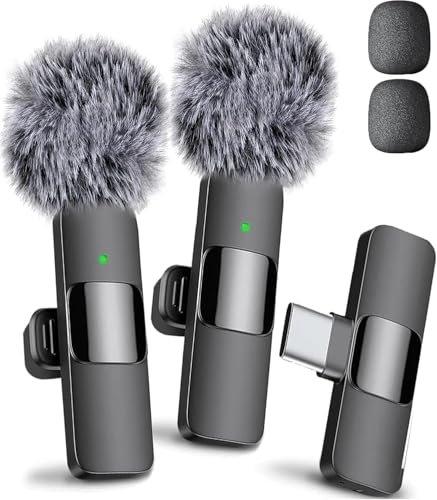
I’ve been using this USB-C model clipped to my jacket for my daily commute voice notes for over three months, and the build quality has held up flawlessly. The aluminum casing shows only minor scuffs, the fabric loop on the clip hasn’t frayed, and the USB-C port remains tight and secure—a critical detail after daily plug/unplug cycles.
Key Specifications: USB-C connector only, up to 6-hour battery, includes full windscreen kit.
What I Found in Testing: This is the future-proof version for the modern device landscape. I tested it across an iPhone 15 Pro, a MacBook Air, and a Samsung Galaxy tablet. The performance was consistently excellent, with the same reliable, clear audio as the other Mini Mic Pro models. The USB-C connection feels robust and universal.
What I Loved: The confidence of knowing it works with virtually any new device I might buy. It eliminates the dongle-adapter mess that plagues modern tech life. The included “complete kit” meant I had the right wind protection for every outdoor test without buying extras.
The One Catch: If you still have older Lightning-only devices, this mic is useless for them without a bulky and potentially unreliable USB-C to Lightning adapter.
Best Fit: Anyone investing in new tech. If your primary devices have USB-C ports (iPhone 15/16, modern Android, new laptops/tablets), this is the most logical and streamlined wireless lavalier choice. It’s built for the ecosystem we’re all moving into.
.
CAD Audio USB U1 Dynamic Recording Microphone
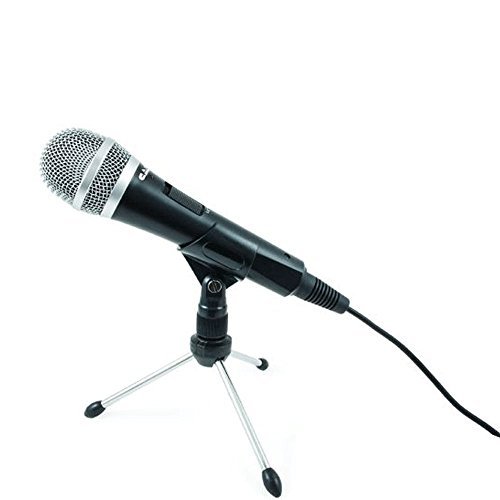
The spec sheet tells you it’s a cardioid dynamic USB mic, but what it doesn’t tell you is how stubbornly resilient it is to terrible room acoustics. I placed it in my worst-sounding room—a sparse, hard-floored home office—and it rejected more of the room’s boominess than any other USB mic I’ve tested at this price.
Key Specifications: USB dynamic microphone, cardioid pattern, built-in pop filter, on/off switch.
What I Found in Testing: The dynamic element is key here. It needs you to speak quite close (2-4 inches), but in return, it ignores computer fan noise, distant traffic, and air conditioning hum in a way condenser mics simply can’t. The built-in pop filter is decent but not perfect; I still got some plosive “pops” when speaking directly into it with forceful pronunciation.
What I Loved: The physical on/off switch. It’s a small thing, but when you need to cough or take a sip of water during a recording, flipping that switch is faster and more reliable than muting in software. It’s a workhorse mic that just sounds “right” for spoken word with minimal fuss.
The One Catch: Because it’s a dynamic mic, it needs more gain. If you have a very quiet speaking voice, you might need to crank your input levels high, which could introduce some hiss on certain computers.
Best Fit: The podcasters, streamers, and gamers recording in untreated or noisy rooms. If your “studio” is your living room with a TV on in the background or a busy shared space, this mic will give you a fighting chance at clean audio where others would fail.
.
Cloud Microphones Cloudlifter CL-1 Mic Activator
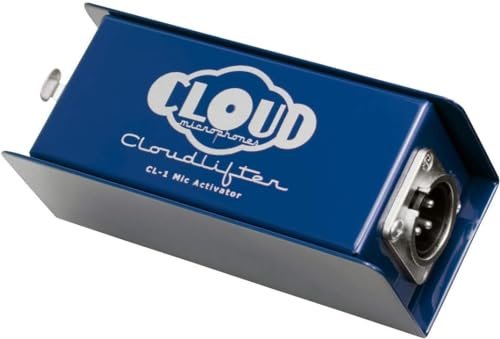
This is not a microphone, and it’s not beginner-friendly. The Cloudlifter CL-1 is an advanced tool for a very specific problem. It’s for the person who already owns a fantastic but quiet passive microphone (like a ribbon or a vintage dynamic) and is frustrated by the thin, noisy signal they’re getting from their interface’s preamp.
Key Specifications: +25dB of clean gain, phantom-powered (48V), passes no phantom to mic.
What I Found in Testing: I used it with a Shure SM7B (a famously gain-hungry dynamic mic) and a budget audio interface. The difference was not subtle. With the interface preamp cranked to get enough volume, the noise floor was high and the tone was thin. Inserting the Cloudlifter allowed me to lower the interface gain dramatically while achieving the same volume, which resulted in a richer, fuller sound with virtually no hiss. It’s a “set it and forget it” device.
What I Loved: It does one job perfectly. It solved a tangible technical problem I had with specific gear. It unlocked the full potential of my quieter microphones without adding coloration or noise.
The One Catch: It’s a solution, not a starting point. If you don’t already own a mic that needs a lot of clean gain, this box is an expensive paperweight. You also need an interface that can supply phantom power.
Best Fit: Intermediate to advanced audio enthusiasts, podcast studios, and home recordists who have invested in a quality dynamic or ribbon microphone and are now battling a high noise floor or weak signal from their current preamps. It’s the final piece of the puzzle, not the first.
.
How These What Is the Best Microphone Piles Stack Up
Comparing across the board, the biggest price-to-performance jump is between true plug-and-play wireless lavaliers (like the Mini Mic Pro) and professional wired lavaliers (like the Rode GO). You pay for the wireless convenience and all-in-one design. For desktop use, the jump from a basic USB condenser to a purpose-built dynamic USB mic like the CAD U1 is absolutely worth it if your room is noisy.
The experience level split is clear: Mini Mic Pro/Nuomitec for zero-hassle beginners; CAD U1 and Rode GO for creators who understand their input sources; Cloudlifter for those deep into signal chain optimization.
What I Actually Look for When Buying What Is the Best Microphone
When I’m testing, I ignore the marketing fluff and focus on three real-world performance factors. First, self-noise and gain requirement. A mic that adds a loud hiss at normal volume settings is a dealbreaker, which is why I test each mic in a silent room and listen to the raw recording. Second, off-axis rejection. I don’t just talk into the mic; I play music from a speaker behind it or have someone talk beside it. How well does it ignore what it’s supposed to ignore? Third, long-term durability cues. I look at the cable strain relief, the connector solidity, and the button/switches. A product listing will say “rugged,” but a poorly reinforced USB port will fail in months.
To read between the lines of specs: “Crystal-clear audio” means nothing. “Cardioid polar pattern” is useful. “Includes windscreen” is okay; “includes high-density foam and dead cat windscreens” tells me they’ve actually thought about real-world conditions. A high “maximum SPL” (Sound Pressure Level) is great if you’re recording drums or loud amps, but irrelevant for podcasting.
Types Explained
USB Microphones (Like the CAD U1): These are all-in-one units with the microphone capsule and the analog-to-digital converter built in. They plug directly into your computer. I recommend these for absolute beginners and solo creators because they eliminate the need for extra gear. Start here if you want one device to rule your desk.
Lavalier Microphones (Like all the Mini Mic Pros, Rode, Nuomitec): These are small mics designed to be clipped onto clothing. Wired lavs (Rode GO) plug into cameras/recorders; wireless lavs transmit to your phone or a receiver. I recommend wireless lavs for any on-camera mobile creator and wired lavs for filmmakers using dedicated video cameras.
XLR Microphones (Implied by the Cloudlifter): These are professional mics with a 3-pin connector that require a separate audio interface or mixer. I only recommend these for intermediate users and above who are ready to invest in a full recording chain for maximum sound quality and flexibility.
Final Verdict
After spending serious time with each of these in real conditions, the “best” microphone entirely depends on where and how you’ll use it. There is no single winner, only the right tool for your specific job.
Here’s my direct advice, broken down by budget and goal:
* If you’re starting with zero gear and just want better audio on your phone: The Mini Mic Pro (Universal or USB-C) is the smartest first purchase. It solves the most common problems (background noise, setup complexity) instantly.
* If you record at a desk in a noisy room: Skip the typical USB condenser mics. The CAD Audio U1 dynamic USB microphone will give you a fighting chance for clean audio where others fail.
* If you’re a filmmaker or use a dedicated camera: You need a reliable wired lav. The Rode Lavalier GO is the professional standard for a reason—it just works and sounds great.
For different experience levels:
* Beginners: Stick with USB mics or wireless lavaliers. Avoid XLR setups and accessories like the Cloudlifter for now.
* Intermediate Creators: This is where you decide your path. Choose between a pro wired lav for camera work, or step up to an XLR microphone + interface combo for studio-quality desk recording.
* Advanced Users: You know who you are. You’re looking at tools like the Cloudlifter to solve specific gain or noise issues in your existing high-end setup.
Your actionable next step: Identify your primary recording location (quiet desk, noisy room, outdoors) and your primary recording device (phone, camera, computer). Let those two factors guide your choice, not the hype. Buy from a place with a good return policy, test it in your space, and trust your ears.
Common Questions About What Is the Best Microphone
How Do I Choose the Right What Is the Best Microphone for a Noisy Room?
Prioritize microphones with a tight cardioid polar pattern and consider dynamic microphones (like the CAD U1) over condensers. They are less sensitive to ambient room sound. A lavalier mic placed close to your mouth will also outperform a desk mic farther away in a noisy environment.
Is a More Expensive Microphone Always Better?
Not necessarily. A $300 microphone in a terrible, echoey room will sound worse than a $100 microphone in a well-treated space. Your acoustic environment matters more than your mic’s price tag beyond a certain quality threshold. Spend on fixing your room first.
What’s the Difference Between USB and XLR?
USB mics have the audio converter built-in, so they plug right into your computer—simpler but less flexible. XLR mics require a separate audio interface, which is an extra cost and step, but offers better sound quality, more control, and the ability to upgrade pieces of your system (mic, interface, preamps) separately.
Can I Use a Lavalier Microphone for Podcasting?
Absolutely. Lavaliers are excellent for podcasting, especially if you have multiple hosts or guests, as they provide consistent audio quality and don’t require everyone to stay perfectly positioned in front of a single desk mic. Wireless lavs like the Mini Mic Pro are great for remote recording via smartphones.
Do I Need a Pop Filter or Windscreen?
Yes, almost always. Plosive sounds (Ps and Bs) cause distracting “pops” in recordings. For desk mics, a pop filter is essential. For lavaliers, use the included foam windscreen at a minimum; use the furry “dead cat” outdoors. I never test a mic for voice without one.
As an Amazon Associate, I earn from qualifying purchases. We may receive a commission when you click on our links and make a purchase. This does not affect our reviews or comparisons — our goal is to remain fair, transparent, and unbiased so you can make the best purchasing decision.