
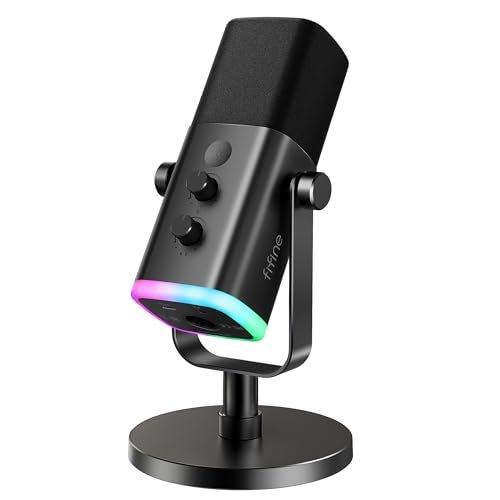
The FIFINE AmpliGame AM8 features dual USB and XLR connections at a low price, while the Logitech G Yeti GX is a USB-only dynamic mic with deep software controls. Choose the AM8 if you want an affordable mic with future XLR upgrade paths. Pick the Yeti GX for automated broadcast processing and Logitech G HUB lighting integration.
I spent weeks testing the FIFINE AmpliGame AM8 and the Logitech G Yeti GX side by side across Discord chats, OBS livestreams, and podcast recordings. Both microphones rely on dynamic capsules to cut out ambient background clatter, yet they approach connectivity, features, and pricing from completely different angles. This breakdown covers how both models perform on a real desk so you can decide which one fits your setup.
FIFINE AmpliGame AM8 vs Logitech G Yeti GX: At a Glance
FIFINE AmpliGame AM8
|
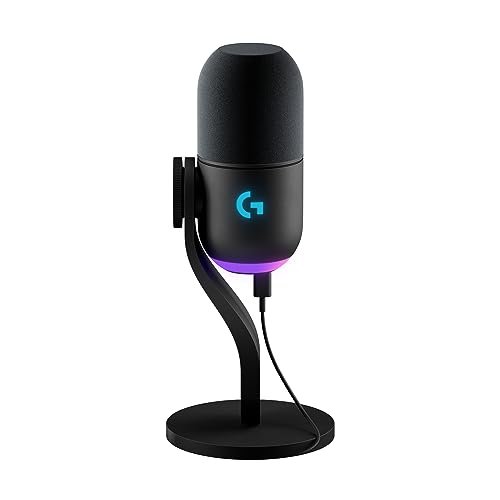
Logitech G Yeti GX
|
|
|---|---|---|
| Connectivity Interface | Dual USB and analog XLR connections for broad device compatibility. | Dedicated digital USB connection designed solely for direct computer setups. |
| Upgrade Flexibility | Seamless transition to mixers and professional audio interfaces via XLR. | Restricted to USB ports without analog audio mixer upgrade potential. |
| Hardware Controls | Physical dials for mic gain, headphone volume, and tap-to-mute sensor. | Digital gain scroll wheel and physical mute switch with status LED. |
| Software Dependency | Driverless plug-and-play design requiring no proprietary software configuration. | Relies heavily on companion desktop software for advanced digital signal processing. |
| Headphone Monitoring | Includes onboard 3.5mm jack for zero-latency real-time voice monitoring. | Lacks direct 3.5mm port, depending on computer audio routing for monitoring. |
| Background Noise Rejection | Dynamic capsule naturally attenuates off-axis ambient room clatter and fan noise. | Dynamic capsule combined with digital audio filters suppresses desk and room noise. |
| Lighting Integration | Self-contained RGB modes toggled entirely through an integrated touch control. | Ecosystem-linked RGB lighting customized and synchronized via central peripheral software. |
Complete Comparison: FIFINE AmpliGame AM8 vs Logitech G Yeti GX
| FIFINE AmpliGame AM8 USB/XLR Dynamic Microphone | Logitech G Yeti GX Dynamic RGB | |
|---|---|---|
| Product Image | |
|
| Price | View On Amazon | View On Amazon |
| Category | Budget Dynamic Hybrid | Premium Dynamic Gaming |
| Connectivity | Dual USB & XLR (Upgrade-ready) | USB Plug-and-Play |
| Acoustic Capsule & Pattern | Cardioid dynamic (50Hz–16kHz) | Custom supercardioid dynamic |
| Audio Processing & Software | Driver-free hardware operation | Blue VO!CE, Smart Audio Lock & G HUB |
| Onboard Controls & Monitoring | Tap-to-mute, mic gain dial, 3.5mm jack with volume knob | Onboard controls with Smart Audio Lock analog limiter |
| RGB Lighting | Base ring with 3 modes, 10+ colors, and memory function | Dual RGB zones powered by LIGHTSYNC ecosystem |
| Mounting Versatility | Desktop stand + built-in 3/8” & 5/8” threads (no adapter needed) | Included desktop stand & broadcast arm compatibility |
| Best For | Creators wanting USB simplicity with a future XLR upgrade path | Gamers seeking advanced DSP filters and Logitech G sync |
| Amazon Link | View On Amazon | View On Amazon |
| Overall Winner | Winner | Runner-up |
FIFINE AmpliGame AM8 Review
FIFINE designed the AmpliGame AM8 as an affordable hybrid microphone with dual USB and XLR connectivity, letting you plug into a PC today and move to an audio mixer down the road. During my testing, the cardioid dynamic capsule did a solid job ignoring computer fan hum and mechanical keyboard clicks when placed two to four inches from my mouth. The body houses physical controls including a tap-to-mute sensor, separate headphone and mic gain dials, and a bottom controllable RGB light ring. Because it draws power over USB, all on-mic touch controls and lighting deactivate as soon as you switch over to an XLR cable. At this price point, having direct 3.5mm real-time headphone monitoring built into the base makes balance adjustments painless while gaming.
Key Features
- Dual USB-C and XLR outputs provide plug-and-play simplicity now and mixer expandability later
- Cardioid dynamic capsule with a 50Hz to 16kHz frequency response tuned for speech clarity
- Quick tap-to-mute capacitive sensor on the front with an LED status indicator
- Controllable RGB base ring with three lighting modes and ten static color choices
- Built-in 3.5mm headphone jack featuring independent monitoring volume and mic gain knobs
Pros
- Versatile dual-output connectivity supports both PC setups and professional audio interfaces
- Clean voice pickup naturally rejects mechanical keyboard noise and room reflections
- Physical knobs for gain and headphone monitoring provide immediate tactile control
- Very affordable price point for a dynamic broadcast-style microphone
Cons
- RGB lighting and hardware mute buttons do not function when running via XLR
- Desktop stand sits low, requiring a boom arm for ideal voice positioning
- Plastic chassis feels light compared to higher-priced metal competitors
Best For
Budget-conscious streamers, podcasters, and gamers who want dynamic noise rejection and plan to eventually upgrade to an XLR audio interface.
Expert Opinion: The AM8 punches far above its price bracket by giving creators an authentic dynamic broadcast tone alongside an easy transition path from USB to XLR hardware.
Logitech G Yeti GX Review
Logitech reimagined the classic Yeti formula by giving the Yeti GX a broadcast-style supercardioid dynamic capsule that targets your mouth and ignores surrounding room noise. Hooking it up via USB immediately activates the Smart Audio Lock feature, which relies on an analog limiter and downward expander to stop voice clipping during loud gaming moments. Testing it inside Logitech G HUB software gave me instant access to Blue VO!CE EQ presets, broadcast filters, and fun audio samples. The exterior features dual LIGHTSYNC RGB zones, illuminating both the rear G logo and the bottom scroll wheel ring in sync with other Logitech peripherals. A tactile scroll wheel on the front handles digital gain on the fly, while a quiet button next to it handles instant muting with clear LED feedback.
Key Features
- Supercardioid dynamic capsule tailored specifically to cut out keyboard clatter and ambient room reflections
- Smart Audio Lock technology uses an analog limiter to balance volume levels and prevent audio distortion
- Dual-zone LIGHTSYNC RGB fully customizable and synchronizable through Logitech G HUB software
- Blue VO!CE software suite delivers studio EQ profiles, noise reduction filters, and voice effects
- Multifunction digital scroll wheel provides tactile mic gain adjustments directly on the front housing
Pros
- Smart Audio Lock automatically prevents distortion when you shout or laugh loudly
- Supercardioid polar pattern offers exceptional rejection of typing and mouse clicks
- Deep G HUB software support with Blue VO!CE gives you extensive vocal processing tools
- Sturdy, compact desktop base with high-end build materials
Cons
- Lacks an XLR output, limiting you exclusively to USB connections
- No onboard 3.5mm headphone jack for zero-latency direct hardware monitoring
- Significantly more expensive than basic dynamic gaming microphones
Best For
Gamers and live streamers already invested in the Logitech G ecosystem who want hands-off audio processing and reliable voice protection against clipping.
Expert Opinion: The Yeti GX excels as a dedicated gaming microphone, letting software do the heavy lifting so your voice stays clear and distortion-free during chaotic matches.
FIFINE AmpliGame AM8 vs Logitech G Yeti GX: Key Differences That Matter
Performance Comparison
Both microphones rely on dynamic capsules, but their polar patterns create distinct listening experiences. The AM8 uses a standard cardioid pattern with a wider front pickup zone. My voice sounded full and warm on the AM8, though it captured slightly more room air when I leaned back from the desk.
Logitech equipped the Yeti GX with a tighter supercardioid pattern. This tighter pattern aggressively cuts out side noise like loud mouse swipes and blue mechanical switches. When gaming gets intense, the Yeti GX has an edge because of Smart Audio Lock. Screaming after a sudden loss would normally blow out a stream, but the Yeti GX compresses the volume before it distorts. The AM8 requires you to set your gain conservatively or configure third-party limiters in OBS to prevent peaking.
Price and Value Analysis
Price is where these two microphones pull apart dramatically. FIFINE priced the AM8 as an entry-level mic, often selling for less than half the cost of the Yeti GX. Despite the lower cost, the AM8 includes both USB and XLR outputs, giving you a functional path to dedicated audio mixers.
Logitech positions the Yeti GX in the premium category. You are paying for custom capsule engineering, integration with G HUB, and the Blue VO!CE software suite. If you only plan to plug into a PC via USB and want automated vocal leveling without learning digital audio workstations, the Yeti GX justifies its price tag. If you want maximum hardware flexibility per dollar spent, the AM8 is tough to beat.
Build Quality Comparison
Holding both units highlights different design philosophies. The AM8 consists mostly of lightweight plastic with a metal grille and a metal-weighted base. Its buttons and dials feel functional, though the plastic knobs have a slight budget feel.
The Yeti GX feels substantial. Logitech used dense, soft-touch matte plastics, metal mounting hardware, and a much heavier desktop stand that absorbs desk bumps better. The scroll wheel on the Yeti GX rotates smoothly with tactile steps, and the mute button operates silently without clicking into your audio feed.
User Experience Differences
Day-to-day operation reveals contrasting workflows. The AM8 handles everything on the mic itself. You tap the top sensor to mute, twist the knobs to balance headphone and mic levels, and tap the lower button to cycle through lighting modes. You do not need companion software running in the background.
The Yeti GX relies heavily on software to shine. You need Logitech G HUB installed to adjust EQ profiles, configure LIGHTSYNC RGB zones, and turn on the Smart Audio Lock limiter. However, the Yeti GX omits a 3.5mm headphone jack entirely. You must monitor your voice through your PC audio output, introducing slight latency unless you route it through an external audio interface.
Which Should You Choose?
Your budget and preference for hardware versus software controls should decide your choice.
| Choose FIFINE AM8 if… | Choose Logitech Yeti GX if… |
|---|---|
| You want an XLR connection to plug into an audio mixer later | You already own Logitech G peripherals and use G HUB software |
| You need an affordable dynamic microphone on a tight budget | You want automatic volume leveling so loud screams never distort your audio |
| You require zero-latency direct headphone monitoring right on the mic | You want tighter background noise rejection from a supercardioid pickup pattern |
| You prefer adjusting your audio settings with physical hardware dials | You prefer shaping your vocal tone using software EQ and Blue VO!CE filters |
Frequently Asked Questions
Q: In the FIFINE AmpliGame AM8 vs Logitech G Yeti GX debate, which mic sounds better out of the box?
A: The FIFINE AM8 sounds warmer and more natural on raw recordings without adjustments. The Logitech Yeti GX sounds slightly brighter and processed, but it reaches its full potential once you engage the Blue VO!CE broadcast presets in G HUB.
Q: Between the FIFINE AmpliGame AM8 vs Logitech G Yeti GX, which one blocks keyboard noise better?
A: The Logitech G Yeti GX blocks keyboard noise better due to its tighter supercardioid pickup pattern. While the AM8 does a respectable job rejecting background sounds, the Yeti GX ignores off-axis mechanical clicks more aggressively.
Q: Does the FIFINE AmpliGame AM8 require an audio interface to work?
A: No, it works right away over an included USB-C cable. The XLR port is optional, allowing you to connect to a mixer later if you choose to upgrade your gear.
Q: Can I use the Logitech G Yeti GX with an XLR cable?
A: No, the Yeti GX is strictly a USB-C microphone. It does not feature an XLR connection, so you cannot plug it into hardware mixers or audio interfaces.
Q: Why doesn’t the Logitech G Yeti GX have a headphone jack?
A: Logitech designed the Yeti GX specifically for gamers who already use wireless gaming headsets or separate desktop DACs. You must route your audio monitoring through your computer instead of plugging directly into the mic.
Q: Do the RGB lights on the FIFINE AM8 work when connected through XLR?
A: No, the RGB lighting, hardware mute button, and gain dials on the AM8 only operate when powered via USB. Running the microphone through XLR turns off all internal electronics, leaving it as a purely passive dynamic mic.
Q: What is Smart Audio Lock on the Logitech G Yeti GX?
A: Smart Audio Lock is an automated feature in Logitech G HUB that combines an analog limiter with a downward expander. It prevents vocal clipping when you talk loudly and cuts out background hiss when you stop speaking.
As an Amazon Associate, I earn from qualifying purchases. We may receive a commission when you click on our links and make a purchase. This does not affect our reviews or comparisons — our goal is to remain fair, transparent, and unbiased so you can make the best purchasing decision.