
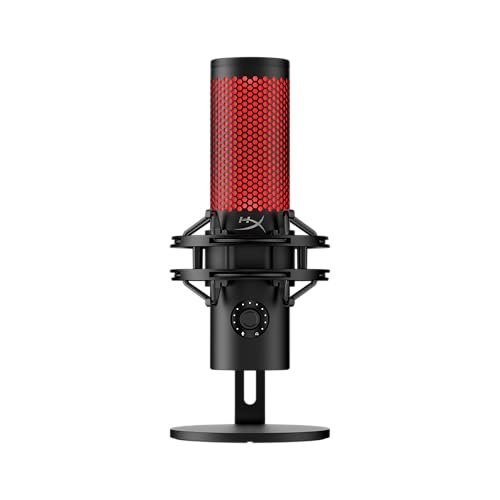
The main difference between the HyperX QuadCast 2 and HyperX SoloCast 2 lies in hardware versatility and polar patterns. The QuadCast 2 offers four polar patterns, hardware gain control, and a dedicated shock mount for multi-person or studio setups. The SoloCast 2 provides a compact cardioid-only design suited for solo streaming on a budget.
I’ve spent several weeks testing both microphones side by side on my desk, putting them through Discord calls, streaming sessions, and voiceover recordings. Both offer clear upgrades over their predecessors, but they serve distinct recording needs and desk spaces. In this guide, I break down audio quality, features, and everyday usability so you can decide which mic fits your setup.
HyperX QuadCast 2 vs HyperX SoloCast 2: At a Glance
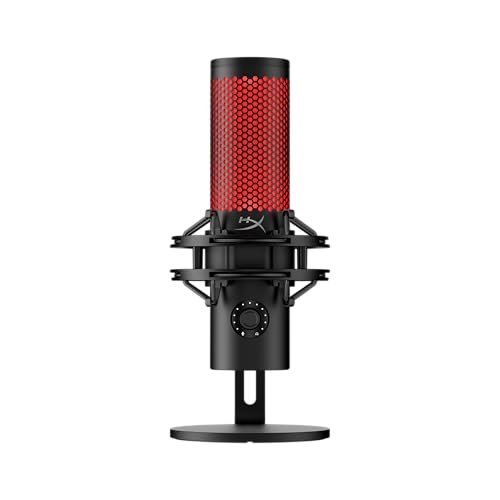
HyperX QuadCast 2
|
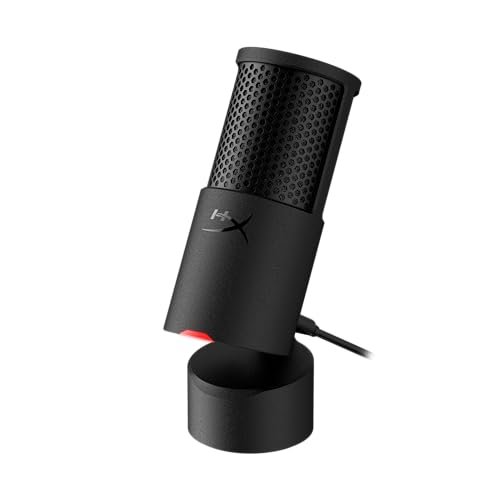
HyperX SoloCast 2
|
|
|---|---|---|
| Polar Pattern Versatility | Multiple selectable patterns (cardioid, omnidirectional, bidirectional, stereo) for diverse recording scenarios. | Single fixed cardioid pattern focused solely on directional solo voice capture. |
| Onboard Controls & Monitoring | Comprehensive controls including dedicated gain, polar pattern selection, and zero-latency headphone monitoring. | Streamlined controls limited to tap-to-mute, relying mainly on software for adjustments. |
| Vibration & Desk Noise Isolation | Built-in dedicated shock mount effectively isolates desk bumps and mechanical rumble. | Basic rigid desktop stand; more susceptible to desk vibrations without external mounting. |
| Form Factor & Footprint | Substantial, full-sized build requiring significant desk space or a sturdy boom arm. | Ultra-compact and lightweight, easily fitting minimal desks or portable setups. |
| Audio Recording Resolution | Studio-grade high-fidelity bit depth and sampling rates for nuanced sound capture. | Standard broadcast-quality resolution optimized for clear vocal communication and basic recording. |
| Ease of Use & Portability | Feature-rich plug-and-play setup, best suited for permanent desktop studio installations. | Simple plug-and-play operation with exceptional travel friendliness and easy repositioning. |
| Primary Use Case | Multi-person podcasts, interviews, competitive streaming, and professional voiceover work. | Solo streaming, gaming voice chat, video conferencing, and straightforward vocal calls. |
Complete Comparison: HyperX QuadCast 2 vs HyperX SoloCast 2
| HyperX QuadCast 2 USB Gaming Microphone | HyperX SoloCast 2 USB Condenser Gaming | |
|---|---|---|
| Product Image | |
|
| Price | View On Amazon | View On Amazon |
| Category | Premium Gaming Microphone | Budget Gaming Microphone |
| Audio Resolution | 24-bit / 96kHz | 24-bit / 96kHz |
| Polar Patterns | 4 Patterns (Cardioid, Omnidirectional, Stereo, Bidirectional) | Cardioid Only |
| Shock Mount & Vibration Control | Removable dedicated external shock mount | Built-in internal suspension system |
| On-Board Controls | Multi-function rotary knob (gain/volume), pattern selector dial, tap-to-mute | Tap-to-Mute sensor with LED status indicator |
| Platform Compatibility | PC, Mac, PS5, and Nintendo Switch | PC Compatible |
| Desk Footprint & Portability | Full-size frame with 9.84 ft cable | Ultra-compact all-in-one design with tiltable weighted stand |
| Audio Customization | Physical hardware controls + HyperX NGENUITY software | HyperX NGENUITY (high-pass, low-pass, & voice enhancement filters) |
| Best For | Multi-platform streamers, content creators, and multi-person podcasts | Solo streamers, gamers, and creators wanting compact plug-and-play simplicity |
| Amazon Link | View On Amazon | View On Amazon |
| Overall Winner | Winner | Runner-up |
HyperX QuadCast 2 Detailed Review
The HyperX QuadCast 2 delivers a significant audio upgrade over the original model, bumping recording resolution up to 24-bit/96kHz studio-grade audio. HyperX redesigned the exterior with an updated red LED lighting aesthetic and a refined removable shock mount that dampens desk bumps effectively. You get four selectable polar patterns, covering stereo, omnidirectional, cardioid, and bidirectional recording scenarios right from a physical dial. A dedicated multi-function rotary knob on the front manages gain and headphone volume, replacing the old bottom gain dial. Plugged in via a generous 9.84-foot USB-C cable, the microphone handles everything from solo PC gaming to multi-guest podcasts with ease.
- 24-bit/96kHz recording resolution for high-resolution vocal capture
- Four selectable polar patterns including cardioid, stereo, omnidirectional, and bidirectional
- Integrated removable shock mount and built-in pop filter
- Multi-function control knob for on-the-fly gain and monitoring adjustments
-
Tap-to-mute sensor with full-body red status lighting
-
Versatile polar patterns support multiple recording formats
- Hardware gain and monitoring control directly on the mic body
- Effective shock mount eliminates mechanical vibrations
-
Generous 9.84-foot USB-C cable length for flexible desk routing
-
Bulky footprint takes up substantial desk space
- Red-only LED illumination cannot be changed to other colors
- Higher price tag than basic condenser alternatives
Best for: Streamers, podcasters, and content creators who need physical gain controls and multiple pickup patterns for recording alone or with guests.
Expert Opinion: The QuadCast 2 remains a flagship USB microphone for creators who value quick physical adjustments and pattern flexibility right out of the box.
HyperX SoloCast 2 Detailed Review
The HyperX SoloCast 2 trims away the bulk while keeping the core acoustic quality found in its larger sibling, also recording at crisp 24-bit/96kHz resolution. Its compact chassis houses an internal suspension system that reduces table vibrations without requiring a bulky external frame. A single cardioid polar pattern focuses directly on speech in front of the capsule, blocking out unwanted ambient noise from the sides and back. Physical controls remain minimal, featuring a reliable tap-to-mute sensor with LED indicator sitting right on the top. Through the HyperX NGENUITY software, you can apply custom high-pass filters, low-pass filters, and voice enhancement profiles directly to onboard memory.
- 24-bit/96kHz audio resolution matching higher-end studio condenser specs
- Internal vibration suspension to isolate desk knocks without an external cage
- Onboard audio filter customization through HyperX NGENUITY software
- Tap-to-mute sensor with clear red LED status indicator
-
Compact tiltable stand with built-in 3/8-inch and 5/8-inch boom arm threads
-
Compact profile fits neatly under monitors and on small desks
- Onboard EQ and filter saving via software
- Excellent vocal clarity at a budget-conscious price point
-
Integrated mounting threads without requiring special adapters
-
No physical gain control dial on the microphone body
- Limited to a single cardioid pickup pattern
- Lacks a headphone jack for direct zero-latency monitoring
Best for: Solo streamers, gamers, and remote workers who want clean voice capture without spending extra on studio features or sacrificing desk space.
Expert Opinion: The SoloCast 2 hits the sweet spot for budget-conscious gamers who want studio-quality vocal clarity in an unobtrusive, set-it-and-forget-it package.
HyperX QuadCast 2 vs HyperX SoloCast 2: Key Differences That Matter
Performance Comparison
Both microphones share the same upgraded 24-bit/96kHz audio processing, meaning your raw vocal tone will sound almost identical when talking directly into either mic in cardioid mode. The QuadCast 2 pulls ahead when recording environments change. Its four polar patterns let you record interviews across a table in bidirectional mode or capture group discussions using the omnidirectional setting. The SoloCast 2 restricts you to cardioid, which works brilliantly for one person sitting in front of a monitor, but falls short if you plan on recording co-hosts or acoustic instruments.
Price and Value Analysis
Budget dictates a major part of this matchup. The SoloCast 2 sits at roughly half the price of the QuadCast 2, making it an attractive purchase for anyone focused purely on gaming communications or basic streaming. You sacrifice physical knobs, lighting flair, and multi-pattern options to save that money. If you already own a boom arm and adjust levels through software, the SoloCast 2 offers incredible value. The QuadCast 2 justifies its premium price tag by bundling a high-grade shock mount, versatile hardware controls, and a dedicated 3.5mm headphone monitoring port.
Build Quality and Design Comparison
Holding both units reveals a stark contrast in desk footprint. The QuadCast 2 is tall, heavy, and commands attention with its vibrant red honeycomb lighting. Its included shock mount uses elastic bands to isolate the capsule from desk vibrations, supported by a heavy metal base. In comparison, the SoloCast 2 is subtle and minimalist. It relies on an internal suspension design rather than an external elastic web, allowing it to sit low under a computer monitor without blocking your screen. Build materials on both feel solid, though the QuadCast 2 carries a more substantial, metallic presence.
User Experience Differences
Day-to-day usability comes down to hardware versus software control. Testing the QuadCast 2, I appreciated reaching out to adjust mic gain on the fly without minimizing my game or streaming dashboard. Having direct 3.5mm latency-free headphone monitoring made sound checks painless. Using the SoloCast 2 requires opening Windows sound settings or streaming software to tweak microphone levels. However, the SoloCast 2 shines in software customization through HyperX NGENUITY, where you can save high-pass and voice enhancement filters directly onto the hardware.
Which Should You Choose?
Your decision comes down to desk space, recording versatility, and how much you value physical audio controls.
| Choose QuadCast 2 if… | Choose SoloCast 2 if… |
|---|---|
| You host podcasts or multi-person interviews requiring multiple polar patterns | You have limited desk real estate or want an unobtrusive setup |
| You need real-time zero-latency headphone monitoring via a 3.5mm jack | You want studio-quality 24-bit audio while keeping costs low |
| You prefer adjusting microphone gain using physical onboard hardware knobs | You only record solo voice commentary, gaming chat, or office meetings |
| You want an eye-catching visual centerpiece with bold red lighting | You prefer tweaking EQ filters through software rather than hardware dials |
Frequently Asked Questions
Q: When comparing HyperX QuadCast 2 vs HyperX SoloCast 2, does one sound noticeably better?
A: Both microphones record at 24-bit/96kHz resolution, so your vocal clarity in standard cardioid mode is virtually identical. The QuadCast 2 gives you more ways to shape your audio with polar patterns, but solo voice quality remains equally sharp on both.
Q: What is the main difference in HyperX QuadCast 2 vs HyperX SoloCast 2 for gaming?
A: The main gaming difference comes down to desk space and onboard controls. The QuadCast 2 offers a physical gain dial and direct headphone monitoring, whereas the SoloCast 2 sits lower under monitors and relies on software adjustments.
Q: Does the HyperX SoloCast 2 have a headphone jack for zero-latency monitoring?
A: No, the SoloCast 2 lacks a 3.5mm headphone port. If you want direct, lag-free audio monitoring straight from the microphone, you will need the QuadCast 2.
Q: Can you mount both microphones on standard boom arms?
A: Yes, both microphones support boom arm mounting. The SoloCast 2 includes built-in 3/8-inch and 5/8-inch threads on its mount, while the QuadCast 2 comes with a dedicated shock mount adapter compatible with most standard boom arms.
Q: Can you change the LED lighting colors on the QuadCast 2?
A: The QuadCast 2 features red LED illumination. If you want customizable RGB lighting across the color spectrum, you would need to look at the QuadCast 2 S model.
Q: Does the HyperX SoloCast 2 pick up keyboard clicks and desk thumps?
A: Thanks to its internal suspension system and cardioid pattern, the SoloCast 2 handles desk bumps better than the original SoloCast. Placing it on a dedicated boom arm will still provide the cleanest sound if you use a mechanical keyboard.
Q: Which microphone is better for podcasting with multiple hosts?
A: The QuadCast 2 is far superior for multi-host podcasts because its bidirectional and omnidirectional polar patterns allow two or more people to speak into a single microphone without losing vocal clarity.
As an Amazon Associate, I earn from qualifying purchases. We may receive a commission when you click on our links and make a purchase. This does not affect our reviews or comparisons — our goal is to remain fair, transparent, and unbiased so you can make the best purchasing decision.